
Free website tools for small businesses: what to use
A small business can check most of its website for free. Use Google Search Console, Analytics and Business Profile for search and leads, Bing Webmaster Tools and Apple Business for other maps and search, and free checkers for email records, SSL, accessibility and uptime. Each tool shows symptoms; a person still decides the fix.
The short version
- Start with Google’s free tools: Business Profile, Search Console and Analytics, owned by a business account.
- Add Bing Webmaster Tools and claim your place on Apple Maps, because not everyone uses Google.
- Use no-sign-in checkers when something looks wrong: email records, SSL, speed, accessibility and structured data.
- Put a free uptime monitor on the site so you hear about an outage before customers do.
- Treat every score as a clue, not a goal. The tools find symptoms; someone still has to fix the cause.
Which free tools does a small business website need?
Most owners don’t need a paid SEO suite. The free tools from Google, Microsoft and Apple, plus a few well-known checkers, answer the questions that matter: can people find you, does the site work, and are visitors turning into calls and enquiries. We checked each tool below against its own documentation on October 31, 2026.
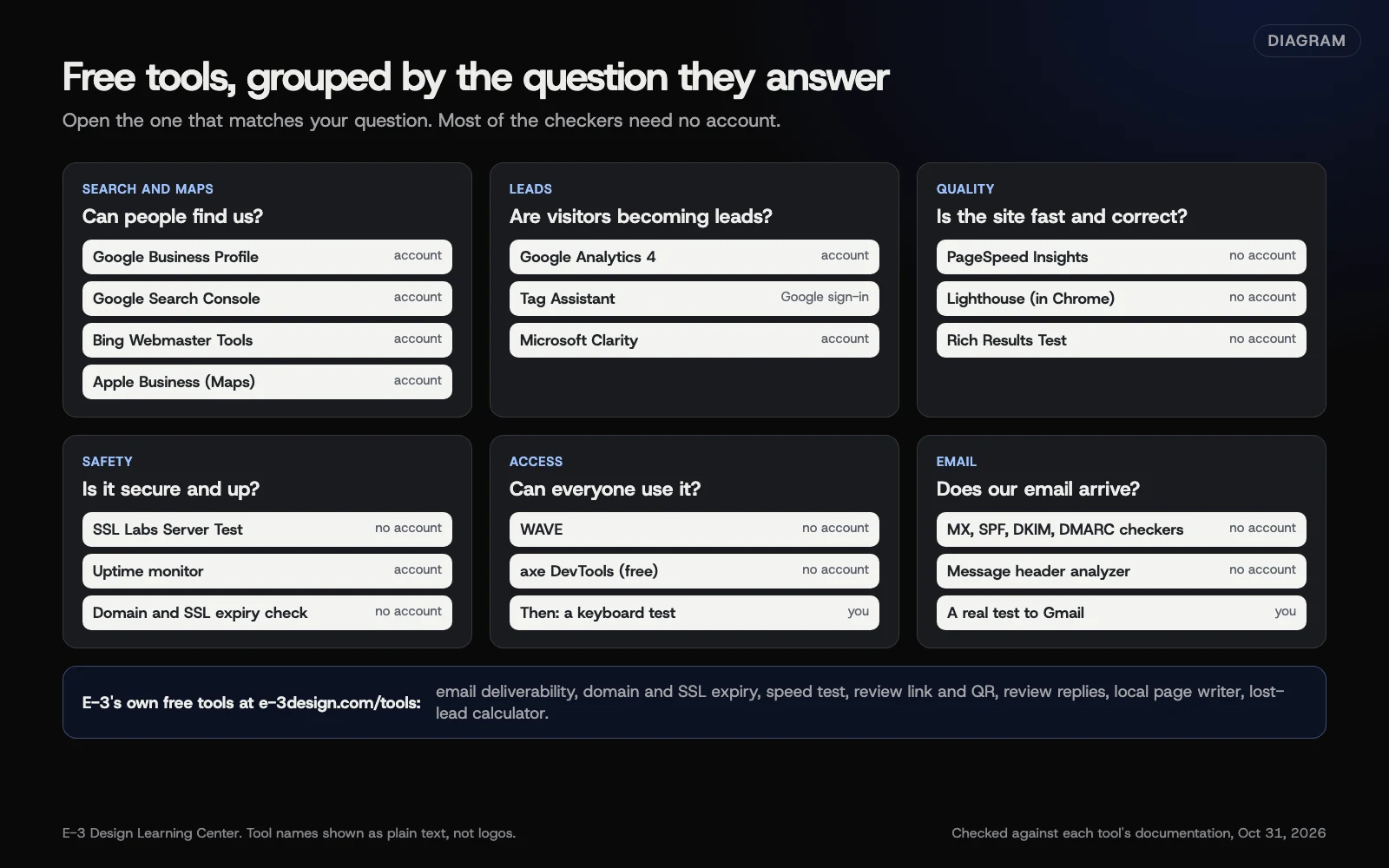 Diagram: the free tools in this guide, grouped by the question each one answers. Tool names are plain text, not logos. Checked against each tool’s documentation, October 31, 2026.
| Tool | What it answers | Account needed? | Our guide |
|---|---|---|---|
| Google Business Profile | How you look on Google Search and Maps | Yes | Google Business Profile hub |
| Google Search Console | Which searches find you, and what Google can’t index | Yes | Google’s free tools |
| Google Analytics 4 | Visitors, sources and leads | Yes | Google’s free tools |
| PageSpeed Insights | How fast pages load for real visitors | No | Google’s free tools |
| Rich Results Test | Whether your structured data qualifies for Google features | No | Google’s free tools |
| Tag Assistant | Whether your tracking tags fire | Google Account | Checking your tags |
| Bing Webmaster Tools | How you appear on Bing and in Copilot answers | Yes | Bing and AI answers |
| Microsoft Clarity | Where visitors click, scroll and get stuck | Yes | Microsoft Clarity |
| Apple Business | Your place card on Apple Maps | Yes | Apple Business guide |
| MX, SPF and DMARC checkers | Whether your email records are set up | No | Checking your email setup |
| SSL Labs | How your secure connection is set up | No | Reading an SSL Labs report |
| WAVE, Lighthouse, axe | Accessibility problems a machine can spot | No | Accessibility checkers |
| Uptime monitors | Whether the site is up right now | Yes | Free uptime monitors |
Google’s free tools
Google gives you the most useful set. Search Console is “a free service offered by Google” that shows the searches that bring people to your site and the pages Google couldn’t index. Analytics counts visitors and, once you set it up, leads. Business Profile is your listing on Search and Maps, and Google says adding or claiming one is free. PageSpeed Insights and the Rich Results Test work on any public page without signing in. Our guide to Google’s free tools explains what each one is for and when to open it. For depth on the two big ones, see our complete guides to Google Search Console and Google Analytics 4. For a quick answer, see how to read a PageSpeed score.
Bing and Microsoft
Bing powers its own search results and Microsoft Copilot’s web answers. Bing Webmaster Tools can import a site you’ve already verified in Search Console, so setup takes a few minutes. Our AI visibility guide explains why Bing Webmaster Tools matters for AI answers. Since February 2026 it also has an AI Performance report in public preview, which counts how often your pages are cited in Copilot and Bing’s AI summaries.
Microsoft Clarity is different. It records sessions and builds heatmaps, masking form inputs and some other text by default (masking reduces what’s captured; it isn’t a privacy guarantee), so you can watch where people click and where they give up. Microsoft’s Clarity FAQ calls it “a free service forever” with no traffic limits. It needs care with privacy and consent, which the guide covers.
Apple Maps
People who use Apple Maps see Apple’s place card for your business, not Google’s. Apple announced on March 24, 2026 that Apple Business Connect would be replaced by a free platform called Apple Business from April 14, 2026, with existing locations moved across. Our listings hub has a step-by-step guide to getting on Apple Maps with Apple Business, and its complete guide to listings beyond Google covers Bing Places, Yelp and Facebook too.
Email, SSL, accessibility and uptime checkers
These are the “is something wrong?” tools. Most work without an account:
- Email record checkers look up your domain’s MX, SPF, DKIM and DMARC records. See checking your email setup with free tools, and our business email guide for fixing what they find.
- SSL Labs grades how your site’s secure connection is set up, from A+ to F. See how to read an SSL Labs report.
- WAVE, Lighthouse and axe flag accessibility problems a machine can detect. The W3C is clear that tools “can not determine accessibility, they can only assist.” See free accessibility checkers and their limits.
- Uptime monitors check your site every few minutes from outside and alert you when it stops answering. See free uptime monitors.
E-3’s own free tools
We built a few small tools for questions clients ask us often. They need no sign-up:
- Email deliverability checker: reads your SPF, DMARC and MX records in plain English, and looks for DKIM under common selector names.
- Domain and SSL expiry checker: shows when your domain and certificate run out.
- Speed test: tests a page on a phone and explains the top fixes.
- Review link and QR maker and review reply writer: for Google reviews.
- Local SEO page writer: a title, description and outline for a local service page.
- Lost-lead calculator: what missed calls might be costing you, using your own numbers.
- Website cost estimator and AI visibility check.
All of them are listed on our free tools page.
How do I set them up, and in what order?
Do the account-based tools once, in this order, then keep the checkers bookmarked.
- Make a Google Account the business owns. Use a business address the business controls, not a staff member’s personal Gmail. Then add each person who needs access as a named user with their own login, rather than sharing one password.
- Claim your Google Business Profile. Follow our create or claim guide.
- Verify Search Console. A Domain property covers every version of your site. Our help page shows how to verify Search Console.
- Set up Google Analytics 4, then track form submissions and phone taps as key events. Without them, the most useful number is missing. See how to know if your site brings in leads.
- Check the tags fire with Tag Assistant.
- Import the site into Bing Webmaster Tools from Search Console.
- Claim your location in Apple Business.
- Add an uptime monitor that emails or texts someone who can act.
- Run the one-off checks for email records, SSL and accessibility, and fix what they find.
Steps 1 to 6 take an afternoon if you have access to the website. Apple’s location review and Google’s profile verification can take several days.
Why do free tools matter?
They tell you about problems you’d otherwise hear about from a customer, or never hear about at all. A form that stopped sending, a page Google dropped from its index, an expired certificate, or a site that’s been down since Saturday all look fine from the owner’s desk.
They also settle arguments with facts. When someone says “the site is slow” or “we’re not on Google,” you can check in a minute rather than guess. And because they come from the search engines themselves, they show your site the way Google, Bing and Apple see it.
The tools only help if someone at the business can sign in. Access and login problems were one of the most common request types E-3 handled from January to October 2026, about 60 in our records. Often a tool exists but sits under a former employee’s or an old agency’s account.
What are the limits of free tools?
- They show symptoms, not causes. A low score tells you something is wrong, not what to change in your theme or plugin.
- Scores aren’t goals. Google’s PageSpeed Insights documentation separates lab results from real-visitor data. Chasing a perfect lab score can waste money that would do more good elsewhere.
- Tools disagree. Analytics, Search Console and Clarity count visits differently. Compare each tool with itself over time, not with the others.
- Automated checks miss things. Accessibility and content quality need a person.
- Some tools collect visitor data. Analytics and Clarity set cookies and may need consent in some places. Check your privacy policy covers them.
- Ownership matters. A tool set up under someone else’s account can vanish when they leave.
Which tools have changed or been retired?
Older guides still recommend some of these. Here’s where things stand on October 31, 2026.
- Mobile-Friendly Test and Mobile Usability report: retired December 1, 2023. Google’s April 2023 post announced it would retire “Search Console’s ‘Mobile Usability’ report, the Mobile-Friendly Test tool and Mobile-Friendly Test API.” Use Lighthouse or PageSpeed Insights instead, and look at your site on a real phone.
- Universal Analytics: stopped July 1, 2023. Google’s Analytics Help says standard properties stopped processing data then, and access to all Universal Analytics data ended the week of July 1, 2024. Google Analytics 4 is the only version now.
- Apple Business Connect: replaced April 14, 2026 by Apple Business, per Apple’s announcement.
- Lighthouse PWA category: removed in Lighthouse 12 (April 2024), per the release notes. Lighthouse 13 (October 2025) also regrouped many performance audits into “insights,” so older screenshots won’t match.
- Tag Assistant Legacy: merged. Google’s Tag Assistant Help says the Legacy and Companion extensions were combined into one extension.
- Clarity and consent: enforced from October 31, 2025 for visitors from the EEA, UK and Switzerland. See the Clarity guide.
- Bing AI Performance: new, February 2026, in public preview.
What if a tool shows a problem?
Don’t fix everything at once. Start with what stops customers reaching you: the site being down, a security warning, a form that doesn’t arrive, or pages missing from Google. Then fix what slows them down. Our guide on which free tool to use when something looks wrong matches common symptoms to the right check, and says when to hand it to your web company.
If a check needs access you don’t have, like the website’s admin or your domain’s DNS, stop there. Changing DNS or server settings without knowing the setup can take email or the site offline.
How much does it cost, and how long does it take?
The tools in this guide are free to use at small-business scale. Some sell paid plans with more monitors, saved reports or team features, and you rarely need them to start. Setting up the account-based tools takes an afternoon. After that, a monthly look at Search Console, Analytics and your profile takes about half an hour, and the checkers take a minute each when you need them. For a full schedule of weekly, monthly and yearly checks, see our website care checklist.
How does E-3 handle this?
Search Console, Analytics and Business Profile are part of our SEO and AI search service; E-3 sets up Search Console for the sites it manages. For hosted sites in website care, E-3’s monitoring tracks PHP version, waiting updates, known plugin vulnerabilities, disk and database space, and domain and plugin-license renewals. Accounts E-3 sets up are in the client’s name, with E-3 added as a user, and changes are tested on a staging copy first.
If you’d rather not do this yourself, we can.
Related questions
Sources
- About Search Console (Search Console Help)
- Add or claim your Business Profile (Google Business Profile Help)
- Set up Analytics for a website and/or app (Analytics Help)
- [UA] Universal Analytics is going away (Analytics Help)
- About PageSpeed Insights (Google for Developers)
- The role of page experience in creating helpful content (Google Search Central Blog, April 19, 2023)
- Start Using Bing Webmaster Tools to Improve Your Site Visibility (Bing Webmaster Blog, June 2025)
- Frequently asked questions (Microsoft Clarity documentation)
- Introducing Apple Business, a new all-in-one platform for businesses of all sizes (Apple Newsroom, March 24, 2026)
- SSL Server Test (Qualys SSL Labs)
- Selecting Web Accessibility Evaluation Tools (W3C Web Accessibility Initiative)
- Lighthouse v12.0.0 release notes (GoogleChrome on GitHub)
- Set up and use Tag Assistant (Tag Assistant Help)
Every Free tools roundup guide
- Google's free website tools: which one answers whatGoogle offers six free tools a small business should know. Business Profile runs your Maps listing, Search Console shows how Google indexes and finds your site, Analytics counts visitors and leads, PageSpeed Insights measures speed, the Rich Results Test checks structured data, and Tag Assistant confirms tracking works.
- Microsoft Clarity: free heatmaps and session recordingsMicrosoft Clarity is a free tool that records how visitors use your pages and turns it into heatmaps, so you can see where they click, how far they scroll and where they get stuck. It masks typed text by default, keeps recordings for 30 days, and needs a consent signal for visitors from the EEA, UK and Switzerland.
- Check your email setup with free tools, and read the resultsRun your domain through a free record checker such as E-3's email deliverability checker, Google Admin Toolbox Check MX or MXToolbox. Confirm MX records reach your real email service, there is exactly one SPF record, DKIM appears under your provider's selector, and a DMARC record exists. Then send a test and read its headers.
- How do I read an SSL Labs report for my website?Enter your domain at SSL Labs' free SSL Server Test and wait a couple of minutes. An A or A+ means the secure connection is set up well. T means the certificate isn't trusted, M means it doesn't match the name, and anything below A lists the setting holding it back, usually one your host changes.
- Free accessibility checkers: WAVE, Lighthouse and axeWAVE, Lighthouse and axe DevTools are free tools that scan a page for accessibility problems a machine can detect, such as missing alt text, low contrast and unlabeled form fields. Use one or two of them on your key pages, fix the errors, then test with a keyboard. A clean scan doesn't mean the site is accessible.
- Free uptime monitors: how to choose and set one upA free uptime monitor visits your site every few minutes from outside and alerts you when it stops answering. Free plans from well-known services cover a handful to dozens of sites, usually with checks every few minutes and email alerts. Monitor your homepage and contact page, and send alerts to someone who can act.
- How do I check my tracking tags work with Tag Assistant?Open tagassistant.google.com, select Add domain, enter your site address and select Connect. Your site opens in debug mode, and Tag Assistant lists which Google tags fired on each page. Submit your form and tap your phone number, then confirm the matching events in Tag Assistant and in Google Analytics DebugView.
- Something looks wrong with my website: which free tool?Match the symptom to the tool. Site down: check on your phone, then an uptime monitor. Security warning: SSL Labs. Fewer leads: send a test, then Tag Assistant. Email in spam: a record checker. Slow: PageSpeed Insights. Fewer Google visitors: Search Console. Each check takes minutes and tells you who needs to fix it.
Common questions
- Are these tools really free?
- The ones in this guide have a free version that covers what a small business needs. Some, like uptime monitors and accessibility checkers, also sell paid plans with more features. Search Console, Business Profile, PageSpeed Insights and Clarity are free to use.
- Which free tool should I set up first?
- Google Business Profile and Google Search Console, signed in with a Google Account the business controls. Then Google Analytics with form and phone leads tracked, and an uptime monitor.
- Do I need an account for every tool?
- No. PageSpeed Insights, the Rich Results Test, SSL Labs, WAVE's website and most email record checkers work without signing in. Search Console, Analytics, Business Profile, Bing Webmaster Tools, Clarity and uptime monitors need an account.
Next step
- Start here: Google's free website tools: which one answers whatThe first guide in Free tools roundup.
- Free website checkPublic checks on your own site, then an action plan of what to fix first.
Still stuck? Ask E-3 for an answer from our help guides.
Rather we handled free tools roundup for you?
It’s part of what we do every week for small businesses, as part of seo and ai search. Start with a free check of your site and profile, or call and ask.