
Free uptime monitors: how to choose and set one up
A free uptime monitor visits your site every few minutes from outside and alerts you when it stops answering. Free plans from well-known services cover a handful to dozens of sites, usually with checks every few minutes and email alerts. Monitor your homepage and contact page, and send alerts to someone who can act.
The short version
- An uptime monitor checks your site from outside, on a schedule, and alerts you when it fails.
- Free plans typically include a set number of monitors, checks every few minutes, and email alerts.
- Monitor the homepage and your contact page. Add a keyword check so a blank or error page counts as down.
- Send alerts to someone who can act, and to a second person.
- Read the terms: some free plans are for personal projects only.
What does an uptime monitor check?
At its simplest, it asks for a page at a set interval and records whether a normal response came back. Most monitors can also:
- Check for a keyword, so an error page or a blank page counts as down even when the server answers.
- Watch the SSL certificate and warn before it expires.
- Confirm from more than one location before alerting, to avoid false alarms.
- Keep a history of outages and response times.
- Publish a status page that customers or staff can check.
It doesn’t tell you why the site is down, and it won’t notice a form that has quietly stopped sending. See what uptime monitoring means for the basics.
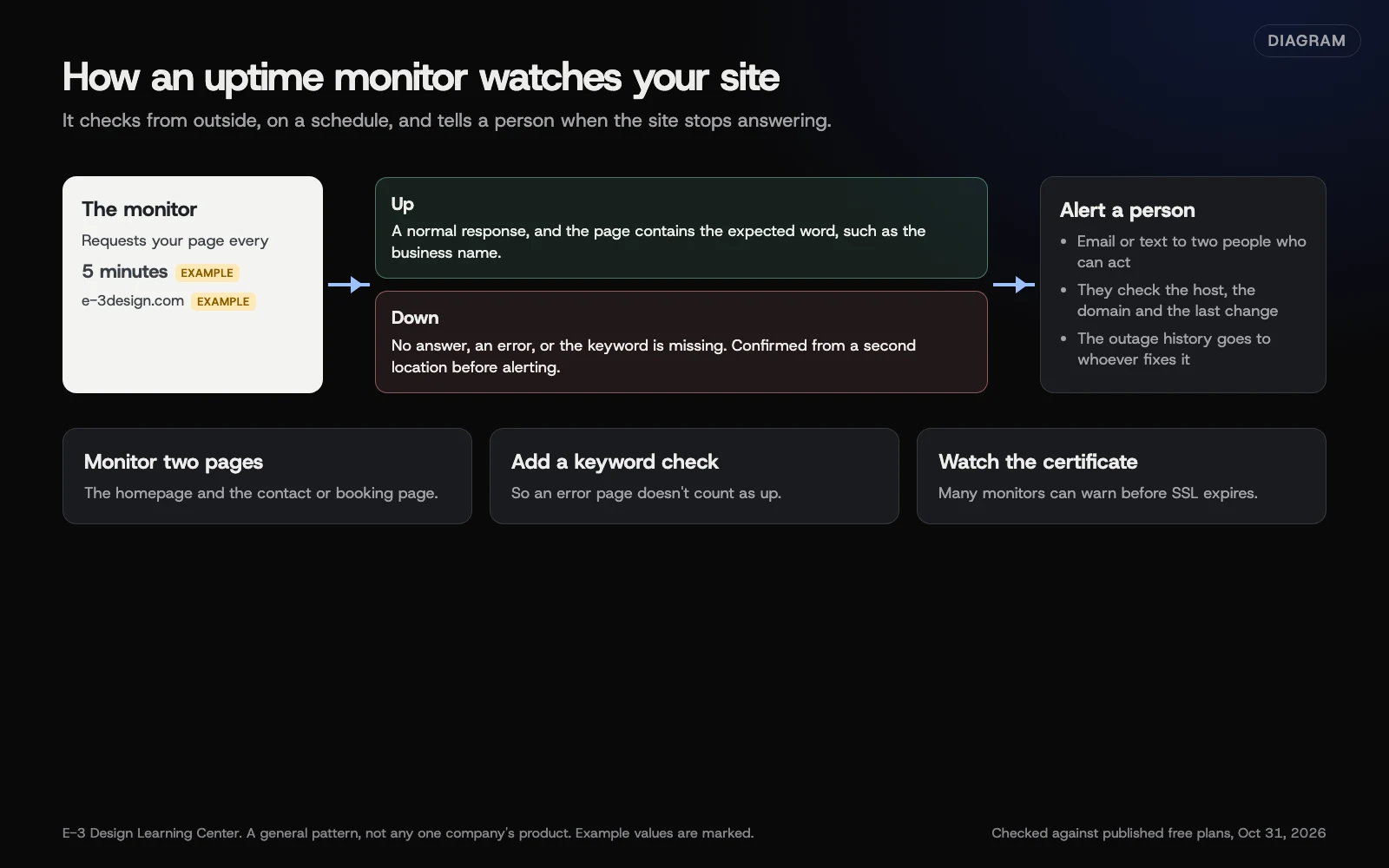 Diagram: how an uptime monitor checks a site from outside and who gets the alert. Example interval and addresses are marked. General pattern, not any one company’s product.
What do free plans include?
Free plans change often, so check the current terms before you sign up. As examples, on October 31, 2026:
| Service | Free plan, as published | Use allowed |
|---|---|---|
| UptimeRobot | 50 monitors, 5-minute interval, limited integrations, one status page | Its terms say “any use, including commercial and business use” |
| Better Stack | 10 monitors and heartbeats, 1 status page, Slack and email alerts | Its pricing says “free for personal projects” |
We list these because they publish their free terms clearly, not because E-3 earns anything from them. Other services offer similar free plans, and some have closed or changed theirs over the years, which is another reason to check who gets alerts after any change.
Texts and phone-call alerts usually cost extra. Faster checks, more locations and team features are what paid plans add.
How do I set one up?
The labels differ between services, but the steps are the same.
- Sign up with a shared business email, not a personal one.
- Add an HTTP(S) monitor for your homepage, using the exact address visitors use, such as https://www.example.com/.
- Pick the shortest interval the free plan allows.
- Add a keyword check if offered. Choose a word that only appears when the page loads properly, like your business name in the footer.
- Add a second monitor for your contact or booking page.
- Set who gets alerts. Add at least two people, and your web company if they look after the site.
- Turn on certificate expiry alerts if the service has them.
- Test it. Most services let you pause and resume, or send a test alert. Make sure the alert arrives and someone knows what to do with it.
Why does it matter?
Most owners find out their site is down from a customer, or not at all. A site can fail on a Friday evening and stay down all weekend while ads keep running and forms go nowhere. A monitor turns that into a message within minutes. Its history also helps when you’re deciding whether your hosting is good enough.
What are the common mistakes?
- Alerts go to one person’s old email. When they leave, nobody hears.
- Monitoring only the homepage, when the page that earns money is the contact or booking page.
- No keyword check, so a “database error” page looks up.
- Ignoring alerts because of false alarms. Turn on confirmation from a second location instead.
- Assuming the host monitors for you. Many hosts watch their servers, not your site.
What if it says my site is down?
- Check it yourself on your phone, using mobile data, not office Wi-Fi.
- If it’s down for you too, see why a website goes down for what to check and who to call.
- If it loads for you, the monitor may be blocked by a firewall or security plugin. Ask your host to allow the monitor’s addresses.
- If it flips up and down, the server may be overloaded or a plugin may be timing out. Send the monitor’s history to whoever manages the site.
Don’t restart services or restore backups unless you know the setup. Note the time it started and what changed recently; that’s what the person fixing it needs most.
How much does it cost, and how long does it take?
Free plans cover most small business sites. Setup takes about fifteen minutes. Paid plans add text alerts, faster checks and more monitors.
How does E-3 handle this?
In website care, monitoring of hosted sites looks at PHP version, waiting updates, known plugin vulnerabilities, disk and database space, and domain and plugin-license renewals. Website care also includes uptime monitoring. A free uptime monitor you set up yourself is still worth having, so the business hears about an outage directly. Our free domain and SSL expiry checker covers the other thing that takes sites down by surprise: a lapsed domain or certificate.
Related questions
Next step
- Next: How do I check my tracking tags work with Tag Assistant?The next guide in Free tools roundup.
- Free website checkPublic checks on your own site, then an action plan of what to fix first.
Still stuck? Ask E-3 for an answer from our help guides.
Rather we handled free tools roundup for you?
It’s part of what we do every week for small businesses, as part of website care. Start with a free check of your site and profile, or call and ask.