
Google Analytics 4: the complete small-business guide
Google Analytics 4 is Google's free tool for measuring what visitors do on your website. Create a property in a Google Account your business owns, add a web data stream, and put the Google tag on every page. Then mark form submissions and phone taps as key events, so the reports show leads as well as visits.
The short version
- Create the Analytics account in a Google Account your business owns, never your web company’s.
- Add a property and a web data stream, then put the Google tag on every page of your site.
- Mark form submissions and phone taps as key events. Without them, you only see visits.
- Each month, check users, traffic by channel, top pages and key events.
- Link Search Console, filter out your own office, and keep two administrators.
What does Google Analytics 4 measure?
Google Analytics 4, or GA4, records what happens on your website: how many people visit, where they came from, which pages they read and what they do. Everything it records is an event, such as a page view, a scroll, a click on an outside link or a form submission. The events that matter most to your business are called key events. Google renamed them from “conversions” on March 21, 2024, per its announcement.
GA4 replaced the older Universal Analytics. Google’s Universal Analytics page says standard properties stopped processing data on July 1, 2023. Guides that mention “goals,” “bounce rate as the main number” or “UA-” codes are out of date.
What GA4 can’t tell you: who a visitor is, whether a phone call turned into a job, or what happened before someone reached your site from Google. For that last one, use Google Search Console.
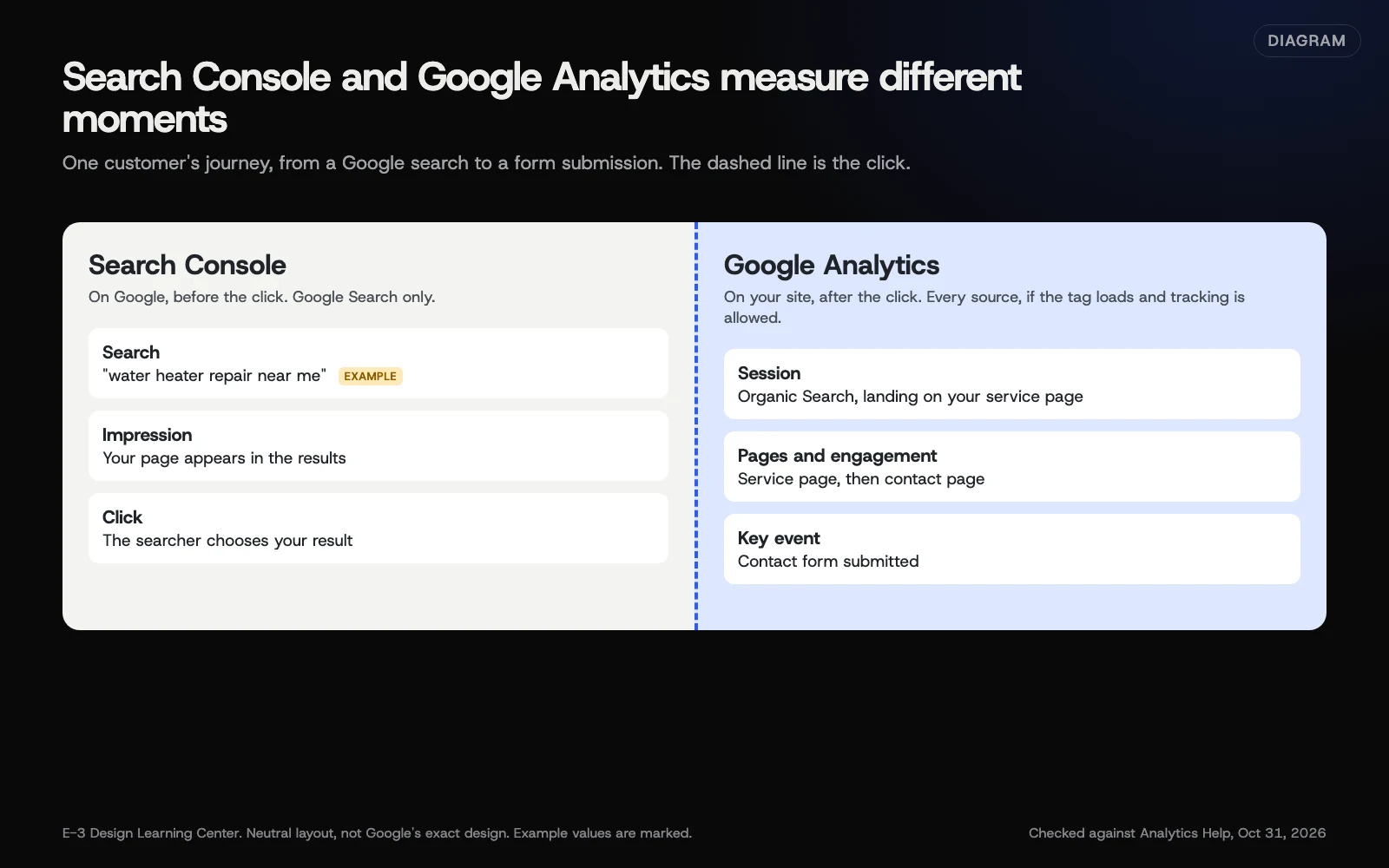 Diagram: Search Console covers what happens on Google before the click; Google Analytics covers what happens on your site after it. Based on Google’s help pages (October 2026).
How do I set it up properly?
1. Create the account, property and data stream
GA4 has three layers. An account is usually your business. A property is one website, with its own time zone and currency. A data stream is the connection between the property and your site, and it has a Measurement ID that starts with G-.
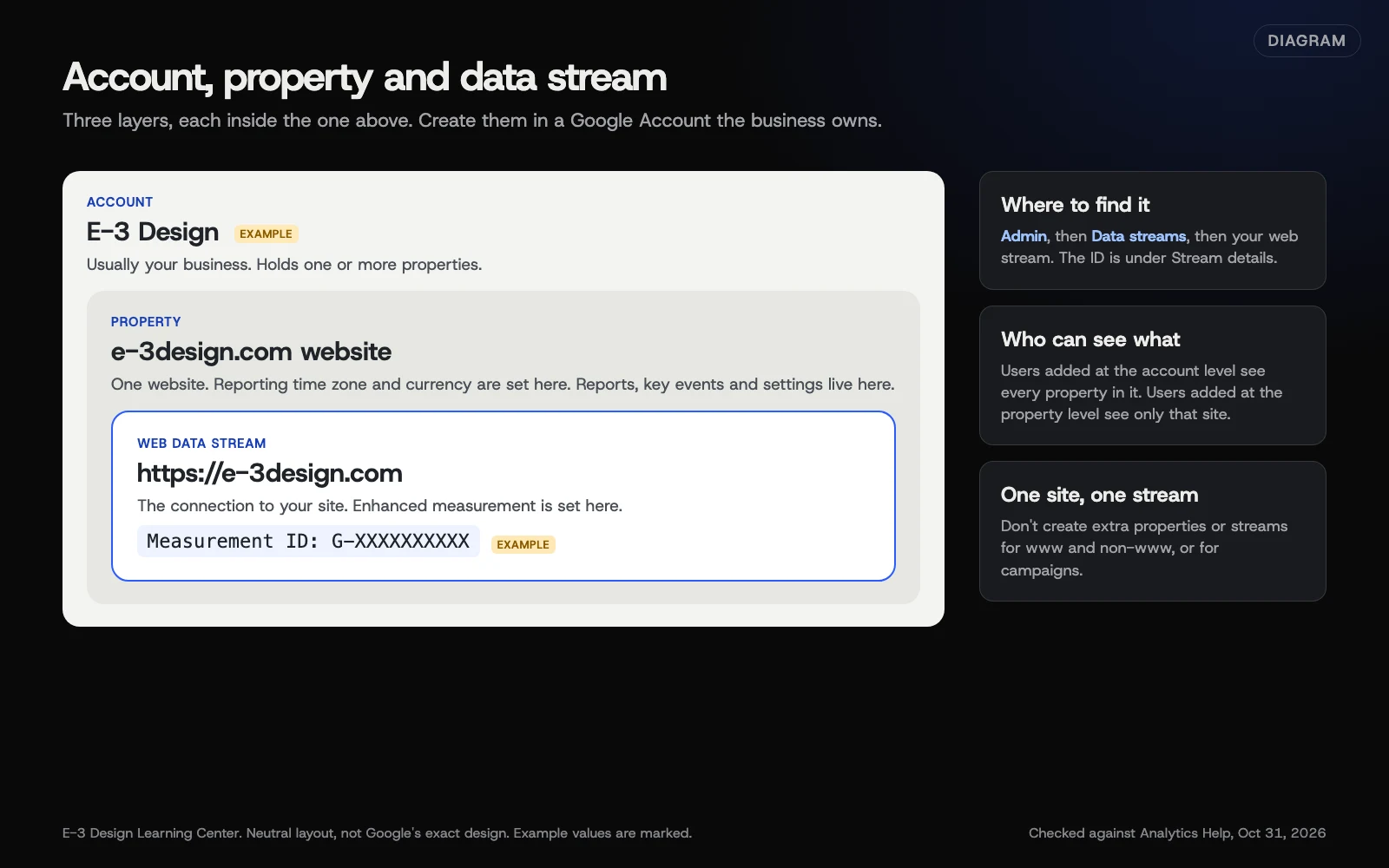 Diagram: how a Google Analytics account, property and web data stream fit together, using E-3 Design as the example. Based on Analytics Help (October 2026).
Create all three in a Google Account the business controls. Our guide to creating a GA4 property and web data stream gives the clicks, including the settings you can’t easily change later.
2. Put the Google tag on your site
The tag is a small piece of code that sends visits to your property. How you add it depends on your site:
- WordPress: Google’s Site Kit plugin, or the Analytics field in many SEO and theme settings.
- Website builders such as Wix and Squarespace: paste your G- ID into their Google Analytics setting. Some only allow this on paid plans. Shopify uses its Google & YouTube sales channel instead.
- Google Tag Manager: add a Google tag inside your container.
Use one method, not two. Our guide to adding GA4 to your website covers each option and how to check it’s working. If you’re weighing up Tag Manager, see whether you need Google Tag Manager.
3. Track the actions that matter
Visits are a start, but leads pay the bills. Enhanced measurement, which Google suggests leaving on, collects page views, scrolls, outbound clicks and file downloads by itself. Form submissions and phone taps usually need a little setup, then you mark them as key events. Our guide to setting up key events shows how, and our answer on tracking calls and form leads explains why it matters.
4. Tidy up the settings
- Filter out your own visits. Staff visits can distort small sites’ numbers. See filtering internal traffic.
- Choose data retention. Google’s data retention page says standard properties keep user-level and event data for 2 or 14 months, with 2 as the default. It only affects Explorations and funnel reports; standard reports keep their totals. Choose 14 if you want year-on-year Explorations, or 2 if you’d rather keep less. Our guide to measuring with fewer cookies covers the privacy side.
- Link Search Console to see Google searches next to on-site behavior. See linking Search Console to GA4.
- Check consent. If you use a cookie banner, it should control the Google tag, and Google’s consent mode passes each visitor’s choice to it. You can see what Analytics receives under Admin, then Consent settings. Our guides on whether you need cookie consent and Google Consent Mode v2 explain the rules and the setup. This isn’t legal advice.
5. Give people access, not passwords
Add each person with their own Google Account and the lowest role that does the job. Keep two administrators who work for your business. Our help article on seeing your visitor numbers and adding users walks through the roles: Viewer, Analyst, Marketer, Editor and Administrator.
What do the main GA4 words mean?
GA4 uses a few terms differently from older tools. Google’s engagement page defines the ones that confuse people most:
| Term | What it means |
|---|---|
| Session | A period when someone is using your site. One person can have several sessions |
| Engaged session | A session that lasts longer than 10 seconds, includes a key event, or has 2 or more page views |
| Engagement rate | The share of sessions that were engaged |
| Bounce rate | The share of sessions that were not engaged. It’s the opposite of engagement rate, not the old Universal Analytics measure |
| Key event | An action you’ve marked as important, such as a form submission |
A low engagement rate on a page people reach from Google is a sign it doesn’t match what they searched for. A high one with no key events usually means the next step, such as the form or phone number, is hard to find.
Which reports do I actually need?
GA4 has a lot of reports. A small business needs a handful, read the same way each month:
| Report | Where | What it answers |
|---|---|---|
| Reports snapshot | Reports | How are things going overall? |
| Realtime | Reports | Is the tag working right now? |
| Traffic acquisition | Reports, then Acquisition | Where did visitors come from? |
| Pages and screens | Reports, then Engagement | Which pages did they read? |
| Key events | Reports, then Engagement | How many leads, and from where? |
Our answer on what to look at in GA4 explains how to read these each month, and our help article on seeing how many people visit gives the clicks. When the labels in Traffic acquisition confuse you, see what Direct, Unassigned and AI Assistant mean.
For questions the standard reports can’t answer, such as which pages people visit before they fill in a form, see when to use Explorations.
Tracking campaigns
When you share a link in an email newsletter, a social post or a printed QR code, add UTM tags so GA4 knows where the visit came from. Otherwise those visits often land in Direct or Referral. Our guide to measuring social media with UTM links shows how to build them, and the same rules work for any link you share.
What are the most common mistakes?
These are common problems when a business first looks closely at its Analytics.
- The wrong owner. A past web company or a former employee owns the account. The business should. See which logins your business should own.
- The tag is missing or doubled. A theme change dropped it, or two plugins both add it, so the same page view can be sent twice. Confirm the duplicate in Tag Assistant before removing anything.
- No key events. The reports show visits but not a single lead.
- Retention left unchecked. Explorations can’t look back further than the retention setting, which is 2 months unless someone changes it.
- Expecting GA4 to match Search Console. They count different things. See why the numbers don’t match.
- Reacting to small numbers. A small site’s week-to-week swings mean little. Compare months, and the same month last year.
- Counting on exact numbers. Visitors who block tracking or decline cookies may not be counted, so treat GA4 as a trend.
What has changed recently?
Google’s release notes list these changes in 2026 that matter to a small business:
- February 10: the Home page now summarizes the top changes in your data since your last visit.
- May 13: a new AI Assistant channel groups visits from chatbots such as ChatGPT, Gemini and Claude. See traffic channels.
- June 8: you can link Google Business Profiles from Admin in Analytics. Our guide to the Business Profile performance report covers it.
- June 15: Google began moving advertising data controls to consent mode in Google Ads, per its data controls page. It matters mostly if you run Google Ads.
- September 9: Dashboards arrived: a single page of the numbers you choose. Google’s dashboard page says Editors and Administrators can build them, and anyone with access can view them.
- September 21: hostname filters let you accept data only from domains you approve, which keeps out data sent from other sites.
What if the numbers look wrong?
- No data at all. Open Realtime and visit your site on your phone. If you don’t appear, the tag isn’t working. See adding GA4 to your website.
- Visits jumped overnight. A second tag, often from a new plugin, is one possible cause. Check Tag Assistant for two page_view events on one page load, and rule out a real spike or bot traffic.
- A sudden drop. Check the tag first, then read our answer on why traffic suddenly drops.
- Lots of Direct or Unassigned. Usually tagging or untagged links. See traffic channels.
- You can’t get in. See who to ask for access.
How much does it cost, and how long does it take?
GA4 is free, though some website builders only allow it on paid plans. A careful setup with key events and the settings above takes an afternoon. Data collection can take up to 30 minutes to start, per Google’s setup page, and a new property needs a few weeks before trends mean much. After that, a monthly check takes about 15 minutes.
How does E-3 handle this?
“How do I see how many people visit my website?” is one of the most common questions E-3’s clients ask, with about 130 requests in our records. WordPress doesn’t count visits on its own, so the answer starts with whether Analytics is set up and who owns it. Accounts E-3 sets up are created in the client’s name, with E-3 added as a user, so the data stays the client’s. Lead tracking is part of our SEO and AI search service.
Related questions
Sources
- Set up Analytics for a website and/or app (Analytics Help)
- Set up the Google tag with a website builder or CMS (Analytics Help)
- Conversions vs. key events in Google Analytics (Analytics Help)
- More insightful measurement across Google Ads and Analytics (Google, March 21, 2024)
- What's new in Google Analytics (Analytics Help)
- Engagement rate and bounce rate (Analytics Help)
- Default channel group (Analytics Help)
- Universal Analytics is going away (Analytics Help)
- Updates to Google Analytics Data Controls (Analytics Help)
- Data retention (Analytics Help)
- Verify and update consent settings in Google Analytics (Analytics Help)
- About Google Analytics dashboard (Analytics Help)
Every Google Analytics 4 guide
- How do I set up a GA4 property and web data stream?Sign in at analytics.google.com with a Google Account the business owns. In Admin, select Create, then Account, and follow the steps to name the property, set your time zone and currency, and add a Web data stream with your site's address. Copy the Measurement ID that starts with G-, then add the Google tag to your site.
- How do I add GA4 to WordPress or another website builder?Pick one way to add the Google tag. On WordPress, use Google's Site Kit plugin or a trusted plugin's Google Analytics field. On Wix or Squarespace, paste your G- Measurement ID into their Analytics setting; Shopify connects through its Google & YouTube sales channel. Otherwise paste the full tag into every page's head, then check Realtime.
- Do I need Google Tag Manager for GA4?Most small-business sites can run GA4 without Google Tag Manager. Tag Manager helps when you manage several tags, such as GA4, Google Ads and a Meta pixel, or want to track clicks and forms without site edits. To add GA4, create a Google Analytics tag with your G- ID, fire it on Initialization, preview, then publish.
- How do I set up key events (formerly conversions) in GA4?A key event is an action that matters to your business, such as a form submission or a phone tap. Make sure GA4 records the action as an event, then go to Admin, Events, and select the star next to it. Google renamed conversions to key events in March 2024. Key events appear in reports within 24 hours.
- What do Direct, Unassigned and AI Assistant mean in GA4?GA4 sorts every visit into a channel using Google's rules. Direct means GA4 couldn't see where the visitor came from. Unassigned means the source didn't match any rule, often because of a mistyped UTM tag. AI Assistant, added May 13, 2026, groups visits from chatbots such as ChatGPT, Gemini and Claude.
- How do I link Search Console to Google Analytics 4?In GA4, go to Admin, then Search Console links, select Link, choose your Search Console property and your web data stream, then submit. You need the Editor role in Analytics and verified ownership in Search Console. Then publish the Search Console collection from the Library so its two search reports appear.
- How do I stop GA4 counting my own visits?Define your office IP address as internal traffic in your web data stream's tag settings, then create an Internal Traffic data filter under Admin, Data filters. Keep the filter in Testing, check it in Explore, then set it to Active. Google warns active filters permanently remove matching data. The office-IP rule works best on a fixed address.
- When should I use Explorations in GA4?Use Explorations when the standard reports can't answer your question, such as which pages people view before sending a form. Open Explore, start a Blank or template exploration, then drag dimensions and metrics into it. Most small businesses only need Free form, Funnel and Path. Explorations only reach back as far as your data retention setting.
- Why don't my GA4 and Search Console numbers match?They count different things. Search Console counts clicks on Google results; GA4 counts sessions from every search engine, and only when its tag runs. Cookie consent settings can limit or model what GA4 records. Time zones, privacy filtering and redirects add more gaps. A steady difference is normal. A sudden new gap needs checking, starting with the GA4 tag.
Common questions
- Is Google Analytics free?
- Yes. The standard version of Google Analytics 4 is free. Analytics 360 is a paid version for large companies, and small businesses don't need it.
- Do I still have my old Universal Analytics data?
- Probably not. Google says standard Universal Analytics properties stopped processing data on July 1, 2023. GA4 is a separate property and starts collecting from the day its tag goes on your site.
- Does WordPress have its own visitor counter?
- No. WordPress doesn't count visitors by itself. Some hosts and plugins show rough numbers, but Google Analytics is the reliable source.
Next step
- Start here: How do I set up a GA4 property and web data stream?The first guide in Google Analytics 4.
- Free website checkPublic checks on your own site, then an action plan of what to fix first.
Still stuck? Ask E-3 for an answer from our help guides.
Rather we handled google analytics 4 for you?
It’s part of what we do every week for small businesses, as part of seo and ai search. Start with a free check of your site and profile, or call and ask.