
Business listings beyond Google: the complete guide
Google isn't the only map people use. Claim your free listings on Bing Places, Apple Business (for Apple Maps), Yelp and Facebook, make your name, address, phone and hours match your website exactly, then add the few directories your customers actually use. Check them twice a year and after any move or number change.
The short version
- Write down one official version of your name, address, phone, website and hours.
- Claim the big free listings: Google, Bing Places, Apple Business, Yelp and your Facebook Page.
- Add only the directories your customers really use: your trade body, chamber and industry sites.
- Hunt down old addresses and phone numbers, and fix the source, not just the copy.
- Check everything twice a year, and on the day you move or change numbers.
How do I get my listings right?
A listing is your business’s entry on a map, search engine or directory. A citation is any mention of your name, address and phone on another site. Together they decide what people see when they look you up somewhere other than your own website. This hub covers everything beyond Google. For Google itself, start with our Google Business Profile guide.
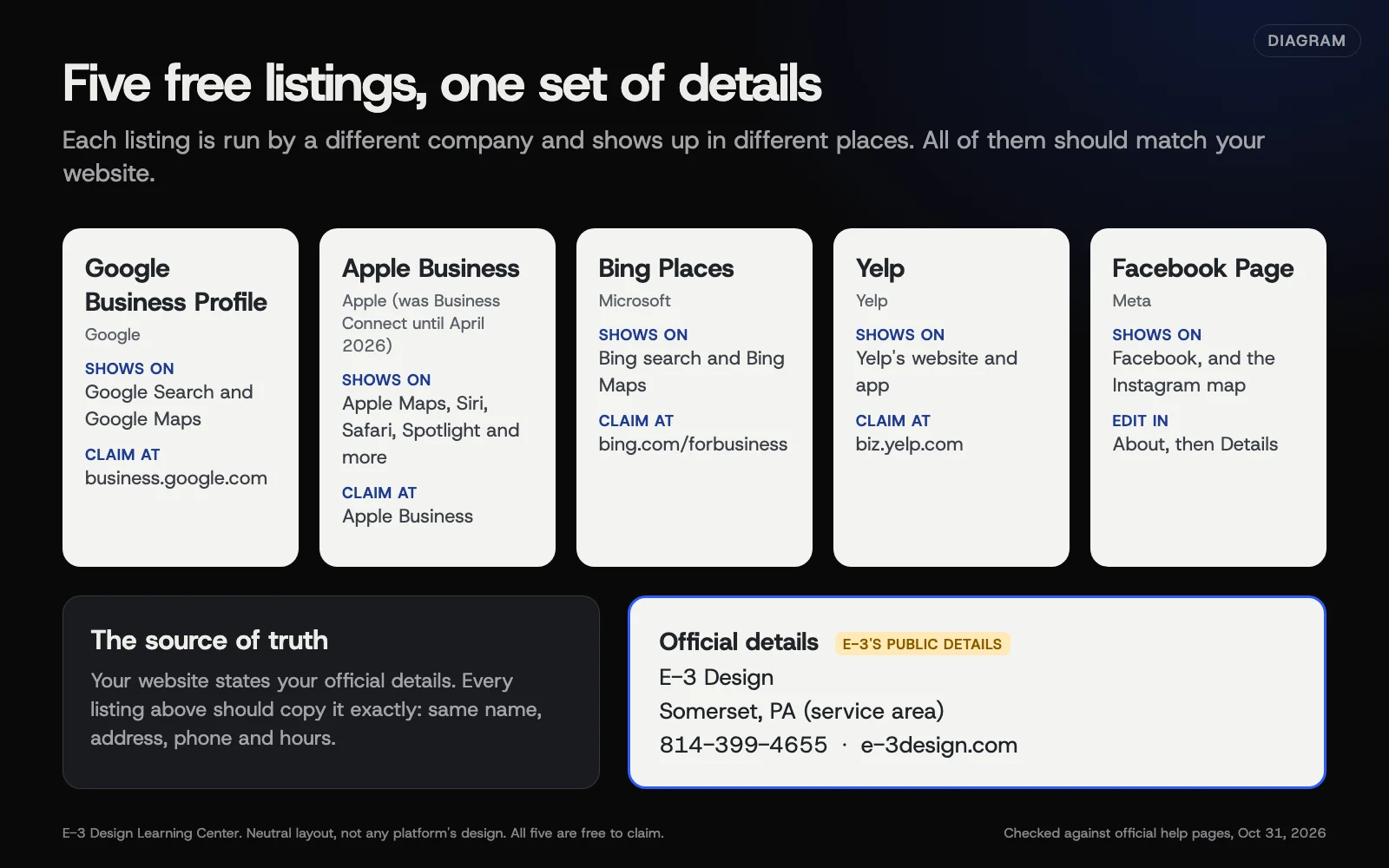 Diagram: the main free listings, who runs each one and where it shows up. Based on each platform’s own help pages, checked October 31, 2026.
1. Write down your official details
Before you touch a single listing, decide exactly how your details read. Use your real business name as it appears on your sign, your full street address (or your service area if customers don’t visit), one main phone number, your website address and your regular hours. Every listing should match this. Our answer on why your name, address and phone should match explains what counts as a real mismatch and what doesn’t.
2. Claim the core listings
Five platforms do most of the work for a local business:
| Listing | Where it shows | Cost to claim | Our guide |
|---|---|---|---|
| Google Business Profile | Google Search and Maps | Free | Google Business Profile hub |
| Bing Places for Business | Bing search and Bing Maps | Free | Claim your Bing Places listing |
| Apple Business | Apple Maps, Siri, Safari, Spotlight and more | Free | Get on Apple Maps with Apple Business |
| Yelp | Yelp’s website and app | Free | Claim and run your Yelp page |
| Facebook Page | Facebook, and the Instagram map | Free | Fix your Facebook Page details |
Do Google first, because Bing can import from it. Then Apple, then Yelp and Facebook.
3. Add the directories that fit your trade
After the core five, more listings give less. A handful matter: your trade association, your chamber of commerce, the Better Business Bureau if your customers check it, Nextdoor for neighborhood businesses, and the one or two industry sites customers in your field really use. Our guide to which directories are worth having helps you choose and tells you which to skip.
4. Find and fix the strays
Most businesses have listings they never made. Old data gets copied from site to site. Our guide to auditing your citations shows how to search for your old phone numbers and addresses and record what you find. Then fixing wrong listings and duplicates covers what to do on each kind of site, including ones you can’t log in to.
5. Keep them right
Listings drift. Customers suggest edits, platforms pull in outside data, and you change things yourself. Keep a simple spreadsheet of every listing, which account it’s managed from and who owns that account. Keep passwords in a password manager, not the spreadsheet. When something changes, follow our checklist for moving or changing your phone number, which sets out the order to update everything.
A starter plan if you’ve never touched your listings
Work in this order. Most steps are short; auditing old citations and recovering listings you don’t control take longer, and verification adds waiting time.
- Fix your website first. The footer, contact page and any structured data should show your official details. It’s the one source you fully control.
- Get your Google profile right, using our Google Business Profile guide.
- Import into Bing Places from Google, so the two start out matching.
- Start Apple Business organization verification early, because Apple’s review can take up to 5 business days and has a 60-day deadline.
- Claim Yelp and tidy your Facebook Page.
- Run a quick audit for old phone numbers and addresses, and fix what turns up.
- Write it all down: every listing, the account it’s managed from and who owns that account (passwords go in a password manager).
Which listings matter for my type of business?
The core five apply to almost everyone. After that, it depends on how customers find you.
| Business type | Beyond the core five | Watch out for |
|---|---|---|
| Shop, salon or office customers visit | Chamber of commerce, Nextdoor | Correct map pin and parking details |
| Trades that go to customers | Trade association, Nextdoor, a home-services site customers use | Hiding a home address where the platform allows it |
| Restaurant, café or attraction | A hospitality review site, such as Tripadvisor | Holiday hours and menus on every platform |
| Professional practice | Your professional body’s directory | Whether individual practitioners also have listings that need checking |
| Online-only business | Google says online-only businesses aren’t eligible for a Business Profile | Focus on your website and social profiles instead |
Our guide to directories worth having explains how to test any site before you join it.
Why do listings matter beyond Google?
Google is the biggest local search tool, but it isn’t the only one people use. iPhone owners who tap an address or ask Siri for directions see Apple’s place card, not Google’s. Apple’s Apple Business guide says place cards appear across Maps, Siri, Calendar, Messages, Spotlight and Wallet. Microsoft says Bing Places listings show on Bing search and Bing Maps. Yelp and Facebook are where many people read reviews and check hours before they visit.
Each of these is a place a customer can find a wrong phone number. That’s the practical case for listings: every wrong one is a lost call or a wasted trip.
Do listings help my Google ranking?
Google’s local ranking page lists three factors: relevance, distance and prominence. It says prominence is “based on info like how many websites link to your business and how many reviews you have.” It doesn’t say that directory listings raise your ranking. Older versions of that page mentioned directories; the current one doesn’t, so be wary of anyone selling hundreds of directory listings as a ranking fix.
Listings do matter to Google another way. Its page on how it sources Business Profile information names four sources: public web content such as your website, “licensed data from third parties,” users, and Google’s own interactions with the place. So the details floating around the web can end up feeding your Google profile, right or wrong.
What about AI answers?
People now ask AI assistants for a nearby business. Google’s guidance on AI features recommends keeping your Business Profile up to date and says there’s no special markup needed. Other assistants describe businesses from what they find across the web. We can’t verify which listings each assistant reads, and the companies don’t publish full lists. The safe approach is the same everywhere: one set of accurate details, repeated consistently. If an assistant already has your details wrong, see what to do when AI gets your business wrong.
How do listings spread from site to site?
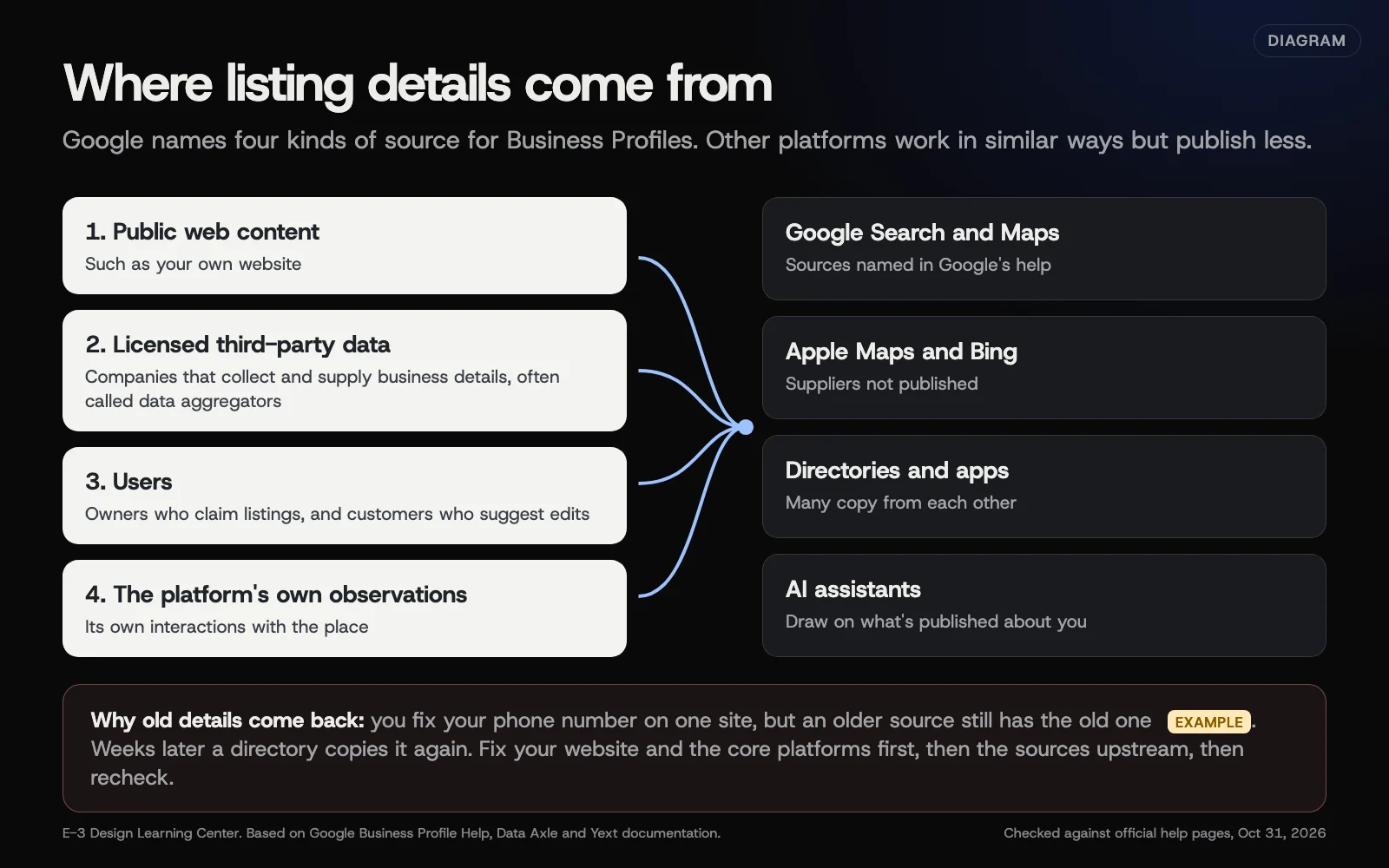 Diagram: the four kinds of sources Google says feed Business Profiles, and how a stale detail can travel. Based on Google Business Profile Help, Data Axle and Yext documentation (October 2026).
Some companies collect business data and pass it on to other sites. They’re often called data aggregators. Data Axle, for example, says on its local listings page that it sends listing data to search engines, online directories, in-car and mobile navigation, and virtual assistants. It doesn’t name its partners, and most platforms don’t publish who supplies them.
That’s why a phone number you dropped years ago can come back. Our guide on how listings spread and whether to pay a listings service explains what’s verifiable, what isn’t, and when a paid service makes sense.
What are the most common mistakes?
- Starting with directories before the core five. Fifty directory listings won’t help if your Apple Maps card shows the old address.
- Several versions of your name. “Smith & Sons” here, “Smith Plumbing LLC” there. Pick the name on your sign.
- A call tracking number that spreads. Tracking numbers on listings tend to get copied to other sites. Keep your main number as the main number.
- Creating a new listing instead of claiming the old one. It leaves a duplicate. Search first, every time.
- Losing the logins. A listing made by a former employee or old agency is hard to fix. Keep logins in the business’s name.
- Paying for hundreds of low-quality directories. They’re hard to update later and don’t add much.
- Showing a home address you don’t want public. Most platforms let a service-area business hide it. Check each one.
Which features have changed or been retired?
As of October 31, 2026:
- Bing Places moved to bing.com/forbusiness on October 3, 2025. Microsoft’s announcement says existing listings moved over automatically. Old bingplaces.com links now redirect.
- Apple Business Connect is now Apple Business. Apple’s newsroom post says Apple Business launched April 14, 2026, free, replacing Business Connect, Business Essentials and Business Manager. Existing place cards moved over automatically. Older guides that say “Business Connect” describe screens that have changed.
- Foursquare City Guide is gone. Foursquare’s sunset page explains the consumer City Guide was retired; its Swarm app and its business places data carry on.
- Google’s ranking page no longer mentions directories. See above.
What if something goes wrong?
- You can’t log in to a listing. Most platforms have a claim or ownership request process. See fixing wrong listings and duplicates.
- A fix keeps reverting. Find where the old detail is coming from. Fix the core platforms first, then aggregators, then recheck in a few months.
- There are two listings for your business. Report the duplicate on that platform rather than editing both.
- A listing shows a business you closed. Mark it closed on that platform; don’t just abandon it.
- You sold the business and it’s still trading. Don’t mark it closed. Hand the listing to the new owner through that platform’s ownership or access settings, then remove yourself.
How much does it cost, and how long does it take?
Claiming Google, Bing Places, Apple Business, Yelp, Facebook and Nextdoor is free, and so is a basic Better Business Bureau profile. Paid add-ons exist on most platforms (ads, upgrades, accreditation) and aren’t needed to be listed. A first pass through the core five takes a few hours, plus waiting time for each platform’s verification. Apple says organization and transfer reviews take up to 5 business days. After that, a twice-a-year check takes about an hour.
How does E-3 handle this?
Our SEO and AI search service looks after your Google Business Profile and the schema markup on your website that states your name, address and phone, so your two most important sources agree. If you want help with other listings, ask us before you start and we’ll say plainly what we can take on. Check how AI tools describe you today with our free AI visibility check.
Related questions
Sources
- Understand how Google sources & uses info in Business Profiles & local search results (Google Business Profile Help)
- Get started with Google Business Profile (Google Business Profile Help)
- Tips to improve your local ranking on Google (Google Business Profile Help)
- Guidelines for representing your business on Google (Google Business Profile Help)
- Introducing the New Bing Places for Business (Microsoft Bing Blogs, October 3, 2025)
- Introducing Apple Business (Apple Newsroom, March 24, 2026)
- Intro to Apple Business (Apple Business User Guide)
- What is a claimed business? (Yelp for Business Support)
- Add or edit an address for your Facebook Page (Facebook Help Center)
- Local Listings (Data Axle)
- What happens when a Listings subscription is cancelled (Yext Help Center)
- City Guide sunset (Foursquare)
- AI features and your website (Google Search Central)
Every Listings and citations guide
- Claim your Bing Places listing (import from Google)Go to bing.com/forbusiness, sign in, and choose Import Google Business Profile to copy your verified Google details across, or search for your business to claim it manually and verify with a PIN. It's free. If you keep Google sync turned on, make future edits in Google, because Bing's dashboard can't edit a synced listing.
- Get on Apple Maps with Apple BusinessApple Maps listings are now managed in Apple Business, which replaced Apple Business Connect on April 14, 2026. Sign up free, verify your organization with two methods, then add your location and confirm it by phone call or documents. Once it's live you can add photos, action buttons and short showcases to your place card.
- Claim and run your Yelp business pageSearch for your business at biz.yelp.com and claim the page; Yelp verifies by phone, and claiming is free. Once claimed you can fix your address, phone, hours and website, add photos and an owner bio, and reply to reviews and messages. You can't remove reviews, and Yelp tells businesses not to ask for them.
- Fix your Facebook Page business detailsSwitch into your business Page, open About, then Details, and edit the address, hours and contact information so they match your official version. Move the map pin when you change the address, because Facebook requires it. If there's no Hours section, change the Page category. Only people with Facebook access to the Page can edit it.
- Which directories are worth listing your business in?After the core five listings, add only directories that real customers use or that vouch for you: your chamber of commerce, your trade association, the Better Business Bureau if your customers check it, Nextdoor for neighborhood trades, and the one or two industry sites in your field. Skip bulk directory packages and sites nobody in your town visits.
- How business listings spread, and paid listing servicesMap apps and directories fill listings from several sources: owners, users, their own observations and licensed data from companies that collect business details, often called data aggregators. That's why an old phone number can reappear after you fix it. Correct the core platforms yourself first; a paid listings service is optional, and its updates stop when you cancel.
- Audit your business citations in an afternoonSearch for your phone numbers, addresses and business names, old and current, in quotes on Google and Bing, and check the core platforms directly. Record each listing in a spreadsheet with what's wrong and whether you can log in. Then fix in order: your website, the core five platforms, data aggregators, and finally the rest.
- Fix wrong listings and duplicates outside GoogleClaim the listing if you can; owners edit directly. If someone else controls it, use the platform's transfer or support process with proof of ownership. For duplicates, keep the listing with the most history and ask the platform to merge or remove the other. On sites you can't claim, report the error or email a correction.
- Moving or changing your phone number: the listings checklistUpdate your website and Google Business Profile on the day the change takes effect, then Apple Business, Bing Places, Yelp and Facebook that week, then directories and aggregators. Edit existing listings rather than creating new ones. Google says a moved business must verify again, so plan for it, and keep the old number forwarding as long as you can.
Common questions
- Do I have to pay to be listed on Bing, Apple Maps or Yelp?
- No. Microsoft calls Bing Places a free platform, Apple says Apple Business is free, and Yelp says claiming a page is free. Paid extras such as ads are optional.
- What is a citation?
- Any mention of your business name, address and phone number on another website, such as a directory, a map app or a local chamber's member list.
- Do I need a paid listings service?
- Not usually for one location. You can claim the main platforms yourself for free. If you do pay for one, know what happens when you stop: Yext, for example, says listings stay live but stop receiving its updates.
Next step
- Start here: Claim your Bing Places listing (import from Google)The first guide in Listings and citations.
- Free website checkPublic checks on your own site, then an action plan of what to fix first.
Still stuck? Ask E-3 for an answer from our help guides.
Rather we handled listings and citations for you?
It’s part of what we do every week for small businesses, as part of seo and ai search. Start with a free check of your site and profile, or call and ask.