
Get on Apple Maps with Apple Business
Apple Maps listings are now managed in Apple Business, which replaced Apple Business Connect on April 14, 2026. Sign up free, verify your organization with two methods, then add your location and confirm it by phone call or documents. Once it's live you can add photos, action buttons and short showcases to your place card.
The short version
- Apple Business Connect became Apple Business on April 14, 2026. It’s free.
- First verify your organization. Apple asks for two different methods.
- Then add your location. If it’s already on Maps, Apple calls the number it has and you enter a 4-digit code.
- Someone else manages it? Use Request Transfer with documents.
- Once live, add photos, Actions (buttons like Reserve) and Showcases.
How do I claim my business on Apple Maps?
Apple announced in its newsroom post that Apple Business would replace Business Connect, Business Essentials and Business Manager, and that existing Business Connect data would move across automatically. If you claimed your place card before April 2026, sign in to Apple Business and check it’s there before doing anything else.
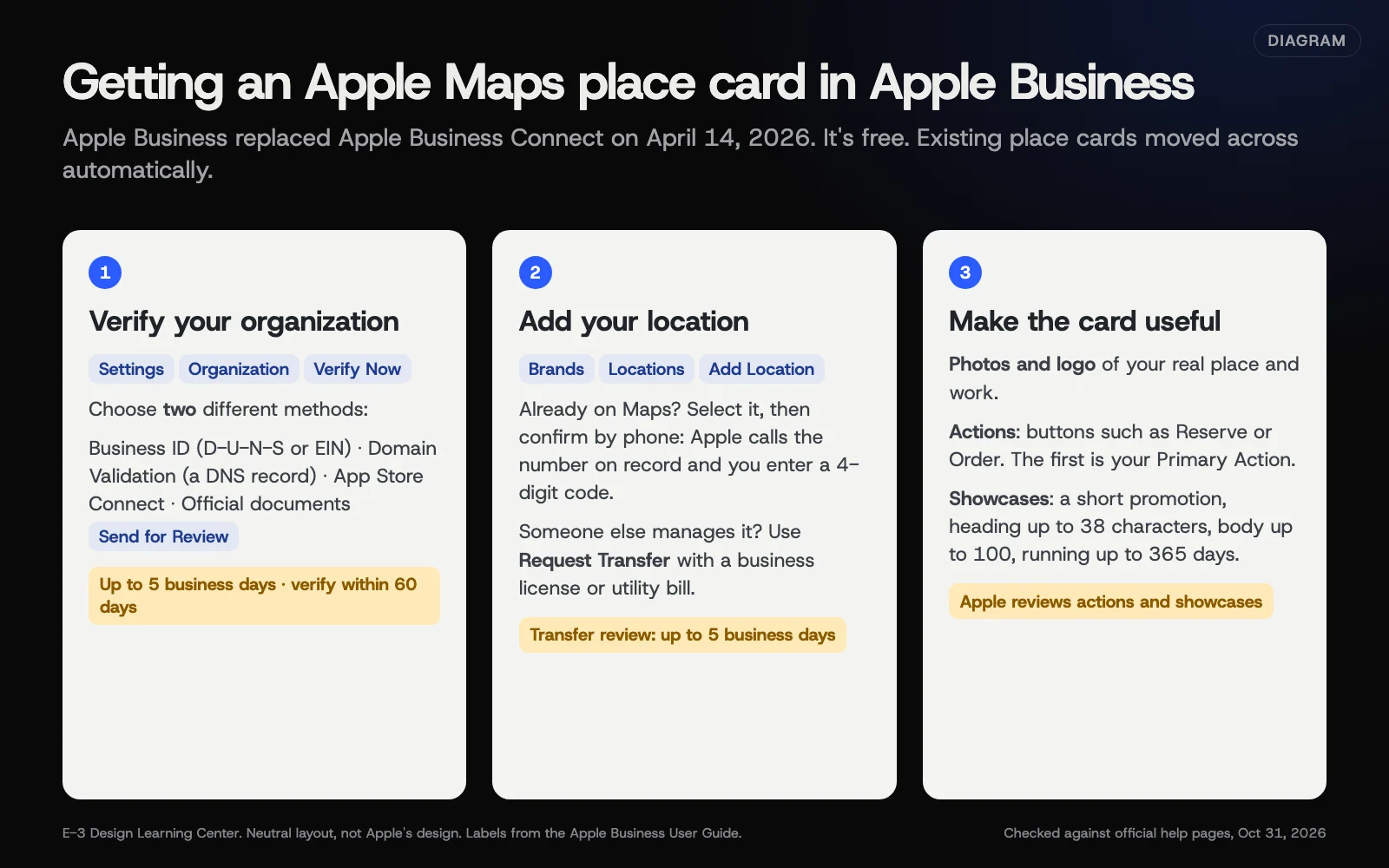 Diagram: the three stages of getting a place card in Apple Business, with Apple’s stated review times. Based on the Apple Business User Guide, checked October 31, 2026.
Step 1: Verify your organization
From Apple’s guide to signing up and verifying:
- Sign up for Apple Business with an Apple Account the business will keep.
- Go to Settings, then Organization, then Verify Now.
- Choose two different methods from: Business ID (a D-U-N-S number or EIN), Domain Validation (a DNS record on your website’s domain), App Store Connect, or Official documents.
- Select Send for Review.
Apple says review takes up to 5 business days, and that you must verify within 60 days or the organization and its data are deleted. Domain validation means adding a TXT record to your domain’s DNS; if someone else looks after your domain, ask them. Our answer on changing DNS safely explains what to watch for.
Step 2: Add your location
From Apple’s guide to adding a single location:
- Go to Brands, then Locations, then Add Location.
- Choose Add single location, then Next.
- If your business already appears on Maps, find it and select it. If it doesn’t, choose to add a new location with your name.
- Set the status to Open, or Opening Soon if you open within 6 months.
- Fill in the details exactly as your official version reads, then select Done.
For a place already on Maps, Apple confirms you’re connected to it by phone: Location Verification, then Next, then Phone Verification. Apple calls the number it has on record, and you enter the 4-digit code from the call.
If another organization already manages the location, select Request Transfer, attach documents such as a business license or utility bill, and select Send for Review. Apple says this takes up to 5 business days.
Step 3: Make the place card useful
- Photos and logo. Real photos of your place and work.
- Actions. Apple’s Actions page describes buttons that send customers to book, order or reserve. Your first one becomes the Primary Action. Apple reviews each, which it says takes up to 3 business days, and customers need iOS or iPadOS 17.4 or later to see them.
- Showcases. A short promotion on your place card, with a heading of up to 38 characters and body text up to 100. Apple’s showcase page says they run for up to 365 days, with 90 days as the default, and that Apple reviews each one, which takes up to 3 calendar days. Create one from Brands, Locations, Showcases, Create.
- Insights. Under your location, Insights shows place card views, taps for directions, calls and website visits. Apple shows small numbers as zero for privacy.
Why does Apple Maps matter?
When someone on an iPhone taps an address or asks Siri for a business, they see Apple’s place card. Apple’s introduction says place cards appear across Maps, Siri, Calendar, Messages, Spotlight and Wallet. If you’ve only ever looked at your business on Google, you may never have seen what iPhone users see. Open Apple Maps on an iPhone and search for yourself.
What are the common mistakes and edge cases?
- Missing the 60-day deadline for organization verification. Set a reminder.
- Picking two methods you can’t complete. Have your EIN letter or D-U-N-S number ready before you start.
- The phone check calls an old number. Apple calls the number on record. If that number is wrong, use the transfer route with documents.
- A showcase with a price or promise that later changes. Set an end date that matches the offer.
- Using a personal Apple Account that leaves with an employee. Use one the business owns.
- Following an old “Business Connect” guide. Screens and names changed in April 2026.
What if this didn’t work?
- Organization verification was rejected. Check that the legal name matches your documents exactly, then try a different pair of methods.
- You can’t find your place on Maps. Add it as a new location. Don’t add a second one if it exists under an old name; search by phone number and street.
- A transfer request was declined. Send clearer documents showing the business name and address together.
- Details on Maps still look wrong after you edit. Apple reviews changes, so give it a few days, then check on an iPhone.
How much does it cost, and how long does it take?
Apple says Apple Business is free. Apple has also announced paid ads on Maps, starting in the US and Canada in 2026, which you don’t need to be listed. Expect an hour of setup and up to 5 business days for each review step.
How does E-3 handle this?
Domain validation needs a DNS record on your domain. If E-3 manages your domain, ask us: we save your existing DNS records before any change, and the record is added only once you approve it. For the rest of your Apple listing, ask us what we can take on; our SEO and AI search service is built around your Google profile and website details.
Related questions
Sources
- Introducing Apple Business (Apple Newsroom, March 24, 2026)
- Apple Business Connect is now Apple Business (Apple Business Connect User Guide)
- Sign up and verify your organization (Apple Business User Guide)
- Add a single location in Apple Business (Apple Business User Guide)
- Create your first showcase (Apple Business User Guide)
- About Actions (Apple Business User Guide)
- Use insights for a single location (Apple Business User Guide)
- Intro to Apple Business (Apple Business User Guide)
Next step
- Next: Claim and run your Yelp business pageThe next guide in Listings and citations.
- Free website checkPublic checks on your own site, then an action plan of what to fix first.
Still stuck? Ask E-3 for an answer from our help guides.
Rather we handled listings and citations for you?
It’s part of what we do every week for small businesses, as part of seo and ai search. Start with a free check of your site and profile, or call and ask.