
AI visibility: how AI assistants find and cite your business
Many AI assistants search the web as they answer: Google's index for AI Overviews, AI Mode and Gemini, Bing for Copilot, and their own crawlers for ChatGPT, Perplexity and Claude. Let those crawlers in, keep your facts identical everywhere, answer real questions plainly, and measure with free reports. No one can guarantee a mention.
The short version
- Many AI assistants can search the web while the customer waits, depending on the product and mode.
- Let their search crawlers read your site, and make sure Google and Bing have indexed it.
- Say who you are, what you do and where, in plain text, the same way everywhere.
- Write pages that answer real customer questions, with the answer first.
- Measure with free reports from Google, Bing and GA4. Ignore anyone who guarantees placement.
How do I get my business found and described correctly by AI tools?
When someone asks ChatGPT, Gemini, Perplexity, Copilot or Google “who does good gutter repair near Somerset?”, a tool with search turned on can look it up. It reads a handful of pages and listings and writes a summary, often with links. When it answers from training alone, it may be working from older information. Your job is to make sure the pages it finds are yours, are readable, and agree with each other.
This guide covers each part, in the order we’d tackle it. Each section links to a step-by-step guide, all checked against the companies’ own documentation on October 31, 2026. For a shorter overview, our answer on how to show up in ChatGPT and other AI answers and our article on showing up in AI answers are good starting points.
1. Understand where each assistant looks
Each company documents a little about its tools. Google’s AI Overviews and AI Mode use Google’s search index. The Gemini app grounds answers in content from that index. Microsoft says Copilot is grounded in web search results for many questions. ChatGPT, Perplexity and Claude each run their own search crawler, plus a fetcher that visits a page when a person asks.
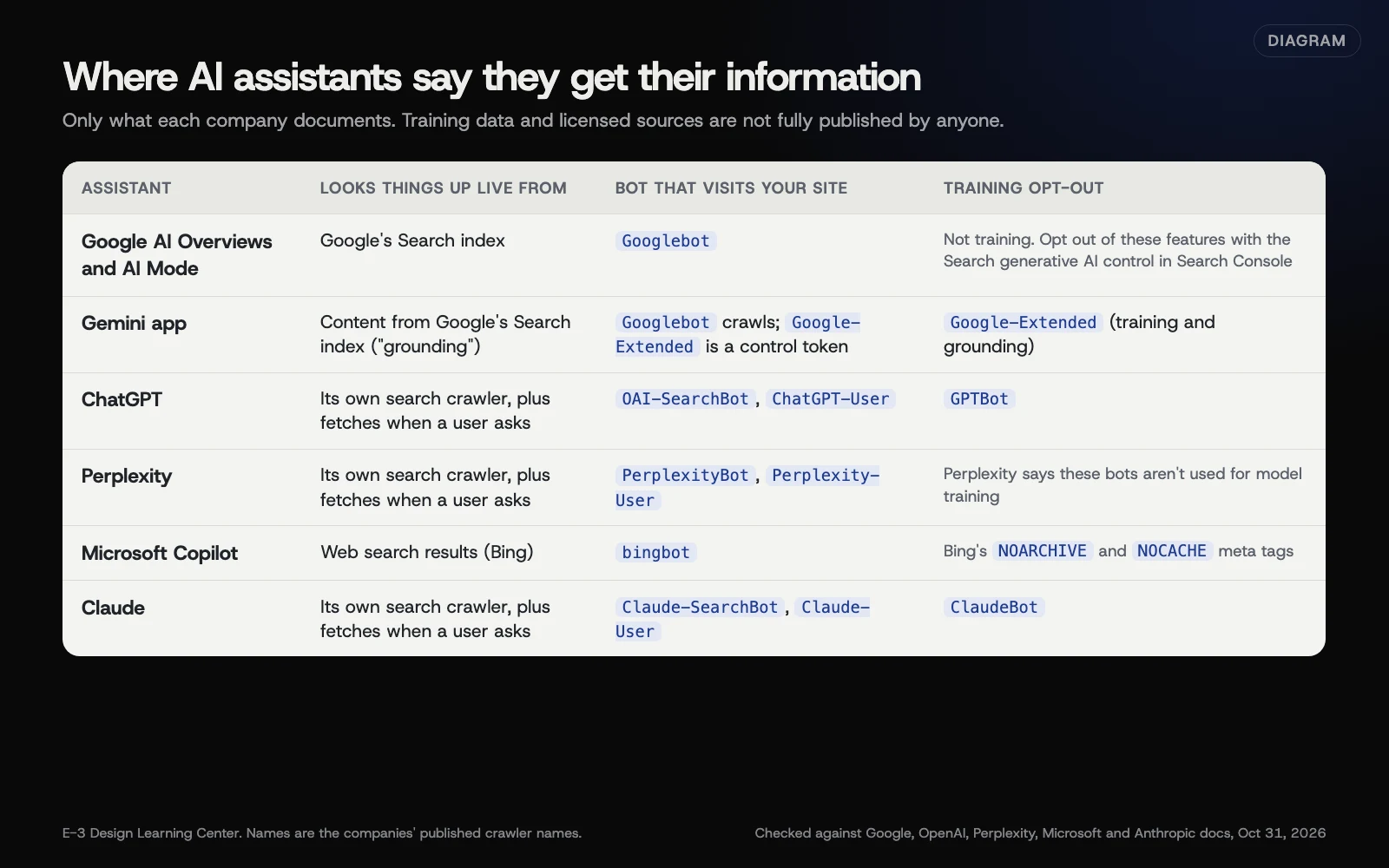 Diagram: what each company says about where its assistant looks things up, which bot visits your site and how to opt out of training. Checked against each company’s crawler documentation, October 31, 2026.
Training data is the slower layer underneath, and nobody publishes exactly what’s in it. Our guide on where AI assistants get facts about your business goes through each tool with sources.
2. Let the right crawlers in
There are two kinds of AI bot: those that fetch pages for search answers, and those that collect content for training. Blocking a search bot can keep you out of that tool’s answers. OpenAI, for example, says sites that opt out of OAI-SearchBot “will not be shown in ChatGPT search answers.” Blocking a training bot doesn’t, by the companies’ own descriptions.
- Decide what you want using our answer on whether to block AI crawlers.
- Write and test the rules with our guide to robots.txt rules for each AI crawler.
- Then check the gate before robots.txt: security plugins, hosts and CDNs can block bots on their own. See whether your host or CDN is blocking AI tools.
3. Know Google’s separate controls
Google has five controls, and they do different things. Google-Extended opts you out of Gemini training and grounding without touching Google Search. Since 2026, a Search Console setting called Search generative AI can take a whole site out of AI Overviews and AI Mode while leaving regular results alone. Most local businesses should leave both at their defaults. Our guide on controlling Google’s AI features explains each one and when it makes sense.
4. Get into Bing properly
Bing is easy to overlook, and it matters more now. Microsoft’s Copilot draws on web search results, and Bing’s updated guidelines cover how pages become eligible for Copilot citations. Bing Webmaster Tools is free; you can import your site from Google Search Console in minutes, submit a sitemap and see a report of AI citations. See why Bing Webmaster Tools matters for AI answers.
5. Be one clear, consistent business
AI tools get confused when your name, address and phone differ between your site and listings, or when another business has a similar name. Pick one exact name, publish a plain About page, add markup that links your official profiles, and match your Google, Bing and Apple listings. Our answer on matching name, address and phone covers the basic cleanup. Our guide on helping AI tell your business apart covers the harder cases. Your Google Business Profile is the biggest single listing to get right, and our listings and citations guide covers the rest.
6. Answer the questions customers ask
Assistants quote pages that say things plainly. A page titled “Services” with only a slogan gives them very little to use. A page that says “We repair gas and oil furnaces in Somerset and Cambria counties, usually within two days” does. Google’s AI guide says original content from first-hand experience will likely matter more than anything else it suggests. Our guide on which customer questions deserve their own page shows how to choose and write them without making thin, copied pages.
7. Clear out old facts
Old menus, price lists, “we’ve moved” posts and forgotten PDFs keep feeding wrong details to any tool that searches your site. Redirect, update or remove them the way Google documents. See how to retire old pages so AI stops quoting them.
8. Measure, then adjust
Four free reports cover most of what you can see:
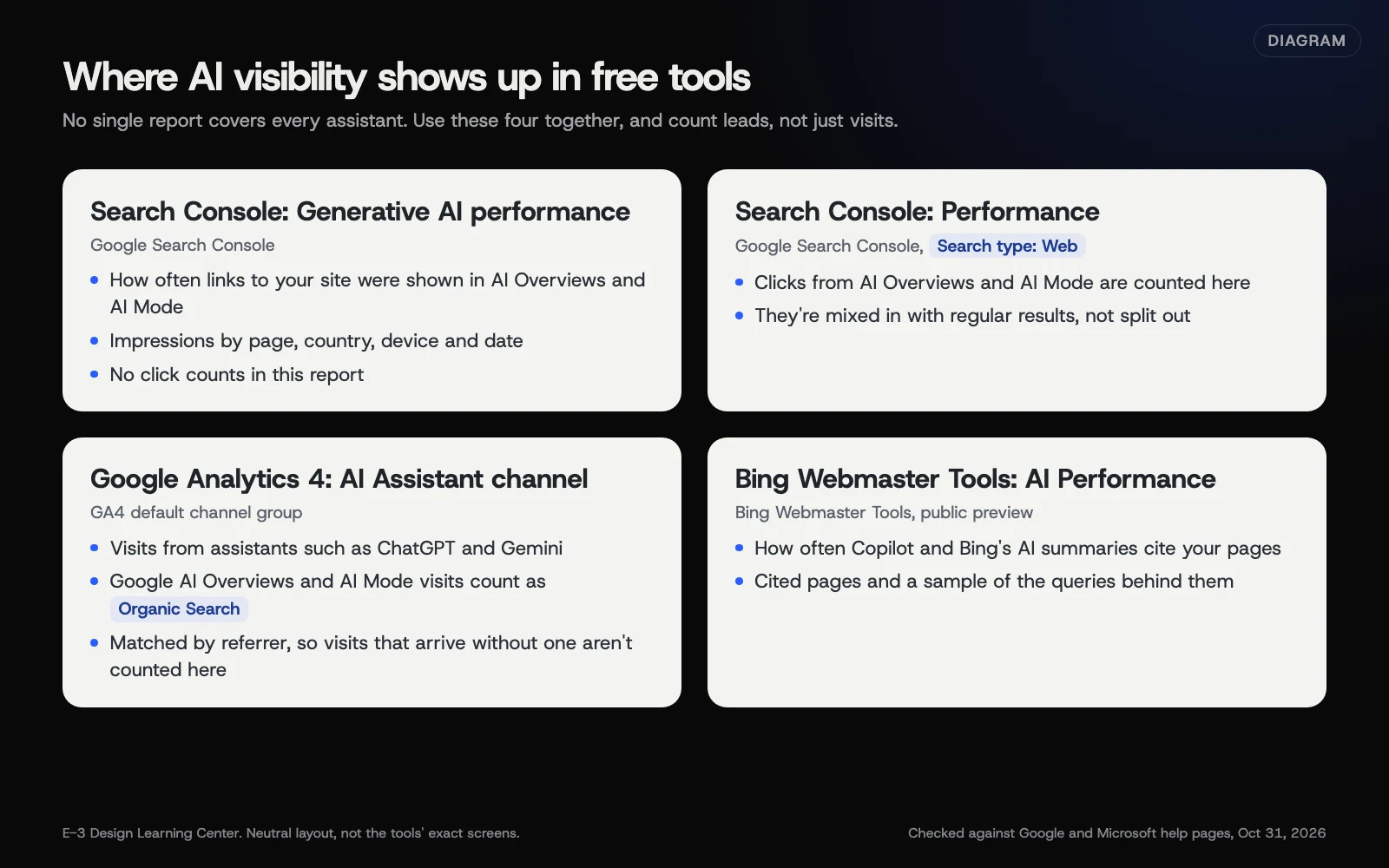 Diagram: the four free reports that show AI visibility and visits, and what each one counts. Checked against Google and Microsoft help pages, October 31, 2026.
- Search Console’s Generative AI performance report for impressions in AI Overviews and AI Mode. Our Search Console guide explains how to read it.
- Search Console’s regular Performance report, where those clicks are counted under “Web.”
- GA4’s AI Assistant channel for visits from tools like ChatGPT and Gemini. See how to tell if AI tools are sending you customers.
- Bing Webmaster Tools’ AI Performance report for Copilot citations.
For ChatGPT, Perplexity and Claude, there’s no owner report, so a monthly spot check fills the gap. See how to check whether AI tools cite your website.
Why does AI visibility matter for a small business?
More people now ask an assistant for a recommendation instead of scrolling a list. Those tools tend to name a few businesses, not ten, and they state facts with confidence. If your facts are thin or conflicting, you may be left out, or described wrongly, without ever knowing.
The encouraging part is that the work overlaps almost completely with good search and good customer service. Google says plainly that optimizing for its AI features “is optimizing for the search experience, and thus still SEO.” The same clear pages and accurate listings that help a person decide to call you help an assistant describe you correctly.
There’s also a cost to ignoring it. A wrong closing time or old phone number in an AI answer can cost a call before you hear about it. Our answer on what to do when ChatGPT says something wrong about your business covers the fix.
What are the most common mistakes?
- Paying for guaranteed AI placement. Nobody outside these companies controls which businesses organic AI answers name. Some products show ads near or inside AI answers; those are labelled advertising, bought from the company itself, and are a separate thing.
- Blocking every AI bot, including the search crawlers, then wondering why you’re never cited.
- Ignoring the firewall. A CDN or security plugin can block crawlers before robots.txt is read.
- Never setting up Bing. Copilot’s web answers depend on what Microsoft’s search can find.
- Facts only in images or PDFs. Hours on a photo of your door sign are hard for any tool to read.
- Three versions of your business name across your site, profile and Facebook.
- Mass-producing pages for every town or phrasing to game rankings. Google’s spam policies call pages made mainly to manipulate rankings scaled content abuse, and Google clarified in 2026 that the policies cover attempts to manipulate AI answers too.
- Chasing new files first. An llms.txt file is optional, and Google says it neither helps nor hurts Google Search.
Our guide to GEO, special AI markup and other myths checks the common claims against what Google and Bing actually say.
What has changed recently?
This area moves quickly. Here’s where things stand as of October 31, 2026, with dates from the official sources.
- Google’s AI optimization guide (May 2026). Google published a full guide to generative AI features, including a myth-busting section on GEO, chunking, special markup and AI text files.
- llms.txt clarified (June 2026). Google’s documentation updates say these files aren’t needed for Google Search; keep one for other services if you like.
- Search generative AI control (rolled out worldwide by August 31, 2026). The new Search Console setting lets a site leave AI Overviews and AI Mode without leaving Search. See Google’s help page.
- Generative AI performance report (all sites by August 31, 2026). Impressions in AI Overviews and AI Mode now have their own Search Console report. Before this, there was no way to separate them; older articles, including some of ours, may still say so.
- GA4’s AI Assistant channel (2026). Google Analytics added it to the default channel group; AI Overviews and AI Mode visits still count as Organic Search.
- Bing AI Performance report (public preview, February 2026) and Bing guidelines covering Copilot citations (early 2026). See Bing’s announcement.
- Google-Extended and AIPREF. Google’s crawler page says it plans to support a new AI training preference signal, AIPREF, in early 2027. Google-Extended remains the control today.
What if AI tools still get my business wrong or leave it out?
- Wrong facts: ask the tool for its sources, fix the source, and use the feedback button. See correcting AI answers.
- Mixed up with another business: make your name, location and specialty unmistakable. See helping AI tell you apart.
- Never cited: check crawler access and firewall settings first, then indexing in Google and Bing, then the pages themselves.
- An old fact keeps coming back: find the old page, PDF or listing still saying it. See retiring outdated pages.
- Customers say they found you through AI, but reports show nothing: some visits arrive without a referrer. Ask every new customer how they found you. It’s simple and often revealing, though people don’t always remember exactly.
How much does it cost, and how long does it take?
The essentials are free: your own pages, robots.txt, Search Console, Bing Webmaster Tools, GA4 and your listings. A first pass through this guide takes a few afternoons. Tools that search the web live can reflect changes once they recrawl, which can be a day or a few weeks. Answers that lean on training data change on the companies’ schedules, which no one outside controls.
How does E-3 handle this?
AI visibility is part of our SEO and AI search service, alongside Google Business Profile work, reviews, Answers pages, schema and tracking. We can check crawler access, indexing, listings and AI citations, then fix what’s in the way. You decide which changes go ahead. For a first look, try our free AI visibility check.
Related questions
Sources
- AI features and your website (Google Search Central)
- Optimizing your website for generative AI features on Google Search (Google Search Central)
- Search generative AI control (Search Console Help)
- Generative AI performance report (Search Console Help)
- Google's common crawlers: Google-Extended (Google Search Central)
- Overview of OpenAI crawlers (OpenAI)
- Perplexity crawlers (Perplexity docs)
- Transparency Note for Microsoft Copilot (Microsoft Support)
- Introducing AI Performance in Bing Webmaster Tools Public Preview (Bing Webmaster Blog, February 10, 2026)
- [GA4] Default channel group (Analytics Help)
- Latest Google Search documentation updates (Google Search Central)
- Bing adds GEO to official guidelines, expands AI abuse definitions (Search Engine Journal, February 27, 2026)
Every AI visibility guide
- Where AI assistants get facts about your businessWhere AI assistants look depends on the product and mode. Google AI Overviews and AI Mode use Google's index, Copilot grounds many answers in web search, and ChatGPT, Perplexity and Claude run search crawlers that look things up live. Answers from training data alone can be outdated. Your website and listings are the sources you control.
- How to set robots.txt rules for each AI crawlerOpen yourdomain.com/robots.txt and add a group for each AI bot you want to treat differently, using the exact names each company publishes. Allow the search bots if you want to appear in answers. Disallow GPTBot or ClaudeBot only to opt out of training; Google-Extended also covers Gemini grounding. Repeat any default rules a new group still needs.
- How to control Google's AI features for your siteGoogle gives you five separate controls. The Search generative AI setting in Search Console takes your whole site out of AI Overviews and AI Mode without affecting regular results. Google-Extended opts out of Gemini training and grounding. Snippet tags and noindex work page by page. Most local businesses should leave all of them at their defaults.
- Why Bing Webmaster Tools matters for AI answersMicrosoft says Copilot grounds many answers in web search results, and Bing's guidelines now cover Copilot citations. Bing Webmaster Tools is free: import your site from Google Search Console, submit your sitemap, check indexing, and use its AI Performance report to see how often Copilot and Bing's AI summaries cite your pages.
- How to help AI tell your business apart from othersAI tools mix up businesses when the facts disagree or the names are close. Pick one exact business name and use it everywhere, publish an About and Contact page with your full details in text, add Organization or LocalBusiness markup that links your official profiles, and make your Google, Bing and Apple listings match. Then remove stray old listings.
- Which customer questions deserve their own page?Give a question its own page when customers ask it often, the answer takes more than a sentence, and you can add first-hand detail nobody else has. Put the direct answer first, then specifics from your own work. Answer small questions on the service page instead, and never make near-identical pages for each town or phrasing.
- How to tell if AI tools are sending you customersMark form sends and phone taps as key events in GA4, then read the AI Assistant row in the Traffic acquisition report to see likely leads from tools like ChatGPT and Gemini. Google's AI Overviews count as Organic Search instead. Check the numbers against real enquiries, and ask every new customer how they found you.
- How to check whether AI tools cite your websiteOpen Search Console's Generative AI performance report to see how often your pages appear in AI Overviews and AI Mode. Check Bing Webmaster Tools' AI Performance report for Copilot citations. For ChatGPT, Perplexity and others, run the same handful of customer questions once a month and log who gets named and which sources are linked.
- How to retire old pages so AI stops quoting themFind every old page, PDF and image that still states an outdated fact. If a newer page covers the same thing, redirect the old address to it with a permanent 301 redirect. If nothing replaces it, delete it so it returns 404 or 410. Remove it from your sitemap and internal links, then ask Google to recrawl.
- Is your host or CDN blocking AI tools without you knowing?Possibly. Security plugins, hosting firewalls and CDNs can block AI crawlers on their own, and some add AI rules to robots.txt for you. Cloudflare, for example, now has separate policies for AI search, agent and training bots. Check robots.txt, your firewall or bot settings and your server logs, then set each category on purpose.
- Do you need GEO, special AI markup or AI-only pages?No. Google says optimizing for its AI features is still SEO, that no special files, AI text files or schema are required, and that you don't need to split content into chunks or write differently for AI. Bing says GEO can't guarantee citations. Spend the effort on clear, original pages and accurate listings.
Common questions
- Can anyone guarantee my business will be named by ChatGPT or Google's AI?
- No. Each company decides what its assistant shows, and answers change with wording, place and time. Bing's own guidelines say this kind of optimization doesn't guarantee citations, just as SEO doesn't guarantee rankings.
- Do I need special files or markup for Google's AI Overviews?
- No. Google says there are no additional requirements beyond being indexed and eligible for a snippet, and no new machine-readable files, AI text files or special schema are needed.
- Can I stay in Google Search but leave AI Overviews?
- Yes. Since 2026, Search Console has a Search generative AI setting that excludes your site from AI Overviews, AI Mode and Discover's AI features. Google says it doesn't affect your regular results, but you also lose all traffic from those features.
Next step
- Start here: Where AI assistants get facts about your businessThe first guide in AI visibility.
- Free website checkPublic checks on your own site, then an action plan of what to fix first.
Still stuck? Ask E-3 for an answer from our help guides.
Rather we handled ai visibility for you?
It’s part of what we do every week for small businesses, as part of seo and ai search. Start with a free check of your site and profile, or call and ask.