
Schema and structured data: a small-business guide
Schema markup is code that labels facts already on your pages, such as your name, address, hours, products and events, so Google and other tools read them reliably. Most small businesses need only LocalBusiness with Organization details, breadcrumbs, and Product or Event where they fit. Keep it matched to the page and tested. It guarantees no feature.
The short version
- Schema labels facts already on your page. Visitors don’t see it.
- Use JSON-LD, the format Google recommends.
- A typical local business needs LocalBusiness (with Organization details) and BreadcrumbList, plus Product or Event where they fit.
- Everything in the markup must be true and visible on the page.
- Test with the Rich Results Test and the Schema Markup Validator, then watch Search Console.
How do I add schema to my site the right way?
If you want the one-paragraph version first, our answer on what schema markup is covers it. This guide goes through the whole job, in order, with links to a step-by-step guide for each part. Every step was checked against Google Search Central and schema.org on October 31, 2026.
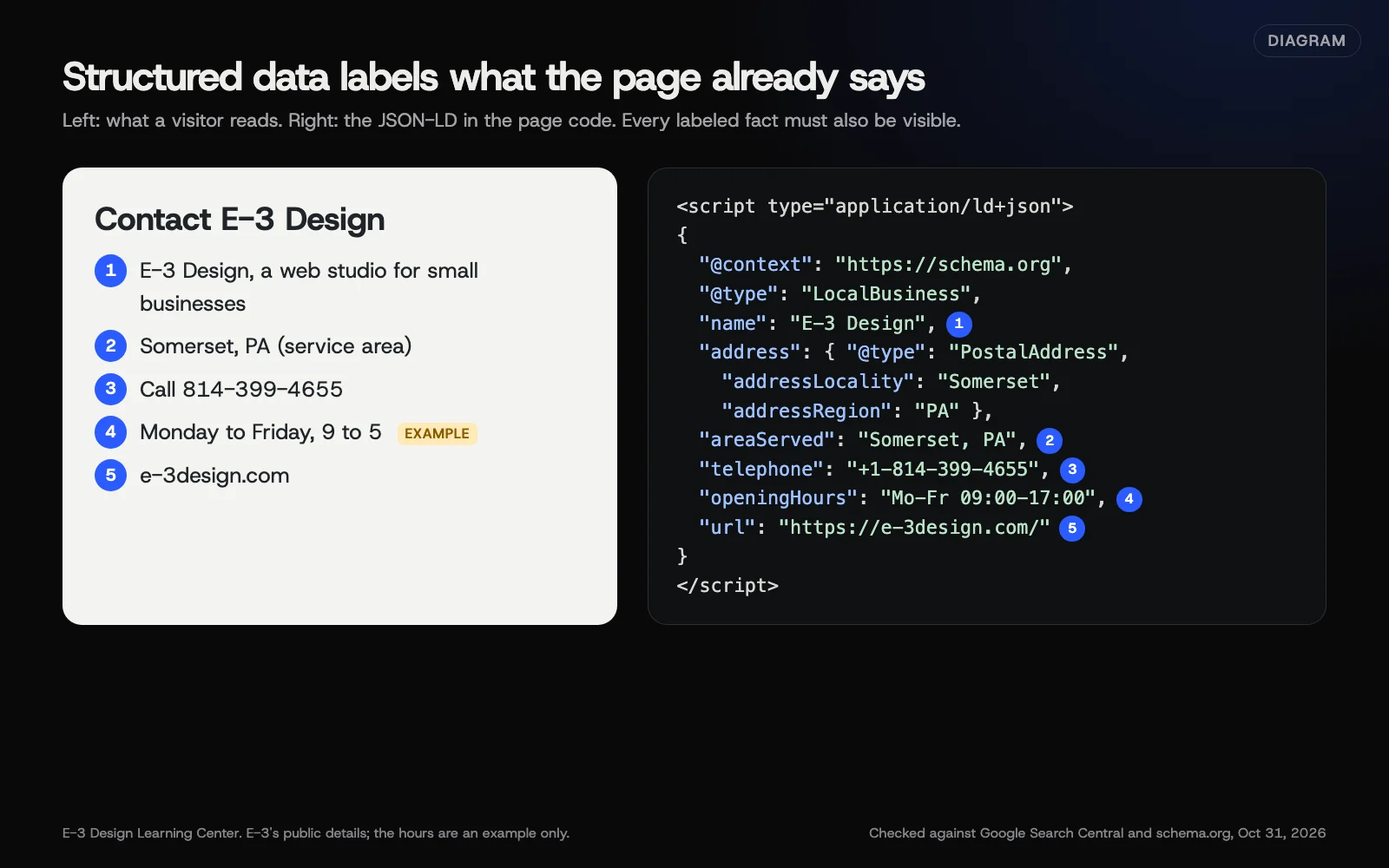 Diagram: a contact page and the LocalBusiness JSON-LD that labels the same five facts. E-3 Design’s public details; the hours are an example only. Checked against Google Search Central and schema.org, October 31, 2026.
1. Understand what it is
Google’s introduction calls structured data “a standardized format for providing information about a page and classifying the page content.” The vocabulary comes from schema.org, a shared list of types and properties that search engines agree on. Google accepts three formats and says it recommends JSON-LD “if your site’s setup allows it.” JSON-LD sits in its own script block in the page code, separate from the visible design, which makes it easier to keep tidy.
2. Decide which types each page needs
Match each type to the page it describes:
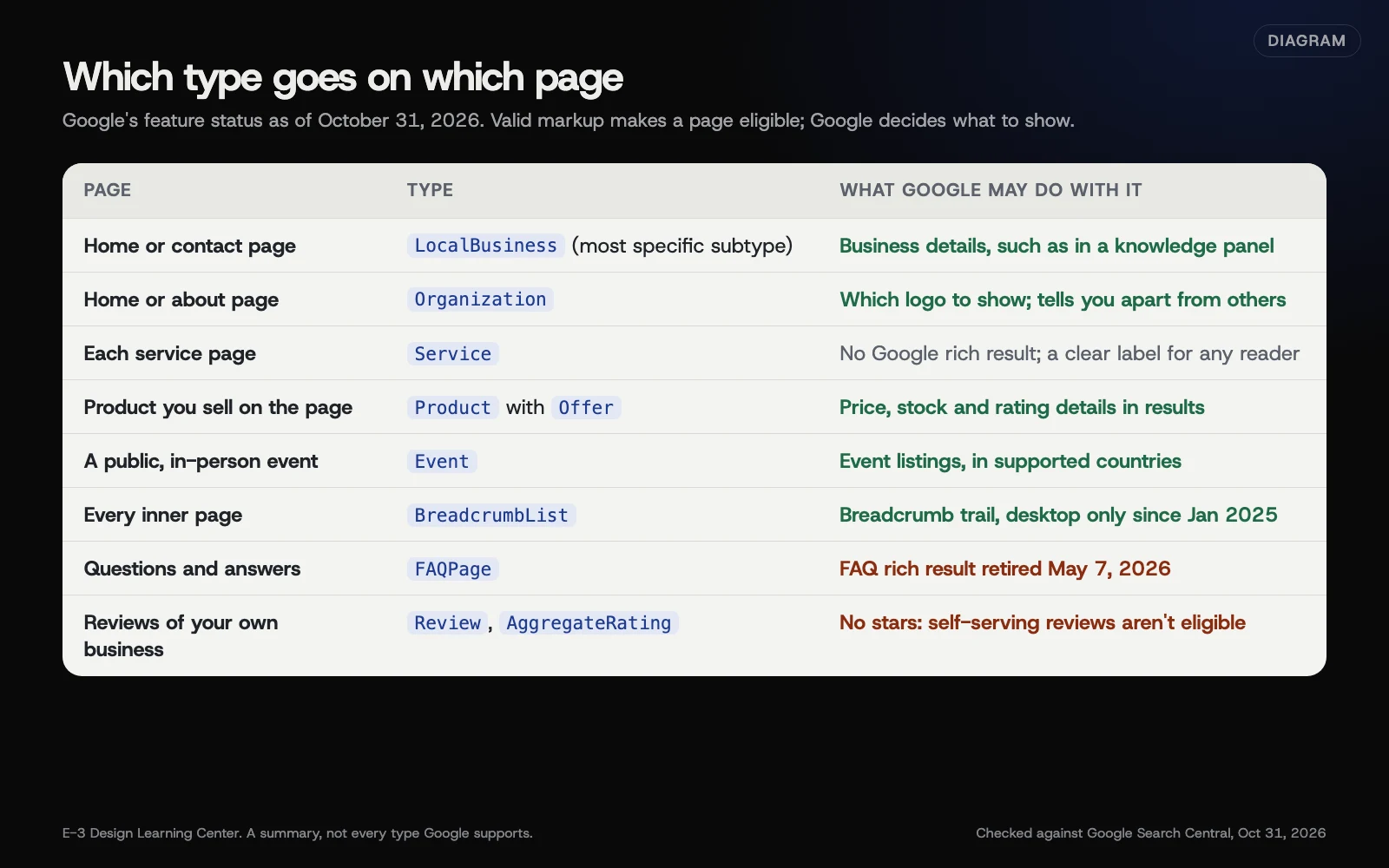 Diagram: which structured data type goes on which page, and what Google may do with it, as of October 31, 2026. Based on Google Search Central.
- Your business: LocalBusiness, using the most specific type that fits, on your home or contact page, with Organization details such as logo and official profiles. See what your LocalBusiness and Organization markup needs.
- What you sell or do: Product and Offer for items you sell; Service for service pages, which Google shows no special result for. See whether to mark up services and products.
- Events: Event markup, for public, in-person events on their own pages. See getting your events into Google.
- Site structure: BreadcrumbList on inner pages. See breadcrumb markup.
- Articles and blog posts: Article markup, which most SEO plugins add automatically.
A worked example: a small plumbing business
Here’s how that plays out on a typical eight-page site for an imaginary plumber. The business is invented; the rules are Google’s.
| Page | Markup |
|---|---|
| Home | Plumber (a LocalBusiness type) with name, address, phone, hours, logo and links to official profiles |
| Contact | The same business details, matching the visible contact block exactly |
| Drain cleaning, water heaters, emergency repairs | Service on each page, plus BreadcrumbList |
| About | Covered by the business markup; nothing extra needed |
| Blog posts | Article, plus BreadcrumbList |
| A free community safety day | Event, on its own page, if it’s public and in person |
Notice what’s missing: no review stars for the business, no FAQ markup for Google, and no markup for anything that isn’t on the page. That’s a complete, honest setup. Most of it comes from one plugin’s settings plus a few per-page choices.
3. Add it with your plugin or template
On WordPress, an SEO plugin such as Yoast SEO or Rank Math builds most of this from one settings screen, so a change of phone number updates every page. Use one plugin for schema, not two. See adding schema in WordPress with Yoast or Rank Math. On a hand-built site, the markup belongs in the page templates, filled from the same data that fills the visible page.
4. Test it
Three free checks answer three different questions. Google’s Rich Results Test shows which Google features a page qualifies for. The Schema Markup Validator checks all schema.org markup, including types Google doesn’t use for a feature. Search Console’s Enhancements reports show problems across your whole site over time. See how to test your schema markup.
5. Keep it matched to the page
Markup is invisible, so it drifts. When hours, prices, addresses or events change, change the markup at the same time, then retest. Plugin updates and new themes can also add a second copy. See which schema mistakes cause real problems.
Why does structured data matter for a small business?
It removes guesswork. A person reading “Open Tuesday to Saturday, 8 to 5” knows it’s your hours. A machine has to infer it. Schema states it outright, in a form every major search engine reads. That’s useful in three ways:
- Eligibility for rich results. Product details, event listings and breadcrumbs can make your result more useful before anyone clicks.
- Clearer identity. Organization markup helps Google pick the right logo and tell you apart from similar names, and links your official profiles together.
- Consistency. When your markup, your page and your listings all say the same thing, there’s less room for any tool to get you wrong. Our guide on helping AI tell your business apart builds on this.
It’s also worth being clear about what it isn’t. Google’s AI optimization guide says “structured data isn’t required for generative AI search,” and Google doesn’t describe schema as a ranking boost. Our guide on whether schema helps your ranking or AI answers goes through what it can and can’t do.
How does schema fit with your Google Business Profile and listings?
They do different jobs, and you need both. Your Google Business Profile is what appears in Google Maps and the local results, and Google’s tips to improve your local ranking are all about the profile. Your schema sits on your website and describes the same business there. Neither replaces the other.
What matters is that they agree. The name, address, phone and hours in your markup should match your profile, your Bing and Apple listings, and your visible pages, character for character where you can. When they disagree, you’ve given every search engine and AI tool two versions of the truth. Our answer on whether your details need to match covers the listings side, and the LocalBusiness and Organization guide covers the markup side.
A practical order: fix your profile and listings first, then make the website and its markup match them, then test.
What are the most common mistakes?
- Markup that says something the page doesn’t. Google’s general guidelines say: “Don’t mark up content that is not visible to readers of the page.”
- Review stars for your own business. Google’s review snippet rules call these self-serving, and they’re ineligible. See who can get review stars.
- Fake or undisclosed incentivized reviews, in markup or on the page. Google added a specific guideline against them in July 2026, and the FTC’s rule applies in the US.
- Two plugins, two sets of markup, often with different hours or names.
- Old values left behind after the page changed.
- Marking things up as what they aren’t, such as a sale as an Event.
- Paying for FAQ schema to win a search feature that no longer exists.
Misleading markup can lead to a manual action from Google, which removes rich result eligibility. Google says this “doesn’t affect how the page ranks in Google web search,” but you lose the features until it’s fixed and reviewed.
What has Google retired or changed?
Older tutorials still teach several of these. Here’s where they stand as of October 31, 2026, from Google’s documentation updates and guides.
- FAQ rich results: retired May 7, 2026. Limited to well-known government and health sites since August 2023, then removed entirely; documentation removed in June 2026. See whether FAQ markup is still worth adding.
- HowTo rich results: retired September 2023.
- Sitelinks search box: removed November 2024.
- Breadcrumbs: desktop only since January 22, 2025.
- Events: in-person and public only since June 5, 2025. Online-event properties were removed from Google’s guide.
- Several niche types phased out in 2025 and early 2026, including course info, estimated salary, learning video, special announcement, vehicle listing, ClaimReview and practice problems. Few small businesses used them.
- New review guideline, July 2026: no fake or undisclosed incentivized reviews.
What if my schema isn’t working?
- Errors in the Rich Results Test: fix the named property at its source, usually a plugin setting, and retest.
- Valid, but no rich result: normal. Eligible isn’t guaranteed. Make sure the page is indexed.
- Duplicate blocks: turn off schema output in the plugin or theme you’re not using for it.
- A manual action in Search Console: fix every instance it describes, then request a review.
- Nothing in Search Console’s Enhancements: Google only shows reports for supported types it has found on your site.
Who should set it up?
If your site runs on WordPress with a current SEO plugin, you can do the basics yourself in an afternoon: fill in the business settings carefully, choose page types, then test. Ask for help if you have several locations, a store with hundreds of products, a custom-built site, or markup from several sources you can’t untangle. In those cases a mistake repeats across every page, so it’s worth having someone who does this regularly check it.
Whoever does it, ask for the same three things: the markup matches the visible pages, it passes both testing tools, and someone is responsible for updating it when your details change.
How much does it cost, and how long does it take?
Schema is free to add. How long setup takes varies: a basic setup with a WordPress SEO plugin is quick, while conflicting plugins, custom templates or several locations take longer. Some local and multi-location features need a plugin’s paid version. Google reads the markup when it next crawls each page, which can take days. After that, update it whenever your details change.
How does E-3 handle this?
Schema is part of our SEO and AI search service, and plugin upkeep on WordPress sites is part of website care. The aim is a small, useful set of types written from the client’s visible pages, tried on a staging copy before the live site. We don’t promise rich results or rankings from schema, because nobody can.
Related questions
Sources
- Introduction to structured data markup in Google Search (Google Search Central)
- General structured data guidelines (Google Search Central)
- Local business structured data (Google Search Central)
- Organization structured data (Google Search Central)
- Review snippet structured data (Google Search Central)
- Event structured data (Google Search Central)
- Breadcrumb structured data (Google Search Central)
- Latest Google Search documentation updates (Google Search Central)
- Optimizing your website for generative AI features on Google Search (Google Search Central)
- Tips to improve your local ranking on Google (Google Business Profile Help)
- Schema Markup Validator (schema.org)
Every Schema for owners guide
- What your LocalBusiness and Organization markup needsPut LocalBusiness markup, using the most specific type that fits, on your home or contact page with your name and address (Google's two required properties), plus phone, website, hours and location. Add Organization details such as your logo and links to your official profiles. Every value must match what visitors can see on the page.
- Should you mark up your services and products?Mark up products you sell on the page with Product and Offer: Google can show price, stock and ratings for them. Service markup is optional. Google has no rich result for it, but it labels what you do and where for any tool that reads the page. Whatever the type, markup must honestly match the page.
- How to get your events into Google with event markupGive each public, in-person event its own page, then add Event markup with the name, start date and the venue's address, plus recommended details like end time, description, image, ticket link and status. Since June 2025 Google's event feature covers only events at a physical location that the general public can book.
- Is FAQ markup still worth adding?Not for Google's search results. Google stopped showing FAQ rich results on May 7, 2026, and removed the documentation in June. Existing FAQPage markup is harmless if it matches the page; Google has said unused structured data doesn't cause problems. The questions and answers themselves are still worth keeping, written plainly on the page.
- What is breadcrumb markup, and does a small site need it?Breadcrumb markup labels a page's place in your site, such as Home, then Services, then Website care. Google can show that trail in desktop results instead of the raw web address; since January 2025 it no longer shows on mobile. It needs at least two items. Most SEO plugins add it automatically, so check before adding more.
- Can you show review stars for your own business?Not from your own site's markup. Google calls reviews a business controls about itself self-serving, and pages with LocalBusiness or Organization markup that do this are ineligible for star snippets. Product pages with real customer reviews can qualify. You can still show genuine reviews on your site as plain text. Never mark up fake, copied or undisclosed incentivized reviews.
- How to test your schema markupPaste the page address into Google's Rich Results Test to see which Google features the markup qualifies for and any errors. Then run the Schema Markup Validator to check all schema.org types, including ones Google doesn't use for a feature. After publishing, watch Search Console's Enhancements reports and use URL Inspection to confirm what Google indexed.
- How to add schema in WordPress with Yoast or Rank MathPick one SEO plugin. In Yoast SEO, set your business under Yoast SEO, Settings, Site representation, and each page's type in the Schema tab. In Rank Math, use Rank Math SEO, Titles and Meta, Local SEO, and the Schema tab's Schema Generator per post. Then test, and make sure no other plugin or theme adds a second copy.
- Which schema mistakes cause real problems?The serious schema mistakes are markup that contradicts the page, hidden or invented content, fake or self-serving reviews, and marking things up as what they are not. Google can respond with a manual action that removes rich result eligibility. Duplicate or stale plugin markup is the most common everyday problem. Match the page, test, and keep it current.
- Will schema help your ranking or AI answers?Schema helps Google and other tools read your facts, and can make a page eligible for rich results like product details, events and breadcrumbs. Those features aren't guaranteed, and Google doesn't call it a ranking boost. Google says AI Overviews and AI Mode don't require it. Treat it as an accurate label, not a lever.
Common questions
- Does schema markup improve my Google ranking?
- Google doesn't describe it as a ranking boost. It helps Google understand your page and can make it eligible for rich results, such as event listings or product details, but Google decides whether to show them.
- Do I need special schema to appear in AI answers?
- No. Google says structured data isn't required for its AI Overviews or AI Mode and there's no special schema.org markup to add. It does ask that any markup you have matches the visible page.
- Can I add review stars for my business to my website's search result?
- No. Google treats reviews a business controls about itself as self-serving, so pages with LocalBusiness or Organization markup about the business are ineligible for stars. Show real reviews as plain text instead.
Next step
- Start here: What your LocalBusiness and Organization markup needsThe first guide in Schema for owners.
- Free website checkPublic checks on your own site, then an action plan of what to fix first.
Still stuck? Ask E-3 for an answer from our help guides.
Rather we handled schema for owners for you?
It’s part of what we do every week for small businesses, as part of seo and ai search. Start with a free check of your site and profile, or call and ask.