
How does Search Console show AI Overviews and AI Mode?
Since August 31, 2026, every Search Console property has a Generative AI performance report showing how often its pages appeared in AI Overviews and AI Mode. It counts impressions, not clicks, and those appearances also count in the main Performance report. A new setting lets you opt out, but then you get no traffic from those features.
The short version
- AI Overviews and AI Mode traffic is counted in the normal Performance report, under the Web search type.
- A separate Generative AI performance report shows impressions in those features. It doesn’t show clicks.
- It rolled out to all sites on August 31, 2026.
- Settings, then Search generative AI, lets you include or exclude your site. Include is the default.
- Excluding your site means no impressions or traffic from AI Overviews and AI Mode. For most businesses, that’s a bad trade.
How do I see my AI Overviews and AI Mode numbers?
Google announced the reports on June 3, 2026, in its AI reports post, and updated it to say they reached all websites worldwide on August 31, 2026. The steps below follow Google’s report help page.
- In Search Console, open the Performance section of the left menu.
- Select the Generative AI report for Search. Google’s help page calls it the Generative AI performance report (Search); the menu wording may be shorter.
- Choose a date range. Hourly, daily, weekly and monthly views are available.
- Use the tabs to see Pages, Countries, Devices and Dates.
- Use the search type filter to switch between Web: text-based and Web: multimodal, which covers image searches with Google Lens, Circle to Search and image uploads, per Google’s multimodal post.
There’s a matching report for Discover if your site appears there.
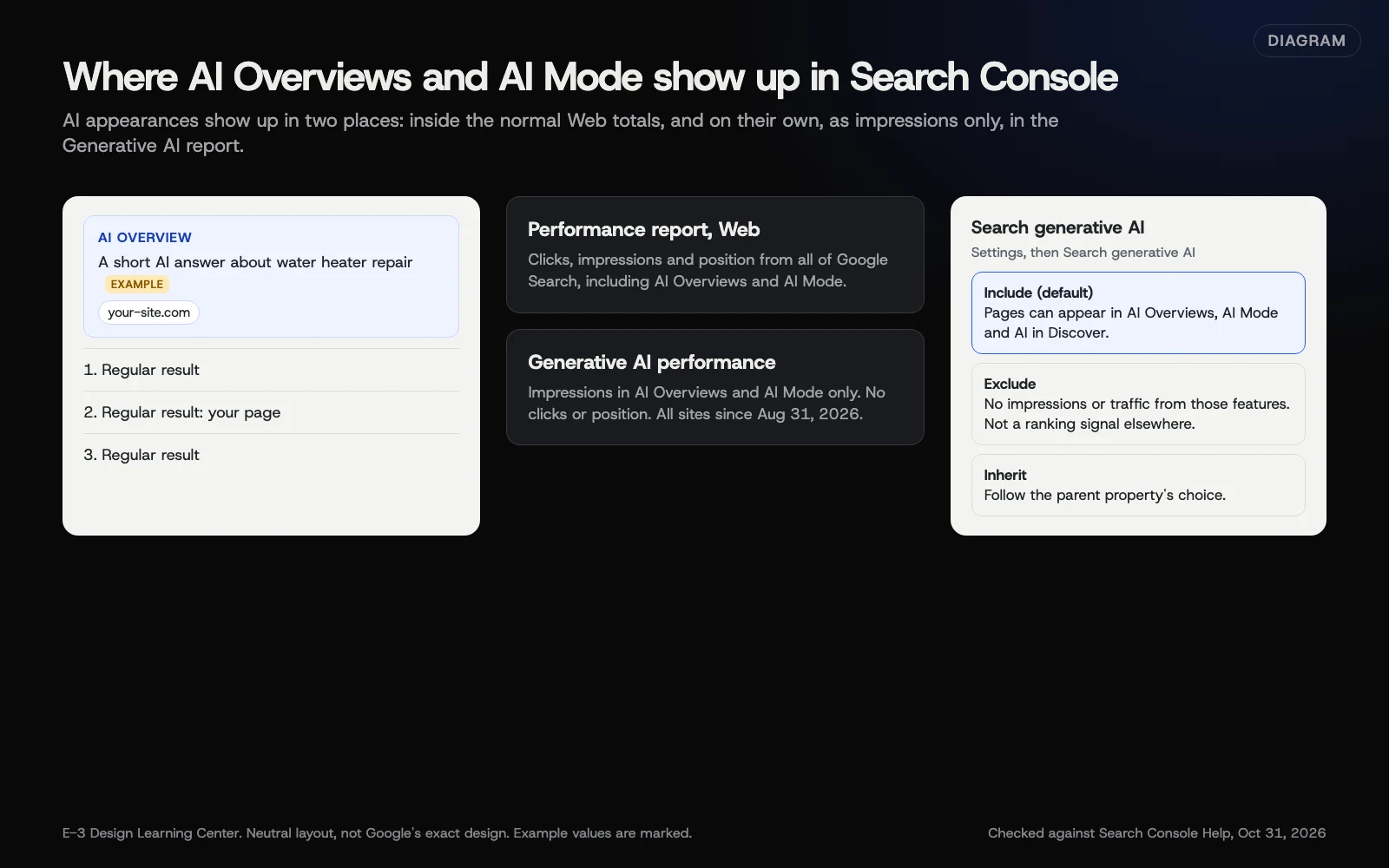 Diagram: where AI Overviews and AI Mode show up in Search Console, and what the Search generative AI setting changes. Based on Search Console Help (October 2026).
What does it count?
Google’s help page defines an impression as “how many times links to your site were shown to a user in a generative AI feature on Google Search.” Two links to your site in the same AI answer count once in the chart total. Search Labs experiments aren’t included.
The report doesn’t show clicks or position. Clicks from AI features are still in the main Performance report, mixed in with all other Web clicks. Google’s AI features page confirms AI traffic is “included in the overall search traffic in Search Console.”
What is the Search generative AI setting?
Google’s control help page describes a setting under Settings, then Search generative AI, with three choices:
| Option | What it does |
|---|---|
| Include my site’s links and content | Your pages can appear in and help ground AI Overviews, AI Mode and AI features in Discover. This is the default |
| Exclude my site’s links and content | Your pages are kept out of those features, and you get no traffic or impressions from them |
| Inherit control from parent | A smaller property follows the setting of the domain above it |
Google says changes take effect within 1 to 2 days, sometimes longer. It also says the setting:
- isn’t used as a ranking signal for the rest of Google Search;
- doesn’t control AI training, which is handled separately by Google-Extended;
- doesn’t remove your site from Google Search. That needs noindex.
Should I exclude my site?
For most local businesses, no. AI Overviews and AI Mode cite and link to websites. Opting out means people asking Google about your kind of service won’t see you there, while your competitors can. It might make sense for a publisher whose content is the product. If you’re unsure, leave the default and watch the numbers for a few months first.
How do I appear more often in AI features?
Google’s optimization guide, last updated July 10, 2026, says optimizing for these features “is still SEO.” Its main points:
- Pages must be indexed and eligible to show a snippet. Check yours with the Page indexing report.
- Write original, first-hand content that answers real questions.
- Keep your Google Business Profile accurate. See our Business Profile guide.
- You don’t need special AI files or markup. Google says Search doesn’t use llms.txt. Our answer on llms.txt explains more.
Our answer on Google AI Overviews and our article on showing up in AI answers go further.
Why does this report matter?
Until 2026, owners could only guess how often AI answers showed their pages. Now you can see which pages Google’s AI features show, and in which countries and devices. That helps you decide which pages to strengthen. It also helps explain a drop in clicks: if impressions in AI features grew while clicks fell, some customers may have got their answer on Google.
What are the common mistakes?
- Adding the AI report to the Performance totals. It’s already counted there under Web. Don’t count it twice.
- Expecting click numbers. The AI report shows impressions only, as of October 2026.
- Opting out to “protect” content without weighing the lost visibility.
- Expecting history. The report starts from when Google began collecting this data, so older months may be empty.
- Paying for “AI placement.” Google’s guide says no third-party tool has access to its ranking or AI systems.
What if the report is empty or missing?
Google gives two reasons: the site “hasn’t received enough impressions in generative AI features,” or it’s excluded through the Search generative AI setting. Check the setting first. If it’s set to include, the report will fill in as Google’s AI features show your pages. New and small sites often see little at first.
How much does it cost, and how long does it take?
Both the report and the setting are free. A monthly look takes five minutes. A change to the setting takes effect within a few days.
How does E-3 handle this?
AI search visibility is part of our SEO and AI search service. Search Console, which E-3 sets up for its managed sites with E-3 as a user, is where the Generative AI performance numbers appear. Whether to change the Search generative AI setting is the client’s decision. To see how AI tools describe your business today, try our free AI visibility check.
Related questions
Sources
- Generative AI performance report (Search) (Search Console Help)
- Search generative AI control (Search Console Help)
- Introducing Search Generative AI performance reports in Search Console (Google Search Central Blog, June 3, 2026)
- AI features and your website (Google Search Central)
- Google's guide to optimizing for generative AI features on Google Search (Google Search Central)
- Announcing web multimodal Search performance reporting in Search Console (Google Search Central Blog, September 24, 2026)
Next step
- Google Search Console: the complete guideEvery guide in this topic, in order.
- Free website checkPublic checks on your own site, then an action plan of what to fix first.
Still stuck? Ask E-3 for an answer from our help guides.
Rather we handled google search console for you?
It’s part of what we do every week for small businesses, as part of seo and ai search. Start with a free check of your site and profile, or call and ask.