
How to control Google's AI features for your site
Google gives you five separate controls. The Search generative AI setting in Search Console takes your whole site out of AI Overviews and AI Mode without affecting regular results. Google-Extended opts out of Gemini training and grounding. Snippet tags and noindex work page by page. Most local businesses should leave all of them at their defaults.
The short version
- Search generative AI control (Search Console): the whole site in or out of AI Overviews, AI Mode and Discover’s AI features.
- Google-Extended (robots.txt): out of Gemini training and grounding. Google Search is unaffected.
- nosnippet, data-nosnippet, max-snippet (page code): limit how much text Google shows anywhere in Search.
- noindex (page code): the page leaves Google Search after Google crawls it again. It doesn’t make a page private.
- For a business that wants customers, the defaults are usually right.
Which control does what?
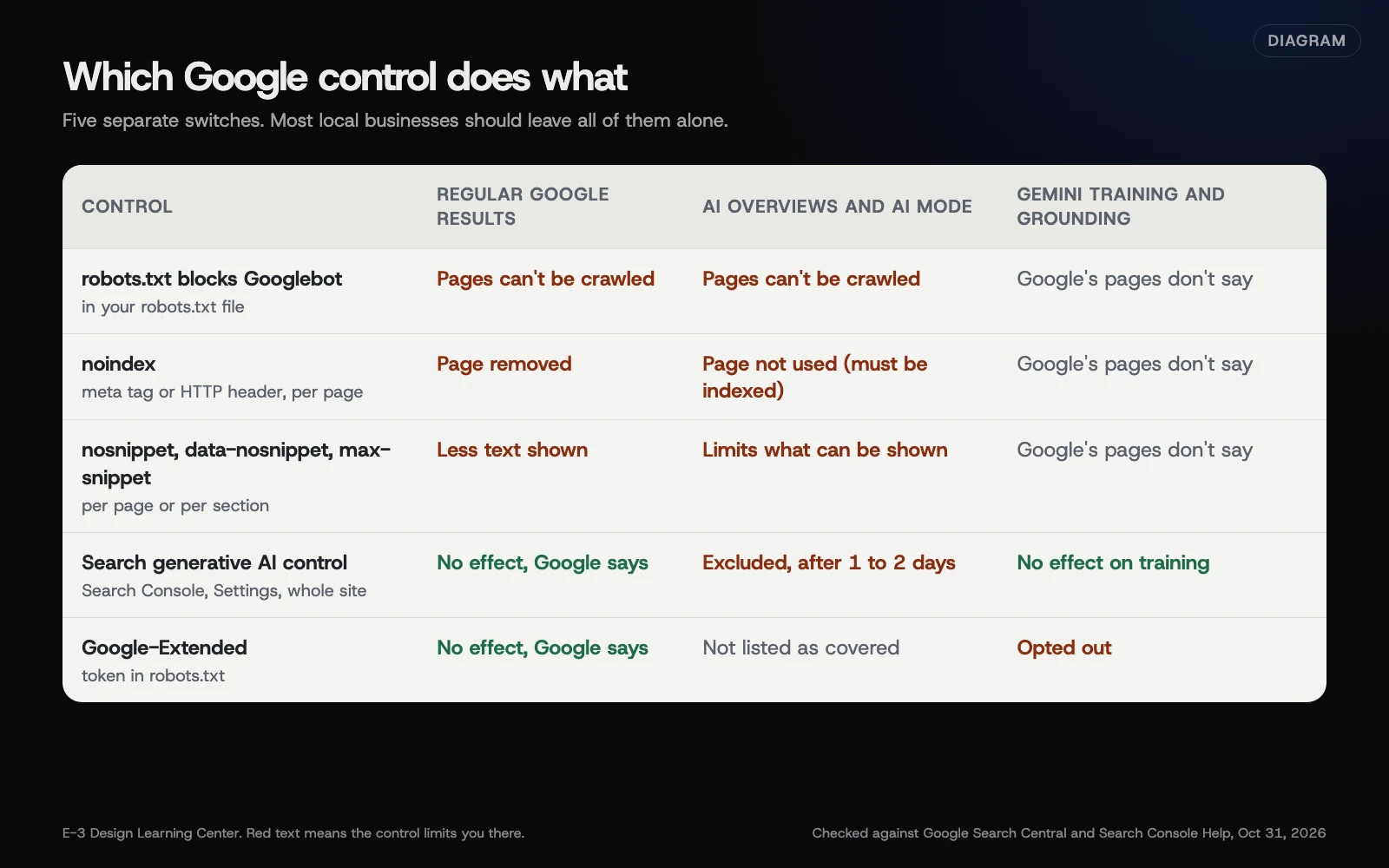 Diagram: Google’s five controls and what each changes in regular results, AI Overviews and AI Mode, and Gemini training and grounding. Checked against Google Search Central and Search Console Help, October 31, 2026.
The Search generative AI control (new in 2026)
This is a newer setting, and many older articles say no such option exists. Google’s Search generative AI control page says it manages “your site’s inclusion” in AI Overviews, AI Mode and generative AI features in Google Discover. Google says it has been rolled out to all websites worldwide as of August 31, 2026.
To find it:
- Sign in to Google Search Console with an account that has access to your site.
- Open Settings.
- Select Search generative AI.
- Choose Include my site’s links and content (the default), Exclude my site’s links and content, or, for a smaller property under a domain, Inherit control from parent.
Our Search Console guide on how Search Console shows AI Overviews and AI Mode covers this screen and its report in more detail.
What Google says happens if you choose to exclude your site:
- Your content can’t be used to generate AI responses or previews in those features, and “you won’t receive any traffic or impressions from these features.”
- The setting “isn’t used as a ranking or inclusion signal affecting other parts of Search.” Your regular blue links stay.
- It “doesn’t affect AI training.” That’s Google-Extended’s job.
- Changes generally apply within a few days; Google says content is excluded within 1 to 2 days after the control goes live, and some may take longer because of caching.
Before you change it, open the Generative AI performance report to see how often your pages already appear in these features. Our guide to checking AI citations explains that report.
Google-Extended
Google’s crawler page calls Google-Extended “a standalone product token.” It controls whether content Google crawls may be used to train future Gemini models, and for grounding in Gemini Apps and the Vertex AI API for Gemini. Google says it “does not impact a site’s inclusion in Google Search” and isn’t a ranking signal. You set it in robots.txt with User-agent: Google-Extended and Disallow: /. Our guide to AI crawler rules shows the full file.
The same page notes Google plans to support a newer training-preference signal, called AIPREF, in early 2027. Nothing to do about that yet.
Snippet controls and noindex
Google’s AI features page points to the same page-level tools that govern regular results:
- nosnippet stops Google showing a text snippet for the page.
- data-nosnippet is an attribute you add to one section of a page, such as a price table, to keep just that part out of snippets.
- max-snippet caps how many characters Google may show.
- noindex removes the page from Google Search, and so from AI Overviews and AI Mode, since a page has to be indexed to be used.
These affect regular results too, so they’re blunt tools for an AI-only goal.
Why would a business use any of these?
Most local businesses shouldn’t. If someone asks Google “who repairs furnaces near me,” you want to be among the sources. Opting out removes that chance and, by Google’s own description, every impression from those features.
There are real exceptions:
- Publishers and course sellers whose content is the product.
- A page with sensitive detail, such as a member-only price list that somehow got indexed. That needs a real login, not an AI setting and not noindex alone. Noindex only keeps a page out of results. Anyone with the link can still open it. Google’s guide to what you share says private pages need a password. Then use the Removals tool to clear the old result faster.
- A section that keeps being quoted out of context. data-nosnippet on that section is a lighter touch than removing the page.
What are the common mistakes?
- Using Google-Extended to leave AI Overviews. It doesn’t do that. Google’s documentation lists Gemini training and grounding, not Search features.
- Blocking Googlebot to stop AI Overviews. Google then can’t crawl those pages for regular results either. They lose their descriptions and go stale. And Google’s robots.txt guide says a blocked address can still show up in results. So it costs a lot and doesn’t reliably remove anything. Use the Search generative AI setting instead.
- Changing a child property without the owner knowing. Google says top-level domain owners are notified when a child property overrides their setting, but it’s better to agree first.
- Expecting an instant change. Allow a few days, and longer for cached pages.
What if my setting doesn’t seem to apply?
- You can’t find the setting. Make sure you’re in the right property and have access to Settings. Google’s page covers domain, URL-prefix and subdomain properties.
- Snippet tags aren’t respected. Google suggests checking that Googlebot actually receives the tags, using URL Inspection, then allowing time for a recrawl.
- Your pages still appear in Gemini answers. The Search setting doesn’t cover Gemini training. Check your Google-Extended rule.
How much does it cost, and how long does it take?
All five controls are free. The Search Console setting takes a minute to change, and Google says to allow a few days for it to apply.
How does E-3 handle this?
We read the Generative AI performance report with the client before anyone touches these settings, because an opt-out has a cost you can see in that report. If you choose to change something, we can make the change; the decision is yours. This advice comes with our SEO and AI search service.
Related questions
Sources
- Search generative AI control (Search Console Help)
- Control what you share with Google Search (Google Search Central)
- AI features and your website (Google Search Central)
- Google's common crawlers: Google-Extended (Google Search Central)
- Generative AI performance report (Search Console Help)
- Introduction to robots.txt (Google Search Central)
Next step
- Next: Why Bing Webmaster Tools matters for AI answersThe next guide in AI visibility.
- Free website checkPublic checks on your own site, then an action plan of what to fix first.
Still stuck? Ask E-3 for an answer from our help guides.
Rather we handled ai visibility for you?
It’s part of what we do every week for small businesses, as part of seo and ai search. Start with a free check of your site and profile, or call and ask.