
How to tell if AI tools are sending you customers
Mark form sends and phone taps as key events in GA4, then read the AI Assistant row in the Traffic acquisition report to see likely leads from tools like ChatGPT and Gemini. Google's AI Overviews count as Organic Search instead. Check the numbers against real enquiries, and ask every new customer how they found you.
The short version
- Visits are a start; real enquiries are the answer. Set up key events for calls and forms first, and remember a tap isn’t a completed call.
- GA4’s AI Assistant channel groups visits from tools like ChatGPT and Gemini.
- Visits from Google’s AI Overviews and AI Mode count as Organic Search, so use Search Console for those.
- Some AI visits arrive with no referrer and land in Direct.
- Ask every new customer how they found you. It catches some of what analytics can’t, though memories aren’t perfect.
How do I measure leads from AI tools?
What each GA4 channel means, including AI Assistant, Direct and Unassigned, is covered in our Analytics guide on what Direct, Unassigned and AI Assistant mean. This guide is about the next step: turning those visits into a count of customers.
- Set up key events for the actions that mean a lead: form submissions, phone-number taps, booking clicks. See how to set up key events in GA4.
- Open Reports, then Acquisition, then Traffic acquisition in Google Analytics, with Session default channel group as the first column.
- Add Key events to the table if it isn’t shown. Pick the one event that means a lead, such as a form send, not the total of all key events. Then read the AI Assistant row: sessions and that event side by side. A phone tap shows interest. It doesn’t prove a call went through or a job was booked. One person can also fire the same event twice. So check the count against the enquiries you really got.
- Switch the column to Session source / medium to see which tools sent leads. Google’s channel rules give these visits the medium
ai-assistantwhen the visit comes from a site on Google’s list of AI tools. A link you tag with that medium lands there too. OpenAI’s publisher FAQ says ChatGPT addsutm_source=chatgpt.comto links it sends. - Check Google’s side in Search Console. Google’s channel page says AI Overviews and AI Mode visits count as Organic Search, and its AI features page says those clicks sit in the Performance report under the “Web” search type. They’re mixed in with regular results. The report doesn’t split out AI clicks.
- Write the three numbers down monthly: AI Assistant sessions, your lead key event from AI Assistant, and how many new customers said they used an AI tool. Treat them as signs to compare over time, not exact counts of customers.
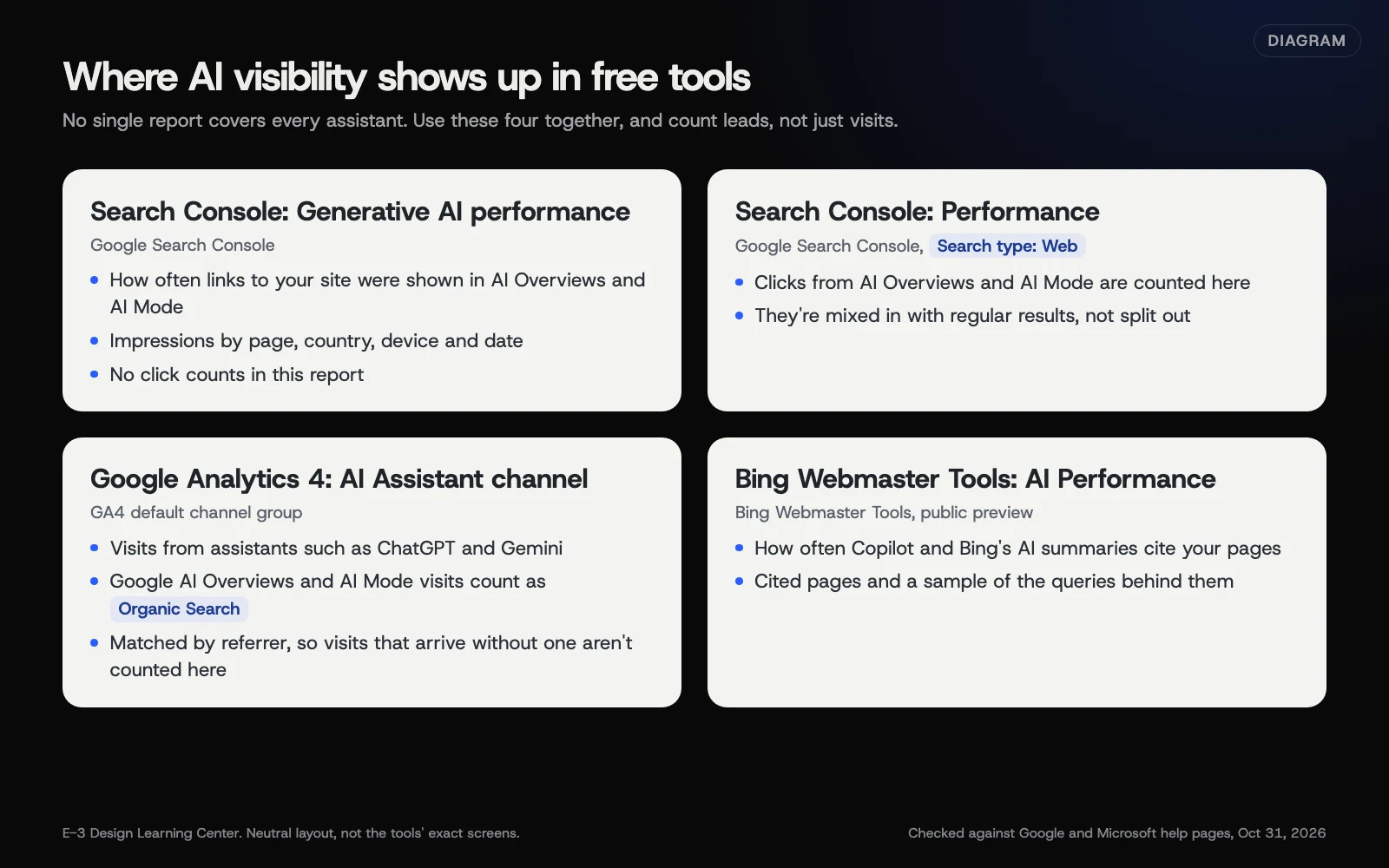 Diagram: the four free reports that show AI visibility and visits, and what each one counts. Checked against Google and Microsoft help pages, October 31, 2026.
Ask the customer
Analytics misses some AI visits, and it can’t see a customer who read an AI answer, then searched your name or simply called. So add one question wherever new work comes in: “How did you hear about us?” Include “ChatGPT or another AI tool” as an option on your contact form, and ask it on the phone. Our answer on tracking calls and form leads covers the rest of the setup, and what to check in GA4 each month puts it in a routine.
Why track this at all?
Two reasons. It shows whether AI tools already bring you work, which tells you how much effort they deserve. And it gives you a before-and-after when you improve pages. If you rewrite a service page and visits from AI tools rise over the next few months, that’s useful evidence. If they don’t, you’ve learned something too.
What are the common mistakes and limits?
- Expecting every AI visit to be labelled. GA4 needs a referrer or a campaign tag to know a visit came from an AI tool. Clicks from some apps carry neither, so they count as Direct.
- Looking for AI Overviews in the AI Assistant row. They’re in Organic Search, by Google’s definition.
- Comparing with old screenshots. Before GA4 added this channel, AI visits usually showed up under Referral, so a report saved last year won’t line up with today’s.
- Building your own channel group without checking it. A custom group can be useful, but test its rules against real source names first.
- Judging success by visits alone. A handful of visits that turn into booked jobs beats a spike of visitors who leave.
What if the numbers look wrong?
- AI Assistant is zero, but customers say they found you in ChatGPT. Check Session source / medium for
chatgpt.com, and look at Direct. Take the customers’ answers seriously. Just remember they’re memories, not exact tracking. - Numbers jumped overnight. Check for a tagging change, spam traffic or a new campaign before celebrating.
- No data at all. Make sure the GA4 tag is on every page. Our help article on seeing how many people visit your website covers the basics.
How much does it cost, and how long does it take?
GA4 is free. Key events take an hour or so to set up the first time. After that, the monthly numbers take about ten minutes, plus a moment on every new enquiry to ask how they found you.
How does E-3 handle this?
Tracking is part of our SEO and AI search service. We can set up key events for calls and forms, then report AI Assistant visits next to Search Console’s numbers, so you see visits and likely leads together.
Related questions
Next step
- Next: How to check whether AI tools cite your websiteThe next guide in AI visibility.
- Free website checkPublic checks on your own site, then an action plan of what to fix first.
Still stuck? Ask E-3 for an answer from our help guides.
Rather we handled ai visibility for you?
It’s part of what we do every week for small businesses, as part of seo and ai search. Start with a free check of your site and profile, or call and ask.