
Social media for small businesses: the complete guide
Pick one or two networks your customers already use, set up proper business accounts that the business owns, and post useful, real content at a pace you can keep. Link your profiles to your website and Google Business Profile, boost only posts that already work, and judge results by calls, messages and website visits.
The short version
- Pick one or two networks your customers already use. Claim your name on a few others.
- Set up proper business accounts, owned by the business, with a trusted backup admin where the platform allows it.
- Post real, useful things at a pace you can keep, planned on a simple calendar.
- Link every profile to your website and your Google Business Profile, and back again.
- Measure calls, messages and website visits, not just likes. Spend on ads only once a post has proved itself.
How do I run social media for a small business?
Social media is where many customers check that you’re real, open and active before they call. For most small businesses, it isn’t a place to chase fame. It’s a place to show your work, answer questions and stay in front of people who already know you. Each part below links to a step-by-step guide, checked against each platform’s own help center on October 31, 2026. Screens change often, so each guide lists its sources.
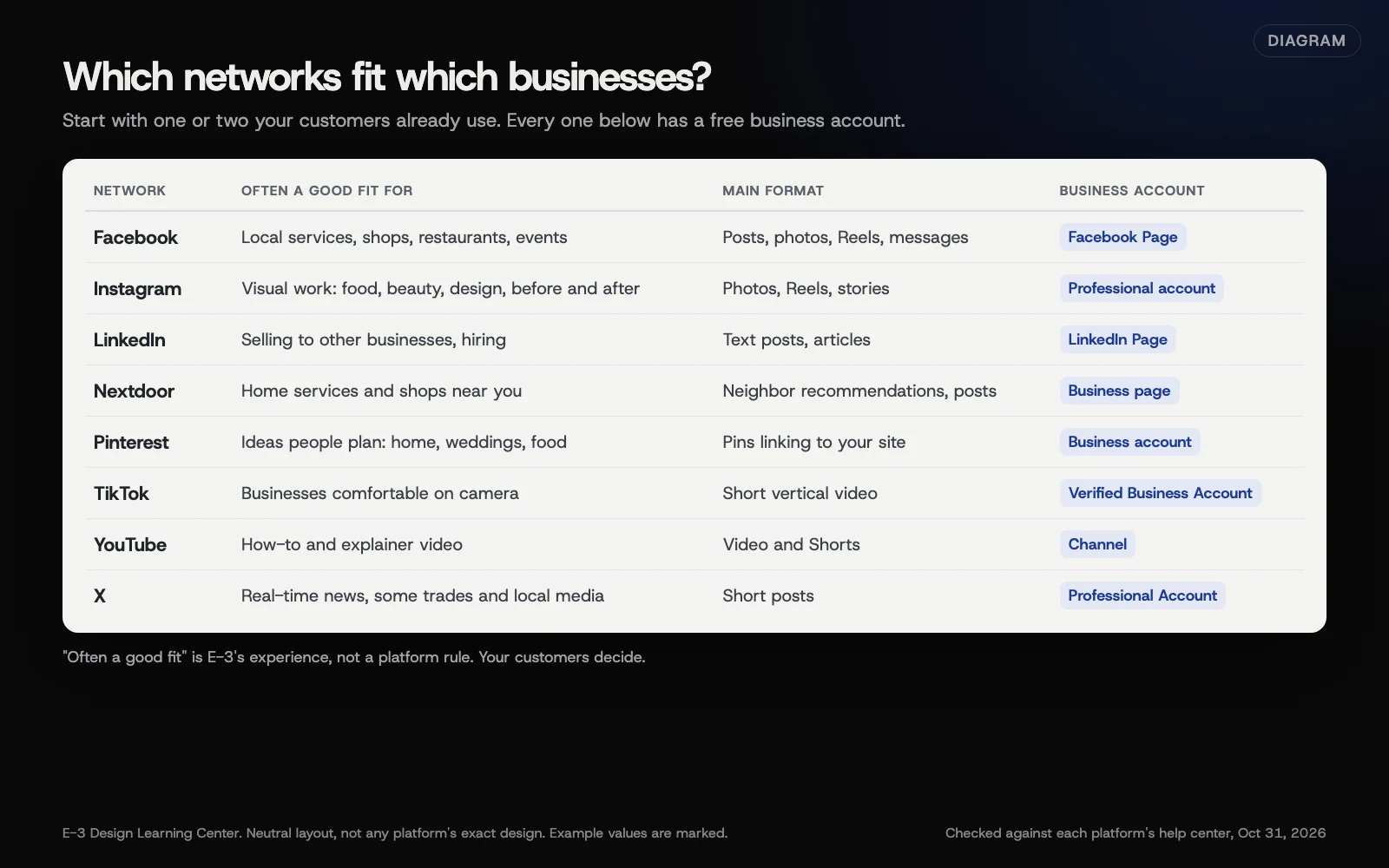 Diagram: the main networks side by side, with the business account type each one offers. Based on each platform’s help center (October 2026).
1. Choose where to show up
You don’t need every network. Ask your last 20 customers how they found you and which apps they use, then look at where businesses like yours are getting real conversation. A home services company often does well with Facebook and Nextdoor. A design-led shop may lean on Instagram and Pinterest. A firm that sells to other businesses usually starts with LinkedIn. Our guide on choosing your platforms walks through the decision and what to do with the networks you skip.
2. Set up business accounts properly
Every major network has a business version, and each works a little differently:
- Facebook: a Page, managed with Meta Business Suite. Meta says Business Suite is free and needs a business portfolio, which holds your Page, Instagram account and ad account together.
- Instagram: a professional account, either Business or Creator, which adds insights and contact buttons.
- LinkedIn: a LinkedIn Page for the company, separate from your personal profile.
- TikTok: TikTok’s help now describes a Verified Business Account, which needs business documents.
- X: a free Professional Account, converted from a regular account.
- Nextdoor: a business page that may already exist, waiting to be claimed.
- Pinterest: a business account, with a claimed website.
- YouTube: a channel. That belongs with video, so see our YouTube channel basics in the video hub.
Two rules apply everywhere. First, the business should own the account, set up with a business email address, not a former employee’s personal login. Second, don’t let one person be the only way in. Where the platform supports it, add a trusted backup with their own login, and give everyone else the lowest role that does their job. Roles work differently on each platform, so check what each level can do before you hand it out. Our article on owning your digital assets covers that in depth.
3. Post useful things at a pace you can keep
None of the platform help centers we checked tell a small business how many times to post. Any guide that names a magic number is guessing. What matters is that you keep going. A business that posts once a week for a year looks more alive than one that posts every day for a month and then disappears.
What works for most local businesses is simple: finished jobs, the people behind the business, answers to the questions customers ask on the phone, behind-the-scenes moments, and news like new hours or events. Our guide to what to post and how often has a starter list and the rules for using customer photos and reviews.
Short video now shows up everywhere: Reels on Facebook and Instagram, TikTok, and YouTube Shorts. Our video hub explains how to make short-form video on a phone, and the wider video for small business websites guide covers captions and embedding.
4. Plan it on a simple calendar
A calendar takes the “what do I post today?” stress away. Plan a month at a time: one or two fixed themes a week, plus the dates that matter to your customers, such as seasons, holidays, local events and your own sales. Meta Business Suite has a built-in Planner that shows scheduled Facebook and Instagram posts on a calendar. A shared spreadsheet works just as well. See how to build a simple content calendar.
5. Spend money only where it pays
Every network sells ads. Facebook and Instagram offer two routes:
- Boosting turns a post you’ve already published into an ad. Meta’s boosted posts page describes them as ads made from existing posts.
- Ads Manager builds full campaigns, with more control over the goal, the audience, the placements and the budget.
Start small, with a post that’s already doing well with your followers, and set a lifetime budget if you want a hard cap. Our guide to boosting versus Ads Manager explains the difference, how budgets behave, and the traps, like the Apple fee on boosts made in the Facebook iPhone app.
6. Connect social to your website and Google profile
Your social profiles, your website and your Google Business Profile should point to each other. Put your website link in every profile. Add social icons to your site’s header or footer; our help article on adding social links and feeds shows how. Where Google offers it, add your profiles to your Business Profile under Contact, then Social profiles. See connecting social to your website and Google.
7. Measure what matters
Likes feel good but rarely pay the bills. Each network has free insights. Meta’s are in Business Suite under Insights, LinkedIn’s in your Page’s admin view, Pinterest’s under Analytics. Then use UTM tags on the links you post, so Google Analytics can show which posts brought people to your site. Our guide on measuring with insights and UTMs shows how.
A simple routine
Every week (about an hour): post what you planned, reply to comments and messages, and share one thing that happened that week.
Every month (about an hour): plan next month’s calendar, look at which posts led to messages, calls or website visits, and check that every profile still has the right hours, phone number and link.
When someone leaves: remove their access to every account the same day, and change any shared password.
Every year: review who has admin access on every account, and update your profile photos and descriptions.
Why does social media matter for a small business?
People look you up before they buy. A Facebook Page with recent posts and answered messages tells them you’re open and paying attention. A dormant one, last updated years ago, makes them wonder. Social profiles also give customers a way to recommend you, tag you and share your work with friends.
There’s a search side too. Your social profiles often appear when someone searches your business name. Google’s Organization structured data guide lets you list them on your website with the sameAs property, which helps tie them to one business. And AI tools pull from many places on the web, so accurate, consistent profiles help them describe you correctly. See our answer on showing up in AI search.
Social media isn’t a replacement for a website or a Google profile, though. You don’t own the platform. Rules, reach and features change without notice, and accounts can be locked. Treat social as a set of front porches, all leading to the house you own: your website.
What usually goes wrong?
These are common problems when a business looks hard at its social presence:
- Nobody can log in. The account was set up by a relative or a past employee, and the password and recovery email are gone.
- Personal profile used as a business. Running a business from a personal Facebook profile limits what you can do and mixes your private life with your customers.
- Dead accounts. An Instagram or X account last used years ago still shows up in search with old hours or an old phone number.
- Broken links. Website icons that go nowhere, or profile links pointing to an old website address.
- Unanswered messages. Customers message a Page and wait days. Meta’s insights show your response time under Messaging.
- Boosting the wrong post. Paying to push a post that nobody engaged with organically.
- Using music or photos you don’t have the rights to. TikTok, for example, says business accounts can’t use its general music library, only the Commercial Music Library.
Which features have changed lately?
As of October 31, 2026, older guides miss these changes:
- Twitter is now X, and business tools live under a free Professional Account. Google’s Business Profile help lists “X (formerly Twitter)” among supported social links.
- TikTok business accounts now need verification. TikTok’s account types page describes a “Verified Business Account” and says that if you don’t verify, your account may be converted back to a General TikTok Account.
- Meta’s insights now count Views. Meta’s Business Suite help describes Views as the number of times your content was played or displayed, and Instagram’s help says the metric is still being rolled out. Old guides that talk only about reach and impressions are out of date.
- Business portfolios. Meta Business Suite now needs a business portfolio, the container that holds your Page, Instagram account and ad account.
- Facebook and Instagram embeds. Pasting a Facebook or Instagram link into WordPress stopped embedding the post in 2020, as WordPress’s own documentation notes. Our social links and feeds article explains the alternatives.
How much does it cost, and how long does it take?
Business accounts on every network covered here are free to set up. Meta says Business Suite is free, X says converting to a Professional Account is free, and Nextdoor and Pinterest business pages cost nothing to claim. Ads are paid, and you set the budget.
Time is the real cost. Setting up two or three accounts properly takes an afternoon. Keeping them going takes about an hour a week once you have a calendar. Verification can take longer: TikTok says business verification may take up to 5 business days.
How does E-3 handle this?
Adding social icons and links to a website is one of the 60 questions E-3’s clients ask most, drawn from about 6,100 support requests since 2019. We add the icons, check that they open the right profiles, and make sure your website, Google Business Profile and social profiles all point to each other. That linking work is part of our SEO and AI search service.
Prefer to hand the linking and checking to someone else? That’s what we do.
Related questions
Sources
- Create a Facebook Page (Facebook Help Center)
- How Meta Business Suite works (Meta Business Help Center)
- Switch to a professional account on Instagram (Instagram Help Center)
- Create a LinkedIn Page (LinkedIn Help)
- Account types on TikTok (TikTok Help Center)
- Professional Accounts (X Help Center)
- Claim or create your business page (Nextdoor Help Center)
- Get a business account (Pinterest Help)
- About boosted posts (Meta Business Help Center)
- Manage social media links on your Business Profile (Google Business Profile Help)
- Collect campaign data with custom URLs (Google Analytics Help)
- Organization structured data (Google Search Central)
- About Insights in Meta Business Suite (Meta Business Help Center)
- Embeds (WordPress documentation)
Every Social media guide
- Which social networks should my business be on?Start with one or two networks your customers already use, not all of them. Facebook and Nextdoor suit many local services, Instagram and Pinterest suit visual work, LinkedIn suits business-to-business, and TikTok and YouTube suit video. Claim your name on the others, link them to your website, and log in now and then rather than half-running them.
- Set up a Facebook Page and Meta Business SuiteCreate a Page from your Facebook account under Pages, then Create page, and add your hours, contact details, photos and website. Then create a business portfolio in Meta Business Suite at business.facebook.com, so the Page, Instagram and ad account sit together with the right people. Use Business Suite to schedule posts and answer messages.
- Switch Instagram to a professional accountIn the Instagram app, go to your profile, tap More, then under For professionals tap Account type and tools and Switch to professional account. Pick a category, choose Business, and add your contact details. A professional account is always public and gets insights and contact buttons. Connecting a Facebook Page is optional but helps.
- Create a LinkedIn Page for your companyOn a computer, click For Business on LinkedIn, then Create a Company Page, choose Company, fill in your details and confirm you can act for the business. You become the super admin. Add a second super admin, give helpers content admin or analyst roles, and post about your work, your team and openings.
- TikTok for a small business: account types and setupTikTok now offers a Verified Business Account for anyone whose main goal is promoting a business. Switch in the app under Settings and privacy, Account, then Business verification, and submit business documents. You get a website link, analytics and the Commercial Music Library, but lose the general music library. Only commit if you can film regularly.
- Is X (formerly Twitter) worth it for a small business?For most local businesses, X is a place to claim your name rather than a main channel, unless your customers, local media or industry are active there. If you use it, switch to a free Professional Account from your profile settings or the X for Professionals tab. US businesses can add a Location Spotlight with address, hours and contact buttons.
- Claim and verify your Nextdoor business pageNextdoor creates pages for many local businesses automatically, so search for yours first and claim it with the link near the top. If there isn't one, select your profile icon, then Add business page. Then verify with a current business document so you get the Verified checkmark and can make business posts.
- Is Pinterest worth it for your business?Pinterest suits businesses whose customers plan and save ideas, like home, weddings, food and design. Create a business account at pinterest.com with Create a business account, or convert a personal one under Settings, then Account management. Claim your website so your Pins carry your name, and judge it by outbound clicks to your site.
- What should a small business post, and how often?Post real, useful things: finished work, the people behind the business, answers to common questions, behind-the-scenes moments and real news. Post at a pace you can keep for a year, because none of the platforms publish a required number. Ask permission before showing customers, and label anything you were paid or given something to post.
- Build a simple social media content calendarPlan one month at a time. Pick one or two weekly themes, add the dates that matter to your customers, and fill the gaps from a list of ideas. Keep it in a shared spreadsheet or Meta Business Suite's Planner, schedule posts ahead, and leave room for real news. Review it each month against your results.
- Boost a post or use Ads Manager? Social ads basicsBoosting turns a post you already published into an ad, with a goal, audience, budget and duration set in a few steps. Ads Manager builds full campaigns with more control over audiences, placements and testing. Start by boosting a post that already works, with a small budget and an end date, and measure calls, messages and site visits.
- Connect your social profiles to your website and GooglePut your website link in every social profile, add social icons to your website's header or footer, and add your profiles to your Google Business Profile under Edit profile, Contact, then Social profiles, where Google offers it. On your website, list the profiles in Organization schema with sameAs. Keep the name, phone and hours identical everywhere.
- Measure what works on social media: insights and UTM linksUse each network's free insights to see which posts get views, interactions and link clicks. Then tag every link you post with UTM parameters, at least utm_source, utm_medium and utm_campaign, so Google Analytics shows which posts and ads brought visitors. Judge social by messages, calls and website visits, checked monthly.
Common questions
- How often should a small business post on social media?
- At a pace you can keep for a year. None of the platforms we checked publish a required number of posts. Steady, useful posts beat a burst followed by silence.
- Do I need to be on every social network?
- No. Start with one or two networks your customers already use, run them well, and claim your name on the others and log in now and then, since some platforms remove accounts that stay inactive.
- Is boosting a Facebook post worth it?
- It can be, for a post that's already doing well with your own followers. Meta says boosted posts are ads made from existing posts. For more control over who sees an ad and what it's for, use Ads Manager.
Next step
- Start here: Which social networks should my business be on?The first guide in Social media.
- Free website checkPublic checks on your own site, then an action plan of what to fix first.
Still stuck? Ask E-3 for an answer from our help guides.
Rather we handled social media for you?
It’s part of what we do every week for small businesses, as part of seo and ai search. Start with a free check of your site and profile, or call and ask.