
Boost a post or use Ads Manager? Social ads basics
Boosting turns a post you already published into an ad, with a goal, audience, budget and duration set in a few steps. Ads Manager builds full campaigns with more control over audiences, placements and testing. Start by boosting a post that already works, with a small budget and an end date, and measure calls, messages and site visits.
The short version
- Boosting pays to show a post you’ve already published to more people. It’s quick.
- Ads Manager builds new ads in campaigns, with more control over goal, audience and placement.
- Boost only posts that are already doing well with your own followers.
- Daily budgets are an average, not a limit. For a hard cap, use a lifetime budget in Ads Manager.
- Judge ads by messages, calls and website visits, not likes.
What’s the difference between boosting and Ads Manager?
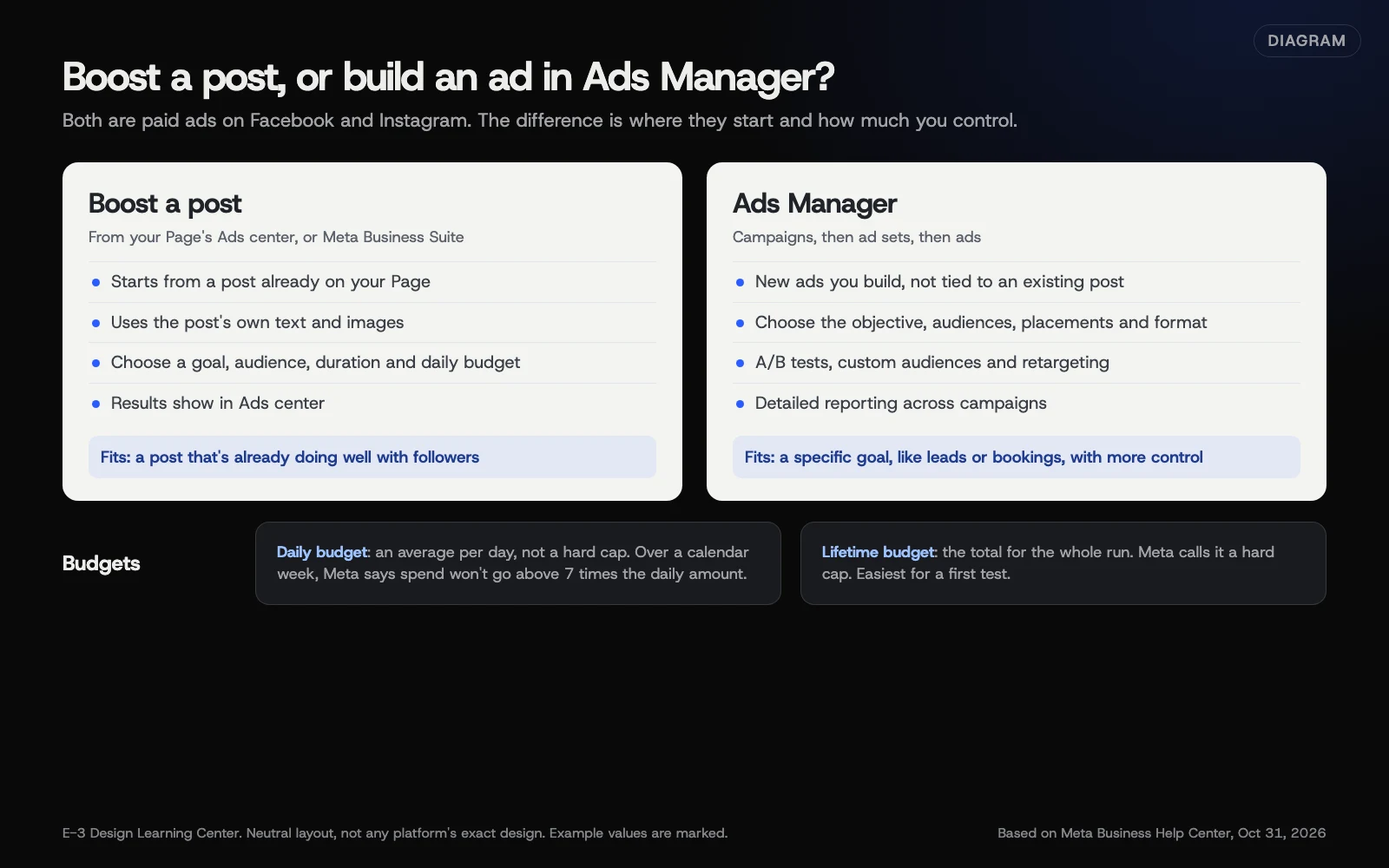 Diagram: what boosting and Ads Manager each offer, and when each fits. Based on Meta Business Help Center pages (October 2026).
Meta’s boosted posts page says boosted posts “are ads you create from existing posts on your Facebook Page,” and that they’re different from creating new ads with creative that hasn’t been published on your Page. Meta says boosting can help you get more messages, video views, leads or calls, and reach people who don’t follow you yet.
Ads Manager, per Meta’s Ads Manager page, is “a tool for creating and managing ads on Facebook, Instagram and other Meta technologies.” Ads are organized as campaigns, which contain ad sets, which contain ads. You choose the objective, the people you want to reach, where the ad shows and the format.
Meta’s comparison page says to use Business Suite for simple ads and scheduled boosts, and Ads Manager for:
- Campaigns with several ad sets and ads, custom audiences and detailed reporting.
- A/B tests that compare ad sets or campaigns.
- Retargeting, such as an offer to past customers.
| Boost a post | Ads Manager | |
|---|---|---|
| Starts from | A post already on your Page | A new ad you build, or an existing post |
| Set up in | Your Page or Business Suite | Ads Manager |
| Control | Goal, audience, duration, budget, placements | All of that plus objectives, ad sets, custom audiences, testing |
| Good for | A post that’s already doing well | A specific goal, like leads or bookings, with more control |
How do I boost a post?
These steps come from Meta’s boost a post page, on a computer. You need Facebook access to the Page, or task access to ads.
- Log in to Facebook, click your profile picture at the top right, and switch into your Page.
- Click Ads center on the left.
- Click Advertise, then select Boost Facebook content.
- Click Boost post on the post you want.
- Fill in the details. Meta uses the post’s images and text. Depending on the post, you can set:
- Goal: the result you want, or let Facebook choose.
- Audience: an Advantage+ recommended audience, or one you build by location, age and interests.
- Special Ad Category: turn this on if the ad is about credit or financial services, jobs, housing, or social issues, elections or politics. These have extra rules.
- Duration and Daily budget.
- Placements and Payment method.
- Click Publish.
Expected result: the ad goes into review, then starts showing. Results appear in Ads center on your Page.
A trap on iPhone
Meta says that since February 2024, an Apple service fee of 30% of your total ad payment may apply when you boost in the Facebook iOS app on an iPhone or iPad. Apple keeps it, not Meta. Boost from a computer to avoid it.
How do budgets work?
Meta’s budgets page explains two kinds:
- Daily budget: the average you want to spend each day. Meta says it isn’t a hard cap; spend can be higher on some days and lower on others, but over a calendar week it won’t go above 7 times the daily budget.
- Lifetime budget: the total you’re willing to spend over the whole run. Meta calls this “a hard cap, not an average.”
For a first test, a hard cap is easier to control, because you know the most you’ll spend. The boost steps above offer a daily budget and a duration; multiply them for a rough total, but remember daily spend can run over on some days. If you want a lifetime budget, build the ad in Ads Manager, where you can still choose a post you’ve already published. In either case the budget is what you pay for the ads to run; depending on where you are, taxes or other charges may be added on top, so check your billing settings. We won’t suggest a dollar amount. Choose a sum you’d be comfortable spending to learn something, and run it long enough to see results. Meta’s budgets page links to its own guidance on minimum budgets.
What about ads on other networks?
Most networks have a simple option and a full ads tool. TikTok’s account page describes Promote, a tool for showing your videos to more people or sending them to your website. X lists Quick Promote for Professional Accounts. LinkedIn content admins can boost posts from the Page, and LinkedIn runs fuller ads in Campaign Manager. The same advice applies: start small, with something that already works, and measure what it brings in.
Why start with a boost?
It’s the easiest way to learn whether paid reach helps you at all. If a post already got comments and shares from followers, Meta’s page notes it “likely means that it resonated with your audience.” Paying to show it to similar people nearby is a low-risk test. If it works, you can boost it again or move to Ads Manager for more control.
What are the common mistakes and edge cases?
- Boosting a post nobody liked. Money won’t fix a weak post.
- The wrong goal. If you want calls, choose a goal that leads to calls or messages, not post engagement.
- Too wide an audience. For a local business, set the location to where you actually work.
- Ignoring the Special Ad Category. Ads about jobs, housing, credit and politics have extra rules. Turn it on when it applies.
- Forgetting it’s running. Set an end date, or use a lifetime budget in Ads Manager.
- Judging by likes. Use the tags in our measuring guide to see website visits from the ad.
What if this didn’t work?
- There’s no Boost post button. Meta has a list of post types that can’t be boosted, such as some shared posts. Check that your Page is published and that you have ads access.
- The ad was rejected. Read Meta’s notice explaining why, fix the text or image, and try again.
- It spent but nothing happened. Check the goal, the audience location and the link. Then try a different post, rather than more money on the same one.
How much does it cost, and how long does it take?
You set the budget; there’s no minimum we can quote for you. A boost takes about 10 minutes to set up. Ads Manager campaigns take longer to build and are worth learning once boosts have shown you what works.
How does E-3 handle this?
Your ad budget is your call, and we don’t suggest amounts. Our part is the other end of the ad: making sure the page an ad sends people to loads quickly and has a clear way to call or message, and that visits from ads show up properly in your analytics. Our SEO and AI search service covers that tracking, and our leads and follow-up service helps you follow up on every enquiry, with one leads inbox and missed-call text-back.
Related questions
Sources
- About boosted posts (Meta Business Help Center)
- How to boost a post from your Facebook Page (Meta Business Help Center)
- About Meta Ads Manager (Meta Business Help Center)
- About budgets (Meta Business Help Center)
- When to use Meta Business Suite and when to use Meta Ads Manager (Meta Business Help Center)
- Account types on TikTok (TikTok Help Center)
- Professional Accounts (X Help Center)
Next step
- Next: Connect your social profiles to your website and GoogleThe next guide in Social media.
- Free website checkPublic checks on your own site, then an action plan of what to fix first.
Still stuck? Ask E-3 for an answer from our help guides.
Rather we handled social media for you?
It’s part of what we do every week for small businesses, as part of seo and ai search. Start with a free check of your site and profile, or call and ask.