
Measure what works on social media: insights and UTM links
Use each network's free insights to see which posts get views, interactions and link clicks. Then tag every link you post with UTM parameters, at least utm_source, utm_medium and utm_campaign, so Google Analytics shows which posts and ads brought visitors. Judge social by messages, calls and website visits, checked monthly.
The short version
- Every network has free insights for business accounts. Check them monthly.
- Look past likes: link clicks, messages, profile visits and follows matter more.
- Add UTM tags to every link you post, at minimum
utm_source,utm_mediumandutm_campaign. - In Google Analytics, see them under Reports, Acquisition, Traffic acquisition.
- Keep tags consistent and lowercase. Google Analytics treats “Facebook” and “facebook” as different.
Where are each network’s insights?
| Network | Where to look | Useful numbers |
|---|---|---|
| Facebook and Instagram | Meta Business Suite, Insights | Views, content interactions, link clicks, follows, messaging response time |
| Instagram app | Your profile’s insights, up to the past 90 days | Views, interactions, new followers |
| Your Page’s admin view, Analytics | Content, followers, visitors, search appearances | |
| Menu, Analytics, Overview | Impressions, saves, outbound clicks | |
| TikTok | Analytics in TikTok Studio, or Business Suite for business accounts | Post, follower and LIVE analytics |
| X | Professional Home | Account analytics |
Sources: Meta’s Insights page, Instagram’s insights article, LinkedIn’s analytics overview, Pinterest’s Analytics article and TikTok’s account types page.
What do Meta’s numbers mean?
Meta’s insights now lead with Views, which Meta defines as the number of times your content was played or displayed. The Overview covers the past 28 days. Results includes views, content interactions and link clicks. Messaging shows how many people messaged you, and your response rate and time. Instagram says its Views metric is still being rolled out, so some accounts may not see it yet.
Meta’s insights also include a Benchmarking tab that compares you with similar businesses. Treat that as a rough guide, not a target.
What should I look at each month?
- Which posts got link clicks, messages or shares? Those are the ones to repeat.
- Did followers grow or shrink? A slow, steady rise is normal.
- How fast did you answer messages?
- What did people actually do on your website? That’s where UTM tags come in.
How do I tag links with UTMs?
UTM tags are short labels added to the end of a link. They don’t change the page; they tell Google Analytics where the visitor came from.
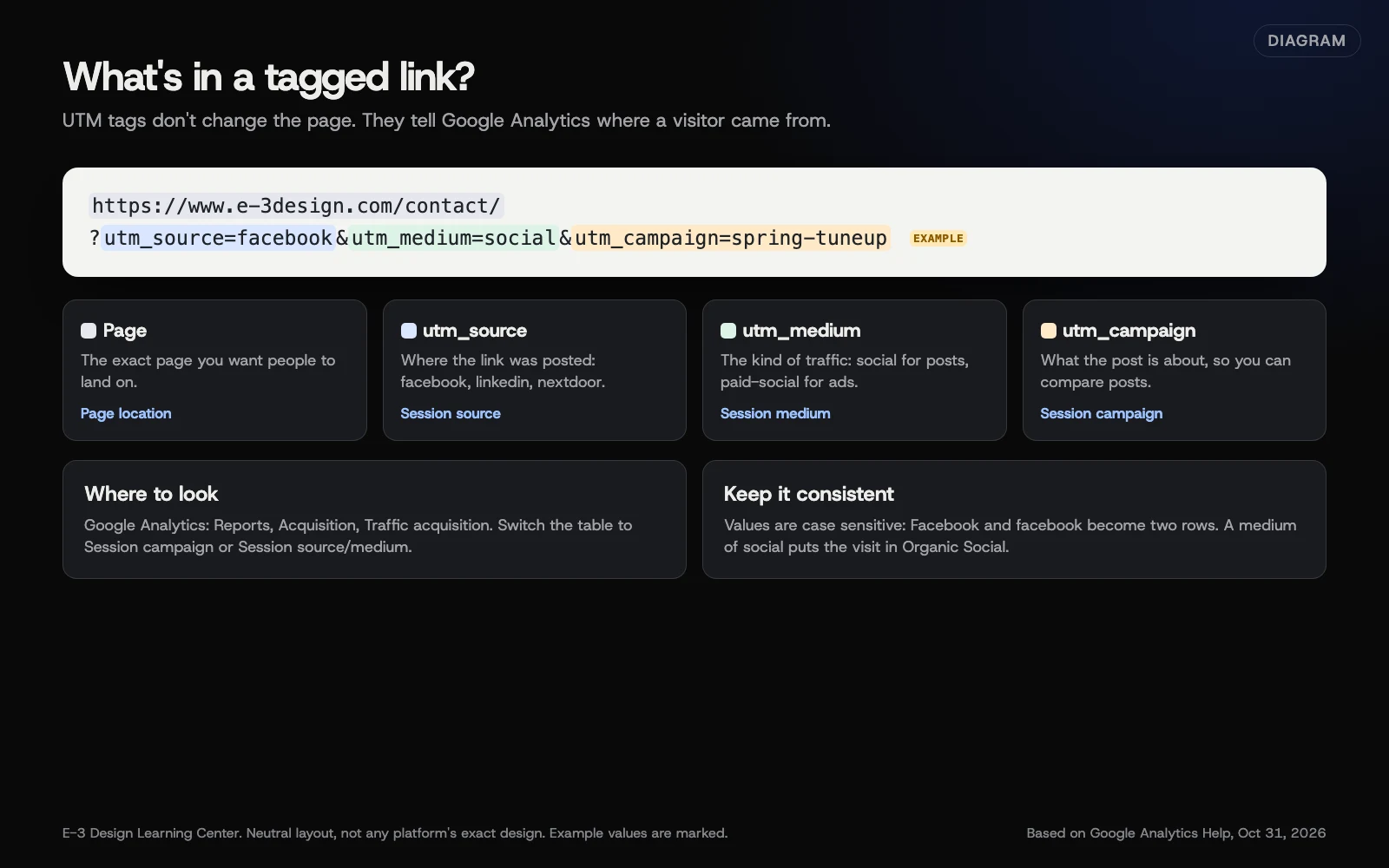 Diagram: the parts of a UTM-tagged link and where each shows up in Google Analytics. Example values are marked. Based on Google Analytics Help (October 2026).
Google’s custom URL page says you should always use three:
- utm_source: where the link was posted, such as
facebookorlinkedin. - utm_medium: the type of traffic, such as
social, orpaid-socialfor ads. - utm_campaign: what the post is about, such as
spring-tuneup.
Google lists others, like utm_content to tell two links in one campaign apart, and recommends utm_id and utm_source_platform too. Leaving the main ones out can lead to “(not set)” in reports.
Never put personal details in a tag: no names, email addresses or phone numbers, and nothing that identifies a customer. Tags show up in the address bar and in your reports, and Google’s guidance on personal information says campaign parameters must not contain any.
Build a tagged link
- Open Google’s Campaign URL Builder.
- Enter the website URL, the exact page you’re linking to.
- Fill in campaign source, campaign medium and campaign name. The builder marks required fields with an asterisk.
- Copy the generated link and use it in your post. If it looks long, the network’s link preview usually hides it.
An example, with example values:
https://www.e-3design.com/contact/?utm_source=facebook&utm_medium=social&utm_campaign=spring-tuneup
Keep the tags consistent
- Lowercase, always. Google says values are case sensitive, so
Facebookandfacebookshow as two sources. - Use
socialfor unpaid posts. Google’s default channel rules put a visit in Organic Social when the source is a known social site or the medium issocial,social-network,social-mediaorsm, among others. For ads, Paid Social needs both: a source on Google’s list of social sites, such asfacebook, and a paid medium, such aspaid-socialorcpc. A paid medium with a source name Google doesn’t recognize as social can land in another channel, so use the plain network name as the source. - Write your tags down. Add a “link” column to your content calendar so everyone uses the same words.
- Never tag links between pages on your own site. Tags are for links from outside.
Where do I see the results in Google Analytics?
In Google Analytics 4, go to Reports, then Acquisition, then Traffic acquisition. Google says you can view Session source/medium, Session medium, Session source and Session campaign there. Change the table’s main dimension to Session campaign to see each campaign, or to Session source/medium to see facebook / social.
If your site doesn’t have Google Analytics set up, start with our answer on what to check in GA4. And if you can only check one thing, our help article on seeing who visits your website covers the basics.
Why measure at all?
Without measuring, you’re guessing which posts are worth your time. Likes are easy to count but don’t tell you if anyone called. Link clicks, messages and tagged website visits get much closer to the question that matters: did social media bring in customers?
Social often helps in ways that are hard to count, too. Someone sees three posts over a month, then searches your name on Google and calls. That visit shows up as search, not social. So use the numbers to compare posts with each other, not to prove social’s total worth to the dollar.
What are the common mistakes and edge cases?
- Judging by followers. A small local following that messages you is worth more than a big one that doesn’t.
- Mixed-case or misspelled tags, splitting one source into several rows.
- Tagging the link in your profile bio with a campaign name, then forgetting it’s there for years. Use a simple, long-lived tag for bio links, like
utm_campaign=profile. - Looking too often. Weekly swings are noise. Monthly is enough.
- Too few followers for details. Instagram says follower demographics need at least 100 followers, and TikTok needs at least one public post before analytics appear.
What if this didn’t work?
- Your tagged visits don’t show up. Check the tag is spelled right, the page has Google Analytics, and you’re looking at the right date range. New data can take a while to appear.
- Everything shows as “(not set).” Start with the link: a missing or misspelled tag is a common cause, so rebuild it with the URL Builder. If the tags are fine, the cause is elsewhere, such as a consent banner that blocks analytics until visitors accept, the report dimension you’ve picked (some are session-level, some event-level), or how Google Analytics is set up on the site. That’s worth a closer look from whoever looks after your analytics.
- A network strips your tags. Click your own link from the live post and look at the address bar. If the tags are gone, tell your web team.
How much does it cost, and how long does it take?
Insights, the URL Builder and Google Analytics are free. Tagging a link takes a minute. A monthly review takes about half an hour.
How does E-3 handle this?
We set up and check Google Analytics and call and form tracking on client websites as part of our SEO and AI search service, so social visits and the leads they bring can be seen side by side. Our answer on tracking calls and forms explains the lead side.
Related questions
Sources
- Collect campaign data with custom URLs (Google Analytics Help)
- Default channel group (Google Analytics Help)
- Best practices to avoid sending personally identifiable information (Google Analytics Help)
- Campaign URL Builder (Google Analytics Demos and Tools)
- About Insights in Meta Business Suite (Meta Business Help Center)
- View insights on Instagram (Instagram Help Center)
- LinkedIn Page analytics overview (LinkedIn Help)
- Pinterest Analytics (Pinterest Help)
- Account types on TikTok (TikTok Help Center)
Next step
- Social media: the complete guideEvery guide in this topic, in order.
- Free website checkPublic checks on your own site, then an action plan of what to fix first.
Still stuck? Ask E-3 for an answer from our help guides.
Rather we handled social media for you?
It’s part of what we do every week for small businesses, as part of seo and ai search. Start with a free check of your site and profile, or call and ask.