
Video for small business websites: the complete guide
Make a few short, useful videos that answer what customers ask, film them on a phone in good light with clear sound, and put them on YouTube. Add accurate captions, embed them on the matching page of your website without slowing it down, and check YouTube Analytics monthly to see what people actually watch.
The short version
- Start with two or three short videos that answer the questions customers ask most.
- Film on your phone: light in front of you, the phone close for sound, held steady.
- Put the main videos on a YouTube channel your business owns, with accurate captions.
- Embed each video on the page it belongs to, with a light embed so the page stays fast.
- Cut short vertical clips for Shorts, Reels and TikTok, and check what people watch monthly.
How do I get started with video for my business?
A customer deciding between you and a competitor wants to know three things: what you do, what it’s like to work with you, and whether you’re real. A one-minute video of you explaining the job, filmed in your own shop or on a real job site, answers all three faster than a page of text. That’s the case for video on a small business website. It isn’t about going viral.
Most of what follows works for any small business with a phone and an hour. Each part links to a step-by-step guide, checked against YouTube Help, Google Search Central, web.dev and W3C guidance on October 31, 2026. Apps change their screens often, so if a button has moved, each guide’s sources are the place to look.
1. Decide what to film first
Don’t start with a brand film. Start with the questions you answer on the phone every week: how much does it cost, how long does it take, what happens at the first visit, how do I care for it afterward. Each becomes a one- to three-minute video. Add a short “who we are” video for your About page and a walk-through of your place or a typical job. Our guide on which videos to make first gives a starter list and a simple script outline.
2. Film it on a phone
A recent phone is good enough. What makes business video look amateur is almost never the camera. It’s dim light, echoing sound and a shaky frame. Face a window, get the microphone close, steady the phone, and turn on the grid so the frame is level. Our guide on filming on your phone covers light, sound and steadiness, with the iPhone and Pixel settings that matter.
3. Caption every video
Captions let deaf and hard-of-hearing people follow along, and they help everyone watching with the sound off. The W3C’s captions guidance says automatic captions must be edited for accuracy. YouTube makes them for you; you correct the names and terms it gets wrong. A transcript on the page helps too. See captions and transcripts.
4. Put it on a channel you own
YouTube is free, handles playback on every device, and is where many people search for how-to video. Create the channel as a Brand Account so it belongs to the business, not to one person’s login, and give helpers their own access. Our YouTube channel basics guide walks through the setup, the upload settings and the channel details worth filling in.
5. Choose where the video is hosted
YouTube isn’t the only option. Vimeo’s product pages say its player shows no ads, and its paid plans let you limit which websites can embed your videos. Uploading video files to your own website is possible but rarely wise for a small business. Our comparison of YouTube, Vimeo and self-hosting sets out the trade-offs in a table.
6. Embed it without slowing the page
A standard YouTube embed loads the player’s code as soon as the page opens, even if nobody presses play. web.dev’s iframe lazy-loading article says lazy-loading YouTube embeds saves around 500 KB on the first page load. Our guide to embedding video without slowing your site explains lazy loading, lightweight “facade” embeds and poster images, and when each one is right. The basic embedding steps for WordPress are in our help article on how to add a video to your website.
7. Help Google understand it
Google’s video best practices say videos can appear on the main search results page, in Video mode, in Google Images and in Discover. To be eligible, a video needs a page where it’s the main content, plus a title, description and thumbnail Google can read. Structured data called VideoObject tells Google those details directly. Our video schema guide shows the three required fields and when it’s worth adding.
8. Cut short clips for Shorts, Reels and TikTok
Short vertical video is where many people now find local businesses. A 30-second clip from a longer video, such as one tip or one before-and-after, can run on YouTube Shorts, Instagram Reels and TikTok. Our guide to short-form video covers the current Shorts rules and how to reuse one clip safely across apps.
9. Check what people watch
YouTube Analytics shows views, watch time, average view duration and where viewers came from. Google Analytics can record when visitors start and finish embedded YouTube videos on your site. A monthly 15-minute look tells you which topics to film next. See measuring your videos.
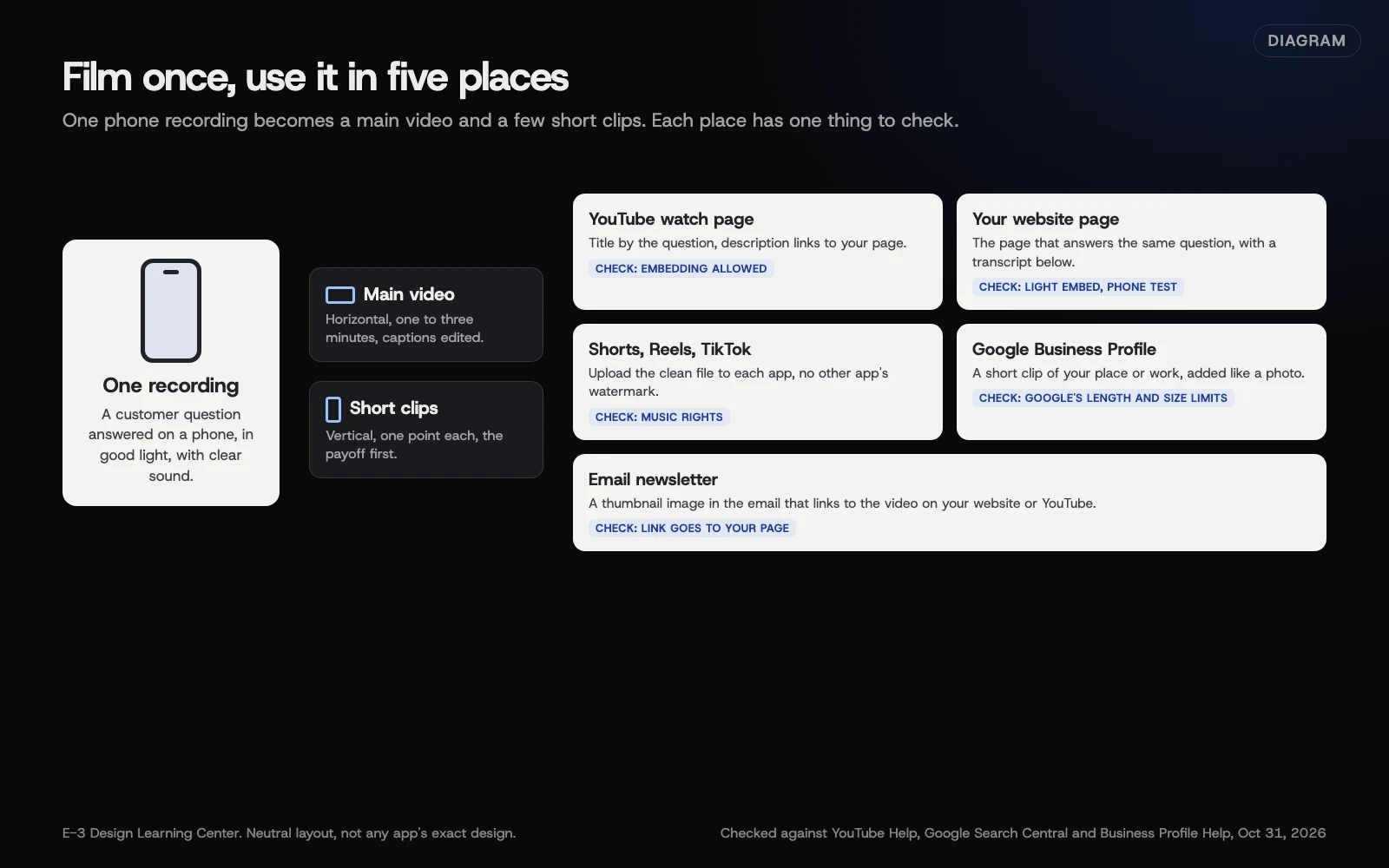 Diagram: one recording, edited into a main video and short clips, then placed on YouTube, your website, your Google Business Profile and social apps. Based on YouTube Help, Google Search Central and Google Business Profile Help (October 2026).
Why does video matter for a small business?
Video does two jobs on a website.
It helps visitors decide. People hiring a contractor, a dentist or a caterer are letting a stranger into their home or their mouth or their wedding. Seeing and hearing you lowers that risk. A plain, honest video of the owner explaining the work often does more than polished stock footage, because it’s real. Our answer on stock or real photos makes the same point for images.
It gives search engines more to show. Google can show a video thumbnail beside your result and can link to key moments inside a longer video. Google’s video structured data page is clear that valid markup doesn’t guarantee any of this. Treat search visibility as a bonus, and make the video useful first.
Video also feeds your other channels. The same footage becomes a post on your Google Business Profile, a Reel, a Short and a clip in your email newsletter. Filming once and using it five ways is how a small team keeps up.
How does video work with my Google Business Profile?
You can add short videos to your Business Profile the same way you add photos, and they appear alongside your photos in Search and Maps. Google sets its own limits on length and file size, and checks each upload before it goes live. Our guide to Business Profile photos and videos has Google’s current limits and the steps. A 20-second walk from the parking lot to your door is a good first one.
What are the common mistakes?
- The channel belongs to a former employee or agency. If the person who made it leaves, you can lose the channel. Create it under the business. See who should own your accounts.
- Autoplay with sound. Browsers block it anyway, and visitors find it jarring. Let people press play.
- Uploading big video files to the website. The page gets slow and your hosting fills up. Host on a video service and embed.
- No captions, or unedited automatic ones. Wrong names and terms in captions look careless and leave some viewers out.
- One video on the home page, nowhere else. Put each video on the page it explains: the drain-cleaning video on the drain-cleaning page.
- Music you don’t have the rights to. On YouTube, YouTube Help says any Short over one minute with an active copyright claim is blocked worldwide. Use music you have a license for, or none. YouTube’s Content ID page suggests swapping claimed audio for a track from the YouTube Audio Library.
- Waiting for the perfect video. A clear, honest two-minute video this month beats a polished one that never gets made.
Which video features have changed or been retired?
Video apps change fast, and plenty of advice online is out of date. This list was checked on October 31, 2026.
- YouTube Shorts can be up to three minutes. YouTube’s October 3, 2024 announcement raised the limit from 60 seconds starting October 15, 2024, for square or vertical videos. YouTube’s three-minute Shorts page confirms videos uploaded since then are classed as Shorts by shape and length.
- YouTube Stories: retired June 26, 2023. YouTube stopped new Stories that day and pointed creators to Shorts and community posts, as TechCrunch reported.
- You can’t hide related videos on a YouTube embed. Since September 25, 2018, YouTube’s player parameters page says the
rel=0setting only limits related videos to your own channel. Themodestbrandingsetting was deprecated in August 2023 and no longer does anything. - Lighthouse no longer flags heavy embeds. Chrome’s facades page says its audit for lazy-loading third-party embeds was removed in Lighthouse 13. The advice still holds; the tool just doesn’t nag you about it.
- Instagram Reels limits keep changing. Instagram raised Reels to three minutes in January 2025, and reports since then describe longer limits. We couldn’t confirm the current figure on Instagram’s own Help Center, so check the app’s upload screen. See short-form video.
What if something goes wrong?
- The video won’t embed. Embedding may be turned off, or the video may be private. Our add a video help article covers the fixes.
- The page got slow after adding a video. Switch to a lazy-loaded or facade embed; see embedding without slowing your site.
- You can’t get into the YouTube channel. If someone else owns it, ask them to add you in Settings, then Permissions. See YouTube channel basics.
- Your Short was blocked. Look for a copyright claim in YouTube Studio and remove or replace the music.
- Google isn’t showing your video. Check the Video indexing report in Search Console; our video schema guide lists the common reasons.
How much does it cost, and how long does it take?
YouTube channels are free, and so is embedding. A tripod or phone clamp and a small clip-on microphone cost little compared with a camera, though prices vary. A simple one- to two-minute video takes an afternoon the first time: an hour to plan, an hour to film, and an hour to trim, caption and upload. It gets faster with practice. Vimeo’s paid plans and professional video crews are priced by the vendor; get a quote.
How does E-3 handle this?
We put client videos on their websites as part of our SEO and AI search service. You can send us a YouTube or Vimeo link and the page it belongs on. We add it on a staging copy first, and a person at E-3 checks it.
Related questions
Sources
- Video SEO best practices (Google Search Central)
- Video (VideoObject, Clip, BroadcastEvent) structured data (Google Search Central)
- Create a YouTube channel (YouTube Help)
- Get started creating YouTube Shorts (YouTube Help)
- Understand three-minute YouTube Shorts (YouTube Help)
- Tall updates coming to Shorts (YouTube Official Blog, October 3, 2024)
- Captions/Subtitles (W3C Web Accessibility Initiative)
- It's time to lazy-load offscreen iframes (web.dev)
- Embed videos & playlists (YouTube Help)
- YouTube embedded players and player parameters (Google for Developers)
- YouTube Stories are shutting down June 26 (TechCrunch, May 25, 2023)
- Learn about Content ID claims (YouTube Help)
- Ad-free video player (Vimeo)
- Lazy load third-party resources with facades (Chrome for Developers)
Every Video guide
- Which videos should a small business make first?Make the videos that answer what customers already ask you: what you do and who you are, how the job works, what it costs to plan for, one before-and-after, and how to care for it afterward. Keep each to one question, one to three minutes long, and put it on the page that answers the same question.
- How do I set up a YouTube channel for my business?Sign in with a Google Account the business controls, go to your channel list and choose Create a new channel, which makes a Brand Account in the business's name. Verify your phone number to get longer videos and custom thumbnails. Upload in YouTube Studio, and add helpers under Settings, then Permissions, instead of sharing your password.
- Shorts, Reels and TikTok: short video for small businessFilm vertically, keep each clip to one tip, answer or before-and-after, and put the point in the first seconds. YouTube Shorts can be up to three minutes for square or vertical video since October 15, 2024. Use music you have rights to: YouTube blocks Shorts over one minute that carry an active copyright claim.
- How do I film good business video on my phone?Face a window or other soft light, get the phone's microphone close to whoever is talking in a quiet room, and hold the phone steady with two hands, a tripod or a clamp. Turn on the grid and level, lock focus and exposure on your face, clean the lens, and record a short test before the real take.
- How do I add captions and transcripts to my videos?Turn on YouTube's automatic captions, then correct them in YouTube Studio under Subtitles, because the W3C says automatic captions must be edited for accuracy. Include who is speaking and important sounds. Put a transcript, or a link to one, right under the video on your page. For prerecorded video with sound, captions are a WCAG Level A requirement.
- How do I embed video without slowing down my site?Add loading="lazy" to video embeds below the first screen so they load only when a visitor scrolls near them, or use a lightweight facade that shows a thumbnail until someone presses play. For self-hosted video, set a poster image and preload="none". Never autoplay with sound, and test the page on a phone afterward.
- YouTube, Vimeo or self-hosted: where should my videos live?For most small businesses, YouTube is the right home: it's free, plays well on every device and doubles as a search engine. Choose Vimeo when you want a player with no ads or tighter control over where videos are embedded. Upload video files to your own site only for short, silent clips, because every play comes from your hosting.
- Video schema: helping Google find and show your videosVideoObject structured data tells Google a video's title, thumbnail and upload date, the three fields Google requires. Video features need a watch page, where the video is the page's main content, and markup never guarantees a rich result. Add it on pages built around one video, then check Search Console's Video indexing report.
- Which numbers should I check for my business videos?Once a month, open YouTube Studio, then Analytics, and check views, watch time, average view duration and impressions click-through rate for each video. On your website, Google Analytics enhanced measurement can record when visitors start, progress through and finish embedded YouTube videos. Make more of what people watch to the end.
Common questions
- Do I need expensive gear to make business videos?
- No. A recent phone, daylight from a window, a quiet room and something to steady the phone are enough for most small-business videos. Clear sound matters more than a sharp picture.
- Should I upload videos to my website or use YouTube?
- For most small businesses, put the video on YouTube or Vimeo and embed it on your page. Uploading files to your own hosting makes every visitor download from your server, and video files are large.
- Does video help my Google ranking?
- Google can show videos in its main results, Video mode, Google Images and Discover, but it doesn't promise any page a better ranking for having video. Video helps most by answering a visitor's question faster than text.
Next step
- Start here: Which videos should a small business make first?The first guide in Video.
- Free website checkPublic checks on your own site, then an action plan of what to fix first.
Still stuck? Ask E-3 for an answer from our help guides.
Rather we handled video for you?
It’s part of what we do every week for small businesses, as part of seo and ai search. Start with a free check of your site and profile, or call and ask.