
Email newsletters for small businesses: the complete guide
Use a newsletter service, not your everyday mailbox. Only email people who asked to hear from you, authenticate your domain, and include your postal address and a working unsubscribe link in every send. Start with a short welcome email, send useful news at a pace you can keep, and judge results by clicks and replies, not opens.
The short version
- Use a newsletter service. Mailing a list from Outlook or Gmail puts your everyday email at risk.
- Email only people who asked to hear from you, and keep a record of how they signed up.
- Set up domain authentication before your first send.
- Every marketing email needs your postal address and a working unsubscribe link.
- Send a welcome email, then useful news at a pace you can keep. Judge it by clicks, replies and calls.
How does email marketing work for a small business?
A newsletter list is the one marketing channel you own outright. Social networks decide who sees your posts; a search engine decides where you rank. The people on your list asked to hear from you. Even so, an email isn’t guaranteed to reach their inbox: mailbox filters also weigh your sending reputation, complaints, engagement and content. Consent and authentication are the two parts you control most directly, which is why most of this guide is about doing them properly.
Every part below links to a step-by-step guide, checked against the vendors’ own help pages, the FTC and Gmail on October 31, 2026. Services change their screens and free plans often, so each guide’s sources are the place to check if a label has moved.
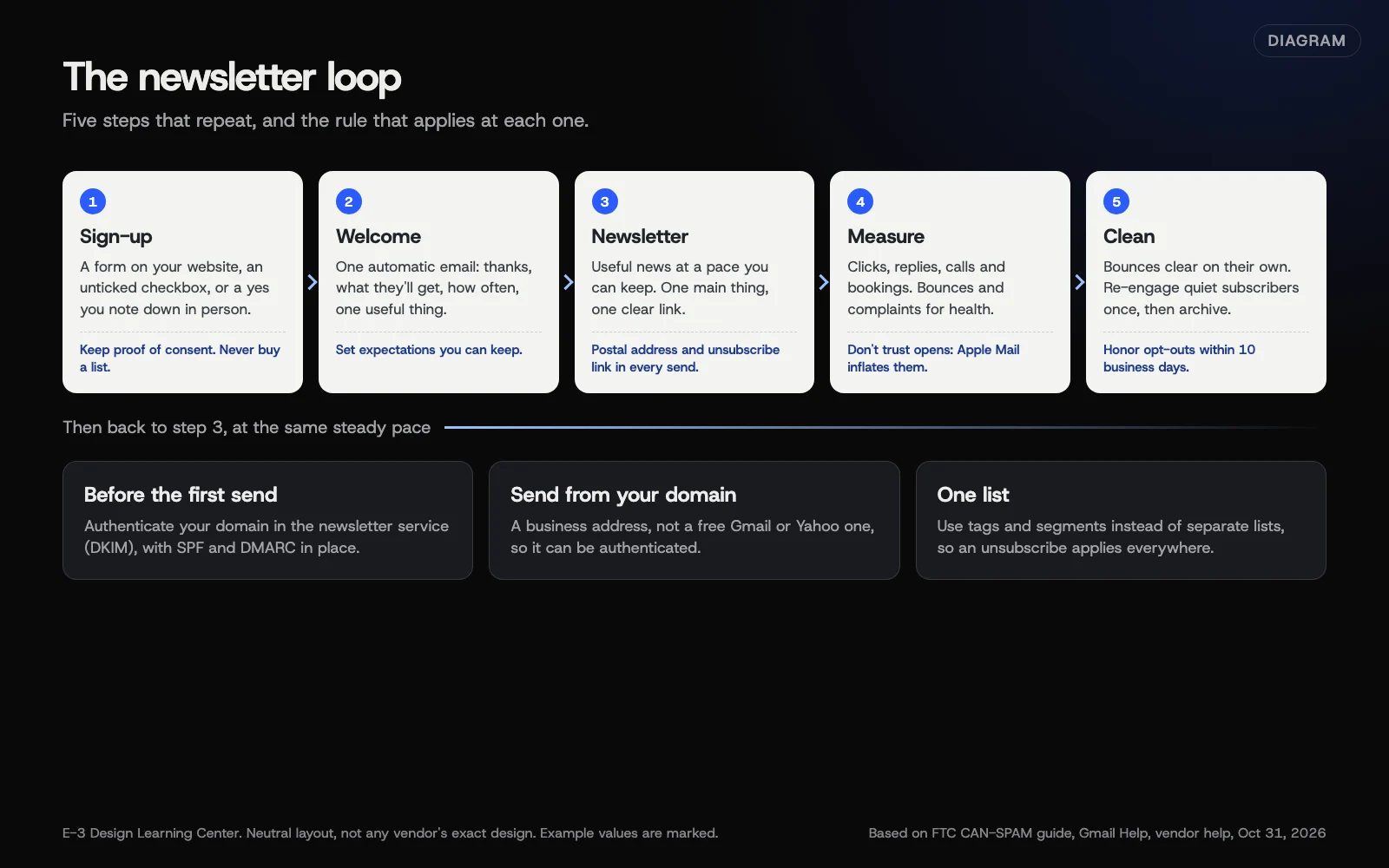 Diagram: the newsletter loop, from a consented sign-up to measuring clicks, with the rules that apply at each step. Based on the FTC’s CAN-SPAM guide, Gmail’s sender guidelines and vendor help pages (October 2026).
1. Choose a service
You need a tool built for sending to a list. It stores who subscribed, adds the unsubscribe link, removes addresses that bounce, and spreads the sending so mailbox providers don’t treat it as a flood. Mailchimp, Constant Contact, Brevo and MailerLite are newsletter services. HighLevel is a broader sales and follow-up system that includes email.
Here’s what each vendor’s site said about free options on October 31, 2026. These change, so treat them as a snapshot.
| Service | Free option, as the vendor states it |
|---|---|
| Mailchimp | Free plan: 250 contacts, up to 500 sends a month or 250 a day; automation flows not included |
| Constant Contact | 30-day free trial with up to 100 total sends; no free plan described |
| Brevo | “Free forever” plan: up to 300 emails a day once Brevo approves the account for sending |
| MailerLite | Free plan: 250 subscribers, 2,500 emails a month, 3 active automations |
| HighLevel | 14-day free trial; email is included but billed by usage |
Our guide to choosing an email marketing platform compares what each one says it does, with no ranking and no prices.
2. Build a list the right way
Good lists are built one sign-up at a time. Gmail’s sender guidelines tell senders to make sure recipients opt in, and to not buy addresses from other companies. Mailchimp’s acceptable use policy bans purchased, rented and third-party lists outright. A bought list fails twice: the people on it didn’t ask for your mail, so they mark it as spam, and that hurts every email you send afterwards.
Sources that work for a local business:
- A sign-up form on your website, with a clear line about what people will get.
- A checkbox on your contact or booking form, unticked by default.
- Asking in person, at checkout or at the end of a job, and noting the answer.
- A paper sign-up sheet at an event, entered within a day or two.
Our guide on building a list with consent covers proof of consent, single versus double opt-in, and what to do with the old spreadsheet of customer emails. To put a form on your site, see adding a sign-up form to your website.
3. Follow the rules
In the US, the FTC’s CAN-SPAM guide applies to commercial email, and it makes no exception for business-to-business mail. In plain terms:
- No misleading From names, headers or subject lines.
- Make it clear when a message is an ad.
- Include a valid physical postal address.
- Give a clear way to opt out, honor it within 10 business days, and keep it working for at least 30 days after you send.
- You stay responsible even when a service sends for you.
The FTC says each separate email that breaks the law can bring penalties of up to $53,088. If you have subscribers in Canada, Canada’s anti-spam law requires consent before you send, as Canada’s guidance explains. Our CAN-SPAM and privacy guide puts both side by side, along with what your privacy policy should say. This isn’t legal advice.
4. Make sure it reaches the inbox
This is where most newsletter problems start, and we cover it in depth in its own hub. The short version: your newsletter service sends “as” your domain, so you add the DNS records it gives you, usually for DKIM, and you make sure your domain has SPF and DMARC. Start with business email that lands, then:
- Add newsletter and CRM tools without breaking SPF, because every new sender can push you over SPF’s lookup limit.
- Move DMARC from none to reject without blocking your own newsletter.
- Gmail, Yahoo and Microsoft bulk-sender rules, including one-click unsubscribe for large senders.
Send from an address on your own domain, not a free Gmail or Yahoo address. Mailchimp’s help says free addresses can’t be authenticated for your newsletter, and our help article on sending a newsletter walks through the import and authentication steps.
5. Welcome new subscribers
The first email after someone signs up is the one they’re most likely to read, because they just asked for it. Set it up once and it sends itself. Mailchimp calls this a welcome flow; Constant Contact calls it a welcome email, and it isn’t created by default. One email is enough to start: thank them, say what they’ll get and how often, and give them one useful thing. Our welcome email guide has the steps for Mailchimp and Constant Contact and a simple three-email plan.
6. Send newsletters people want
People open email from businesses that send them something useful. That means news they’d want anyway: a seasonal reminder, a new service, an event, a practical tip, a real offer. It doesn’t mean a monthly email for its own sake.
There’s no correct frequency. Pick a pace you can keep, tell subscribers what it is in your welcome email, and stick to it. Sending in bursts, then going quiet for a year, means people forget who you are and mark you as spam. Our guide to writing newsletters people read covers subject lines, length, one main link, and an outline that works for most local businesses.
7. Send the right email to the right people
Once the list grows, not every email suits every subscriber. A landscaper’s commercial clients don’t need the spring lawn offer for homeowners. Tags and segments let you send to part of the list without keeping several lists. Mailchimp recommends one primary audience, and it counts someone on two audiences as two contacts. See segments and tags.
8. Measure what counts
Open rates used to be the headline number. They aren’t reliable any more. Apple’s Mail Privacy Protection, announced in June 2021, “prevents senders from seeing if you’ve opened the email message they sent you.” Mailchimp’s Apple privacy FAQ says emails in Apple Mail are reported as opened “regardless of the contact’s activity,” and recommends focusing on clicks.
Watch these instead:
- Clicks on the link that matters.
- Replies, calls and bookings in the days after a send.
- Unsubscribes and spam complaints, which tell you when you’ve sent too often or to the wrong people.
- Bounces, which tell you the list is going stale.
Our email metrics guide explains each number and how to see email visits in Google Analytics.
9. Keep the list healthy
Lists decay. People change jobs, abandon addresses and stop reading. Your service removes hard bounces on its own; Mailchimp, for example, cleans them “automatically and immediately.” Contacts who haven’t clicked in a long time are a different problem: they don’t bounce, but they drag down how mailbox providers see you. Try one re-engagement email, then archive the people who still don’t respond. Our list cleaning guide has the steps.
10. Switch services without losing anyone
If you outgrow a service, or want your email and follow-up in one place, you can move. Export everyone, including unsubscribed contacts, so nobody who opted out gets mail from the new service. Then set up authentication for the new service before you send. See switching email marketing platforms.
Why does email still matter for a small business?
Email reaches people who already know you: past customers, people who asked a question, people who came to an event. Those are the people most likely to call again or send a friend. A short, regular email keeps you in mind for the day they need you, which is something a social post that scrolls past in an hour can’t do.
It also works alongside the rest of your marketing. A newsletter can point to a new page on your site, a post on your Google Business Profile, or a short video. Our social media guide covers the channels you don’t own, and our video guide covers the clips that often make the best newsletter content.
What are the most common mistakes?
- Mailing a list from Outlook. Everyone sees each other’s addresses unless you use BCC, mailbox sending limits kick in, and complaints can push your everyday mail into spam.
- Importing everyone who ever emailed you. An inbox full of contacts isn’t a list of people who agreed to newsletters.
- Skipping authentication. Newsletters from an unauthenticated domain are far more likely to land in spam, and Gmail now requires it for bulk senders.
- Forgetting the postal address or unsubscribe link. Most services add them to their templates; custom designs sometimes lose them.
- Sending only when there’s a sale. Subscribers learn to ignore you.
- Judging success by opens. Apple Mail inflates them.
- Moving services and losing the unsubscribes. People who opted out must stay opted out.
What if my newsletter isn’t working?
- It lands in spam. Check authentication first, then complaint rates; see why good emails land in junk and checking blocklists and your sending reputation.
- Lots of bounces on the first send. The list is old. Expect it, let the service clean the bounces, and don’t re-add them.
- Nobody clicks. Give each email one clear reason to click, and make the link say what happens next.
- Unsubscribes jumped after one send. Look at what changed: frequency, a hard sell, or a group who never expected that kind of email.
- The import failed. Our help article on sending a newsletter covers the file format most services need.
How much does it cost, and how long does it take?
Several services have free plans for small lists, and others offer free trials, as the table above shows. Paid plans are usually priced by number of contacts or sends; check each vendor’s pricing page, because those numbers change. Setting up a service, a sign-up form, domain authentication and a welcome email takes a few hours. After that, a simple newsletter takes an hour or two to write and send.
How does E-3 handle this?
Sending a newsletter is one of the 60 client questions in E-3’s help library, which we built in October 2026 from about 7,100 support requests since 2019: about 6,100 help-desk tickets from 2019 on, plus about 970 requests in 2026. Typical help includes getting a list into the right shape for import and adding the authentication records to the client’s domain before the first send. For clients who want email tied to their leads and follow-up, we use HighLevel as part of our leads and follow-up service.
Related questions
Sources
- CAN-SPAM Act: A Compliance Guide for Business (Federal Trade Commission)
- Email sender guidelines (Gmail Help)
- Mailchimp pricing: Marketing plans (Mailchimp)
- Constant Contact free trial (Constant Contact Knowledge Base)
- Brevo pricing plans (Brevo)
- MailerLite pricing (MailerLite)
- HighLevel pricing (HighLevel)
- Use Mail Privacy Protection on iPhone (Apple Support)
- Apple privacy FAQ (Mailchimp Help)
- Getting consent to send email: Canada's anti-spam legislation (Innovation, Science and Economic Development Canada)
Every Email campaigns guide
- Mailchimp, Constant Contact, Brevo, MailerLite or HighLevel?Choose the tool that fits how you'll use email. Mailchimp, Brevo and MailerLite have free plans for small lists; Constant Contact and HighLevel offer free trials. A newsletter tool suits regular updates. HighLevel suits a business that wants email, texts, forms and follow-up in one place. Check the vendor's own pricing page before you sign up.
- How do I build an email list with real consent?Add people only when they've clearly asked for your emails: a website form, an unticked checkbox, or a yes in person that you note down. Say what they'll get and how often, and record when and how each person joined. Never buy a list. For old contacts, ask in person or by phone rather than emailing everyone.
- Add a newsletter sign-up form to your websiteCreate the form in your newsletter service, copy its embed code, and paste it into your site where people finish reading: the footer, the end of blog posts, or a contact page. Ask for an email address and little else, say what they'll get, then sign up with a test address to confirm it reaches your list.
- CAN-SPAM and privacy basics for business newslettersUnder the US CAN-SPAM Act, every marketing email needs honest From and subject lines, a valid postal address, a clear way to opt out, and opt-outs honored within 10 business days. It applies to business-to-business mail too. Canada and the UK generally require consent, with narrow exceptions. Your privacy policy should name your email service. This isn't legal advice.
- Set up a welcome email for new subscribersSet up one automatic email that goes out when someone joins your list: thank them, say what they will get and how often, and give one useful thing, like a tip, a guide or your booking link. In Mailchimp use a welcome flow under Automations; in Constant Contact, create and activate a welcome email. Test it first.
- How do I write a newsletter people actually read?Send something customers would want even if it weren't from you: a seasonal reminder, a useful tip, real news or a genuine offer. Keep it short, with one main thing and one clear link. Write a subject line that says what is inside, send at a pace you can keep, and test on a phone first.
- Segments and tags: send the right email to the right peopleKeep one list and label people with tags, such as how they joined or what they bought. Then build segments, saved filters like 'homeowners who joined this year', and send to those. Mailchimp recommends one primary audience and counts anyone on two audiences as two contacts. Start with two or three tags you'll actually use.
- Email metrics: which numbers to trust, and why opens lieTrust clicks, replies and what happens on your website more than opens. Since Apple's Mail Privacy Protection arrived in 2021, Apple Mail can report an email as opened whether or not anyone read it. Watch clicks on your main link, bounces, unsubscribes and spam complaints, and turn on Google Analytics link tracking to see what email visitors do.
- Clean your email list: bounces and inactive subscribersLet your service remove hard bounces, and never add them back. Every few months, find subscribers who haven't clicked anything in a long time, send them one honest 'still want these?' email, and archive or unsubscribe the ones who don't respond. Use clicks, not opens, to decide who's inactive, because Apple Mail inflates opens.
- Switch email marketing platforms without losing subscribersExport every contact from the old service, including unsubscribed and cleaned ones, as a CSV. Import subscribed contacts as subscribed and keep the others suppressed, so nobody who opted out gets mail. Set up domain authentication for the new service, rebuild your forms and welcome email, test, and only then close the old account.
Common questions
- Can I send my newsletter from Outlook or Gmail?
- For a handful of people, yes. For a real list, use a newsletter service. It handles unsubscribes, bounces and sending limits, and it keeps complaints about a blast from hurting your everyday business email.
- Is there a free newsletter service?
- Several have free plans with limits on contacts or sends, including Mailchimp, Brevo and MailerLite as of October 31, 2026. Constant Contact and HighLevel offer free trials rather than free plans. Limits change, so check each vendor's pricing page.
- Do I need permission to email my customers?
- Your newsletter service and Gmail both require that people opted in, and Canada's law requires consent. The US CAN-SPAM Act sets rules for every commercial email, including an unsubscribe link and your postal address. This isn't legal advice.
Next step
- Start here: Mailchimp, Constant Contact, Brevo, MailerLite or HighLevel?The first guide in Email campaigns.
- Free website checkPublic checks on your own site, then an action plan of what to fix first.
Still stuck? Ask E-3 for an answer from our help guides.
Rather we handled email campaigns for you?
It’s part of what we do every week for small businesses, as part of leads and highlevel. Start with a free check of your site and profile, or call and ask.