
Clean your email list: bounces and inactive subscribers
Let your service remove hard bounces, and never add them back. Every few months, find subscribers who haven't clicked anything in a long time, send them one honest 'still want these?' email, and archive or unsubscribe the ones who don't respond. Use clicks, not opens, to decide who's inactive, because Apple Mail inflates opens.
The short version
- Hard bounces are removed by your service. Don’t re-add them.
- Every few months, find people who haven’t clicked anything in a long time.
- Send them one short re-engagement email with a clear “keep me on the list” link.
- Archive or unsubscribe the ones who don’t respond.
- Judge inactivity on clicks, not opens.
How do I clean my list, step by step?
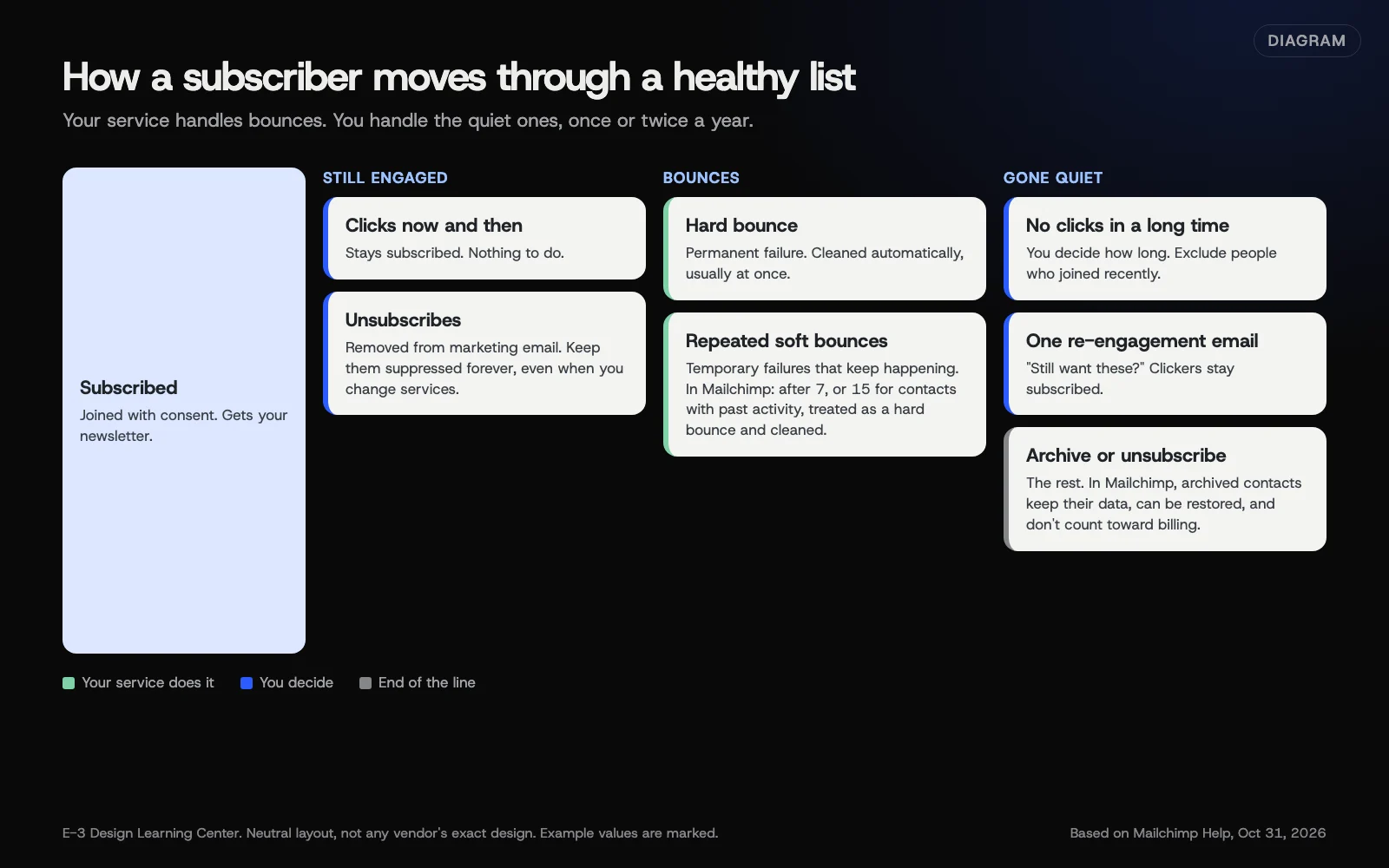 Diagram: how a subscriber moves through a healthy list, from subscribed to cleaned, inactive, re-engaged or archived. Based on Mailchimp Help pages on bounces, inactive contacts and archiving (October 2026).
1. Let bounces clear on their own
Mailchimp’s bounce page says hard-bounced addresses are “cleaned from your audience automatically and immediately” in most cases. Soft bounces are temporary, but an address that keeps soft-bouncing “will eventually be considered a hard bounce.” Mailchimp’s threshold is 7 soft bounces for contacts with no activity and 15 for contacts who’ve engaged before.
Your only job here: don’t import those addresses again from an old spreadsheet.
2. Find inactive subscribers
Mailchimp’s inactive subscribers guide suggests building a segment of subscribed contacts who “did not click” your recent emails, with time options like the last 5 emails or the last 3 months. Add a Date added condition set to “is before” a date, so people who joined recently aren’t caught.
How long is “inactive”? Mailchimp says “It’s up to you to determine how long you think an inactive period is.” Base it on how often you send. Someone who hasn’t clicked in a year of monthly newsletters is a good candidate; someone who hasn’t clicked your two seasonal emails may just be waiting for the next season.
Use clicks rather than opens. Mailchimp’s Apple privacy FAQ explains that Apple Mail reports emails as opened whatever the reader does, which makes “did not open” segments miss people. Clicks aren’t perfect either: some workplace security filters open links to scan them, which can record a click nobody made. Treat clicks as a better signal than opens, not as proof a person is reading.
3. Send one re-engagement email
Keep it short and honest. For example:
Subject: Still want our seasonal tips? We haven’t seen you click in a while, and we don’t want to crowd your inbox. If you’d like to keep getting our emails, click below. If not, no hard feelings; we’ll take you off the list soon. [Yes, keep me on the list]
That’s sample wording. Make the button a link you can track, so anyone who clicks drops out of the inactive segment.
4. Archive or unsubscribe the rest
Wait a couple of weeks, then act on the people who didn’t click. In Mailchimp, the archive guide says to select the contacts (or preview the segment and select all), click Archive, type ARCHIVE and confirm. Mailchimp says “Archived contacts don’t count toward your billing tier,” their data is kept, and you can unarchive them later.
Unsubscribing is the firmer choice: they won’t get marketing email again unless they sign up again. Either is fine. What matters is that they stop getting newsletters they don’t read.
Why does cleaning matter?
Mailbox providers watch how people react to your mail. A list full of people who never engage, plus a few who hit “Report spam” because they’ve forgotten you, can push your good newsletters toward junk. Gmail’s sender guidelines ask senders to keep complaints below 0.10%. A smaller list of people who want your email reaches more inboxes than a big list of strangers.
It can also save money. Many services charge by contact count, so archiving people who never read keeps you on a smaller plan.
What are the common mistakes and edge cases?
- Re-importing the old spreadsheet. It brings back every bounce and unsubscribe you just cleared. Never re-import unsubscribed people.
- Using opens to decide. You’ll keep Apple Mail users who never read and drop careful readers whose email app blocks images.
- Cleaning too soon. Someone who joined last month hasn’t had a chance to click.
- Several re-engagement emails. One, maybe two, is enough.
- Deleting instead of archiving. Deleted contacts lose their history. Archive unless you have a reason to delete.
- Customers who buy but never click. Some people read and then call. Check your customer records before archiving a regular customer.
What if the list keeps going bad?
- Lots of bounces from new sign-ups. Fake or mistyped addresses. Turn on double opt-in; see building a list with consent.
- Complaints keep coming. Check how people joined, and whether they know what they signed up for.
- Mail is going to spam even after cleaning. Check authentication and reputation; see checking blocklists and reputation.
How much does it cost, and how long does it take?
Cleaning is free. Building the segment and writing the re-engagement email takes under an hour. Doing it a couple of times a year keeps the job small.
How does E-3 handle this?
We can help with the parts around the newsletter service, such as your domain’s authentication records and checking import files so old bounces and unsubscribes don’t come back. Newsletter and follow-up help sits within our leads and follow-up service.
Related questions
Next step
- Next: Switch email marketing platforms without losing subscribersThe next guide in Email campaigns.
- Free website checkPublic checks on your own site, then an action plan of what to fix first.
Still stuck? Ask E-3 for an answer from our help guides.
Rather we handled email campaigns for you?
It’s part of what we do every week for small businesses, as part of leads and highlevel. Start with a free check of your site and profile, or call and ask.