
Move DMARC from none to reject without losing mail
Start with v=DMARC1; p=none and a reporting address, so nothing is blocked while reports show who sends as you. When every legitimate sender passes for at least a week, change p=none to p=quarantine. When the reports stay clean at quarantine, change it to p=reject. Check reports before every step and whenever you add a tool.
The short version
- Stage 1, monitor:
v=DMARC1; p=none; rua=mailto:dmarc@yourbusiness.com(the address is an example). - Stage 2, quarantine: change
p=nonetop=quarantineonce every real sender passes. - Stage 3, reject: change it to
p=rejectonce quarantine has run cleanly. - Google suggests at least a week at each stage. Many small businesses take a few weeks to find every sender.
- Set up SPF and DKIM at least 48 hours before you start.
What are the steps?
Before you start
Make sure SPF and DKIM are in place for your mailbox provider. See the SPF record for Microsoft 365 or Google Workspace and turning on DKIM. Google’s DMARC page says to let them run for at least 48 hours before adding DMARC.
Decide where reports go. Google recommends a dedicated mailbox, a group, or a DMARC reporting service rather than a personal inbox, because large senders get many reports a day. If the address is on a different domain, such as a reporting service’s, that domain has to publish a record agreeing to receive them. Good services do this for you.
Stage 1: monitor
- At your DNS provider, add a TXT record.
- Host:
_dmarc(some providers want_dmarc.yourbusiness.com) - Value:
v=DMARC1; p=none; rua=mailto:dmarc@yourbusiness.com
- Host:
- Check it with our email deliverability checker.
- Wait for reports. Google says they’re usually sent once a day by each provider that received your mail.
At p=none, nothing is blocked or moved to spam because of DMARC. You’re only collecting evidence.
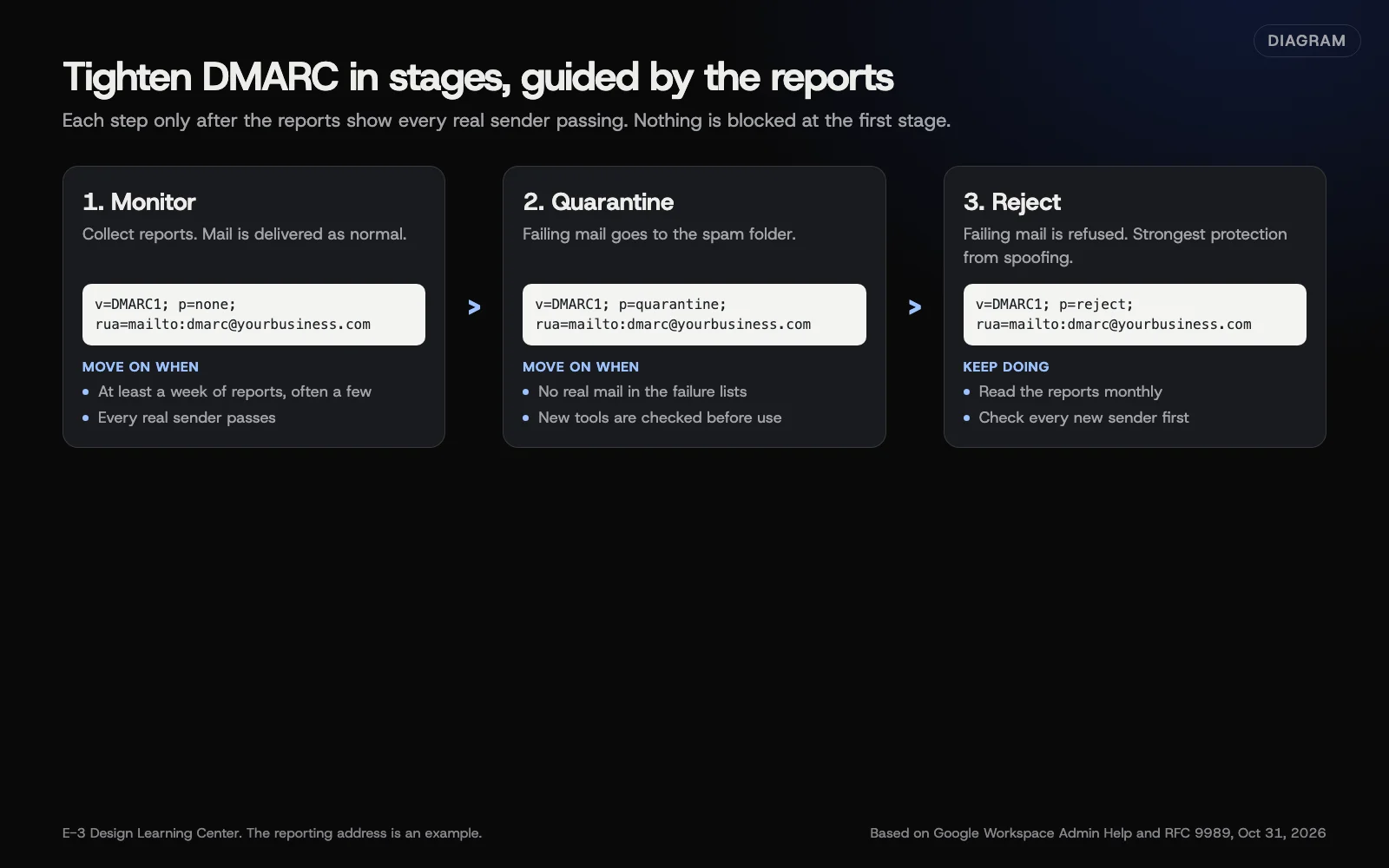 Diagram: the three DMARC stages, with example records and when to move on. The reporting address is an example. Based on Google Workspace Admin Help (October 2026).
Stage 2: quarantine
Move on when the reports show every service you recognize passing DMARC, through SPF or DKIM lined up with your domain, for at least a week, and you’ve looked up any unknown failing sources rather than assuming they’re spoofing. Check your own list too: a tool that sends only a few times a year may not show up in a week of reports, and not every receiver sends reports. Google’s rollout page suggests at least one week of monitoring. Then edit the same record:
v=DMARC1; p=quarantine; rua=mailto:dmarc@yourbusiness.com
Receivers are now asked to treat mail that fails DMARC as suspicious, which usually means the spam folder. The standard leaves the final handling to each receiver. Keep reading reports. If a real sender shows up failing, fix it or step back to p=none while you do.
Stage 3: reject
When quarantine has run cleanly, typically a few weeks with no legitimate mail failing, change it again:
v=DMARC1; p=reject; rua=mailto:dmarc@yourbusiness.com
Receivers are now asked to refuse failing mail. Many large providers do, but the DMARC standard (RFC 9989, sections 5.4 and 7.4) leaves the final decision to each receiver, and some quarantine it instead. That’s the strongest protection against someone sending as your domain, and it’s what BIMI and Microsoft’s sender policy recommend.
What about pct, sp and the new standard?
Older guides, and Google’s own pages, use pct to apply a policy to a share of your mail at first, such as pct=5. RFC 9989, the new DMARC standard published in May 2026, removes pct and adds a t (testing) tag in its place. Receivers are moving to the new rules at different speeds, so some will honor pct and some will ignore it.
Our advice: don’t rely on pct or t to soften a policy. Rely on the reports. Only tighten when nothing legitimate is failing, and you won’t need a partial policy.
Two other tags are worth knowing:
spsets a separate policy for subdomains. Without it, subdomains follow your main policy. That’s usually what you want.adkimandaspfset alignment to relaxed (the default) or strict. Relaxed letsnews.yourbusiness.comcount as matchingyourbusiness.com. Leave them at the default unless you have a reason.
Why does this matter?
A DMARC record is required for bulk senders to Gmail, Yahoo and Outlook.com. Even p=none meets that requirement; see the bulk-sender rules. But p=none doesn’t ask receivers to act on fake mail in your name. Only quarantine and reject do. And the reports are the most reliable way to discover the services sending as your domain, including ones you’d forgotten, though not every receiver sends them.
What are the common mistakes?
- Going straight to reject. The invoice tool, the website form or the booking system nobody listed gets blocked, and you hear about it weeks later.
- Parking at p=none forever. The record exists, reports pile up unread, and spoofing still works.
- Two DMARC records. Only one is allowed. Edit the one you have.
- Typos. DMARC is fussy. Each tag ends with a semicolon,
v=DMARC1comes first, and the address needsmailto:. - Adding a new tool after reject. Its mail fails from day one. Set up its DKIM before it sends a single message.
- Forgetting forwarding. Some forwarded mail fails SPF. DKIM usually carries it through, which is another reason to have DKIM on everything.
What if real mail starts failing?
- Step back one stage right away: reject to quarantine, or quarantine to none.
- Find the failing source in the reports. See reading DMARC reports.
- Fix it with DKIM for your domain, an SPF include, or by sending that mail through your main provider.
- Watch for a clean week, then tighten again.
How long does it take?
Each record change takes minutes and costs nothing. The calendar is the slow part: at least a week at p=none, often a few, then a few weeks at quarantine. A DMARC reporting service is optional and has its own pricing. The free alternative is reading the raw files yourself.
How does E-3 handle this?
DMARC is one of the records we look at whenever a client’s mail has trouble. Moving a policy to quarantine or reject changes what happens to a business’s mail, so it’s a decision to make with the reports in front of you, not a default.
Related questions
Next step
- Next: How to read DMARC reportsThe next guide in Business email that lands.
- Email deliverability checklistA free printable checklist (PDF).
Still stuck? Ask E-3 for an answer from our help guides.
Rather we handled business email that lands for you?
It’s part of what we do every week for small businesses, as part of website care. Start with a free check of your site and profile, or call and ask.