
How do I build an email list with real consent?
Add people only when they've clearly asked for your emails: a website form, an unticked checkbox, or a yes in person that you note down. Say what they'll get and how often, and record when and how each person joined. Never buy a list. For old contacts, ask in person or by phone rather than emailing everyone.
The short version
- Add people only when they’ve clearly asked: a form, an unticked checkbox, or a yes you write down.
- Tell them what they’ll get and roughly how often, right where they sign up.
- Keep a record of when, where and how each person joined.
- Never buy, rent or borrow a list. The services ban it and mailbox providers punish it.
- For old customer contacts, ask at the next visit or call, and add only the people who say yes. Emailing them to ask is itself a marketing email in some countries.
Where should sign-ups come from?
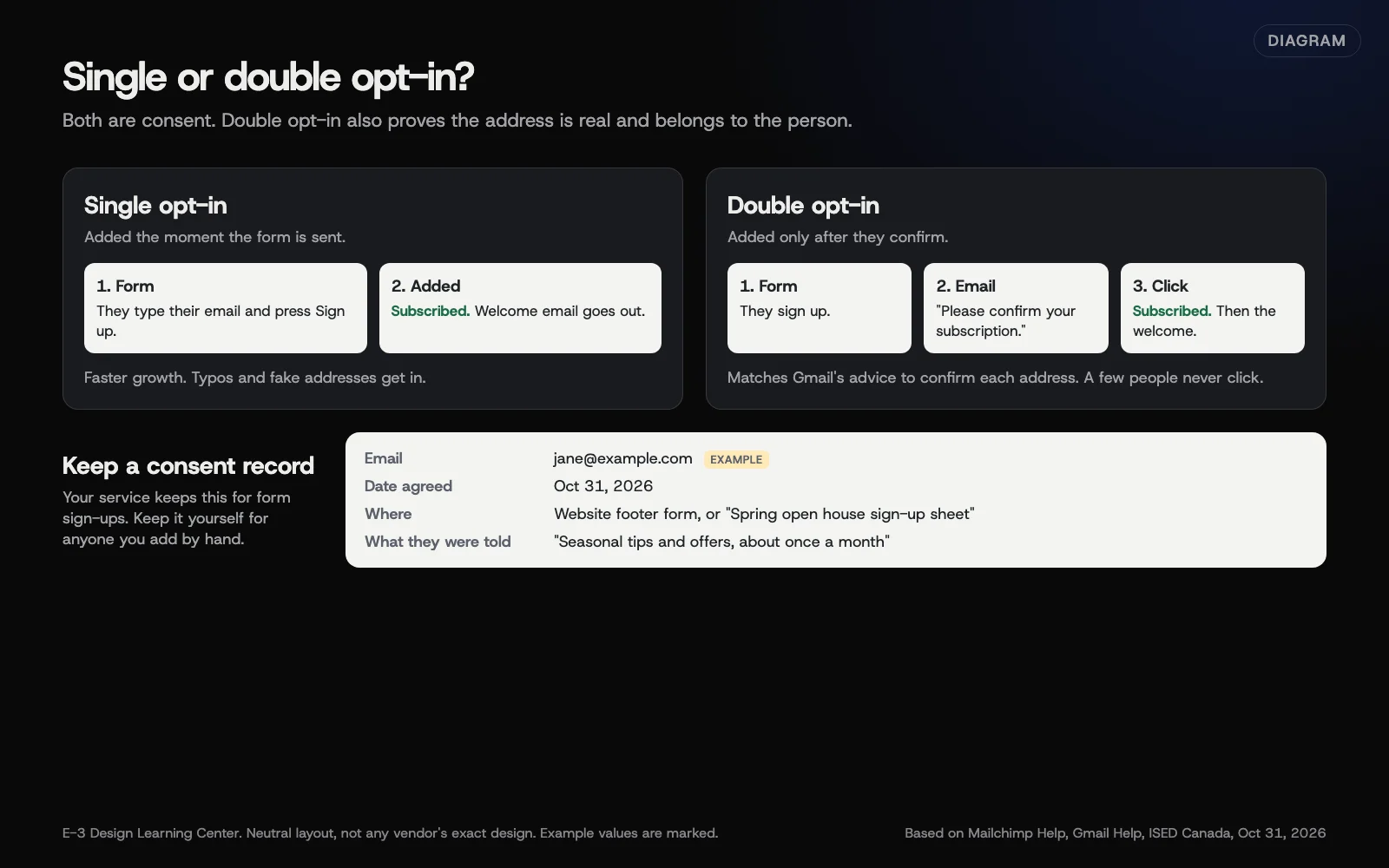 Diagram: single and double opt-in side by side, and the consent record to keep for each subscriber. Based on Mailchimp Help, Gmail’s sender guidelines and Canada’s anti-spam guidance (October 2026).
The best sources are places where people are already talking to you.
- Your website. A short form on the home page, the blog or the footer, with one line saying what they’ll get. See adding a sign-up form to your website.
- Your contact or booking form. Add a checkbox such as “Send me the occasional newsletter.” Leave it unticked, so only people who tick it are added.
- In person. At checkout, at the end of a job or at an event, ask “Can we add you to our newsletter?” Write down the yes, the date and where you asked.
- A paper sign-up sheet. Fine at events and counters. Put the newsletter’s name and what it covers at the top, and enter the names within a day or two so the welcome email still makes sense.
- Past customers. Send one personal email inviting them to join, with a sign-up link. Add only the people who click through and sign up.
Single or double opt-in?
With single opt-in, people are added as soon as they submit the form. With double opt-in, they get an email asking them to confirm, and they’re added only after they click. Mailchimp’s double opt-in page describes it as “an extra confirmation step that checks each email address.” You turn it on in the audience settings, and it applies to Mailchimp’s own sign-up forms.
Gmail’s sender guidelines say to “Confirm each recipient’s email address before subscribing them.” Double opt-in does that for you. It also keeps typos and fake addresses off your list. The trade-off is that some people never click the confirmation, so the list grows a little slower. For most small businesses, the cleaner list is worth it.
What record should I keep?
Your service keeps most of this for form sign-ups. For people you add by hand, keep it yourself:
- Their email address.
- The date they agreed.
- Where: which form, which event, which counter.
- What they were told they’d get.
Mailchimp’s acceptable use policy says you must be able to “point to an opt-in form or show other evidence of consent.” Canada’s anti-spam guidance also expects you to show proof of consent if asked.
Why does consent matter so much?
People who asked for your email open it, click it and reply. People who didn’t ask mark it as spam. Gmail asks senders to keep spam complaints below 0.10% and never reach 0.30%, measured in its Postmaster Tools. A few dozen complaints on a small list can do that. Once a mailbox provider decides your mail is unwanted, your good newsletters, and sometimes your everyday business email, start landing in junk.
There’s a legal side too. The US CAN-SPAM Act sets rules for every commercial email, and Canada’s law requires consent before you send. Our CAN-SPAM and privacy guide covers both. This isn’t legal advice.
What are the common mistakes and edge cases?
- Buying a list. Mailchimp’s policy bans “purchased, rented, third-party” lists and partner lists “of any kind.” Gmail says “Don’t purchase email addresses from other companies.”
- Importing your whole inbox. Someone who emailed you once about an invoice didn’t sign up for a newsletter.
- A pre-ticked box. If the box is ticked for them, it isn’t their choice.
- Business cards. A card handed over at a trade show isn’t a newsletter sign-up. Ask first.
- Contest entries. If entering a giveaway also signs people up, say so plainly on the entry form.
- Adding people from another business. A partner’s list, a chamber directory or a supplier’s customer list is still someone else’s list.
- Hiding what they’ll get. “Join our list” is vague. “A monthly email with seasonal tips and offers” is clear.
What if my list is already a mess?
- You have an old spreadsheet and no idea who agreed. Don’t import it as subscribed. The safest route is to ask in person, on a call or on an invoice or receipt, and add only the yes answers. An email asking for consent can itself count as a marketing email: under Canada’s anti-spam law, a consent request sent by email is treated as a commercial electronic message, so you need an existing basis, such as a recent purchase, before you send it. Sending from your normal mailbox or in small batches doesn’t change that. If you have contacts in Canada or the UK, get advice before emailing an old list.
- Your service flagged your import. Tell them honestly where the contacts came from, remove any that didn’t opt in, and import the rest.
- The first send brought lots of bounces and complaints. That’s the list telling you who didn’t want it. Let the service remove them, and don’t add them back. See list cleaning.
How much does it cost, and how long does it take?
Collecting consent costs nothing but a form and a habit. Turning on double opt-in takes a minute in most services. A clean list grows slowly at first. That’s normal, and the people on it are worth more than a long list of strangers.
How does E-3 handle this?
Getting a list into the right shape for import is common newsletter help. We can check your file before you import it, or do the import for you, and we can add a sign-up form or checkbox to your website so the list keeps growing. This is part of our leads and follow-up service. Changes to your website go onto a staging copy before the live site. There’s no need to share your newsletter password with us: the account stays in your name and you add E-3 as a user.
Related questions
Sources
- Email sender guidelines (Gmail Help)
- Acceptable Use Policy (Mailchimp)
- About double opt-in (Mailchimp Help)
- Getting consent to send email (Innovation, Science and Economic Development Canada)
- Canada's anti-spam legislation: guidance on implied consent (CRTC)
- CAN-SPAM Act: A Compliance Guide for Business (Federal Trade Commission)
Next step
- Next: Add a newsletter sign-up form to your websiteThe next guide in Email campaigns.
- Free website checkPublic checks on your own site, then an action plan of what to fix first.
Still stuck? Ask E-3 for an answer from our help guides.
Rather we handled email campaigns for you?
It’s part of what we do every week for small businesses, as part of leads and highlevel. Start with a free check of your site and profile, or call and ask.