
Email metrics: which numbers to trust, and why opens lie
Trust clicks, replies and what happens on your website more than opens. Since Apple's Mail Privacy Protection arrived in 2021, Apple Mail can report an email as opened whether or not anyone read it. Watch clicks on your main link, bounces, unsubscribes and spam complaints, and turn on Google Analytics link tracking to see what email visitors do.
The short version
- Opens are unreliable. Apple Mail can count an email as opened when nobody read it.
- Clicks on your main link are the best number inside your newsletter service.
- Replies, calls, bookings and website actions are what really count.
- Bounces, unsubscribes and spam complaints tell you about list health.
- Turn on Google Analytics link tracking so email visits show up in GA4.
Why did open rates stop working?
Open tracking has always relied on a tiny invisible image in each email. When the image loads, the service counts an open. Mailchimp’s open and click rate page says “Open rate tracking relies on images, so it isn’t 100% accurate,” because some email apps block images.
In June 2021 Apple announced Mail Privacy Protection, which “stops senders from using invisible pixels to collect information about the user.” Apple’s current iPhone guide says it hides your IP address and “prevents senders from seeing if you’ve opened the email message they sent you.” On an iPhone it’s under Settings, Apps, Mail, Privacy Protection, then Protect Mail Activity.
The effect on your reports: Mailchimp’s Apple privacy FAQ says emails in Apple Mail with this setting “are reported as ‘opened,’ regardless of the contact’s activity.” Open rates look higher than they are, open-based A/B tests “may not be accurate,” and segments built on opens catch the wrong people. Mailchimp says you can tick a box to exclude these opens from its dashboard and custom reports for emails sent on or after June 22, 2024.
Which numbers should I watch?
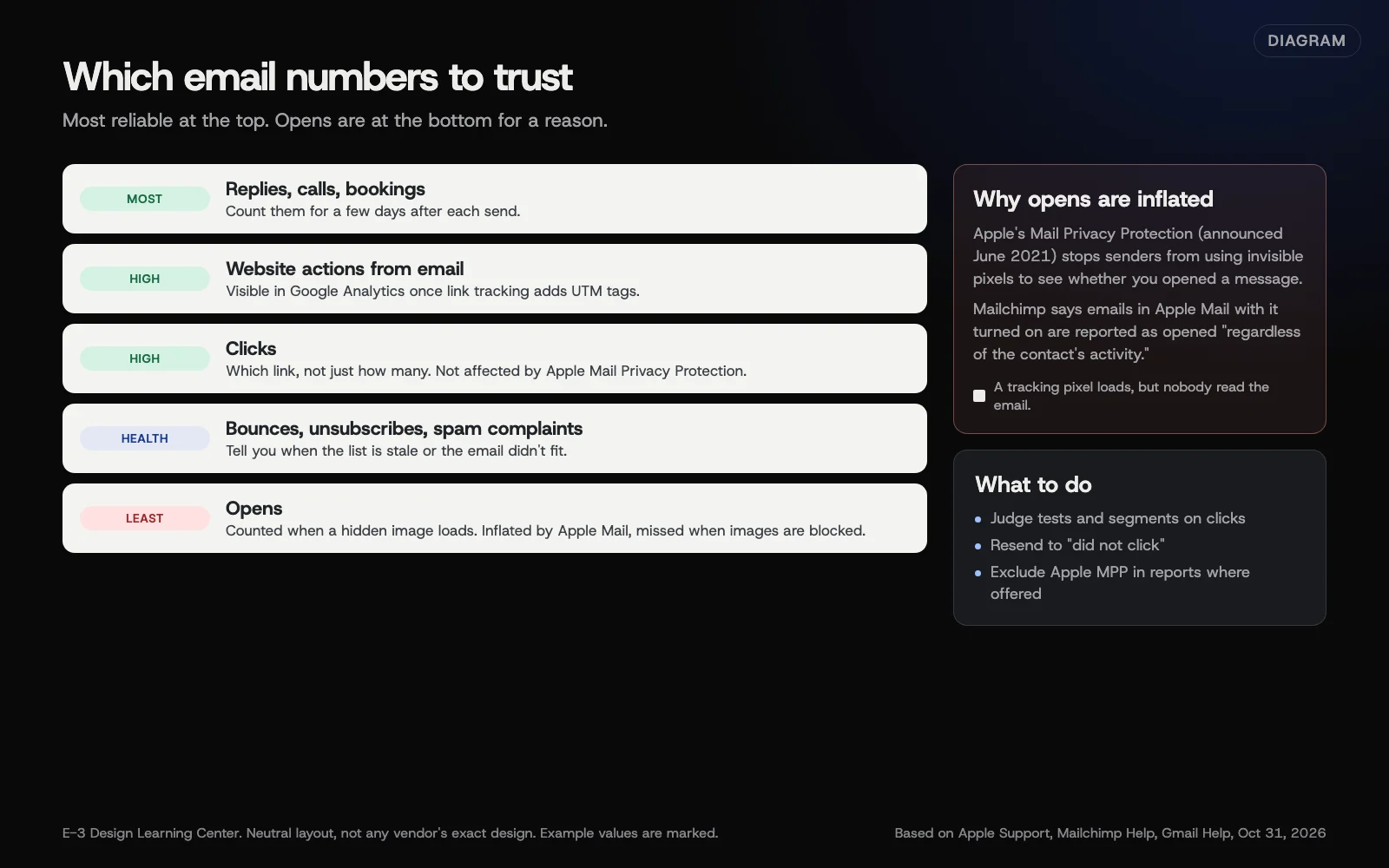 Diagram: which email numbers to trust, from most reliable to least, and why opens are inflated by Apple Mail Privacy Protection. Based on Apple Support, Mailchimp Help and Gmail Help (October 2026).
| Number | What it tells you | How much to trust it |
|---|---|---|
| Replies, calls, bookings | Whether the email made someone act | Most. Count them for a few days after each send |
| Website actions from email (GA4) | What email visitors did on your site | High, once link tracking is on |
| Clicks | Who found something worth clicking | High. Mailchimp says clicks “aren’t impacted by Apple MPP” |
| Unsubscribes | Whether the email fit the people who got it | Useful when it jumps after one send |
| Spam complaints | Whether people think you’re spam | Critical. Gmail sets a very low limit |
| Bounces | Whether addresses still work | Useful for list health |
| Opens | Roughly whether the email was delivered and noticed | Least. Inflated by Apple Mail |
Clicks
Mailchimp defines click rate as the share of delivered emails that registered at least one click. Look at which link got the clicks, not just the total. An email built around one clear link gives you a clean answer.
Bounces
Mailchimp’s bounce page says a hard bounce is “a permanent reason an email can’t be delivered,” and those addresses are usually cleaned “automatically and immediately.” Soft bounces are temporary; repeated ones are eventually treated as hard bounces. Lots of hard bounces on one send means the list is old. See list cleaning.
Spam complaints
Gmail’s sender guidelines say to keep the spam rate reported in Postmaster Tools below 0.10% and avoid ever reaching 0.30%. Your newsletter service also shows complaints in each report. A jump usually means people didn’t expect the email.
How do I see email visits in Google Analytics?
Most services can add campaign tags to your links so GA4 knows a visit came from email. In Mailchimp, the Google Analytics guide says to tick Google Analytics link tracking in the Settings & Tracking section of each email (in a flow, it’s under Edit Settings). Mailchimp then adds utm_source, utm_medium, utm_campaign and utm_term to your links.
In GA4, email visits then appear in your traffic reports, usually in the Email channel when the medium is “email.” Our guide to GA4 traffic channels explains the reports, and tracking clicks with UTM links shows how to tag links by hand for tools that don’t do it for you.
What are the common mistakes and edge cases?
- Celebrating a high open rate. It may be mostly Apple Mail.
- Resending to “didn’t open.” Mailchimp suggests resending to people who didn’t click instead.
- Comparing with industry averages you found online. Your own numbers from send to send tell you far more.
- Ignoring replies. A reply is the strongest signal there is, and many services don’t count it.
- Testing subject lines by opens. With inflated opens, the winner may be random. Judge tests on clicks.
- Untagged links. Without link tracking, email visits can show up in GA4 as direct traffic.
What if the numbers look wrong?
- Almost every email shows as opened. Apple Mail at work. Exclude Apple MPP in your reports if your service offers it.
- Clicks but nothing in GA4. Check link tracking is on, and that your site keeps the UTM tags through redirects.
- Clicks that look too good. Mailchimp’s open and click rate page says Apple MPP “and other bot activity” can inflate opens and clicks, and recommends excluding them from reports.
- A sudden drop in everything. You may be landing in spam; see checking blocklists and reputation.
How much does it cost, and how long does it take?
Reports are included in every newsletter service. Turning on link tracking takes a minute per email or once per flow. Looking over each send’s numbers takes about 10 minutes, a few days after it goes out.
How does E-3 handle this?
Our leads and follow-up service can bring calls, forms and replies into one leads inbox. That makes the most reliable number on this page, the replies and calls after a send, easier to see.
Related questions
Sources
- Use Mail Privacy Protection on iPhone (Apple Support)
- Apple advances its privacy leadership with iOS 15, iPadOS 15, macOS Monterey, and watchOS 8 (Apple Newsroom, June 7, 2021)
- Apple privacy FAQ (Mailchimp Help)
- About open and click rates (Mailchimp Help)
- Soft vs. hard bounces (Mailchimp Help)
- Integrate Google Analytics with Mailchimp (Mailchimp Help)
- Email sender guidelines (Gmail Help)
Next step
- Next: Clean your email list: bounces and inactive subscribersThe next guide in Email campaigns.
- Free website checkPublic checks on your own site, then an action plan of what to fix first.
Still stuck? Ask E-3 for an answer from our help guides.
Rather we handled email campaigns for you?
It’s part of what we do every week for small businesses, as part of leads and highlevel. Start with a free check of your site and profile, or call and ask.