
Audit your business citations in an afternoon
Search for your phone numbers, addresses and business names, old and current, in quotes on Google and Bing, and check the core platforms directly. Record each listing in a spreadsheet with what's wrong and whether you can log in. Then fix in order: your website, the core five platforms, data aggregators, and finally the rest.
The short version
- Write your official details at the top of a spreadsheet.
- List every old phone number, address and name the business has used.
- Search each one in quotes on Google and Bing, and check the core platforms directly.
- Record every listing: what’s wrong, and whether you can log in.
- Fix in order: website, core five, aggregators, then the rest.
How do I audit my citations?
A citation is any mention of your business name, address and phone number on another site. An audit finds the listings that matter most, the ones customers and search engines are likely to see, and shows what needs fixing. No search finds every copy, so write down what you searched and where, and treat the rest as unknown until it turns up.
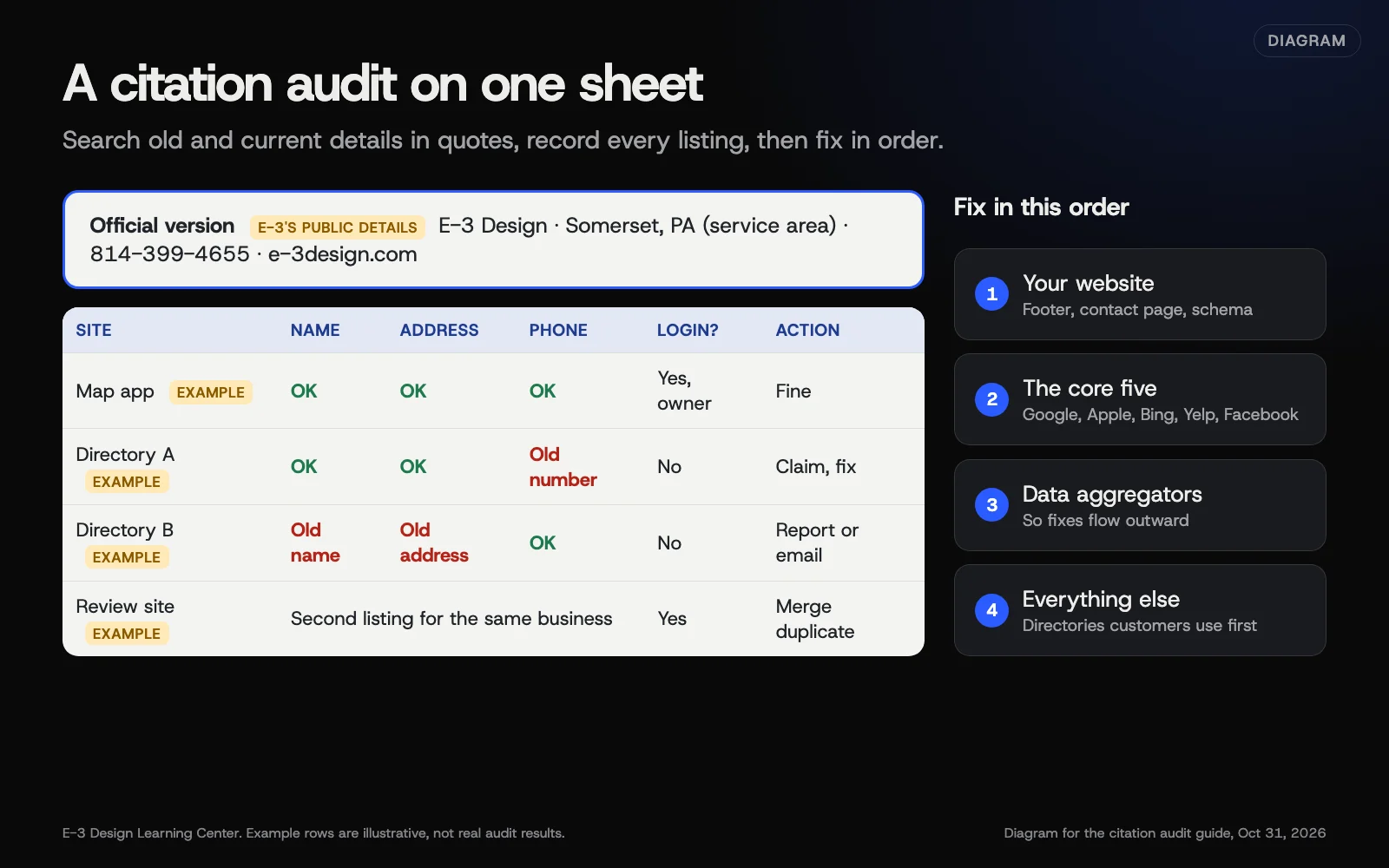 Diagram: a citation audit worksheet with example rows, and the order to fix things in. Example values are marked; E-3 Design’s public details are used as the official version.
Step 1: Set the official version
At the top of a spreadsheet, write your business name as it appears on your sign, your full address or service area, your main phone, your website and your hours. Google’s guidelines ask you to represent your business “as it’s consistently represented and recognized in the real world,” which is a good test for the other platforms too.
Step 2: List your history
Write down every phone number, address and name variation the business has used, including:
- old addresses from before a move;
- old landlines, fax numbers and former staff cell phones;
- call tracking numbers from past advertising;
- earlier business names, and common shortenings.
These are your search terms. Old details are what you’re hunting for.
Step 3: Search
Put each detail in quotation marks. Google’s search help says quotes search for an exact word or phrase. Search on Google and on Bing, since they find different pages. For phone numbers, try the common formats, such as “814-399-4655” and “(814) 399-4655”. (That’s E-3’s own number, used here as an example.)
Then check the core platforms directly, because search results don’t always show them:
- Google Maps, on a phone and a computer.
- Apple Maps, on an iPhone.
- Bing Maps.
- Yelp.
- Facebook, searching for Pages and places.
Step 4: Record what you find
Give each listing a row with these columns:
| Site | Link | Name OK? | Address OK? | Phone OK? | Hours OK? | Can we log in? | Login owner | Action |
|---|
In Action, write one of: fine, fix, claim, merge duplicate, close, or remove.
Step 5: Rank the fixes
Work in this order:
- Your website, including the footer, contact page and structured data.
- The core five: Google, Apple Business, Bing Places, Yelp and Facebook.
- Data aggregators you can update, so fixes flow out to other sites. See how listings spread.
- Everything else, starting with directories customers really use.
Our guide to fixing wrong listings and duplicates covers how to fix each kind.
Why audit at all?
Google’s page on how it sources Business Profile information includes “licensed data from third parties” and publicly available web content. So wrong details elsewhere don’t just mislead customers; they can feed back into the platforms that matter most. An audit also gives you something most owners don’t have: a full list of where the business appears and who holds each login.
What are the common mistakes and edge cases?
- Searching only for your current details. Those listings are usually fine. The problems sit under the old ones.
- Searching only on Google. Bing and the map apps turn up different results.
- Skipping the login column. Knowing who controls a listing is half the fix.
- Counting small format differences as errors. “St.” versus “Street” is generally understood; spend the time on old numbers and addresses.
- Treating a reseller’s “citation score” as a ranking. It’s their measure, not Google’s.
What if this didn’t work?
- Searches turn up hundreds of results. Start with the first two pages for each search, since the listings that show up first are the ones people are most likely to see. Note in your spreadsheet how far you looked, so a later check can go further.
- You find a listing for a business with a similar name. Leave it alone unless it’s using your phone or address.
- You can’t tell if a site is legitimate. If it’s spammy and nobody visits it, note it and move on.
How much does it cost, and how long does it take?
A manual audit is free. As a rough estimate, not a measured figure, one location with a short history takes two to four hours. A business that has moved or changed numbers several times needs longer. Paid audit tools exist; they save time, but check what they count before trusting a score.
How does E-3 handle this?
Our SEO and AI search service starts with the two sources we look after: your website and your Google profile. If you’d like an audit of your wider listings, ask us and we’ll tell you plainly what’s involved. Tell us which listings you want changed, and we’ll check the details with you first. Our free AI visibility check shows how AI tools describe your business, so you can spot old details there too.
Related questions
Next step
- Next: Fix wrong listings and duplicates outside GoogleThe next guide in Listings and citations.
- Free website checkPublic checks on your own site, then an action plan of what to fix first.
Still stuck? Ask E-3 for an answer from our help guides.
Rather we handled listings and citations for you?
It’s part of what we do every week for small businesses, as part of seo and ai search. Start with a free check of your site and profile, or call and ask.