
Moving or changing your phone number: the listings checklist
Update your website and Google Business Profile on the day the change takes effect, then Apple Business, Bing Places, Yelp and Facebook that week, then directories and aggregators. Edit existing listings rather than creating new ones. Google says a moved business must verify again, so plan for it, and keep the old number forwarding as long as you can.
The short version
- Before the change: list every listing you have, and keep the old phone number working.
- Day one: your website, then your Google Business Profile.
- Same week: Apple Business, Bing Places, Yelp and Facebook.
- Within a month: directories, trade bodies and data aggregators.
- Edit existing listings. Never start new ones for a move.
What do I update, and in what order?
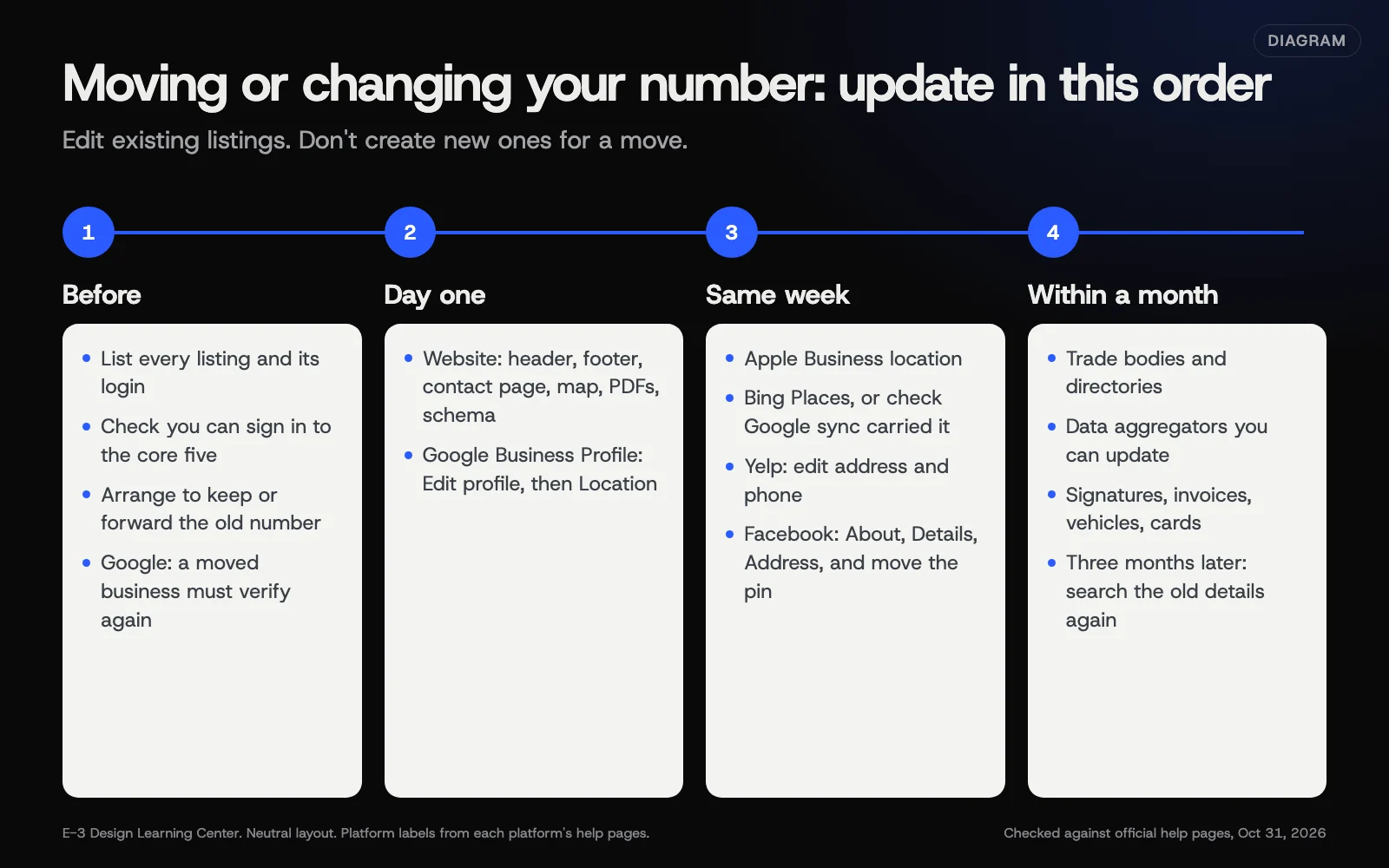 Diagram: the order to update listings when you move or change your phone number. Based on each platform’s help pages, checked October 31, 2026.
Before the change
- Pull up your listings spreadsheet. If you don’t have one, do a quick citation audit now. It’s much easier before the move than after.
- Check you can log in to Google, Apple Business, Bing Places, Yelp and Facebook. Sort out access now, while the details still match and verification is easy.
- Keep the old number. Ask your phone provider about forwarding or porting the old number. Calls from forgotten listings can keep arriving long after you switch.
- Plan for Google re-verification after a move. Google’s edit profile page says: “If you move your business to a new address after it’s verified, you must verify your business again.”
Day one
- Your website. Header, footer, contact page, map, PDFs and any structured data. Our help article on updating your phone, address or hours covers every place to look.
- Google Business Profile. For an address, Google’s address page gives the steps: Edit profile, then Location, then Edit next to the business location, then Save. Google says changes usually take about 10 minutes and sometimes up to 30 days. Edit the existing profile; Google’s guidelines say not to create more than one page for each location.
The same week
- Apple Business. Update the location’s details. If you’re moving to a place Apple doesn’t show yet, check the pin on an iPhone afterward. See our Apple guide.
- Bing Places. If Google sync is on, your Google change carries across; check it did. If not, edit in Bing’s dashboard. See our Bing guide.
- Yelp. Claimed owners can edit address and phone, per Yelp’s page on claimed businesses.
- Facebook. About, then Details, then Address, and move the pin. Facebook’s address guide says you must move it. See our Facebook guide.
Within a month
- Directories and trade bodies. Work down your spreadsheet. Member directories are often edited by the association; email them.
- Data aggregators. Data Axle’s local listings page offers free updates for up to 10 listings. See how listings spread.
- Everything else with your details: email signatures, invoices, vehicle signs, business cards, social profiles.
Three months later
Search for your old address and old number in quotes. Fix anything that’s come back.
Why does the order matter?
Your website and Google profile are the two sources you control most directly, and Google’s own help names public web content, such as your website, as one of its sources. Fixing them first gives everything else a correct place to copy from. Doing it all in one week also limits the time customers see two different answers.
What if it’s a phone number change only?
The same order applies. Google’s edit profile page only says a move must be verified again (and a name change might be), not a phone change, but Google can still ask any business to verify before its edits go live. If it does, follow the verification guide. A few extra points:
- Change the click-to-call link on your website, not just the visible number.
- Keep the old number forwarding as long as you can afford to.
- If you use a call tracking number anywhere, decide now whether it stays. Keep your main number as the main number on every listing.
What if I’m becoming a service-area business?
If customers will no longer visit you, you may need to hide your address on Google and list service areas instead. See Google’s options in our guide to service-area businesses. Check each other platform for a similar setting.
What are the common mistakes and edge cases?
- Creating new listings at the new address. That leaves the old ones live, and duplicates.
- Letting the old number lapse the day you switch.
- Forgetting the map pin on Facebook or Apple Maps.
- Changing Google before the move happens. Update on the day it takes effect.
- A business closing at one site and opening at another as a different business. That’s not a move; close the old listing and claim or create the new one.
What if this didn’t work?
- Google asks you to verify and it fails. See our verification guide.
- An old listing still shows the old address. See fixing wrong listings and duplicates.
- Customers still call the old number from an old listing. Search that number in quotes to find where it lives.
How much does it cost, and how long does it take?
Updating the major platforms is free. Plan two to three hours for the core platforms, and another afternoon for directories. Allow for Google re-verification, which Google says usually takes up to 5 business days.
How does E-3 handle this?
Tell us what is changing and when. We update your website on a preview for you to approve, and if your service includes your Google profile, we update that too. Our SEO and AI search service covers the Google side. Verification steps that Google sends to the business stay with you. For other listings, ask us what we can take on.
Related questions
Sources
- Edit your Business Profile (Google Business Profile Help)
- Verify your business on Google (Google Business Profile Help)
- Manage your business address (Google Business Profile Help)
- Guidelines for representing your business on Google (Google Business Profile Help)
- Add a single location in Apple Business (Apple Business User Guide)
- What is a claimed business? (Yelp for Business Support)
- Add or edit an address for your Facebook Page (Facebook Help Center)
- Understand how Google sources & uses info in Business Profiles & local search results (Google Business Profile Help)
- Local Listings (Data Axle)
Next step
- Listings and citations: the complete guideEvery guide in this topic, in order.
- Free website checkPublic checks on your own site, then an action plan of what to fix first.
Still stuck? Ask E-3 for an answer from our help guides.
Rather we handled listings and citations for you?
It’s part of what we do every week for small businesses, as part of seo and ai search. Start with a free check of your site and profile, or call and ask.