
Video schema: helping Google find and show your videos
VideoObject structured data tells Google a video's title, thumbnail and upload date, the three fields Google requires. Video features need a watch page, where the video is the page's main content, and markup never guarantees a rich result. Add it on pages built around one video, then check Search Console's Video indexing report.
The short version
- VideoObject is structured data that describes a video to Google.
- Required:
name,thumbnailUrlanduploadDate. Adddescription,durationandembedUrlorcontentUrltoo. - Video features need a watch page, where the video is the main content. A page with a supporting video can still show as a text result, or in Google Images with a video badge.
- Valid markup makes a video eligible for video features. Google says it never guarantees them.
- Check the result in Search Console’s Video indexing report.
Does my video page need schema?
Only some pages do. Google’s video best practices say a video is considered for video features only on a watch page: a page whose main purpose is to show one video. A service page with a supporting video, or a blog post with a video partway down, doesn’t qualify for those video features, however good the markup. Those pages aren’t shut out of Search: Google says they can still appear as a text result, and as a Google Images result with a video badge.
| Your page | Worth adding VideoObject? |
|---|---|
| A page built around one video, like “How we replace a water heater (video)” | Yes |
| A service page with a supporting video | Optional; it won’t get video features, because the page isn’t a watch page |
| A gallery of several videos | No; Google indexes one video per page |
| The video’s own page on YouTube | YouTube handles this itself |
If you’re not sure, read our answer on schema markup first.
How do I add VideoObject markup?
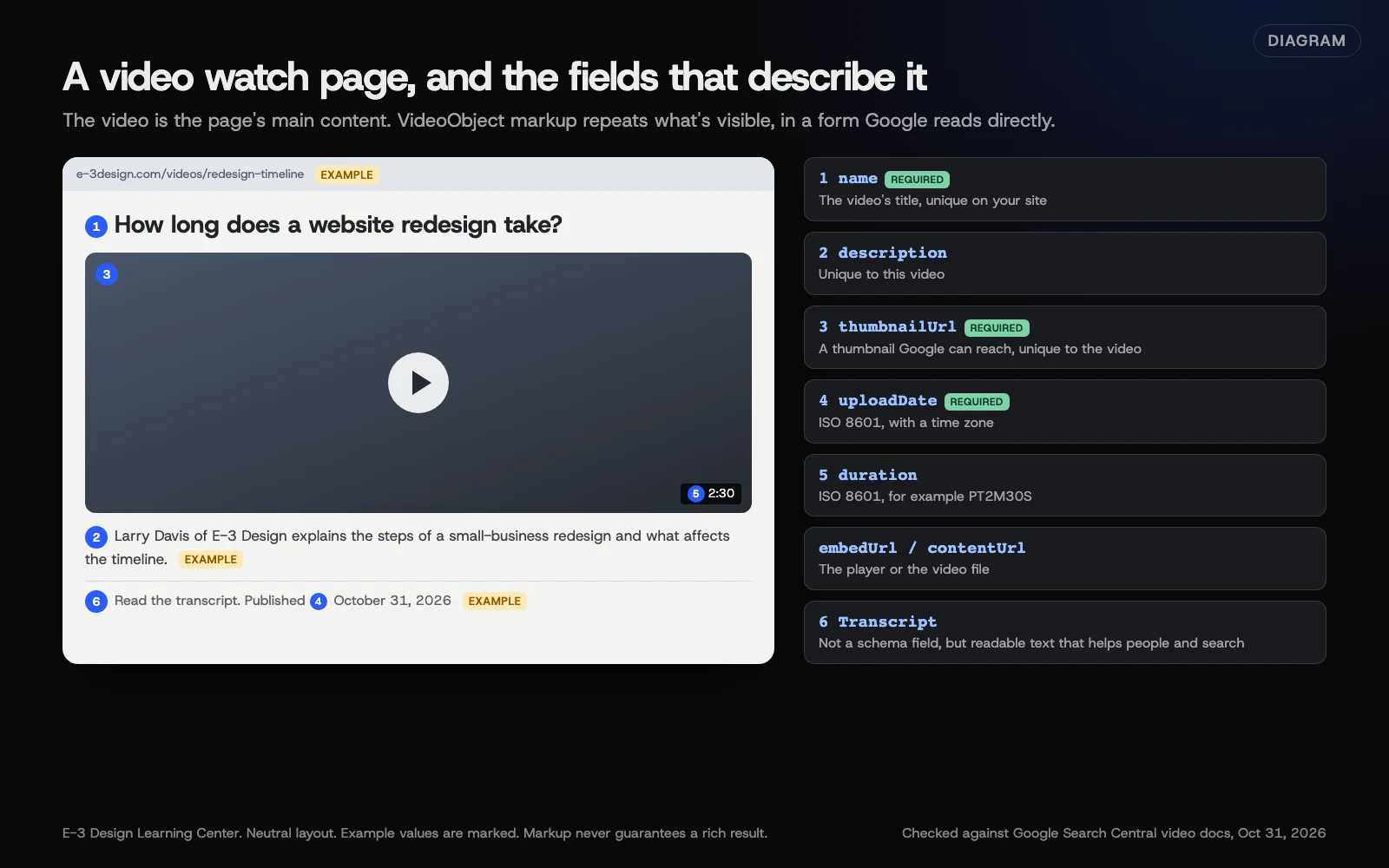 Diagram: a video watch page and the VideoObject fields that describe it. Example values are marked. Based on Google Search Central’s video structured data and video best practices pages (October 2026).
1. Build the watch page
Give the video its own page with a title and description unique to that video, the player near the top, and the transcript below. Google’s guidance says not to require a click or swipe before the video loads, so use a real player here rather than a click-to-load facade; see embedding without slowing your site.
2. Add the markup
Here’s an example in JSON-LD, one of the formats Google’s examples use, as described in our answer on schema markup. Every value is an example; yours must match what’s on your page.
{
  "@context": "https://schema.org",
  "@type": "VideoObject",
  "name": "How long does a website redesign take?",
  "description": "Larry Davis of E-3 Design explains the steps of a small-business redesign and what affects the timeline.",
  "thumbnailUrl": "https://www.e-3design.com/media/redesign-video-thumb.jpg",
  "uploadDate": "2026-10-31T09:00:00-04:00",
  "duration": "PT2M30S",
  "embedUrl": "https://www.youtube.com/embed/VIDEO_ID"
}
Google’s video structured data page lists what each field means:
| Field | Required? | What it is |
|---|---|---|
name | Required | The video’s title, unique for each video on your site |
thumbnailUrl | Required | A thumbnail image unique to the video |
uploadDate | Required | When it was first published, in ISO 8601 format with a time zone |
description | Recommended | A description unique to the video |
duration | Recommended | Length in ISO 8601, such as PT2M30S for two and a half minutes |
contentUrl | Recommended | The video file’s address; Google calls it the most effective way to fetch the video |
embedUrl | Recommended | The player’s address, when there’s no file address |
Google warns that without the required fields, it may not be able to extract any information about the video.
On WordPress, an SEO plugin can often generate this for you from the page’s video. Check its output rather than assuming it’s right.
3. Test it
- Paste the page address into Google’s Rich Results Test.
- Fix any errors in the video section, and look at the warnings.
- Publish, then wait for Google to recrawl the page.
The test catches syntax mistakes. Google notes it can’t tell whether your markup is honest or the content is spammy.
4. Check Search Console
Search Console’s Video indexing report shows which of your indexed pages have an indexed video, and why others don’t. It reports on one video per page. To check a single page, use URL Inspection, which shows a video section when it finds one. If you haven’t set up Search Console yet, see our help article on verifying Search Console.
What are key moments?
Google can show links to points inside a longer video. Google’s video best practices say it tries to detect these automatically, but prioritizes key moments you set, either with Clip markup on your page or with timestamps in a YouTube description. For YouTube videos, timestamps are the easy route: YouTube’s chapters page says to start at 00:00 with at least three timestamps, each chapter at least 10 seconds long. Google’s structured data page says key moments need a video of at least 30 seconds.
Why does this matter?
A video that Google understands can show up in more places than a plain blue link: the main results, Video mode, Google Images and Discover, per Google’s video best practices. Structured data is one of the ways Google learns about a video, along with video sitemaps and Open Graph tags. Clear markup removes guesswork. It won’t make a weak video rank, and Google’s structured data page is explicit that it doesn’t guarantee rich results even with valid markup.
What are the common mistakes and edge cases?
- Marking up a supporting video on a service page and expecting video results. That page isn’t a watch page.
- The same thumbnail or title for every video. Google asks for values unique to each video.
- A thumbnail Google can’t reach, blocked by robots.txt or a login.
- Markup for a video that isn’t on the page. Google says VideoObject must be added to a page where users can watch the video.
uploadDatewithout a time zone. Google recommends one; otherwise it uses Googlebot’s time zone.- Old guides using
interactionCount. Google has recommendedinteractionStatisticinstead since 2019, though the old property still works.
What if Google still doesn’t show my video?
The Video indexing report gives a reason. The common ones from Google’s help:
- “Video isn’t on a watch page.” The video supports the page rather than being its main content.
- “Cannot determine video position and size.” The player isn’t there when the page loads, often because of a click-to-play thumbnail.
- “No thumbnail URL provided,” “Invalid thumbnail size” or “Thumbnail is transparent.” Fix the thumbnail.
- “Video not found on host service.” The video was removed, made private, or can’t be reached.
And remember the watch page itself must be indexed. Google says the page must be performing well in Search before its video is considered.
How much does it cost, and how long does it take?
Structured data is free. Adding it to one watch page, testing it and checking Search Console takes under an hour. Google’s report can take weeks to reflect changes.
How does E-3 handle this?
Schema is part of our SEO and AI search service. We add markup on a staging copy first, and a person checks it. We don’t promise rich results, because Google doesn’t.
Related questions
Next step
- Next: Which numbers should I check for my business videos?The next guide in Video.
- Free website checkPublic checks on your own site, then an action plan of what to fix first.
Still stuck? Ask E-3 for an answer from our help guides.
Rather we handled video for you?
It’s part of what we do every week for small businesses, as part of seo and ai search. Start with a free check of your site and profile, or call and ask.