
How do I embed video without slowing down my site?
Add loading="lazy" to video embeds below the first screen so they load only when a visitor scrolls near them, or use a lightweight facade that shows a thumbnail until someone presses play. For self-hosted video, set a poster image and preload="none". Never autoplay with sound, and test the page on a phone afterward.
The short version
- A normal YouTube or Vimeo embed loads the player as soon as the page opens, even if nobody watches.
- Add
loading="lazy"to embeds below the first screen so they wait until a visitor scrolls near. - A facade shows a thumbnail and loads the real player only on click. It’s the lightest option.
- Self-hosted video: a
posterimage,preload="none", no autoplay with sound. - On a page built around one video that you want Google to find, keep a real player on the page.
What are my options, and which should I use?
The basic steps for pasting a YouTube or Vimeo link into WordPress are in our help article on adding a video to your website. This guide is about what happens next: how much that video costs the page in loading time, and how to cut it.
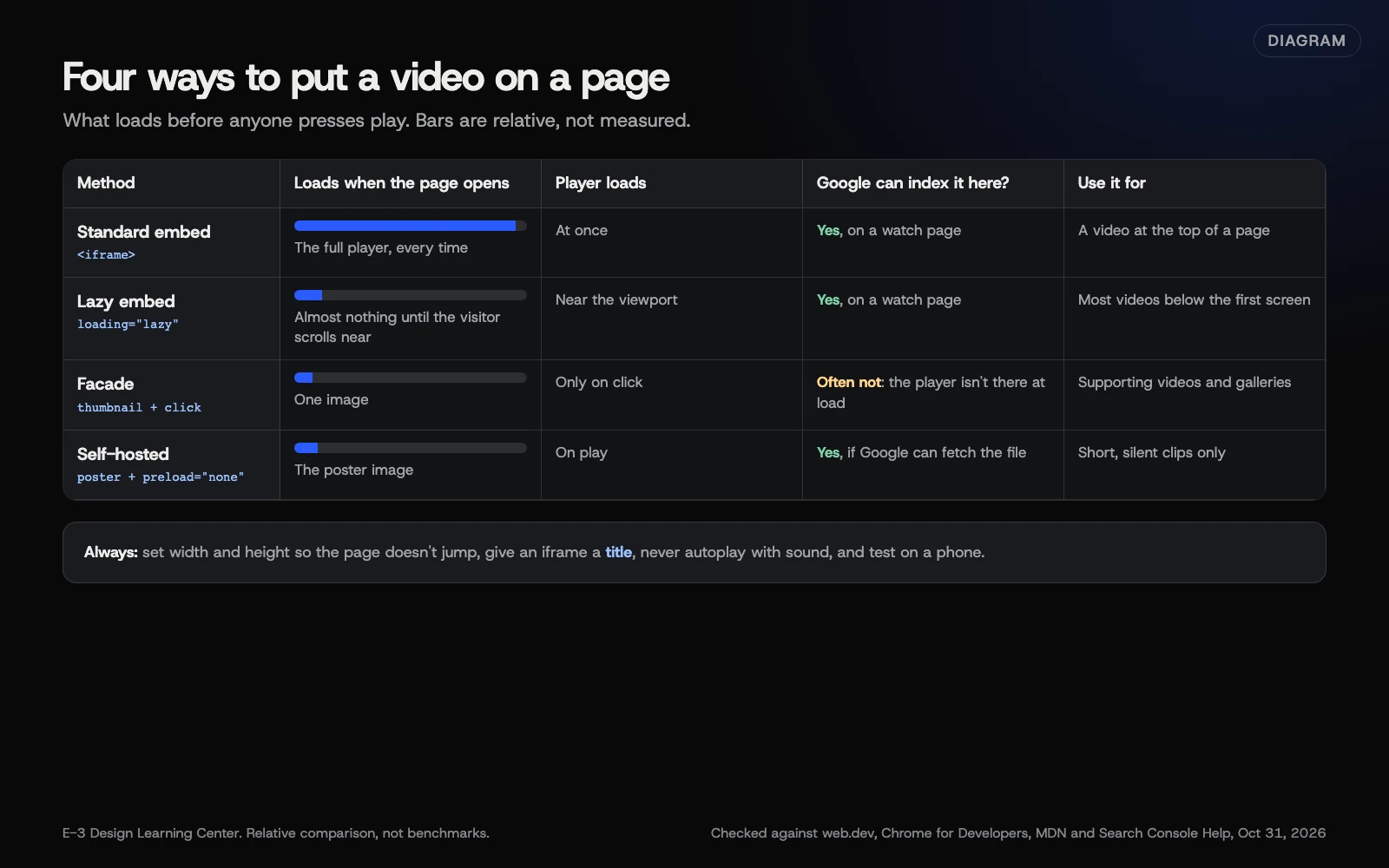 Diagram: four ways to put a video on a page and what each loads before anyone presses play. Relative, not measured. Based on web.dev, Chrome for Developers, MDN and Google Search Central (October 2026).
Option 1: Lazy-load the embed (simple, safe)
A YouTube or Vimeo embed is an <iframe>: a small window to another site. Adding one attribute tells the browser to wait:
<iframe src="https://www.youtube-nocookie.com/embed/VIDEO_ID"
  title="How long does a roof replacement take?"
  loading="lazy" width="560" height="315" allowfullscreen></iframe>
web.dev’s iframe lazy-loading article says browser-level iframe lazy loading is well supported across the major browsers, and that lazy-loading YouTube embeds saves around 500 KB on the first page load. Use it for any video that isn’t on the first screen.
Two notes:
- Don’t lazy-load a video at the very top of the page. It’s on screen straight away, so waiting gains nothing.
- Give the iframe a
title. Screen readers announce it, so describe the video.
WordPress has added loading="lazy" to iframes in post content since version 5.7, as its developer note explains, but only when the iframe has both a width and a height. Page builders may handle it differently. Check by viewing the page source and searching for “loading”.
Option 2: Use a facade (lightest)
A facade is a stand-in: a thumbnail image with a play button that looks like the player. The real player loads only when someone clicks. Chrome’s facades page lists open-source facades, including lite-youtube-embed and lite-vimeo-embed, and WordPress plugins offer the same idea.
The trade-offs, from the same page: facades don’t have every feature of the real embed, and autoplay may not work consistently when a player loads late. That page also notes that Lighthouse 13 removed its audit for this, so the speed test won’t remind you anymore.
Option 3: Self-hosted video done properly
If a video file is on your own site (see YouTube, Vimeo or self-hosted first), set it up like this, using attributes from MDN’s video element page:
<video controls preload="none" poster="/media/roof-poster.jpg"
  width="1280" height="720">
  <source src="/media/roof.mp4" type="video/mp4">
  <track kind="captions" src="/media/roof.vtt" srclang="en" label="English" default>
</video>postershows an image until the video plays. Without it, MDN says nothing shows until the first frame is available.preload="none"asks the browser not to fetch the video in advance. web.dev’s video lazy-loading article calls this the best chance of avoiding loading the video. MDN notes it’s only a hint the browser may ignore.- Width and height reserve space so the page doesn’t jump when the video appears.
loading="lazy"on video is newer. web.dev says browsers have started to support it and others ignore it; it’s safe to add.
Background video loops
A silent looping clip behind a headline is a special case. web.dev’s article uses autoplay muted loop playsinline for it, and says playsinline is needed for autoplay on iOS. MDN notes browsers block autoplay with sound. Keep the file small, and ask whether the page needs it at all.
Those attributes only cover playback. A loop that moves for more than five seconds alongside other content also needs a way to stop it: WCAG’s Pause, Stop, Hide rule asks for a control to pause, stop or hide it. So a complete background video also has:
- A visible pause button that works with a keyboard and has a clear label, such as “Pause background video.”
- A reduced-motion setting respected. If a visitor has asked their device for less motion, show the poster image instead of playing the loop.
Test both before you call it done: tab to the button and press it, then turn on reduced motion on a phone or computer and reload the page. Ask whoever builds your site to set this up.
Will a facade stop Google from finding my video?
It can. Google’s video indexing report help lists “Cannot determine video position and size” as a reason a video isn’t indexed, often because a thumbnail must be clicked before the player appears. Google’s video guidance also says not to require a click to load the video.
So choose by the page’s job:
| The page | What to use |
|---|---|
| A service page with a supporting video | Facade or lazy embed. Google only indexes videos that are the main content of a page anyway. |
| A page built around one video you want in Google’s video results | A real player, lazy-loaded if it’s below the first screen. See video schema. |
| Several videos in a gallery | Facades. |
| A video at the top of the page | A real player, not lazy-loaded, with a poster or thumbnail. |
Why does this matter?
Speed is part of how visitors judge a site, especially on phones. Google’s Core Web Vitals measure loading, responsiveness and visual stability; see our answer on Core Web Vitals. web.dev’s LCP article says for a video, the poster image’s load time or the first frame counts, whichever is earlier, and a good LCP is 2.5 seconds or less. So a large, slow poster at the top of the page can be what holds the score back. Compress posters like any image; see image sizes.
What are the common mistakes?
- Three embeds on the home page, each loading a full player.
- Autoplay with sound. Browsers block it, and visitors leave.
- A huge poster image straight out of the phone. Resize and compress it.
- No width and height, so content jumps when the player appears.
- A facade on a page meant to rank in video results, which can stop Google seeing the video.
- Privacy forgotten. YouTube’s embed page describes privacy-enhanced mode at youtube-nocookie.com. Mention embedded video in your privacy policy. This isn’t legal advice.
What if this didn’t work?
- The page is still slow. Run it through our speed test and look at what loads first. The video may not be the cause.
- The facade shows a blank box. The plugin may be blocked by another script or a caching setting. Clear the cache and test again.
- Autoplay doesn’t start on iPhone. Add
mutedandplaysinline. Keep the pause button and reduced-motion check too. - The layout jumps. Set width and height, or an aspect-ratio rule, on the player.
How much does it cost, and how long does it take?
Lazy loading and facades are free. Adding loading="lazy" to an embed takes minutes. Installing and testing a facade plugin takes an hour or two, including checking every page with video on a phone.
How does E-3 handle this?
Speed is part of our SEO and AI search service and our speed program. We add or change video embeds on a staging copy first, and a person checks the page.
Related questions
Sources
- Understanding Success Criterion 2.2.2: Pause, Stop, Hide (W3C)
- It's time to lazy-load offscreen iframes (web.dev)
- Lazy loading video (web.dev)
- Lazy load third-party resources with facades (Chrome for Developers)
- <video>: The Video Embed element (MDN Web Docs)
- Largest Contentful Paint (LCP) (web.dev)
- Video indexing report (Search Console Help)
- Lazy-loading iframes in 5.7 (Make WordPress Core, February 19, 2021)
- Embed videos & playlists (YouTube Help)
Next step
- Next: YouTube, Vimeo or self-hosted: where should my videos live?The next guide in Video.
- Free website checkPublic checks on your own site, then an action plan of what to fix first.
Still stuck? Ask E-3 for an answer from our help guides.
Rather we handled video for you?
It’s part of what we do every week for small businesses, as part of seo and ai search. Start with a free check of your site and profile, or call and ask.