
How do I film good business video on my phone?
Face a window or other soft light, get the phone's microphone close to whoever is talking in a quiet room, and hold the phone steady with two hands, a tripod or a clamp. Turn on the grid and level, lock focus and exposure on your face, clean the lens, and record a short test before the real take.
The short version
- Light: face a window or soft light. Never stand with a bright window behind you.
- Sound: a quiet room with soft surfaces, and the microphone close to the speaker.
- Steady: a tripod, a clamp or two hands and elbows tucked in. Turn on the grid and level.
- Focus: tap your face, then hold to lock focus and exposure so it doesn’t drift.
- Test: record 10 seconds, play it back with headphones, then do the real take.
How do I set up a shot?
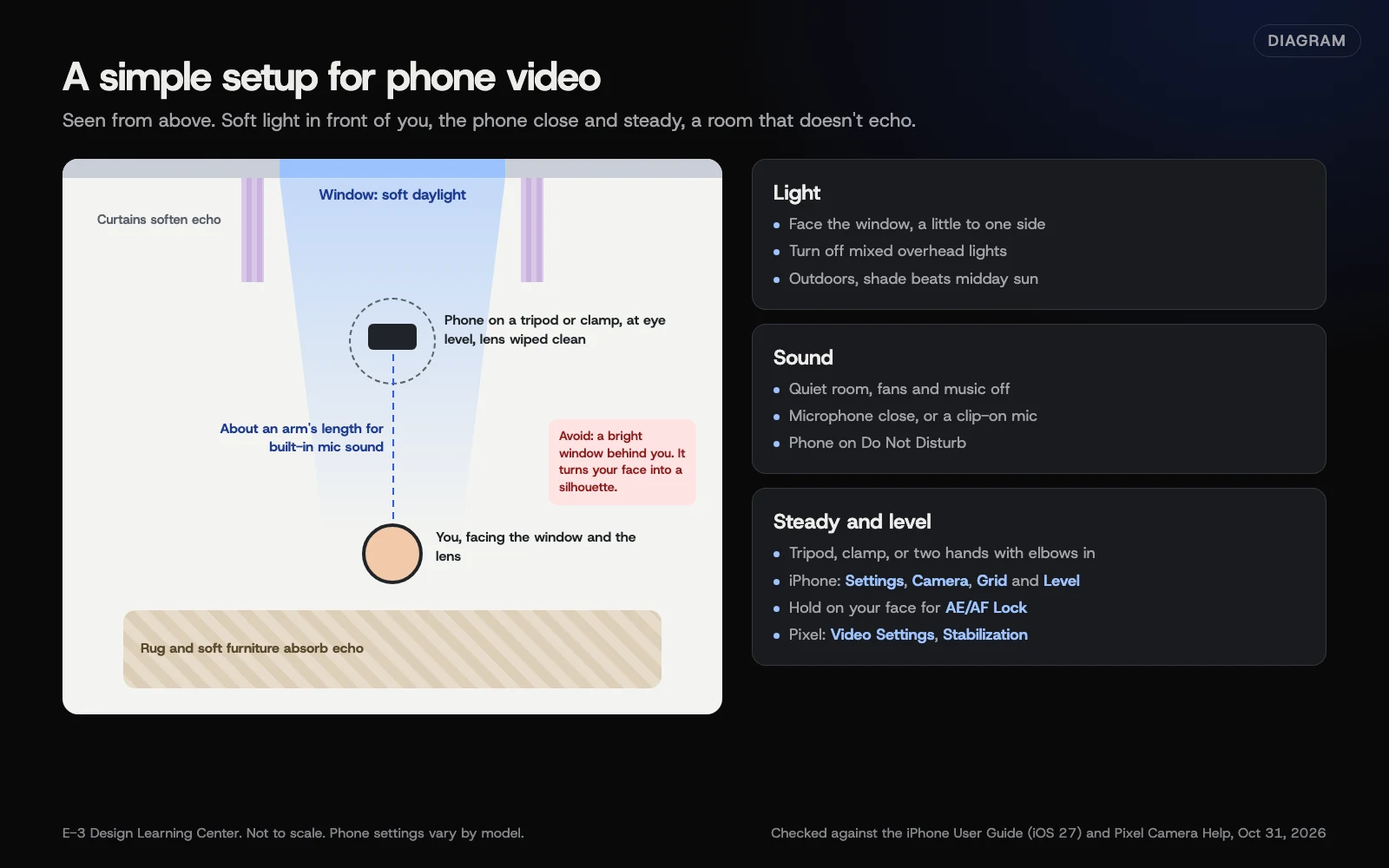 Diagram: a simple phone filming setup seen from above, with light, sound and steadiness checks. Based on the iPhone User Guide (iOS 27) and Pixel Camera Help (October 2026).
1. Get the light right
Light decides whether a phone video looks professional or murky. The phone’s camera does its best work with plenty of soft, even light.
- Face the window. Daylight from a window in front of you, a little to one side, is the best free light there is.
- Never backlight. A bright window behind you turns your face into a silhouette.
- Avoid mixed light. Overhead fluorescent tubes plus daylight give odd skin tones. Turn off the overheads if the window is enough.
- Overcast beats sun outdoors. Hard midday sun makes squinting and dark eye shadows; shade or a cloudy day is easier.
- One lamp helps in a dark room. Point it at a wall or ceiling so the light bounces softly onto you.
2. Get the sound right
People will watch a slightly soft picture. They won’t sit through sound they can’t understand. Clear audio matters more than anything else on this list.
- Get close. The phone’s microphone is on the phone. An arm’s length away is about as far as it can be for a talking video.
- Choose a soft room. Rugs, curtains, sofas and bookshelves soak up echo. Bare kitchens and empty offices bounce sound.
- Kill background noise. Turn off music and notification sounds, and put the phone in Do Not Disturb. Switch off a fan or compressor only where it’s safe and allowed; never interrupt ventilation, refrigeration or safety equipment that needs to keep running. Otherwise, move away from the noise.
- Use a clip-on microphone for videos where you move around or stand farther back. Many plug into the phone or connect wirelessly.
- Wind outdoors. Apple’s sound recording page says iPhone 16 and later reduce wind noise automatically when recording in Spatial Audio or Stereo. Still, find shelter from the wind.
3. Keep it steady
- A tripod or clamp is the single best low-cost upgrade. Set the phone at eye level.
- Handheld: two hands, elbows tucked in, and walk slowly with bent knees.
- Use stabilization. On iPhone, Apple’s video settings page says Enhanced Stabilization is on by default on supported models. For walking shots, Apple’s record a video page describes Action mode, which works best in bright light and records at up to 2.8K. On a Pixel, Google’s Pixel Camera help says to open Video Settings, then Stabilization, and choose Standard, Locked for still shots, or Active for heavy movement (Locked and Active are on Pixel 4a (5G) and later).
4. Turn on the helpers
- Grid and level. On iPhone, Apple’s camera tools page says to open Settings, then Camera, and turn on Grid and Level. Pixel Camera has gridlines in its camera settings.
- Lock focus and exposure. On iPhone, tap your face on the screen, then touch and hold until you see AE/AF Lock. That stops the picture pulsing brighter and darker as you move.
- Clean the lens. A smudged lens makes everything look hazy. Apple’s advanced camera settings page says supported iPhones detect a smudge and suggest cleaning it. Wipe it with a soft cloth anyway.
5. Choose the format
- Horizontal for videos on your website and regular YouTube videos.
- Vertical for Shorts, Reels and TikTok. See short-form video.
- Resolution: 1080p (HD) at 30 frames per second is plenty for most business video and keeps files manageable. Apple notes that higher resolutions and frame rates make larger files. You change it on iPhone under Settings, Camera, Record Video, or by tapping the values at the top of the screen in Video mode.
6. Record a test
Film 10 seconds, then watch it with headphones. Can you hear every word? Is your face bright and in focus? Is the frame level? Fix what’s off, then record the real take. Do two or three full takes; the third is often the most relaxed.
Why do light, sound and steadiness matter so much?
Because a phone handles everything else automatically. Focus, color and exposure are handled by the phone’s software, which works best when it has good light. What it can’t fix is a noisy room, a microphone two meters away or a frame that wobbles. Those three habits are what separate a video people finish from one they close.
What are the common mistakes?
- Filming from below. A phone on a desk looks up your nose. Raise it to eye level.
- Digital zoom. Pinching to zoom lowers quality. Move closer instead, or use the phone’s other lenses.
- Too much headroom. Keep your eyes about a third of the way down the frame; the grid helps.
- Reading off a screen beside the camera. Your eyes wander. Talk from a few bullet points and look at the lens.
- Filming customers or staff without asking. Get permission first, and keep addresses and plates out of shot.
- Storage running out mid-take. Clear space before you start; higher resolutions fill a phone fast.
What if the video still looks or sounds bad?
- Grainy picture. Not enough light. Move to the window or add a lamp.
- Picture keeps changing brightness. Lock focus and exposure.
- Echo. Move to a smaller room with soft furnishings, or get the microphone closer.
- Hum or hiss. Look for a fan, fridge or air handler. Move away from it, or switch it off for the take only if that’s safe and allowed; never turn off equipment that must keep running.
- Shaky walking shot. Turn on Action mode or Active stabilization, and walk slower.
How much does it cost, and how long does it take?
Your phone is enough. A small tripod or a phone clamp and a clip-on microphone are inexpensive compared with a camera, though prices vary by brand. Setting up a corner of your shop as a regular filming spot takes an hour once, and then each video starts in minutes.
How does E-3 handle this?
When you send us a finished video as a YouTube or Vimeo link, we add it to your site as part of our SEO and AI search service, and add it on a staging copy first.
Related questions
Sources
- Record a video with your iPhone camera (iPhone User Guide)
- Change video recording settings on iPhone (iPhone User Guide)
- Change sound recording options on iPhone (iPhone User Guide)
- Use iPhone camera tools to set up your shot (iPhone User Guide)
- Change advanced camera settings on iPhone (iPhone User Guide)
- Record videos with Pixel Camera (Pixel Camera Help)
- Get started creating YouTube Shorts (YouTube Help)
Next step
- Next: How do I add captions and transcripts to my videos?The next guide in Video.
- Free website checkPublic checks on your own site, then an action plan of what to fix first.
Still stuck? Ask E-3 for an answer from our help guides.
Rather we handled video for you?
It’s part of what we do every week for small businesses, as part of seo and ai search. Start with a free check of your site and profile, or call and ask.