
How do I add captions and transcripts to my videos?
Turn on YouTube's automatic captions, then correct them in YouTube Studio under Subtitles, because the W3C says automatic captions must be edited for accuracy. Include who is speaking and important sounds. Put a transcript, or a link to one, right under the video on your page. For prerecorded video with sound, captions are a WCAG Level A requirement.
The short version
- Let YouTube make automatic captions, then correct them under Subtitles in YouTube Studio.
- Captions include who’s speaking and sounds that matter, not just the words.
- Put a transcript, or a link to one, right under the video on your page.
- Burned-in text counts as captions only if it’s complete. On your main videos, closed captions are better, because viewers can turn them off or adjust them.
- WCAG lists captions for prerecorded video with sound at Level A. This isn’t legal advice.
How do I caption a video on YouTube?
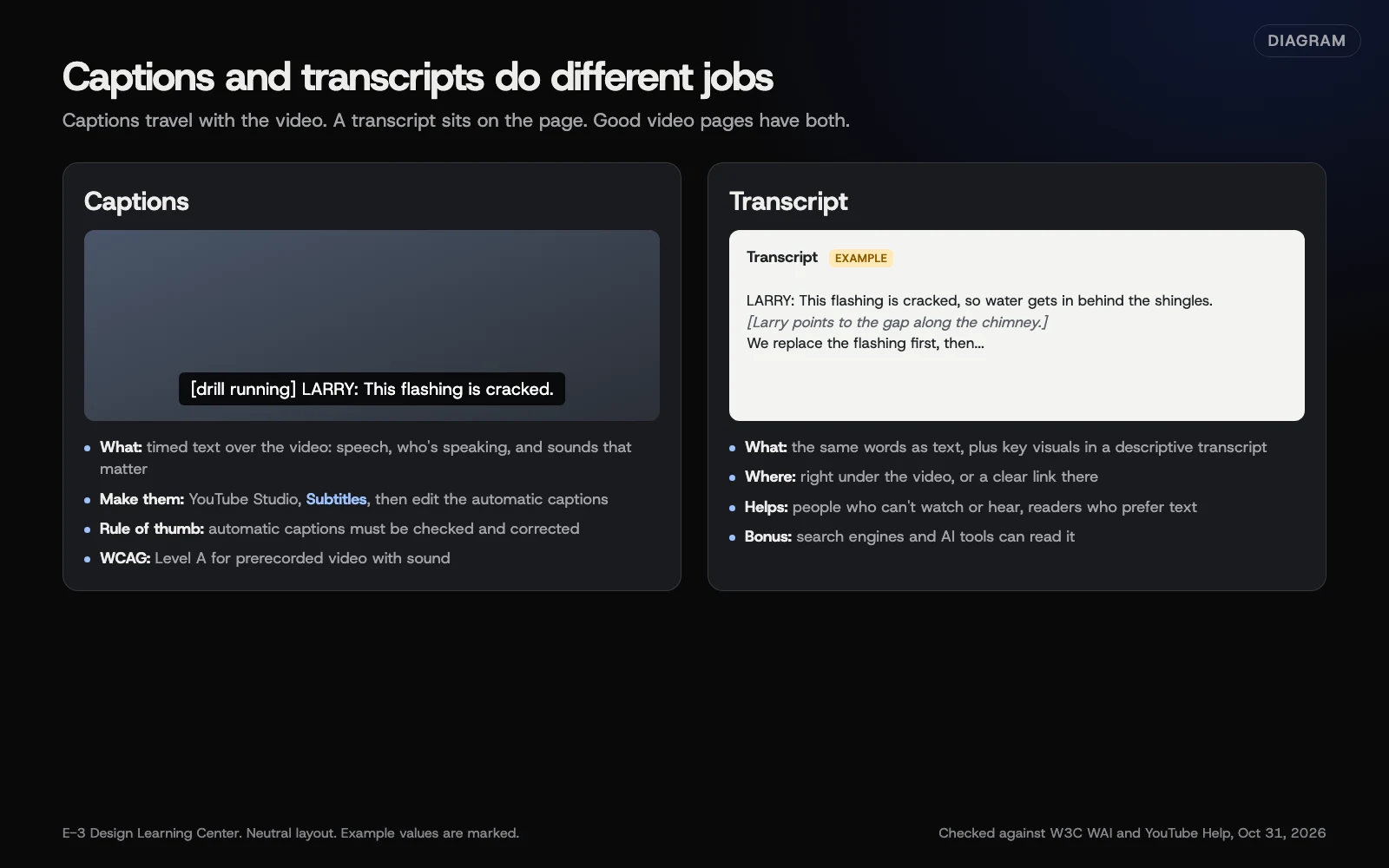 Diagram: what captions and transcripts each contain, who they help, and where they go. Based on W3C WAI captions and transcripts guidance and YouTube Help (October 2026).
Option 1: Fix the automatic captions (fastest)
YouTube makes automatic captions for many languages, but they’re machine-made. YouTube’s automatic captions page says they can get speech wrong because of accents, dialects, mispronunciations and background noise, and that they may not be ready right after upload. To review them:
- Sign in to YouTube Studio.
- From the left menu, select Subtitles.
- Click the video.
- Next to the automatic subtitles, click More, and edit any words that are wrong.
Check names, street names, product names and trade terms first. They aren’t everyday words, so automatic captions often miss them.
Option 2: Add your own captions
YouTube’s subtitles page gives three ways, starting in YouTube Studio under Subtitles, choosing the video, then Add language and, under Subtitles, Add:
- Upload file. If you have a caption file from an editing app or a service, choose With timing, or Without timing for a plain transcript, and upload it.
- Auto-sync. Paste or upload a transcript of what’s said, and YouTube matches the timing. YouTube doesn’t recommend it for videos over an hour or with poor audio.
- Type manually. Play the video and type as you go; YouTube sets the timing. Then select Publish.
If you wrote an outline or script, auto-sync is quick: edit the script to match what you actually said, paste it in, and let YouTube time it.
Captions on short clips
TikTok’s auto captions announcement says creators choose auto captions on the editing page and can edit the text, and viewers can turn them off. YouTube’s automatic captions page says they work on Shorts too, and Instagram added automatic captions for videos in 2022, as TechCrunch reported. Correct them before posting. Many short clips also carry “burned-in” text, typed onto the picture in an editing app. The W3C’s captions page counts these as open captions, which are always shown and can’t be turned off. Complete, accurate open captions are real captions. A few highlighted words or a headline on screen aren’t: they leave out most of what’s said. For your main videos, closed captions are the better choice, since viewers can hide them, and some players let viewers change how they look.
Captions on a self-hosted video
If a video file is uploaded to your own site, captions go in a separate WebVTT file (ending in .vtt), attached with a <track> element, as MDN’s video element page shows. Most editing apps and caption services can export one. This is a job for whoever builds your site.
What should good captions include?
The W3C describes captions as a text version of the speech and the non-speech audio needed to understand the content. In practice:
- Every spoken word, including what other people say in the shot.
- Who’s speaking, when it isn’t obvious.
- Sounds that matter: [phone ringing], [drill running], [laughs].
- Correct spelling of names, places and terms.
- Readable timing: short lines that stay up long enough to read.
How do I add a transcript?
A transcript is the same words as plain text on your page. The W3C’s transcripts page says to place it, or a link to it, right under the video. A descriptive transcript also describes the important visuals, like “Larry points to the cracked flashing on the roof,” which helps people who are both deaf and blind.
The easy way: copy your corrected YouTube captions, tidy them into paragraphs, add a few visual notes, and paste them under the video. A collapsible “Read the transcript” section keeps the page neat.
What about the visuals?
Captions and a transcript cover the sound. If the video shows something people need to see to understand it, such as a step being demonstrated or text on screen that nobody reads out, the W3C’s planning guide says that’s a separate requirement. At WCAG Level A, an audio description or a descriptive transcript covers it; at Level AA, you need audio description. The easiest fix is to say out loud what you’re showing as you film. If the visuals only support what’s spoken, no description is needed, and the W3C suggests telling viewers so.
Why do captions matter?
- Access. Captions let deaf and hard-of-hearing people follow your video. The W3C lists captions for prerecorded video with needed audio at WCAG Level A, and for live video at Level AA.
- Sound off. Plenty of people watch with the sound muted, at work or on a bus. Captions keep them watching.
- Understanding. Some people take in written words more easily than speech, as the W3C notes.
- Text for search. A transcript gives search engines and AI tools readable words about your video. It doesn’t guarantee better ranking, but a page with a transcript says more than a page with only a player.
Accessibility law in the US is complicated and changing. Our answers on ADA website accessibility and our practical start on accessibility explain more. This isn’t legal advice.
What are the common mistakes?
- Publishing automatic captions unedited. The W3C is direct: you need to edit them for accuracy.
- Leaving out the speaker or sounds. “[Customer] Thank you!” says more than “Thank you!”
- Captions only in the picture. Burned-in text can’t be resized, translated or read by screen readers. Use real captions on your main videos.
- Transcript on a different page with no link. Put it, or a clear link, right under the video.
- Overlapping speech. YouTube says overlapping speakers make automatic captions miss words. Take turns talking on camera.
What if this didn’t work?
- No automatic captions appeared. YouTube lists the usual causes: unsupported language, poor sound, a long silence at the start, overlapping speakers, or a long video. Upload your own captions instead.
- A word keeps showing as ”[ __ ].” YouTube hides possibly inappropriate words in automatic captions by default. Correct the line by editing it.
- Auto-sync timing is off. Check the transcript matches what was said, word for word.
How much does it cost, and how long does it take?
YouTube’s automatic captions are free. Correcting them takes about as long as the video plus a few minutes. Paid caption services exist and are priced by the vendor. A transcript from corrected captions takes 10 to 20 minutes to tidy.
How does E-3 handle this?
We add client videos to their pages as part of our SEO and AI search service. Adding a transcript under a video is an ordinary page edit: ask for it and we make it.
Related questions
Sources
- Captions/Subtitles (W3C Web Accessibility Initiative)
- Planning audio and video media (W3C Web Accessibility Initiative)
- Transcripts (W3C Web Accessibility Initiative)
- Use automatic captioning (YouTube Help)
- Add subtitles & captions (YouTube Help)
- <video>: The Video Embed element (MDN Web Docs)
- Instagram is rolling out auto-generated captions for videos (TechCrunch, March 1, 2022)
- Introducing auto captions (TikTok Newsroom, April 6, 2021)
Next step
- Next: How do I embed video without slowing down my site?The next guide in Video.
- Free website checkPublic checks on your own site, then an action plan of what to fix first.
Still stuck? Ask E-3 for an answer from our help guides.
Rather we handled video for you?
It’s part of what we do every week for small businesses, as part of seo and ai search. Start with a free check of your site and profile, or call and ask.