
What should I do in the first 90 days after launch?
In week one, fix errors, broken links and anything that fails on phones. In the first month, watch Search Console's page indexing report and your analytics to see which pages bring visits and leads. By day 90, answer the questions customers still ask by phone, sharpen pages seen but not clicked, and ask happy customers for reviews.
Download the launch checklist (PDF)5 pages, 350 KB, free to print. What's inside
The short version
- Days 1 to 7: fix. Errors, broken links, forms, phones.
- Days 8 to 30: measure. Indexing, visits, leads, and the questions people still ask.
- Days 31 to 90: improve. Answer those questions, sharpen weak pages, gather reviews.
- Google says it can take a few weeks to notice a new site. Don’t panic in week two.
- Book a 90-day review on the calendar on launch day.
Why do the first 90 days matter?
Launch is when real customers start using the site, and they usually find things a review didn’t. It’s also when search engines are discovering the new pages. Google’s guide to getting on Google says it “can take a few weeks for Google to notice a new site, or any changes in your existing site.” What you fix and add in this window shapes how the site performs for years.
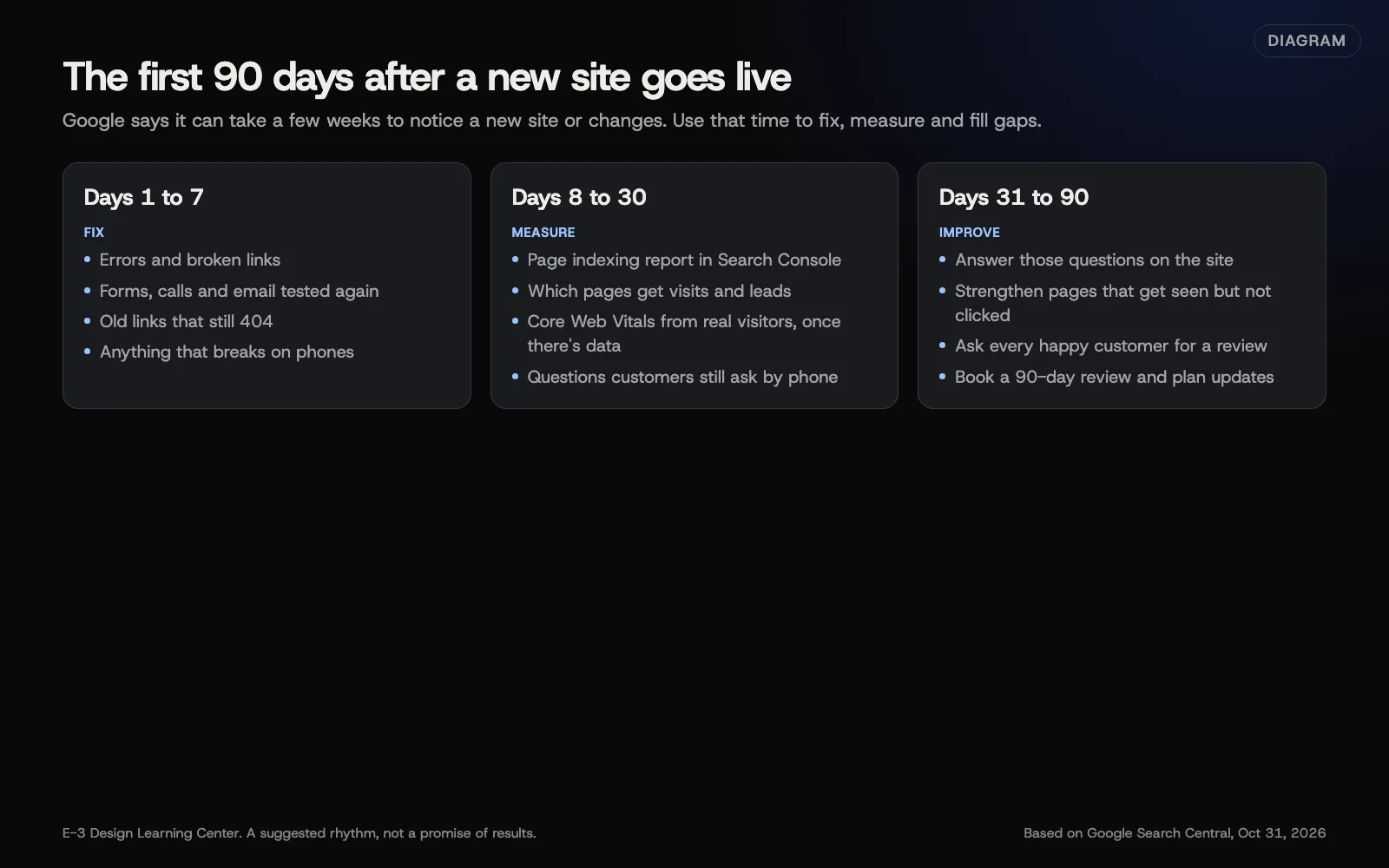 Diagram: a suggested rhythm for the first 90 days after launch, based on Google Search Central (October 2026). Not a promise of results.
What should I do in week one?
- Work through anything left from the launch checklist.
- Send a test through every form again, and call your own phone link from a phone.
- Check old addresses that customers or other sites still use. Add redirects for any that show a “not found” page.
- Ask two or three customers or friends to use the site on their phones and tell you what confused them.
- Fix anything broken first. Polish can wait.
What should I measure in the first month?
Is Google finding the pages?
Open Search Console’s page indexing report. It shows which pages Google has indexed and why others aren’t. Our guide to the page indexing report explains the reasons. A few “not indexed” pages early on is normal. The thing to catch is a whole section missing, which usually means a leftover noindex or a robots.txt block.
Which pages bring visits and leads?
In Google Analytics, check which pages people land on and which lead to a call, form or booking. Those actions should be set up as key events, which Google describes as actions “particularly important to the success of your business.” See setting up key events and where visitors come from.
How fast is it for real visitors?
Search Console’s Core Web Vitals report fills in once enough people have visited. Until then, test on a real phone.
What do customers still ask?
Ask whoever answers the phone to note every question for a month. Each repeated question is a page, or a paragraph, the site is missing.
What should I improve by day 90?
- Answer the questions customers still ask, on the page where they’d look for the answer. Google’s people-first content guidance is built around one test: does the page give people what they came for?
- Strengthen pages that get seen but not clicked. Search Console’s performance report shows pages with impressions and few clicks. A clearer title and description often help. See the performance report.
- Strengthen pages that get visits but no leads. Make the next step obvious, and check the form works on phones.
- Ask for reviews. Every customer, the same way each time, whatever the outcome. See getting more reviews.
- Add the pages you marked “later” in your page plan, starting with the ones customers ask about.
What are the common mistakes?
- Judging the site in week two. Search takes weeks to settle.
- Not looking at all. A site nobody checks slowly breaks.
- Chasing traffic instead of leads. More visits matter only if more people call or book.
- Changing everything at once. Change a few things, then watch what happens.
- Letting the content go stale. Old hours or prices undo good work quickly.
What if traffic dropped after a redesign?
Some movement in the first weeks is normal. A sharp, lasting drop usually points to missing redirects, a noindex left on, or important pages removed. See what to do if traffic drops after launch and why traffic dropped.
How much does it cost, and how long does it take?
Checking takes about an hour a week in the first month, then an hour a month. Content improvements take as long as the writing does. We can’t promise rankings or results, and you should be wary of anyone who does.
How does E-3 handle this?
E-3 sets up Search Console and adds itself as a user, so we can see indexing problems after launch. Our website care includes uptime monitoring, updates tested on a staging copy first, daily backups and security alerts. See what’s included and our website care service.
Related questions
Next step
- Planning a new website: the complete guideEvery guide in this topic, in order.
- Website launch checklistA free printable checklist (PDF).
Still stuck? Ask E-3 for an answer from our help guides.
Rather we handled planning a new website for you?
It’s part of what we do every week for small businesses, as part of websites and redesigns. Start with a free check of your site and profile, or call and ask.