
Planning a new website: the complete small-business guide
Plan a new website in order: write a one-page brief, gather real content, turn it into a page plan, choose a platform you can own and maintain, review designs with one decision-maker, build on a private staging copy, set accessibility and speed targets from the start, launch with a checklist, then spend 90 days fixing and improving.
Download the launch checklist (PDF)5 pages, 350 KB, free to print. What's inside
Download the hiring checklist (PDF)6 pages, 437 KB, free to print. What's inside
The short version
- Write a one-page brief: customers, the actions you want, must-haves, budget range, deadline, one decision-maker.
- Gather real content before design, then turn it into a page plan.
- Choose a platform you can own, maintain and leave if you need to.
- Review designs on a phone, send one combined list of feedback, and approve the build on staging.
- Set accessibility and speed targets on day one, launch with a checklist, then improve for 90 days.
How do I plan a new website, step by step?
Whether it’s your first site or a replacement, the order is the same. Each step depends on the one before it, and skipping ahead is a common cause of delays.
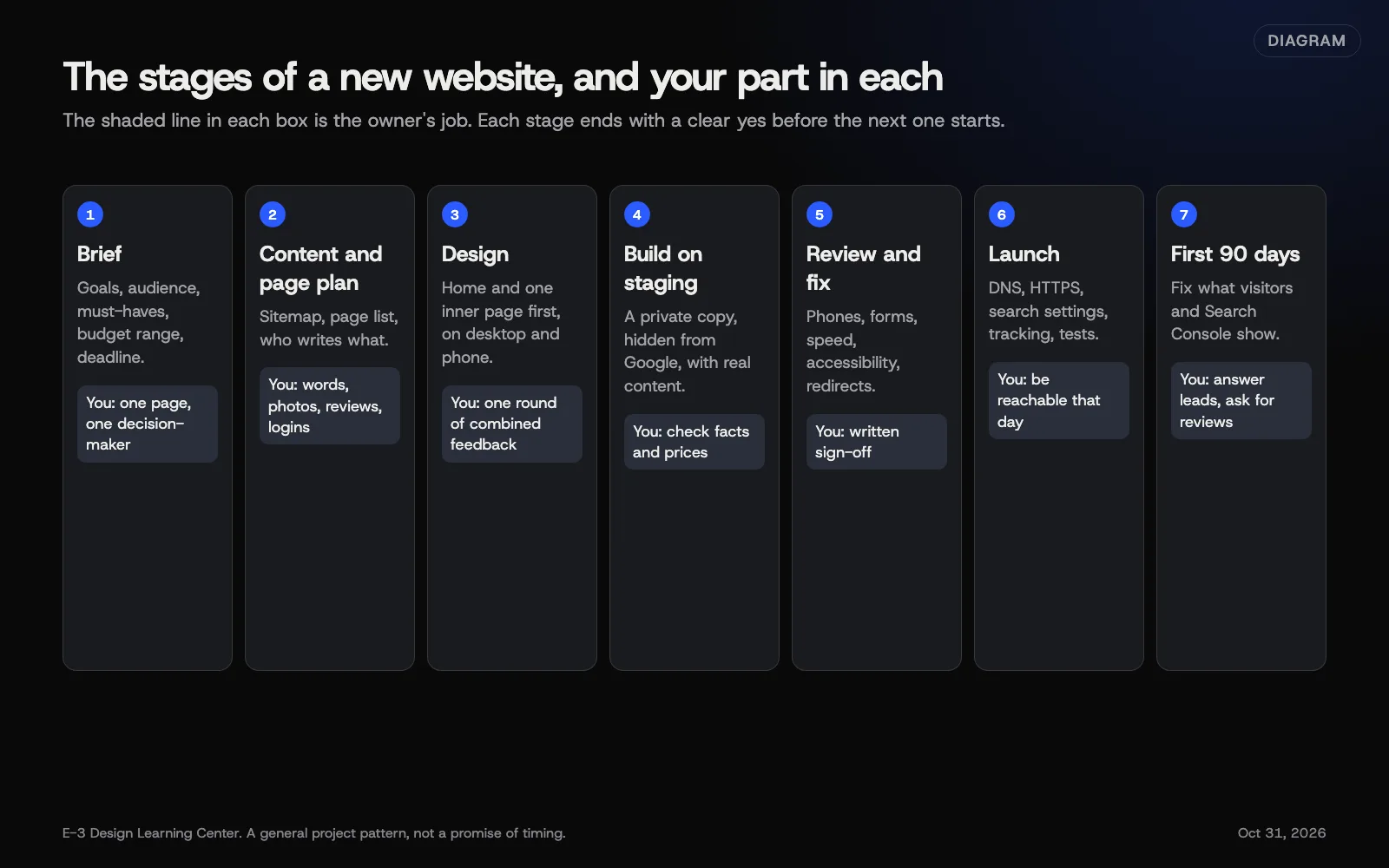 Diagram: the stages of a website project and the owner’s part in each. A general pattern, not a promise of timing.
1. Decide whether you need a new site at all
If you have a site already, start by asking whether to fix it or replace it. Fix it if it runs on a supported platform, works on phones and mainly needs speed work, updates and better content. Replace it if it’s hard to use on a phone, you can’t make simple changes, or it no longer matches the business. Our answer on redesign or fix goes through the signs, and how to prepare for a redesign lists what to gather first.
2. Write a one-page brief
A brief tells every designer the same thing, so their quotes can be compared. It covers who your customers are, the one or two actions you want them to take, the pages and features you know you need, what must carry over from the old site, a budget range, a deadline tied to something real, one decision-maker, and how you’ll judge success. Our guide to writing a website brief has a template you can copy.
3. Choose who will build it
Look for recent work for businesses like yours, plain explanations, and the domain and accounts registered in your name. Our answer on choosing a web design company covers the comparison, and our article on questions to ask a web company gives you 18 questions to put in writing.
4. Gather real content before design
Real words and photos shape a better design than placeholder text. For each page you need its purpose, the facts, the questions customers ask about it, and real photos. Google’s guidance on people-first content asks whether a page offers original information and first-hand expertise, which only the business can supply. Our guide to content before design lists what each page needs.
5. Turn it into a page plan
List every service and every question customers ask, give each a page, and group them under five or six menu items.
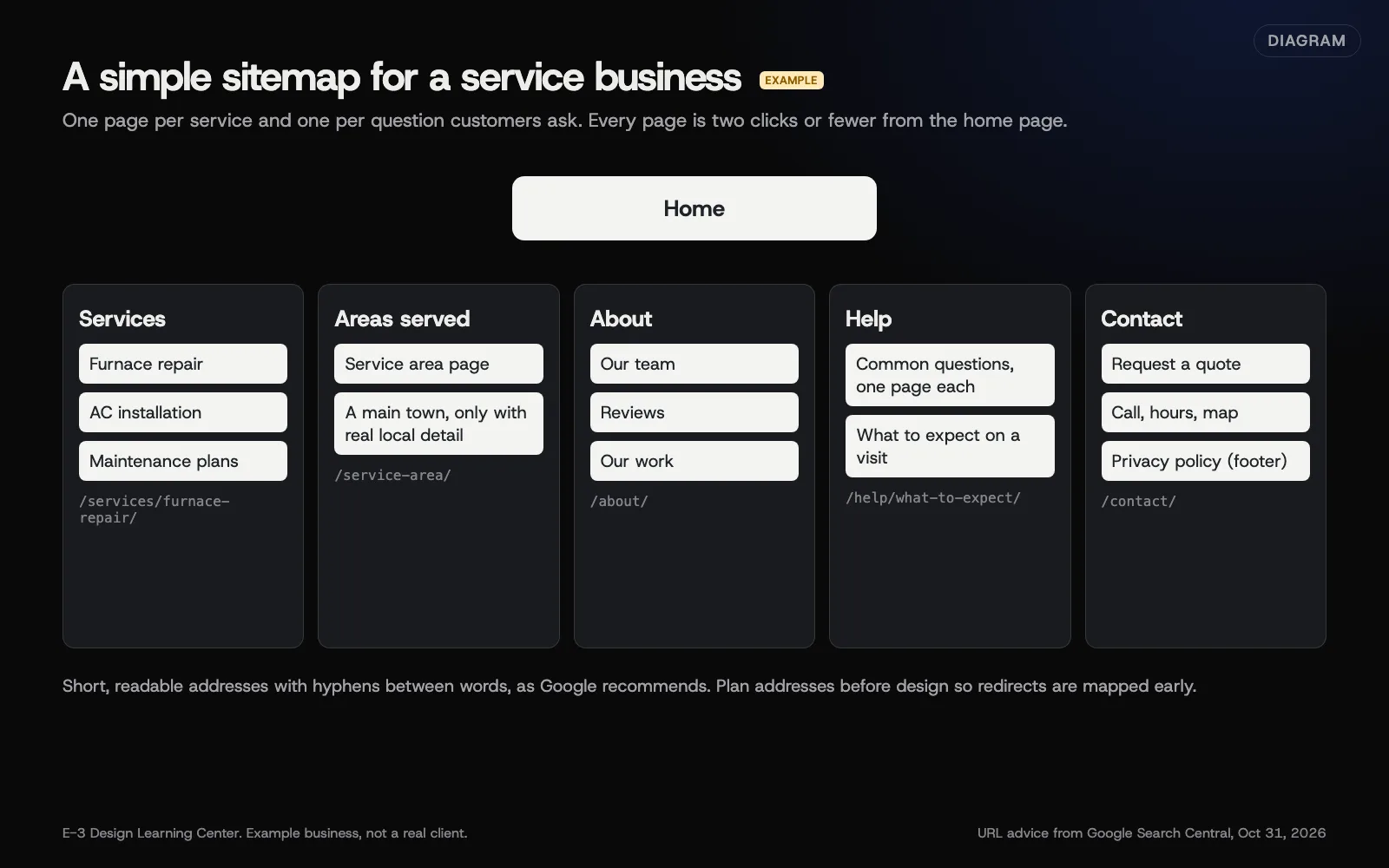 Diagram: an example sitemap for a small service business, with URL advice from Google Search Central (October 2026). The business is an example, not a client.
Decide page addresses now. Google’s URL structure guidance recommends readable words, hyphens between words and a simple structure. If you’re replacing a site, map every old address to a new page at this stage. See how to plan the pages.
6. Choose the platform
| If… | Lean toward |
|---|---|
| You want to own the whole site and move it freely | WordPress or a static build |
| Selling products is the main job | Shopify, or WooCommerce on WordPress |
| You’ll run a simple site yourself and won’t move it | A hosted builder such as Squarespace or Wix |
| Pages rarely change and speed matters most | A static build |
WordPress.org describes WordPress as open source under the GPL, so you can run it on any host. Hosted builders are easier to start but harder to leave: Wix says its sites need to be hosted on Wix’s servers, and Squarespace exports only some content. Our guide to choosing a platform compares them in full.
7. Set accessibility and speed targets on day one
Two lines in the brief save a lot of rework:
- “The site must meet WCAG 2.2 Level AA.” WCAG 2.2 has been a W3C Recommendation since October 2023. The US Department of Justice’s web guidance calls WCAG “helpful guidance” for businesses open to the public. See accessibility from day one. This isn’t legal advice.
- “Key pages must meet Google’s Core Web Vitals ‘good’ thresholds on mobile.” web.dev’s Web Vitals page sets those at 2.5 seconds for the main content, 200 milliseconds to respond to a tap, and a layout shift of 0.1 or less. See speed from day one.
8. Review designs and approve the build on staging
Review designs on a phone first, then a computer. Send one numbered list of feedback from one decision-maker, describing problems rather than prescribing fixes. The build should happen on a private staging copy that search engines can’t see; Google’s noindex guide explains how that’s done, and why a robots.txt block alone doesn’t do it. Check every fact, price and form there, then give written sign-off. See giving feedback and approving a design and what a staging site is.
9. Launch with a checklist
Launch in three passes: the week before (sign-off, forms, redirect map, saved DNS records, logins), launch day (domain, HTTPS, remove the staging noindex, robots.txt, redirects, analytics, sitemap) and the week after (Search Console, broken links, phone speed, email, Google profile, monitoring). Our launch checklist lists every item. If you’re replacing a site that already ranks, also read redesigning without losing what works.
10. Spend 90 days fixing and improving
Google says it can take a few weeks to notice a new site or changes. Use that time: fix in week one, measure in the first month, then improve by answering the questions customers still ask. See the first 90 days.
What’s different when you’re replacing a site?
A first website starts from a blank page. A replacement starts with history, and that history is worth protecting:
- Pages that already bring visits and leads. Find them in Search Console and Analytics before anything changes, and keep or improve them rather than starting over.
- Addresses people and other sites already use. Every old address needs a permanent redirect to its closest new page.
- Accounts and access. Work out who holds the domain, hosting, analytics and Google profile logins. A replacement project is the best moment to move them into the business’s name.
- Forms and email. Old forms may send through settings nobody remembers. Test the new ones, and don’t let a DNS change for the website touch your email records.
None of this changes the order of the steps above. It adds a short audit before the brief. Our article on redesigning without losing what works walks through that audit page by page.
Why does planning matter so much?
Much of what goes wrong with a new website is decided before anyone opens a design tool. A missing brief leads to quotes that can’t be compared. Missing content leads to a site that looks finished but can’t launch. A platform chosen for its demo leads to a site you can’t leave. A forgotten redirect map leads to lost search traffic. Each of these costs little to prevent and a lot to fix.
Planning also keeps the site about customers. The questions in a good brief, who is this for and what should they do, are the same questions that make a page useful to a visitor and clear to a search engine or AI assistant.
What are the most common mistakes?
- Starting with the look. Colors and fonts come after purpose and content.
- No single decision-maker. Conflicting feedback slows every round.
- Placeholder content. Real words arrive late and don’t fit.
- A platform you can’t leave, chosen before asking about exports.
- Accessibility and speed as afterthoughts. Retrofitting costs more.
- Feature creep during review. Keep a “phase two” list.
- The staging noindex left on at launch.
- Accounts in someone else’s name. Domain, hosting, analytics and Search Console should belong to the business. See owning your digital assets.
What if the project goes off track?
- It’s stalled. Find what it’s waiting for: usually content, a decision or a login. See how long a redesign takes.
- The design isn’t right. Go back to the brief. Is the problem the design, or something the brief never said?
- Traffic dropped after launch. Check redirects, noindex and removed pages first. See will a redesign hurt my rankings.
- You and the designer have parted ways. Make sure you have every login and a full backup. See what to get when your new website is finished.
How much does it cost, and how long does it take?
There’s no single price. Cost depends on how many pages you need, who writes the words, the design, and what the site has to do, such as bookings, payments or logins, plus the ongoing side: hosting, updates, backups and security. Our answer on how much a small business website costs explains each factor, and our website cost estimator helps you think through them.
Time depends less on the build than on everything around it: content readiness, how quickly decisions are made, extra features, and launch details like redirects and DNS. See how long a redesign takes.
How does E-3 handle this?
“Can you redesign my website?” comes up about 106 times in our support records, and new sites and redesigns together account for about 150 requests. E-3 builds custom websites and redesigns on WordPress or as fast static builds. Every project starts with a short call and a free check of your current site, then a plan you approve. Redesigns are tested on a staging copy first, and you try a working preview on your own phone before anything goes live. Accounts we set up are in your business’s name with E-3 added as a user, domains we manage are registered to you, and we save your DNS records before changing them. We’ll quote after a short call; see our redesigns service or Can you redesign my website?.
Every guide in this hub
- How do I write a brief for a new website? Ten headings and a template to copy.
- What content do I need before design starts? Page by page, plus photos and who writes.
- How do I plan the pages? Sitemap, page plan table and addresses.
- WordPress, Shopify or a website builder? Ownership, upkeep, selling and leaving.
- How do I give feedback and approve a design? Reviews, staging and sign-off.
- How do I build accessibility in from the start? WCAG 2.2 AA at every stage.
- How do I make a new site fast from the start? Core Web Vitals targets and the choices that decide them.
- What should I check before and after launch? Three passes, from the week before to the week after.
- What should I do in the first 90 days? Fix, measure, improve.
Related questions
Sources
- Creating helpful, reliable, people-first content (Google Search Central)
- URL structure best practices for Google Search (Google Search Central)
- Block search indexing with noindex (Google Search Central)
- Get your website on Google (Google Search Central)
- Web Vitals (web.dev)
- Web Content Accessibility Guidelines (WCAG) 2.2 (W3C)
- Guidance on web accessibility and the ADA (U.S. Department of Justice)
- About WordPress (WordPress.org)
- Exporting or embedding your Wix site elsewhere (Wix Help Center)
- Exporting your site (Squarespace Help Center)
Every Planning a new website guide
- How do I write a brief for a new website?A website brief is one page that tells a designer what the site must do. Write down who your customers are, the one or two actions you want them to take, the pages and features you know you need, what must carry over from the old site, your budget range, your deadline, who approves, and how you'll judge success.
- What content do I need before website design starts?Before design starts, gather the real content for your main pages: what each service is and who it's for, prices or how pricing works, your service area, team bios, real photos of your work and people, reviews you have permission to use, answers to common questions, and your contact details and hours. Designing around real content avoids rework later.
- How do I plan the pages for a new website?List every service and every question customers ask, then give each its own page. Group them under five or six menu items, keep every page two clicks or less from the home page, and give each one a short address with hyphens. Write one line per page on its purpose and main action. That list is your sitemap.
- WordPress, Shopify or a website builder: which should I use?Choose WordPress for a site you fully own and can move to any host, if someone will keep it updated. Choose Shopify if selling products is the main job. Choose a hosted builder like Squarespace or Wix for a simple site you run yourself that can't move later. A static site suits pages that rarely change.
- How do I give feedback and approve a new website design?Review designs on a phone and a computer, then send one combined list of feedback from one decision-maker, written as problems rather than solutions. Expect the build to happen on a private staging copy that search engines can't see. Check every fact, price and form there, and give written sign-off before anything goes live.
- How do I build accessibility into a new website?Write WCAG 2.2 Level AA into the brief and contract, then check it at each stage: a design with enough contrast and visible focus, a build that works by keyboard, content with real headings and alt text, and labeled forms. Test with free tools and by hand before launch. It costs far less than fixing a finished site.
- How do I make sure a new website is fast from the start?Put Google's Core Web Vitals targets in the brief: main content visible within 2.5 seconds, a response to taps within 200 milliseconds, and almost no layout jumping. Then keep the top of each page light, limit plugins and outside scripts, size images properly, choose hosting that fits the site, and test on a real phone before launch.
- What should I check before and after a new website launches?Check in three passes. The week before: content signed off, forms tested, old addresses mapped, DNS records saved and logins in the business's name. Launch day: point the domain, confirm HTTPS, remove the staging noindex, test redirects and forms, and submit the sitemap. The week after: watch Search Console, fix broken links and confirm email still works.
- What should I do in the first 90 days after launch?In week one, fix errors, broken links and anything that fails on phones. In the first month, watch Search Console's page indexing report and your analytics to see which pages bring visits and leads. By day 90, answer the questions customers still ask by phone, sharpen pages seen but not clicked, and ask happy customers for reviews.
Common questions
- How long does a new small-business website take?
- It depends mostly on how ready the content is and how quickly decisions get made, plus extra features like a store or bookings. A ready owner with one decision-maker shortens a project more than anything the designer does.
- Should I redesign my current site or start again?
- Fix it if it runs on a supported platform and mainly needs speed, updates and better content. Start again if it's hard to use on phones, you can't make simple changes, or every fix uncovers a bigger problem.
- Can I move my website to another company later?
- On WordPress or a static build, yes, the whole site. On hosted builders it's limited: Wix says its sites must be hosted on Wix's servers, and Squarespace exports only some content. Check before you choose.
Next step
- Start here: How do I write a brief for a new website?The first guide in Planning a new website.
- Website launch checklistA free printable checklist (PDF).
Still stuck? Ask E-3 for an answer from our help guides.
Rather we handled planning a new website for you?
It’s part of what we do every week for small businesses, as part of websites and redesigns. Start with a free check of your site and profile, or call and ask.