
How do I plan the pages for a new website?
List every service and every question customers ask, then give each its own page. Group them under five or six menu items, keep every page two clicks or less from the home page, and give each one a short address with hyphens. Write one line per page on its purpose and main action. That list is your sitemap.
The short version
- One page per service, and one per real question customers ask.
- Five or six top-level menu items is plenty for most small businesses.
- Every page within two clicks of the home page.
- Short, readable addresses with hyphens, decided before design.
- Write one line per page: its purpose and the action it leads to.
How do I build the page list?
- List every service you want customers to find, in the words customers use. “Furnace repair,” not “thermal comfort solutions.”
- List the questions customers ask by phone or email before they buy. Check your inbox and ask whoever answers the phone.
- Add the essentials: home, about, contact, and a privacy policy.
- Group them. Services together, proof together (team, reviews, work), help together.
- Cut or merge anything that would be thin, a near-copy of another page, or that nobody asks about.
The result usually looks like this:
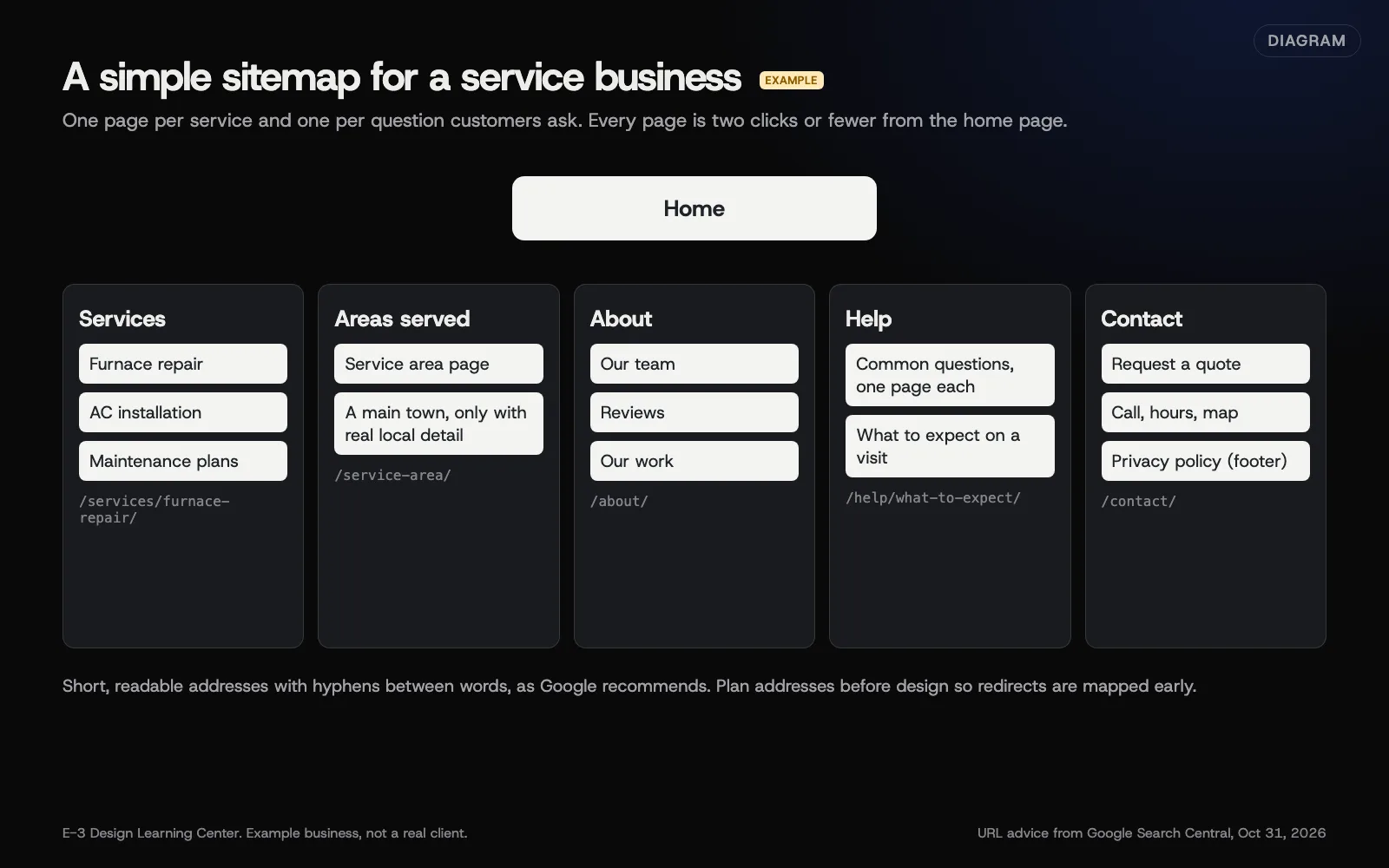 Diagram: an example sitemap for a small service business, with URL advice from Google Search Central (October 2026). The business is an example, not a client.
What should each page plan say?
For each page, write one line in a table:
| Page | Address | Purpose | Main action | Content owner |
|---|---|---|---|---|
| Furnace repair | /services/furnace-repair/ | Explain the service and when to call | Call or request a quote | Owner |
| Service area | /service-area/ | Show where you work | Check your town, then call | Office manager |
| Reviews | /about/reviews/ | Proof from real customers | Request a quote | Office manager |
Example values for an example business.
This table becomes the designer’s checklist and your content list. It also makes it obvious when two pages have the same purpose.
How should addresses look?
Google’s URL structure guidance recommends readable words rather than long ID numbers, hyphens rather than underscores between words, and a simple structure. In practice:
/services/furnace-repair/, not/page?id=482.- Lowercase, no dates, no spaces.
- Decide them now. Changing addresses after launch means redirects.
If you’re replacing an existing site, map every old address to its new page as part of this plan. Our article on redesigning without losing what works shows how.
Should I have a page for every town?
Only where you have something different and useful to say about that town. Google’s spam policies list doorway pages, near-identical pages made for different places, as abuse. Our answer on service area pages goes into the details.
Why does the page plan matter?
It’s the cheapest point to change your mind. Moving a page on paper costs nothing; moving it after design and build costs time and money. A clear plan also gives every page one main job, which helps visitors find what they came for. Google’s people-first content guidance puts the same idea first: content made primarily to help people.
What are the common mistakes?
- Menus named after the company’s departments, not the customer’s questions.
- One “Services” page listing everything. Each main service deserves its own page.
- Too many top-level items. Group them.
- Thin pages “for SEO.” A page with two sentences helps nobody.
- A blog with nothing planned for it. See should my business website have a blog.
- Forgetting the footer. Privacy policy, accessibility statement if you have one, and contact details belong there.
What if the plan keeps growing?
Mark each page “launch” or “later.” Launch with the pages that bring calls and answer the most common questions. Add the rest in the first 90 days, when you can see what visitors look for.
How much does it cost, and how long does it take?
A page plan for a small business site takes a few hours, including a review with whoever answers customer calls. The number of pages affects the build cost; see what drives the cost of a website.
How does E-3 handle this?
The page plan is part of the plan you approve before design starts. On redesigns, we map old addresses to new pages and set up redirects, and we set up Google Search Console with E-3 added as a user so we can watch for problems after launch.
Related questions
Next step
- Next: WordPress, Shopify or a website builder: which should I use?The next guide in Planning a new website.
- Website launch checklistA free printable checklist (PDF).
Still stuck? Ask E-3 for an answer from our help guides.
Rather we handled planning a new website for you?
It’s part of what we do every week for small businesses, as part of websites and redesigns. Start with a free check of your site and profile, or call and ask.