
How do I give feedback and approve a new website design?
Review designs on a phone and a computer, then send one combined list of feedback from one decision-maker, written as problems rather than solutions. Expect the build to happen on a private staging copy that search engines can't see. Check every fact, price and form there, and give written sign-off before anything goes live.
Download the hiring checklist (PDF)6 pages, 437 KB, free to print. What's inside
The short version
- One decision-maker, one combined list of feedback per round.
- Describe the problem (“customers won’t find the phone number”), not the fix (“make it red”).
- Review on a real phone first. Most of your visitors may be on one.
- The build happens on a private staging copy that search engines can’t see.
- Give written sign-off. Nothing goes live without it.
What happens at each stage?
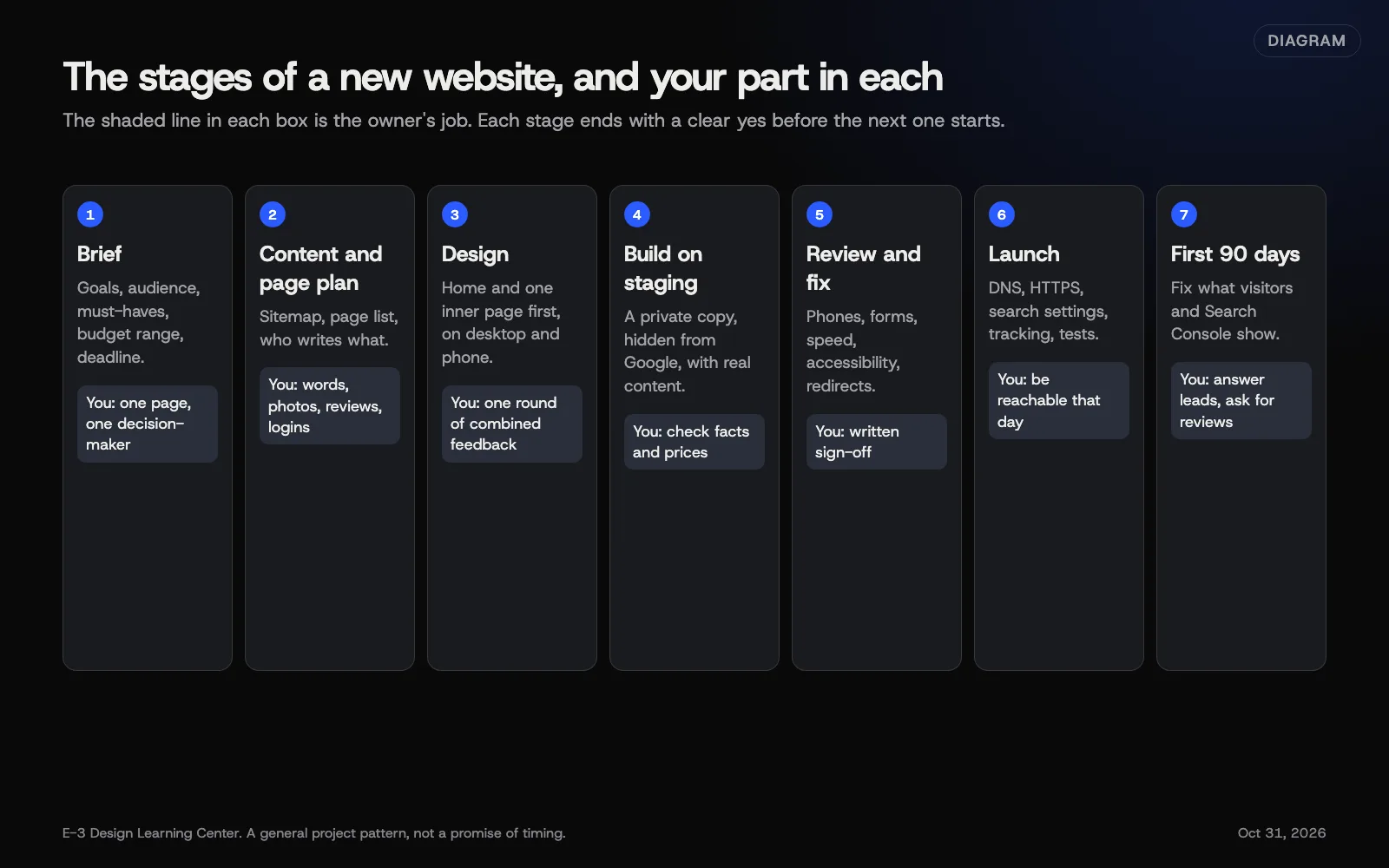 Diagram: the stages of a website project and the owner’s part in each. A general pattern, not a promise of timing.
Most projects follow the same arc: a brief, a page plan, design, build on staging, review, launch and the first 90 days. How long each takes depends mostly on content and decisions; see how long a redesign takes. This page is about your part in the middle: reviewing design and approving the build.
How should I review a design?
Designers often show the home page and one inner page first. That’s the moment to steer. Review it like a customer:
- Open it on your phone. Can you tell in five seconds what the business does, and how to call?
- Then on a computer. Does the layout still make sense?
- Pretend you’re a new customer with one question. Can you find the answer?
- Check the feel against the sites you liked in your brief.
- Ignore placeholder text and images for now, but say if the space for real content looks too small.
How do I give useful feedback?
- Collect it, then send it once. Gather everyone’s comments, settle the disagreements internally, and send one list from the decision-maker.
- Number each point so the designer can reply point by point.
- Describe the problem. “Older customers may struggle with the small grey text” leads to a better fix than “make the text bigger and black.”
- Say what works too, so it isn’t changed by accident.
- Separate must-fix from preference. Mark each point.
Many design agreements include a set number of rounds. Combined feedback makes each round count.
What is staging, and why does it matter?
A staging site is a private copy where the new site is built and tested before it goes public. For the basics, read what a staging site is. Two things to know as an owner:
- It should be hidden from search engines. Google’s noindex guide explains how a noindex rule keeps pages out of results. Google notes that if robots.txt blocks a page, Google can’t see its noindex rule, so the page could still appear if other sites link to it. A password on the staging site avoids the question entirely.
- The noindex must come off at launch. Forgetting it is one of the classic launch mistakes.
What should I check on staging?
- Every fact: prices, hours, phone numbers, service areas, team names.
- Every form: send a test and confirm it reaches the right inbox.
- Every phone link: tap it on a phone.
- Accessibility basics: the W3C’s Easy Checks are a good first look. See accessibility from day one.
- Old addresses redirecting to the right new pages, if this replaces a site.
For smaller edits later, after launch, our help page on reviewing and approving a preview shows the same idea on a smaller scale.
How do I sign off?
In writing: an email that says what you’ve approved, for example “Approved: all pages on staging as of today, ready to launch.” That protects both sides and makes it clear what “done” means.
What are the common mistakes?
- Feedback from five people, five times. The designer can’t satisfy conflicting comments.
- New features during review. Write them on a “phase two” list instead.
- Reviewing only on a big monitor. Customers mostly won’t.
- Silent approval. “Looks fine” in passing isn’t sign-off.
- Content still changing at launch. Freeze it a few days before.
What if the project stalls?
Find what it’s waiting for. Usually it’s content, a decision, or an outside login. Our answer on what to do when a redesign stalls lists the usual causes. If the designer has gone quiet, ask for a written status and a date.
How much does it cost, and how long does it take?
Reviews cost your time. Extra design rounds or features added mid-project often cost money; check what your agreement says. For timelines, see how long a redesign takes.
How does E-3 handle this?
Redesigns are tested on a staging copy first. You get a working preview to try on your own phone before launch.
Related questions
Next step
- Next: How do I build accessibility into a new website?The next guide in Planning a new website.
- Before you hire a web designerA free printable checklist (PDF).
Still stuck? Ask E-3 for an answer from our help guides.
Rather we handled planning a new website for you?
It’s part of what we do every week for small businesses, as part of websites and redesigns. Start with a free check of your site and profile, or call and ask.