
Service-area business or storefront: set it up right
If customers visit a staffed location with signage, you're a storefront and your address shows. If you travel to customers and don't serve them at your address, remove the address and set up to 20 service areas within about 2 hours' drive. If you do both, you're a hybrid: show the address and add service areas.
The short version
- Customers come to you: storefront. Your address shows.
- You go to customers and don’t serve them at your address: service-area. Remove the address.
- Both: hybrid. Show the address and add service areas.
- Up to 20 areas, by city or postal code, within about 2 hours’ drive. No radius.
- A home address is fine for verification; it just isn’t shown.
Which type of business am I?
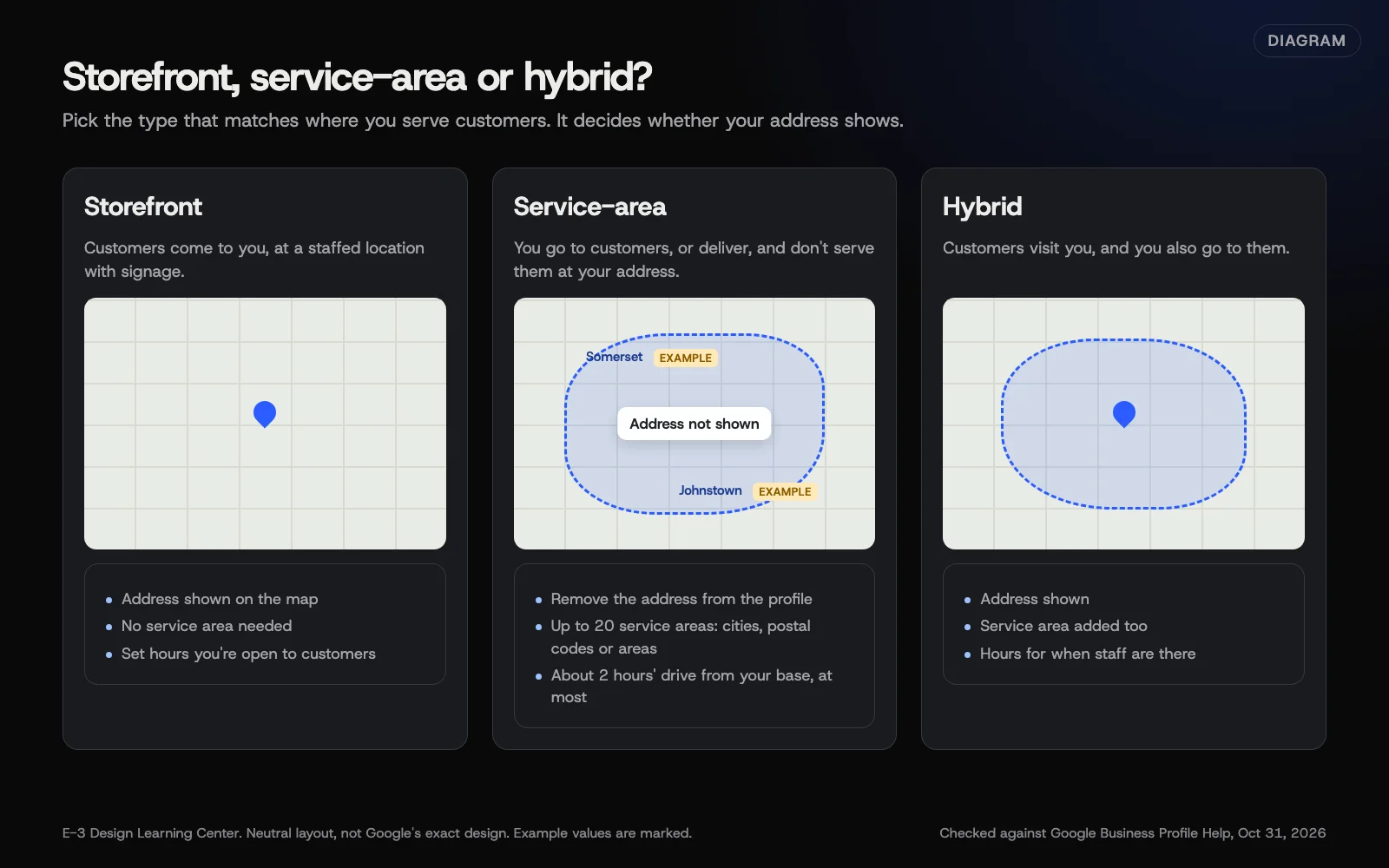 Diagram: storefront, service-area and hybrid profiles, with example towns marked. Based on Google Business Profile Help (October 2026).
Google’s service area page and its guidelines describe three types:
- Storefront. Customers come to you, at a staffed location with permanent signage, open during the hours you list. Shops, salons and most offices fit here.
- Service-area business. You go to customers, or deliver to them, and you don’t serve them at your address. Plumbers, cleaners and many contractors fit here.
- Hybrid. Customers can visit you, and you also go out to them. Set your hours for when staff are on site.
Google adds one condition: if your location lacks permanent signage, it doesn’t count as a storefront.
How do I set my service area?
These steps come from Google’s service area page:
- Go to your Business Profile.
- Select Edit profile, then Location.
- Next to “Service area,” select Edit.
- Choose a suggested area or type your own.
- Select Save.
To remove areas, follow steps 1 to 3. Under “Selected service areas,” remove the places you don’t serve, then select Save. You can only remove every service area if your profile shows a storefront address.
To switch types: storefront to service-area means removing your address and adding areas. Service-area to storefront means adding your address, with a staffed and signed location. Adding areas to a storefront makes you a hybrid.
Google’s limits
- Up to 20 service areas, using cities, postal codes or other named areas.
- About 2 hours’ drive. Your whole area generally shouldn’t go beyond that from your base, though Google says larger areas may suit some businesses.
- No radius. If you set one years ago, you can’t edit it, so re-enter your area by town or postal code.
Why does this choice matter?
It decides whether Google shows your address to the world. A home-based plumber with the house on the map invites strangers to the door. A shop that hides its address loses walk-in customers. The wrong type can also fail verification or lead to a suspension.
What are the common mistakes and edge cases?
- P.O. boxes and remote mailboxes. Not allowed as an address.
- Virtual offices. Renting a mailing address where you don’t work makes you ineligible.
- Co-working spaces, unless they have clear signage, take customers during your hours and are staffed by your team then.
- Age-restricted products. Businesses selling alcohol, cannabis or weapons must have a storefront.
- Listing towns you wish you served. Adding a town doesn’t promise you’ll show up there. Google says its local results still weigh distance from the searcher.
- Using a county name when customers search by town.
Start with where your customers really are. Pull up last year’s jobs and list the towns. A business based in Somerset, PA might list Somerset, Johnstown and a few nearby towns; that’s an illustration, not a rule. Back it up on your website with a clear “Areas we serve” section. Our answer on service area pages shows how to do that without thin, copied pages.
What if it didn’t work?
- Your change hasn’t appeared. Google says approved service-area edits can take up to 48 hours to show.
- You’re asked to verify again. Big changes like switching type can trigger it. For video verification, service-area businesses show nearby street signs or landmarks, their tools or branded gear, and proof they run the business. See our verification guide.
- Your profile was suspended after an address change. Our suspension guide explains the appeal.
- Someone else controls a service-area profile. Google’s ownership page says to contact support and choose Transfer ownership of listing, instead of the usual request form. Our guide on creating or claiming a profile covers the other routes.
How much does it cost, and how long does it take?
Setting a service area is free and takes a few minutes. Allow up to 48 hours for the change to appear.
How does E-3 handle this?
Choosing the right business type and service areas is part of how we look after Google profiles in our SEO and AI search service. People at E-3 make the changes, in your business’s own profile.
Related questions
Sources
- Manage your service areas for service-area & hybrid businesses (Google Business Profile Help)
- Guidelines for representing your business on Google (Google Business Profile Help)
- Verify your business with a video recording (Google Business Profile Help)
- Request ownership of a Business Profile (Google Business Profile Help)
Next step
- Next: Photos and videos: what to upload and what Google allowsThe next guide in Google Business Profile.
- Google Business Profile checklistA free printable checklist (PDF).
Still stuck? Ask E-3 for an answer from our help guides.
Rather we handled google business profile for you?
It’s part of what we do every week for small businesses, as part of seo and ai search. Start with a free check of your site and profile, or call and ask.