
Website accessibility for business owners: ADA and WCAG
Website accessibility means people with disabilities can use your site by keyboard, screen reader, zoom or captions. The Justice Department says the ADA covers what businesses open to the public offer online, without a detailed technical rule for them. WCAG 2.2 Level AA is the usual target. Test, fix the site itself, and keep checking. This isn't legal advice.
The short version
- DOJ says the ADA covers the goods and services a business open to the public offers online. There’s no detailed federal web rule for private businesses.
- The dated rule is for state and local governments: WCAG 2.1 AA by April 26, 2027 or April 26, 2028, after an April 2026 extension.
- Aim for WCAG 2.2 Level AA. It covers the older versions too.
- Test with a keyboard, a screen reader and a contrast checker, not only an automated scan.
- Fix the site itself, publish an accessibility statement, and recheck after every change. This isn’t legal advice.
This guide sticks to what four official sources say, with dates: the Justice Department (ada.gov), the W3C’s Web Accessibility Initiative, the U.S. Access Board and the Federal Trade Commission. Where the law is unsettled, we say so rather than guess. For your own situation, talk to a lawyer.
What does the law actually say about websites?
Three federal sources matter for a small business, and they say different things.
Businesses open to the public (ADA Title III)
The Justice Department’s guidance on web accessibility, dated March 18, 2022, says businesses open to the public must give people with disabilities full and equal enjoyment of their goods and services, and that this includes what they offer on the web. It also says DOJ has no regulation setting detailed web standards for businesses, so they “have flexibility in how they comply.” It points to WCAG and the federal Section 508 standards as helpful guidance.
That’s the whole federal picture for a shop, a clinic or a contractor’s site: a duty, but no checklist in a regulation and no deadline. We checked ada.gov on October 31, 2026, and the 2022 guidance is still posted with no notice that it was withdrawn.
State and local governments (ADA Title II)
In April 2024, DOJ published a rule that does set a technical standard: WCAG 2.1 Level AA, for the websites and mobile apps of state and local governments. On April 20, 2026, an interim final rule moved its compliance dates back. According to ada.gov’s page on the rule, the dates are now April 26, 2027 for governments serving 50,000 people or more, and April 26, 2028 for smaller ones and special districts.
That rule doesn’t cover private businesses, with one exception worth knowing: governments must make sure contractors who provide services for them follow Title II. If you build, host or run anything public-facing for a town, school district or county, read our guide to the Title II web rule and its dates.
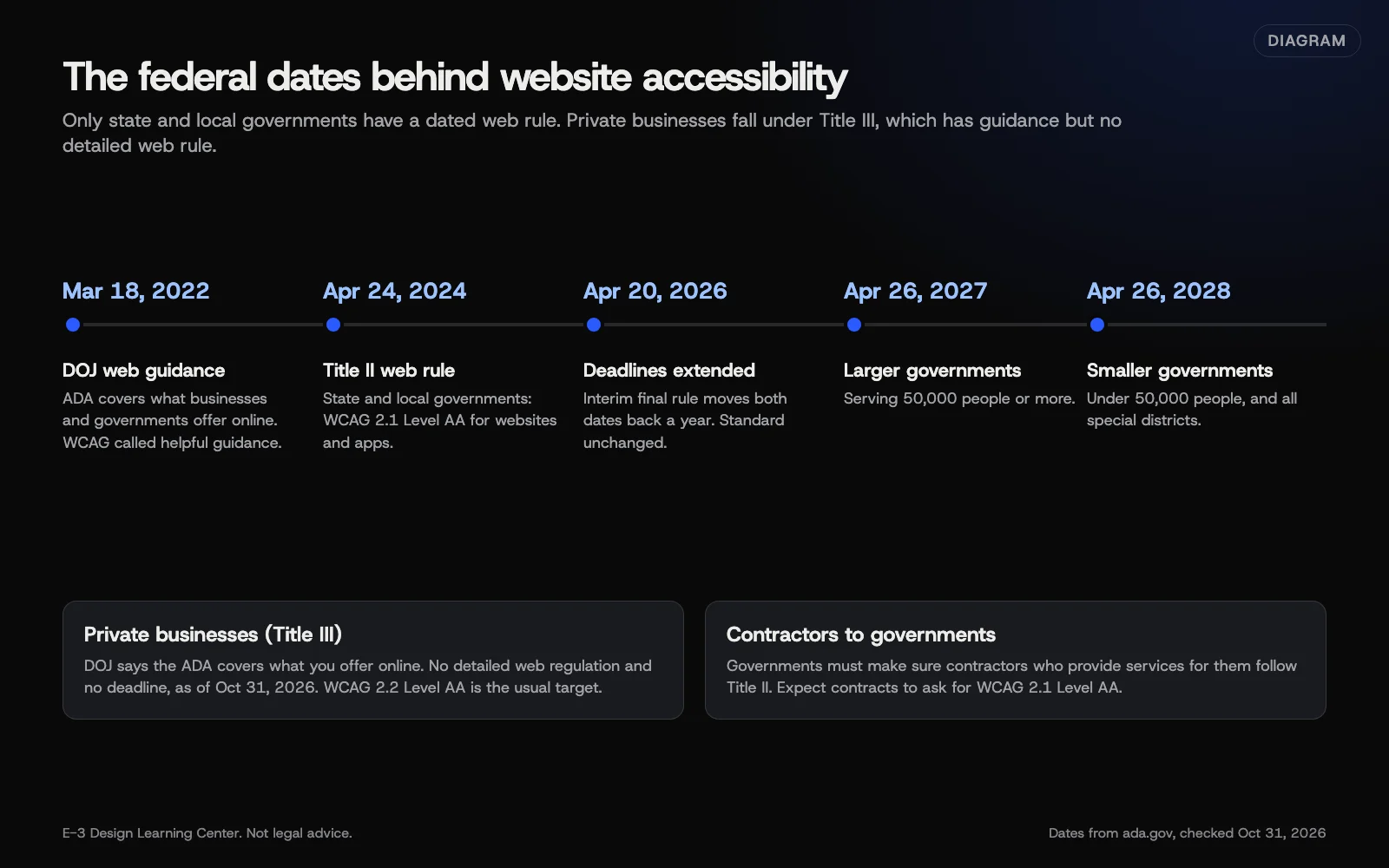 Diagram: the federal dates behind website accessibility, from DOJ’s 2022 guidance to the 2026 extension of the Title II rule. Dates from ada.gov, checked October 31, 2026.
Federal agencies (Section 508)
The U.S. Access Board’s Revised 508 Standards apply to technology federal agencies build, buy or use. They require electronic content, including documents, to meet WCAG 2.0 Level A and AA. Most small businesses aren’t covered, but if you sell to federal agencies, your documents and web tools may need to meet them.
Our short answer on whether your small business site needs to be ADA accessible covers this in a few paragraphs. This pillar goes further.
What standard should my site meet?
WCAG, the Web Content Accessibility Guidelines, is published by the W3C. Its WCAG overview, updated September 17, 2026, says WCAG 2.2 was published on October 5, 2023, with an update on December 12, 2024. The W3C encourages using the latest version. It also notes WCAG 2.2 is now an ISO standard, ISO/IEC 40500:2025. WCAG 3 is still an early draft, so don’t plan around it yet.
Each rule in WCAG, called a success criterion, has a level:
- Level A: the minimum. Missing these blocks people outright.
- Level AA: all of A, plus more. This is the target the Title II rule and Section 508 name, and the one most businesses use.
- Level AAA: all of A and AA, plus more. The W3C says AAA isn’t recommended as a policy for whole sites, because some content can’t meet it.
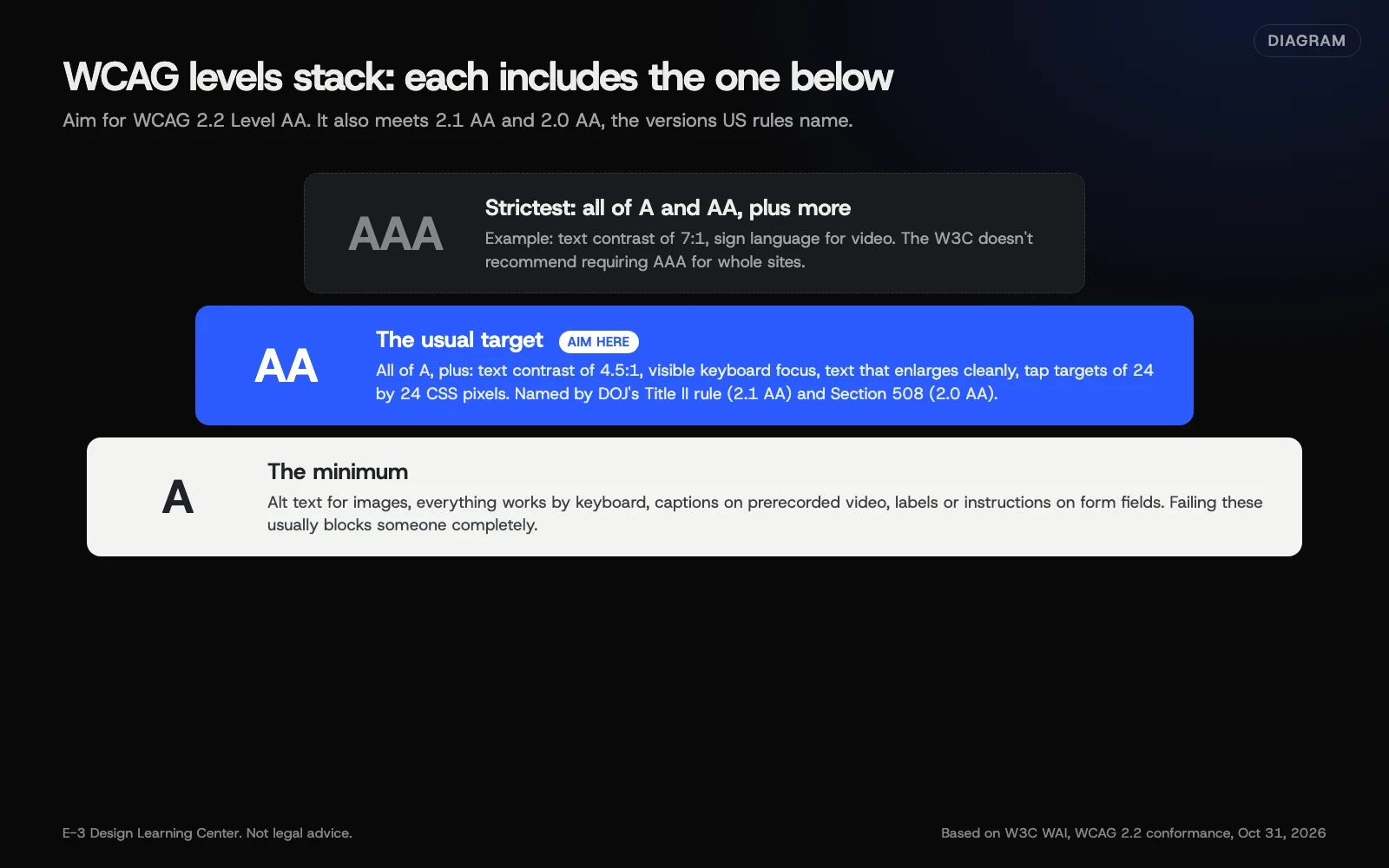 Diagram: how WCAG’s three levels stack. Each level includes the one below it. Based on the W3C’s WCAG 2.2 conformance rules.
Two conformance rules surprise people. A page only conforms if the whole page does, not just the main column. And if a page is part of a process, such as booking or checkout, every step of that process has to conform. Our guide to WCAG levels A, AA and AAA explains this, and our guide to what WCAG 2.2 changed covers the six newer rules at A and AA.
How do I find the problems on my site?
You need three kinds of checks. Each catches things the others miss.
- An automated scan. Free tools like WAVE, Lighthouse and axe find missing alt text, low contrast and unlabeled fields in seconds. Our guide to free accessibility checkers shows how to run each one. DOJ’s guidance warns that a clean report “does not necessarily mean everything is accessible.”
- A keyboard test. Put the mouse away and use Tab, Shift+Tab, Enter and Space. Can you reach and use every link, menu and form, and can you always see where you are?
- A screen reader test. Turn on VoiceOver on a Mac or iPhone, or install the free NVDA on Windows, and listen to your home and contact pages.
Our guide to testing with a keyboard and a screen reader walks through the second and third checks step by step, with the exact keys. If you want a quick first pass across many basics, our article on where to start with website accessibility includes the W3C’s 30-minute Easy Checks.
What should I fix first?
DOJ’s guidance lists the barriers it sees most on business sites: poor color contrast, color used alone to give information, missing alt text, videos without captions, inaccessible forms, and controls that only work with a mouse. Fix them in this order, because forms and contact details are where a barrier costs you a customer:
- Contact, booking and checkout forms. Labels, clear errors and keyboard use. See our guide to making website forms accessible.
- Contrast and focus outlines. Often a few style changes fix every page at once. See how to check and fix color contrast.
- Images. Useful alt text on images that carry meaning, and empty alt text on decorative ones. See how to write alt text.
- Headings and links. Real headings in a logical order, and link text that makes sense on its own.
- Video, audio and motion. Captions, a pause button for anything that moves, and no sound that plays by itself. See what accessibility asks of video, audio and moving content.
- Documents. Menus, forms and price lists posted as PDFs. See how to make PDFs and documents accessible.
Cookie banners and spam checks trip people up too. Our guides to accessible cookie banners and CAPTCHAs and accessibility cover those.
Do overlays or widgets solve it?
No. An overlay is a script that adds a toolbar or automatic “fixes” on top of your pages. The barriers that stop people live in the site’s own code and content, and a script can’t reliably repair them.
In January 2025, the FTC announced an order requiring accessiBe to pay $1 million over claims that its AI tool could make any website WCAG-compliant. Our answer on whether overlays make a site compliant has the detail. Be wary of any product or person that promises “full compliance.”
How do I show customers I take it seriously?
Publish an accessibility statement. The W3C’s statement guidance says the minimum is three things: a commitment to accessibility, the standard you aim for (such as WCAG 2.2 Level AA), and contact details for reporting problems. It suggests linking to it from your footer. The W3C also offers a free generator. Our guide on how to write an accessibility statement gives a plain example you can adapt.
When someone reports a problem, thank them, help them get what they need another way right away, then fix the barrier. A phone number that works is the best fallback you have.
What if I get a demand letter?
Don’t ignore it, and don’t answer it by installing a widget. Note any deadline, call a lawyer, and save a dated record of what the site looked like. Then get an honest test of the pages named and a written plan to fix them. Our guide to ADA website demand letters sets out what to gather and what to avoid. It’s not legal advice either, and it can’t be: every letter and every state is different.
When is the best time to fix accessibility?
During a redesign. Choosing accessible colors, a theme that handles focus and headings well, and form tools that label fields properly costs far less at the start than after launch. Our guide on building accessibility into a new website in our website planning hub lists the checkpoints for each stage, from brief to launch. Our answer on whether to redesign or fix your site can help if you’re not sure which path you’re on.
What are the most common mistakes?
- Treating it as a one-time project. New pages, photos, PDFs and plugins bring new problems. Recheck after each round of changes.
- Trusting a score. A perfect automated score can sit on top of a form nobody can finish with a keyboard.
- Removing focus outlines because they look untidy. Keyboard users then can’t see where they are.
- Text in images, like hours or prices inside a graphic.
- Fixing only the home page. Forms, booking and checkout matter more.
- Believing a promise of full compliance, from a widget seller or anyone else.
What has changed recently?
- April 20, 2026: DOJ’s interim final rule moved the Title II web deadlines back a year, to April 26, 2027 and April 26, 2028. The standard, WCAG 2.1 AA, didn’t change.
- December 12, 2024: the W3C published an update to WCAG 2.2. WCAG 2.2 is also now ISO/IEC 40500:2025.
- January 2025: the FTC announced its order against an overlay maker over compliance claims.
- Still true: there’s no detailed DOJ web regulation for private businesses, as of October 31, 2026.
How much does it cost, and how long does it take?
The checks in this guide are free. A keyboard and screen reader test of three key pages takes an hour or two the first time. Fixes depend on how the site was built. Content fixes like alt text and link wording are quick. Problems in a theme or page builder take developer time, and an old site with many of them may be a case for a redesign. We won’t quote a general number, because it depends so much on the site.
How does E-3 handle this?
ADA and WCAG questions are a small part of E-3’s support history: about half a dozen requests since 2019 asked about compliance, testing or a lawsuit. We fix problems in the site itself rather than adding an overlay, and we publish this site’s own results on our accessibility page. Redesigns and updates are tested on a staging copy first. Ongoing checks are part of website care. No one can honestly promise legal compliance, and we don’t.
Related questions
Sources
- Guidance on web accessibility and the ADA (U.S. Department of Justice, March 18, 2022)
- Fact sheet: new rule on the accessibility of web content and mobile apps (ada.gov)
- WCAG 2 overview (W3C Web Accessibility Initiative)
- Understanding conformance (W3C WAI, WCAG 2.2)
- Developing an accessibility statement (W3C WAI)
- Revised Section 508 standards (U.S. Access Board)
- FTC order requires online marketer to pay $1 million for deceptive claims that its AI product could make websites compliant (FTC, January 2025)
Every Website accessibility guide
- The ADA Title II web rule: dates and who it coversDOJ's 2024 Title II rule requires state and local government websites and apps to meet WCAG 2.1 Level AA. An April 2026 interim final rule moved the deadlines to April 26, 2027 for governments serving 50,000 people or more, and April 26, 2028 for smaller ones. It doesn't cover private businesses, except as contractors. This isn't legal advice.
- WCAG levels A, AA and AAA: which one do I need?WCAG sorts its rules into three levels. Level A is the minimum, Level AA adds the rules most organizations aim for, and Level AAA is the strictest, which the W3C doesn't recommend requiring for whole sites. Aim for WCAG 2.2 Level AA: it also meets 2.1 and 2.0 AA, the versions US rules name.
- How do I write an accessibility statement?An accessibility statement is a short page that says you're committed to accessibility, names the standard you aim for, such as WCAG 2.2 Level AA, and tells people how to report a problem. The W3C also suggests listing known gaps. Link it from your footer, keep it honest and dated, and answer every report.
- Test your site with a keyboard and a screen readerPut the mouse away and press Tab through your key pages: every link, menu and form should work, with a visible outline showing where you are. Then turn on VoiceOver (Command-F5 on a Mac) or the free NVDA on Windows and listen. Headings, links, buttons and form fields should all announce clear names.
- How do I check and fix color contrast on my site?WCAG Level AA asks for a contrast ratio of at least 4.5:1 for normal text and 3:1 for large text. Buttons, form borders, icons and focus outlines need 3:1 against what's next to them. Measure your real colors with a free contrast checker, darken the ones that fail, and never use color alone to carry meaning.
- Video, audio and motion: what accessibility asksFor prerecorded video with sound, WCAG Level A asks for captions plus audio description or a transcript, and Level AA asks for audio description of important visuals. Audio-only content needs a transcript. Sound playing by itself over three seconds needs a stop control, moving content needs a pause button, and nothing should flash over three times a second.
- How do I make PDFs and documents accessible?Put key information on a web page first, and use a PDF only when people need a printable file. Build the document in Word with real headings, alt text and simple tables, run Word's Accessibility Checker, then save it as a PDF with document structure tags turned on. Check it with Acrobat's accessibility check. Scanned PDFs need rebuilding.
- Got an ADA website demand letter? What to do firstDon't ignore it and don't reply on your own. Note any deadline, call a lawyer, and save dated copies of the pages named. Then have the site tested honestly, by a person as well as a scanner, and get a written plan for fixes. Don't rely on an overlay widget. This isn't legal advice.
Common questions
- Is there a federal deadline for my business website?
- No dated web rule covers private businesses. The dated rule, with deadlines of April 26, 2027 and April 26, 2028 after a 2026 extension, covers state and local governments under Title II. DOJ still says the ADA applies to what businesses open to the public offer online.
- Which WCAG version and level should I aim for?
- WCAG 2.2 Level AA. It's the latest version, and the W3C encourages using it. Meeting 2.2 also meets 2.1 and 2.0, which is what the Title II rule and the federal Section 508 standards name.
- Is this legal advice?
- No. This guide reports what the Justice Department, the W3C, the Access Board and the FTC say, with dates. For your own legal risk, talk to a lawyer.
Next step
- Start here: The ADA Title II web rule: dates and who it coversThe first guide in Website accessibility.
- Free website checkPublic checks on your own site, then an action plan of what to fix first.
Still stuck? Ask E-3 for an answer from our help guides.
Rather we handled website accessibility for you?
It’s part of what we do every week for small businesses, as part of website care. Start with a free check of your site and profile, or call and ask.