
Do CAPTCHAs hurt accessibility and privacy?
Visible puzzles do. The W3C says image and audio CAPTCHAs shut out many disabled people, so prefer checks visitors never see: a honeypot first, then Cloudflare Turnstile or reCAPTCHA v3. Both load a third-party script that handles visitor data, so name them in your privacy policy, and check reCAPTCHA's free monthly limit.
The short version
- Puzzles that ask people to pick images or type wobbly letters block some real customers.
- Start with a honeypot. It asks nothing and sends no data anywhere.
- If spam continues, add Turnstile or reCAPTCHA v3, which normally ask nothing either.
- Both load a script from another company, so list them in your privacy policy.
- reCAPTCHA is now part of Google Cloud (documented under Google Cloud Fraud Defense): free up to 10,000 checks a month, and billing is needed beyond that.
How do the options compare?
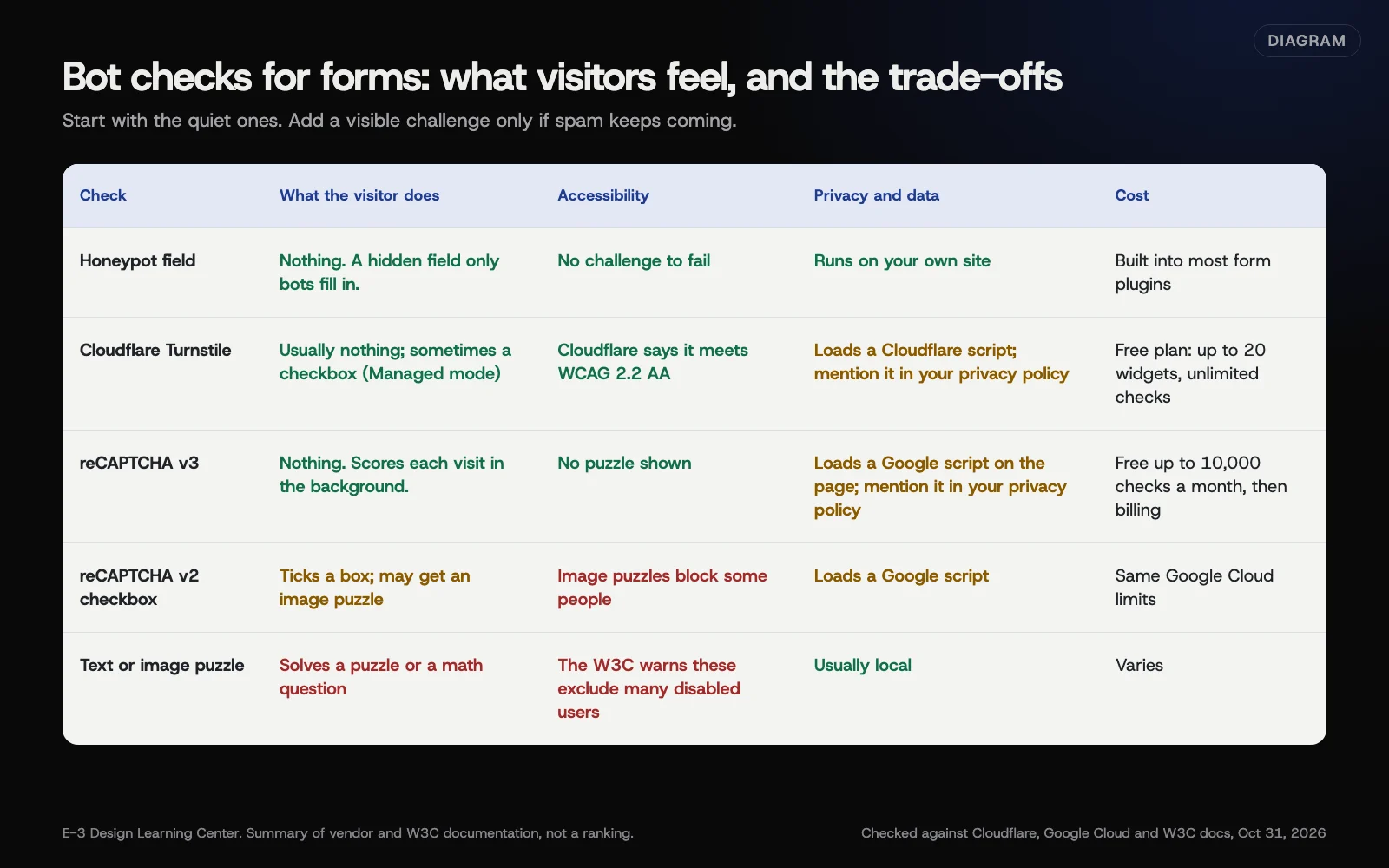 Diagram: five kinds of form bot check compared on visitor effort, accessibility, privacy and cost. A summary of vendor and W3C documentation (October 2026), not a ranking.
Honeypot
A honeypot is a form field hidden from people. Bots fill in every field, so anything typed there marks the entry as spam. Gravity Forms calls it Detect Spam using the Advanced Honeypot in its form settings, and adds an optional Submission Speed Check that flags forms filled in faster than a person could. The W3C lists honeypots among the alternatives to CAPTCHA in its note on the inaccessibility of CAPTCHA.
Cloudflare Turnstile
Turnstile checks visitors in the background. Cloudflare’s overview says it “works without showing visitors a CAPTCHA,” works on any site without routing traffic through Cloudflare, and “is WCAG 2.2 AA compliant.” It has three widget modes. Managed shows a checkbox only to visitors it’s unsure about. Non-interactive never asks anything, and Invisible is hidden completely. The plans page lists a free plan with up to 20 widgets and unlimited checks.
On privacy, Cloudflare says Turnstile “does not access, store, or transmit user communications, form entries, or other page inputs.” It still runs a Cloudflare script in the visitor’s browser.
Google reCAPTCHA
reCAPTCHA v3 gives each visit a score in the background and never shows a puzzle. The older v2 checkbox asks people to tick a box and sometimes to solve an image puzzle.
reCAPTCHA has changed. Google’s migration overview says new “Classic” keys stopped being allowed in the third quarter of 2024. Google moved existing keys into Google Cloud projects automatically between late 2025 and early 2026. Its tier comparison says the Essentials tier is “Free up to 10,000 assessments per calendar month” and counts use across all your sites together. The billing requirement sits with the paid Premium tier, and the migration overview says usage over 10,000 a month needs billing turned on for your Google Cloud project. Google now documents reCAPTCHA as part of Google Cloud Fraud Defense, so you may see that name in the console. A busy site, or one under a bot attack, can pass that limit.
reCAPTCHA loads a Google script on your page, which needs a mention in your privacy policy.
Text and image puzzles
These include “pick all the traffic lights,” distorted text, audio clips and math questions. The W3C note explains who they shut out. Image puzzles block blind and low-vision people, and audio puzzles are hard for deaf people and anyone in a noisy place. Logic questions can stop people with cognitive disabilities. Its conclusion: “All else being equal, we prefer non-interactive approaches because these pose no accessibility challenges.”
What does WCAG say about CAPTCHAs on forms?
WCAG 2.2 added a rule for sign-in pages, Success Criterion 3.3.8, Accessible Authentication (Minimum). The W3C’s explanation of 3.3.8 says it covers logging in to an existing account, and that a CAPTCHA used there needs a method without a cognitive test, with some exceptions at level AA. It doesn’t directly cover a contact form. The W3C’s guidance points the same way for every form, though: avoid puzzles where you can.
This isn’t legal advice. For more on accessibility rules, see our article on website accessibility basics.
How do I set this up?
- Turn on your plugin’s honeypot and any speed check, and keep caught spam in a spam list.
- Watch for a week. Count the spam that still gets through.
- If needed, add Turnstile or reCAPTCHA v3 through your form plugin’s settings or add-on. Use Turnstile’s Managed mode or reCAPTCHA v3, not an image puzzle.
- Test with a keyboard and a phone. Submit the form without a mouse, and on mobile data, to check nothing blocks you.
- Update your privacy policy to name the service, and check your cookie banner settings. Our privacy guides cover what a privacy policy should say and the vendors that handle visitor data.
Our help article on stopping spam through your website form has the plugin-by-plugin steps.
Why does this matter?
A check that blocks one real customer costs you a lead you’ll never know about. Visible puzzles also slow everyone down, especially on phones. Quiet checks catch most bots without that cost.
What are the common mistakes and edge cases?
- Adding a puzzle as the first fix. Try the honeypot first.
- Stacking several CAPTCHA services. More scripts and more data shared, with little extra protection.
- Ignoring the reCAPTCHA limit. Google’s migration page says that past the free allowance with no billing, some requests fail closed, and others fail open and let everything through.
- No spam folder. Flag suspected spam; don’t delete it.
- Not mentioning the service in your privacy policy.
- Hiding the honeypot in a way screen readers announce. Good plugins hide it properly. If you build your own, test it with a screen reader.
What if spam still gets through?
Check whether it’s bots or people. People paid to fill in forms will pass any automated check. For those, use your plugin’s content filters, block phrases that only spammers use, and keep the spam list to review. The answer on contact form spam covers more options.
How much does it cost, and how long does it take?
Honeypots are free in most form plugins. Turnstile’s free plan covers most small sites. reCAPTCHA is free up to 10,000 checks a month across your Google Cloud organization. Turning on a honeypot takes minutes, and adding Turnstile or reCAPTCHA takes under an hour, including tests.
How does E-3 handle this?
On sites we look after, we generally start with the quiet checks and prefer settings that keep blocked entries in a spam list rather than deleting them, so a real customer isn’t silently lost. After any change, a test with a keyboard and on a phone is the way to confirm the form still works. Our leads and follow-up service covers forms as part of the whole lead path.
Related questions
Sources
- Inaccessibility of CAPTCHA (W3C Group Draft Note, December 2021)
- Understanding Success Criterion 3.3.8: Accessible Authentication (Minimum) (W3C)
- Turnstile overview (Cloudflare docs)
- Turnstile plans (Cloudflare docs)
- Compare features between Google Cloud Fraud Defense tiers (Google Cloud documentation)
- reCAPTCHA Classic migration overview (Google Cloud documentation)
- Form settings: spam detection (Gravity Forms documentation)
Next step
- Next: Route form leads to the right person, every timeThe next guide in Forms and lead follow-up.
- Free website checkPublic checks on your own site, then an action plan of what to fix first.
Still stuck? Ask E-3 for an answer from our help guides.
Rather we handled forms and lead follow-up for you?
It’s part of what we do every week for small businesses, as part of leads and highlevel. Start with a free check of your site and profile, or call and ask.