
WCAG levels A, AA and AAA: which one do I need?
WCAG sorts its rules into three levels. Level A is the minimum, Level AA adds the rules most organizations aim for, and Level AAA is the strictest, which the W3C doesn't recommend requiring for whole sites. Aim for WCAG 2.2 Level AA: it also meets 2.1 and 2.0 AA, the versions US rules name.
The short version
- Level A is the floor. Failing it usually blocks someone completely.
- Level AA includes all of A, plus rules like color contrast and visible focus. It’s the usual target.
- Level AAA includes A and AA, plus stricter rules. The W3C doesn’t recommend requiring it for a whole site.
- Newer versions add rules. Meeting WCAG 2.2 AA also meets 2.1 AA and 2.0 AA.
- Conformance counts whole pages and whole processes, such as all of checkout.
How do the levels work?
WCAG is a list of testable rules called success criteria. Each one has a level. The W3C’s conformance page sets out what each level requires:
- Level A: every Level A rule is met.
- Level AA: every Level A and Level AA rule is met.
- Level AAA: every rule at all three levels is met.
So the levels stack. You can’t skip A and claim AA.
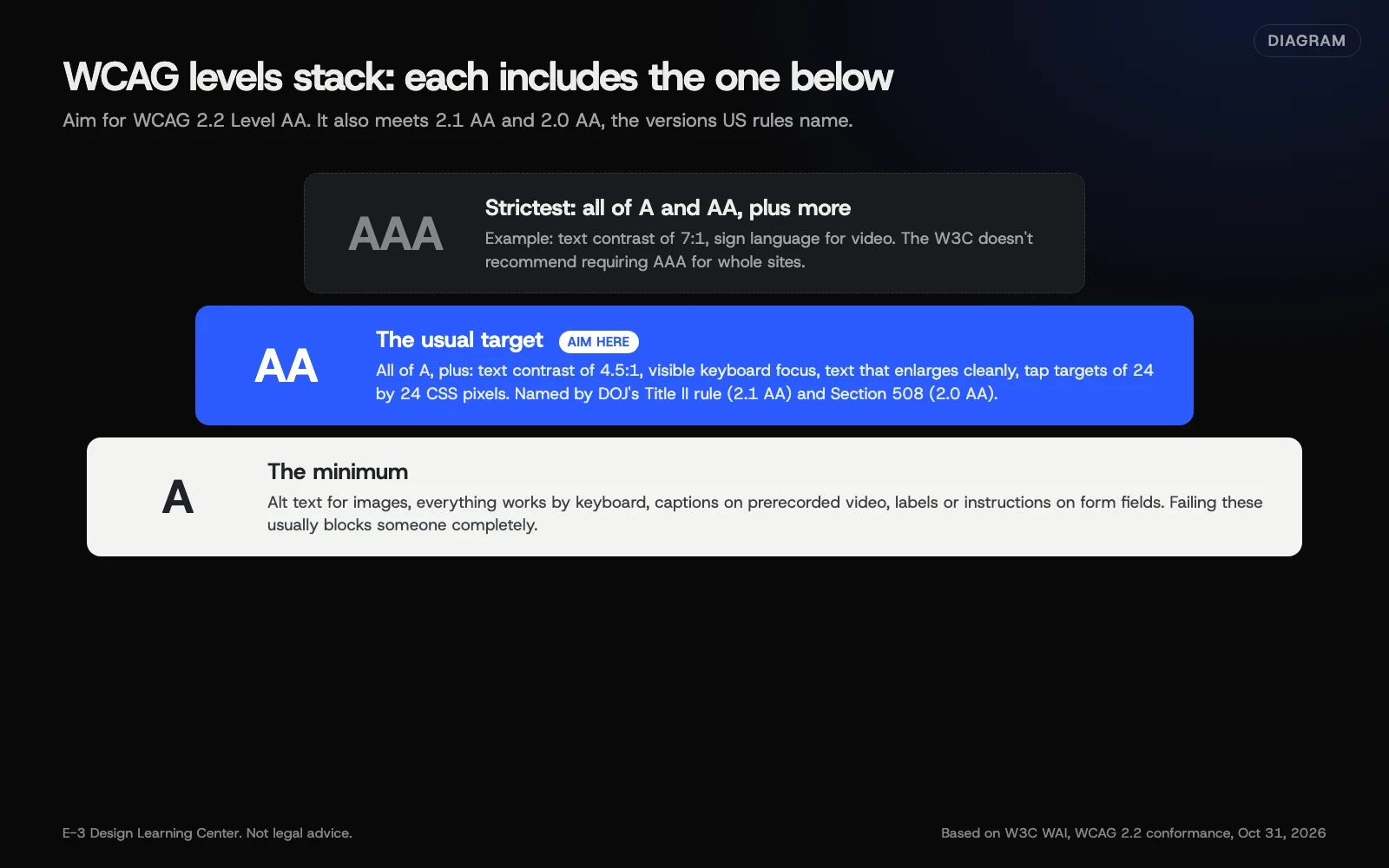 Diagram: how WCAG’s three levels stack. Each level includes the one below it. Based on the W3C’s WCAG 2.2 conformance rules.
What kinds of rules sit at each level?
A few examples from WCAG 2.2 show the pattern. Level A rules remove hard blocks. Level AA rules make the site workable for more people. Level AAA rules go further than most sites can.
| Level | Example rules |
|---|---|
| A | Images have text alternatives. Everything works with a keyboard. Prerecorded video has captions. Form fields have labels or instructions. |
| AA | Text has a contrast ratio of at least 4.5:1. The keyboard focus is visible. Text can be enlarged to double size without breaking. Tap targets are at least 24 by 24 CSS pixels, with exceptions. |
| AAA | Text contrast of at least 7:1. Sign language for prerecorded video. No time limits at all. |
The WCAG 2.2 quick reference lists every rule and filters by level, which is the easiest way to see the full set.
Which level should my business aim for?
Level AA, in the latest version you can manage: WCAG 2.2. Three reasons:
- It’s what US rules point to. DOJ’s Title II web rule requires WCAG 2.1 Level AA for state and local governments. The Access Board’s Section 508 standards require WCAG 2.0 Level A and AA for federal agencies.
- It’s achievable. The W3C says “It is not recommended that Level AAA conformance be required as a general policy for entire sites,” because some content can’t meet every AAA rule.
- Newer covers older. The W3C’s WCAG overview says WCAG 2.2 builds on 2.1 and 2.0 and encourages using the latest version. Content that meets 2.2 AA meets the older AA versions too.
You can still meet some AAA rules where it’s easy. Higher contrast or plain language helps everyone. Just don’t promise AAA across the whole site.
How do the versions fit together?
According to the W3C’s overview page, updated September 17, 2026:
| Version | Published | Notes |
|---|---|---|
| WCAG 2.0 | December 11, 2008 | Named by the Section 508 standards |
| WCAG 2.1 | June 5, 2018 | Named by DOJ’s Title II rule |
| WCAG 2.2 | October 5, 2023, updated December 12, 2024 | Latest. Now also ISO/IEC 40500:2025 |
| WCAG 3 | Draft | An early draft. Don’t plan around it yet |
WCAG 2.2 added nine rules and removed one old rule about code parsing. Our guide to what WCAG 2.2 changed covers the six new rules at A and AA.
What does “conformance” really mean?
Two rules in the W3C’s conformance page catch people out:
- Full pages. Conformance “cannot be achieved if part of a web page is excluded.” A pop-up, chat widget or cookie banner counts as part of the page.
- Complete processes. If a page is one step in a process, like booking or checkout, every step must meet the level. A perfect booking page followed by an inaccessible payment page means the process doesn’t conform.
The W3C also allows a statement of partial conformance when something outside your control, like a third-party map, doesn’t meet the rules. It’s honest about a gap, not a pass. List it in your accessibility statement.
Why does the level matter?
Without a target, “make the site accessible” never ends and never gets checked. A named level gives your designer, developer and content writers one shared standard. It also lets you answer a customer, a government client or a lawyer with something specific: “We aim for WCAG 2.2 Level AA, we last tested on this date, and here’s what we know still needs work.”
What are the common mistakes?
- Claiming AA after an automated scan. Scanners check only some rules. Contrast, alt text quality and keyboard use need a person. See how to test with a keyboard and a screen reader.
- Promising AAA in a contract or statement. Few sites can meet it everywhere.
- Testing only the home page. Forms, booking and checkout are processes and must conform in full.
- Forgetting third-party tools. Booking widgets, chat and embedded forms are part of your page.
- Using an old version in a new contract. Ask for WCAG 2.2 AA unless a rule names an older one.
What if my site can’t meet Level AA yet?
That’s normal for an older site. Start with the Level A failures, because they block people completely: keyboard traps, unlabeled forms, missing alt text and uncaptioned video. Then work through AA, starting with color contrast and focus outlines, which often fix many pages at once. Publish what’s still open in your accessibility statement, with a contact route, and update it as you go.
How much does it cost, and how long does it take?
Choosing a target is free. Reaching it depends on the site. A newer site on a well-built theme may need a few days of fixes. An old site built on a heavy page builder may need template work, and sometimes a redesign is the cheaper path. We’d rather test first than guess.
How does E-3 handle this?
E-3 builds sites to WCAG Level AA and fixes problems in the site itself, not with an overlay. Fixing them is part of website care, with bigger changes tested on a staging copy first. We won’t claim a site meets a level that hasn’t been tested.
Related questions
Next step
- Next: How do I write an accessibility statement?The next guide in Website accessibility.
- Free website checkPublic checks on your own site, then an action plan of what to fix first.
Still stuck? Ask E-3 for an answer from our help guides.
Rather we handled website accessibility for you?
It’s part of what we do every week for small businesses, as part of website care. Start with a free check of your site and profile, or call and ask.