
What is Google Consent Mode v2, and do I need it?
Google Consent Mode tells Google Analytics and Google Ads tags what a visitor chose in your cookie banner, so the tags behave accordingly. Version 2 added two settings for advertising data. If you use Google tags and get visitors from the EEA, UK or Switzerland, Google expects consent signals. It isn't a banner itself. This isn't legal advice.
The short version
- Consent mode is a way for your cookie banner to tell Google tags “yes” or “no.” It doesn’t ask the visitor anything itself.
- It has consent types, each granted or denied. Version 2 added
ad_user_dataandad_personalization. - Basic setup: Google tags wait until the visitor chooses. Advanced: tags load at once, and send no cookies if consent is denied.
- Google expects consent signals for visitors from the EEA, UK and Switzerland. From March 2024, Google began limiting ad personalization and audiences for EEA traffic without them.
- If you don’t use Google Ads and have no European visitors, it matters much less.
This isn’t legal advice. Consent mode is a technical tool; it doesn’t decide what the law requires of you.
How does consent mode work?
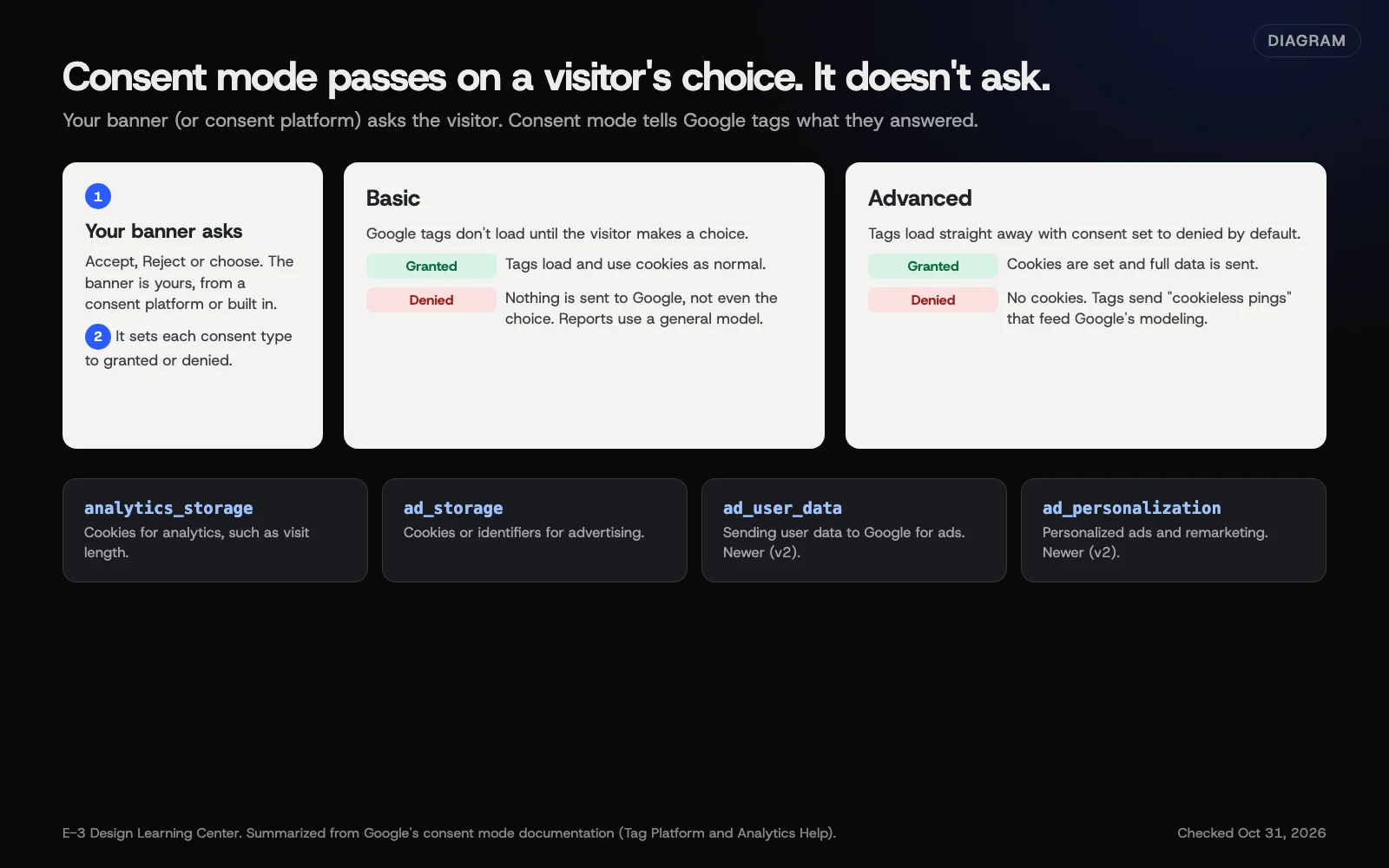 Diagram: how consent mode passes a banner choice to Google tags, basic versus advanced, and the four main consent types. Based on Google’s consent mode documentation (October 2026).
Google’s consent mode overview says it lets sites “adjust tag and app SDK behavior based on user consent choices.” It also says plainly: “You are responsible for obtaining users’ consent.” You still need a banner, from a consent management platform (CMP) or built yourself.
The consent types
| Consent type | What it controls |
|---|---|
analytics_storage | Cookies for analytics, such as visit duration |
ad_storage | Cookies or device identifiers for advertising |
ad_user_data | Sending user data to Google for online advertising (added in v2) |
ad_personalization | Personalized advertising, including remarketing (added in v2) |
There are also functionality_storage, personalization_storage and security_storage for site features.
Basic versus advanced
- Basic: Google tags are blocked until the visitor interacts with the banner. If they decline, Google’s overview says no data is sent, “not even the consent status.” Google says conversion modeling then falls back to a general model rather than one built for your site.
- Advanced: tags load straight away with consent set to denied by default. While denied, they send what Google calls cookieless pings: no cookies, but basic signals Google uses for modeling. Once consent is granted, cookies are set and full data is sent.
Modeling isn’t automatic in either mode. Google’s behavioral modeling page says a GA4 property needs advanced consent mode on every page, at least 1,000 events a day with analytics consent denied for 7 days, and at least 1,000 daily users with it granted on 7 of the previous 28 days. Even then, it isn’t guaranteed. Many small sites won’t qualify, so don’t expect modeled numbers to fill the gap.
Which to choose is partly a legal question. Advanced still sends some data to Google before consent, so talk to your adviser if you serve European visitors.
What changed with v2?
Google’s EEA update page explains that Google tightened enforcement of its EU user consent policy and introduced ad_user_data and ad_personalization. Google Analytics Help describes what changed in early March 2024. If you take no action, only users outside the EEA go into audiences shared with linked ad products. And “personalized advertising and remarketing will require affirmative end-user consent signals.” Google’s EEA update page adds that a Google-certified consent management platform updates to the newest consent mode version automatically.
How do I set it up?
- Choose a consent tool that supports consent mode. Google’s setup guide lists CMP and CMS integrations. If you use a Google-certified CMP, it can send the signals for you.
- Set defaults by region. Google’s Analytics consent page recommends region-specific defaults so strict settings for Europe don’t reduce measurement elsewhere.
- Map each banner category to consent types. “Analytics” maps to
analytics_storage. “Marketing” maps toad_storage,ad_user_dataandad_personalization. - Check it in Google Analytics. In Admin, under Data collection and modification, select Consent settings. Then pick your data stream to see whether consent signals are arriving, per Google’s verification page. Google notes updates can take 48 to 72 hours to show.
- Test it yourself. Use Google Tag Assistant to watch consent states change as you click the banner.
Why does it matter?
Without it, Google may limit what your ads and analytics can do for European traffic, and your reports may be missing or wrong. With it set up properly, your banner choices are respected and your numbers are more honest. If you track leads from your site, our forms and leads guide on measuring which pages produce leads relies on those numbers.
What are the common mistakes?
- Thinking consent mode replaces the banner. It doesn’t.
- Hard-coded tags outside the consent setup. An old Google Ads tag in the theme ignores consent mode.
- Defaults set to “granted” for everyone. Then Europeans are tracked before they choose.
- Only setting the old two types. Without
ad_user_dataandad_personalization, ad features for EEA traffic may be limited. - Never checking. The consent settings screen in Analytics shows whether signals arrive.
What if the numbers dropped after setup?
Some drop is expected: people who decline aren’t counted with cookies. Check that defaults are set by region, that “Accept” really grants the right types, and that the banner isn’t hidden or broken on phones.
How much does it cost, and how long does it take?
Consent mode itself is free. Setup with a supporting consent tool takes a couple of hours, plus a few days for Google’s reports to confirm signals.
How does E-3 handle this?
Under website care, we can connect your banner to Google tags with consent mode and set regional defaults. Then we check the signals in Analytics and Tag Assistant. You decide whether to go ahead, and whether basic or advanced suits you after advice on the legal side.
Related questions
Sources
- About behavioral modeling for consent mode (Google Analytics Help)
- Consent mode overview (Google Tag Platform)
- Set up consent mode on websites (Google Tag Platform)
- Updates to consent mode for traffic in the European Economic Area (Tag Manager Help)
- Consent mode on websites and mobile apps (Analytics Help)
- Verify and update consent settings in Google Analytics (Analytics Help)
- EU user consent policy (Google)
Next step
- Next: Can I measure my website with fewer cookies?The next guide in Privacy and cookies.
- Free website checkPublic checks on your own site, then an action plan of what to fix first.
Still stuck? Ask E-3 for an answer from our help guides.
Rather we handled privacy and cookies for you?
It’s part of what we do every week for small businesses, as part of website care. Start with a free check of your site and profile, or call and ask.