
How do I handle a request to see or delete someone's data?
Log the date, verify identity for requests to see, correct or delete data using details you already hold, search every place it might be, act and reply in writing. Honor opt-outs of sale or sharing without an identity check. California allows 45 days for most requests; the EU and UK, one month. Not legal advice.
The short version
- Requests can arrive any way: email, phone, your contact form or a letter. Write down the date it arrived; that starts the clock.
- To see, fix or delete data: check who it is with details you already have. Never ask for passwords or more ID than you need.
- Opt-outs of sale or sharing don’t need an ID check.
- Search every place: website entries, inboxes, CRM, spreadsheets, invoices and vendors.
- Reply in writing, and keep a short record of what you did.
This isn’t legal advice. Whether you’re legally required to respond depends on which laws cover you, but answering a reasonable request quickly is good practice either way.
How do I handle a request, step by step?
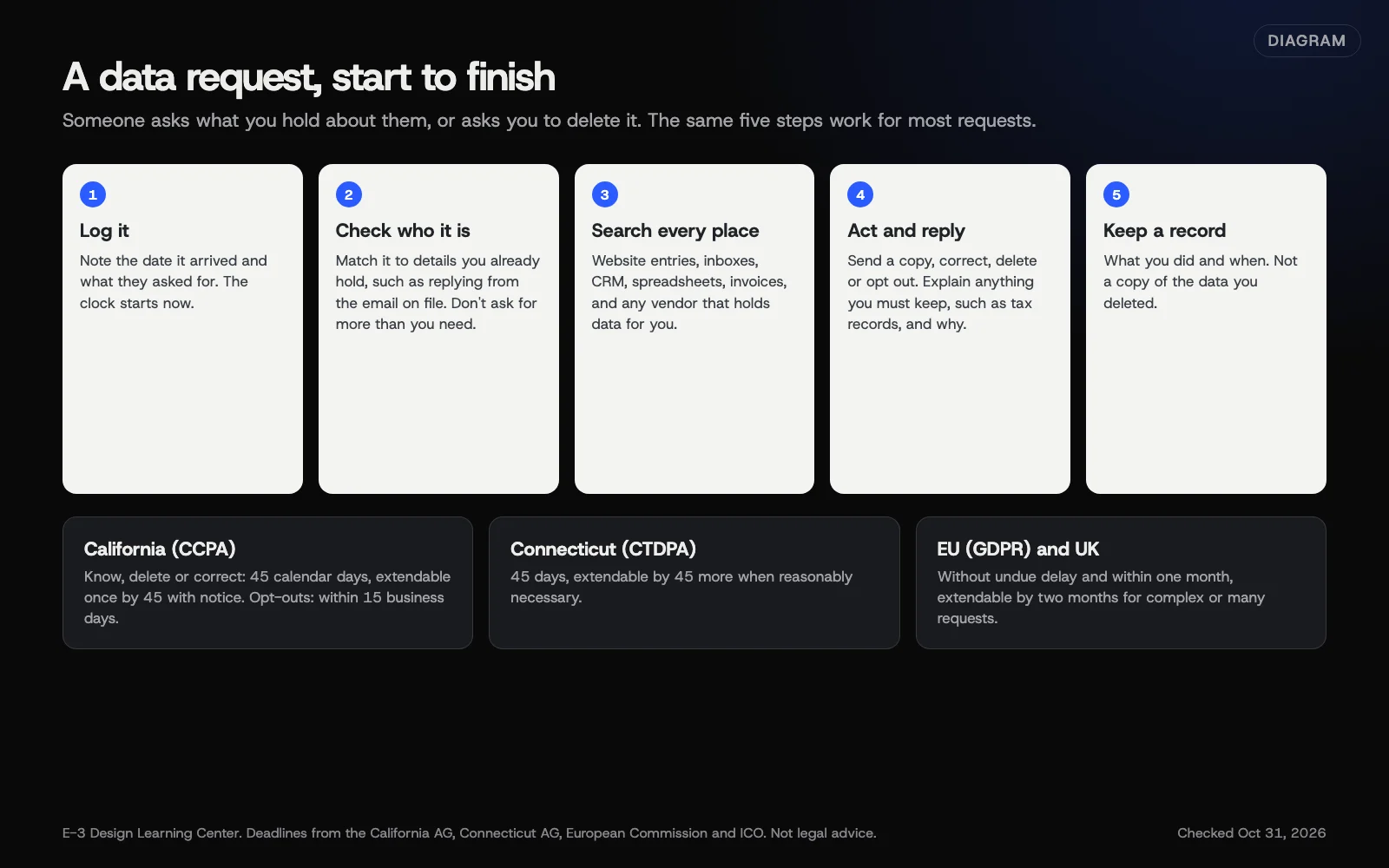 Diagram: five steps for handling a data request, with deadlines for California, Connecticut, the EU and the UK. Based on official guidance (October 2026). Not legal advice.
Step 1: Log it and check the deadline
| Where the law applies | Deadline |
|---|---|
| California (CCPA) | Requests to know, delete or correct: 45 calendar days, extendable by 45 more with notice. Opt-outs: as soon as feasible, no later than 15 business days. (CA Attorney General) |
| Connecticut (CTDPA) | 45 days, extendable by 45 more when reasonably necessary. (CT Attorney General) |
| EU (GDPR) | One month. You can add two more months for complex requests if you tell the person in the first month. (EDPB guide for small business) |
| UK (UK GDPR) | One month, extendable by two months for complex or numerous requests. (ICO) |
If no law covers you, aim for the same timelines anyway.
Step 2: Check who’s asking
Not every request needs an ID check.
- To see, fix or delete data: check who it is. Don’t send data to the wrong person. Don’t delete it on a stranger’s word. California’s CCPA guidance says you must verify these.
- To opt out of sale or sharing, or a Global Privacy Control signal: no ID check. The same guidance says businesses should not require one. You may ask basic questions to find the right records.
For the first kind, the ICO’s subject access guide says to use reasonable measures, and that checks may be unnecessary when you already know the person. Good ways to check:
- reply to the email address you already have on file and ask them to confirm;
- ask for a detail only the real person would know, such as the date of their last job or invoice number.
Don’t ask for a password, full card number or copy of a passport just to answer a simple request. If they’re asking on someone else’s behalf, ask for proof of permission.
Step 3: Search every place
Use the list from your form data retention work:
- Website: form entries, user accounts, comments, orders.
- Email: inboxes and sent folders of everyone who handles leads.
- CRM or leads inbox, including notes and call recordings. See connecting forms to a CRM.
- Spreadsheets, exports and invoices.
- Vendors that hold data for you, such as your email list tool. See vendors and processors.
Step 4: Use WordPress’s built-in tools
WordPress has export and erase tools that use an email confirmation step. To export, go to Tools, then Export Personal Data, enter the username or email and select Send Request. Once the person confirms by email, select Email Data or Download Personal Data, per the WordPress export documentation. Erasing works the same way from Tools, then Erase Personal Data.
Know the limits. WordPress’s erase documentation says erasing is permanent. There’s no confirmation prompt after you select Erase Personal Data. It only covers WordPress and plugins that join in. And it “does not remove the data from backups.” Form plugins must be set up to join in. In Gravity Forms, that’s the Enable option in each form’s personal data settings.
Step 5: Act, reply and record
- Access request: send what you hold in a readable form, securely.
- Deletion request: delete it everywhere you found it. If you must keep something, such as tax records, say what and why.
- Correction: fix it in every copy.
- Opt-out of sale or sharing: stop it, and stop it for any vendors involved.
Keep a short record: date received, what was asked, what you did and when you replied. Don’t keep a copy of the deleted data.
Why does it matter?
Deadlines are short, and a missed request can become a complaint to a regulator. Handling them well also builds trust: most requests come from people who just want to stop hearing from you.
What are the common mistakes?
- Missing the request because it came through the contact form and looked like a sales lead.
- Deleting from the website but not inboxes or the CRM.
- Asking for too much ID, or sending data to the wrong email.
- Erasing in WordPress without exporting first when the request was for a copy.
- Restoring a backup that brings deleted data back.
What if this didn’t work?
- The person won’t confirm who they are: for a request to see, fix or delete data, explain what you need and why. Hold it until they do. Never hold up an opt-out for this.
- You can’t find any data: say so in writing.
- The request seems unreasonable or repeated: some laws allow refusals in narrow cases. Ask a lawyer before refusing.
How much does it cost, and how long does it take?
WordPress’s tools are free. A simple request takes 30 minutes to an hour if you know where your data lives. A map of your data makes every future request faster.
How does E-3 handle this?
If you’re on website care and a request arrives, we can run WordPress’s export or erase tools for you. We can check that your form plugin is connected to them. We can also tell you which other systems on the site hold that person’s data. You decide what to send or delete, and you reply to the person.
Related questions
Sources
- California Consumer Privacy Act (CCPA) (California Attorney General)
- The Connecticut Data Privacy Act (Connecticut Attorney General)
- A guide to subject access (ICO)
- Respect individuals' rights: data protection guide for small business (EDPB)
- Tools Export Personal Data screen (WordPress documentation)
- Tools Erase Personal Data screen (WordPress documentation)
- Personal data settings (Gravity Forms documentation)
Next step
- Next: Which vendors handle my customers' data, and what should I check?The next guide in Privacy and cookies.
- Free website checkPublic checks on your own site, then an action plan of what to fix first.
Still stuck? Ask E-3 for an answer from our help guides.
Rather we handled privacy and cookies for you?
It’s part of what we do every week for small businesses, as part of website care. Start with a free check of your site and profile, or call and ask.