
How your profile, website and local ranking connect
Google says local results depend mainly on relevance, distance and prominence. You can't change distance. You can improve relevance with the right category, complete details and a website that explains each service, and grow prominence with reviews and links. Google says there's no way to request or pay for a better local ranking.
The short version
- Google weighs relevance, distance and prominence.
- Relevance: your category, services, description and website pages. You control most of it.
- Distance: where you are compared with the searcher. You can’t change it, so don’t fake it.
- Prominence: reviews, links and being known. It grows over time.
- Make your website’s name, address, phone and hours match the profile exactly.
What decides who shows up first?
Google’s local ranking page says local results are based mainly on three things.
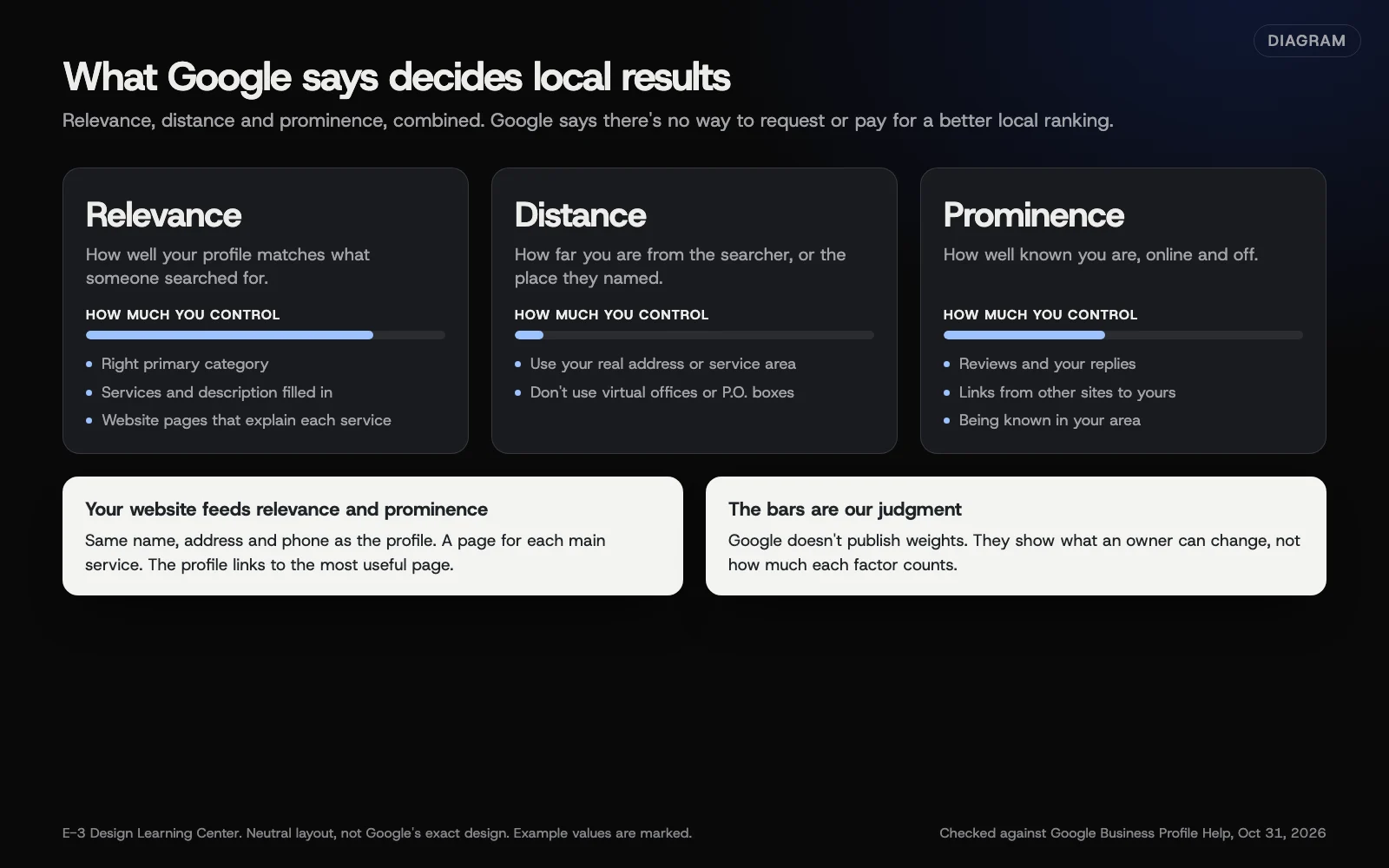 Diagram: relevance, distance and prominence, with what an owner can influence. The bars are E-3’s judgment, not Google weights. Based on Google Business Profile Help (October 2026).
- Relevance is “how well a Business Profile matches what someone is searching for.”
- Distance is how far each business is from the person searching. Google uses the searcher’s location, or its best estimate.
- Prominence is “how well-known a business is.” Google says it considers things like how many websites link to you and how many reviews you have. It also says: “More reviews and positive ratings can help your business’s local ranking.”
How do I improve my local ranking?
Google’s ranking page lists five things to do:
- Verify your business.
- Keep your business information up to date.
- Respond to reviews.
- Add photos and videos.
- Add in-store products, for retailers in eligible regions.
In practice, that means:
- For relevance: get your primary category and services right, and fill in your description and attributes.
- For distance: use your real address, or set an honest service area.
- For prominence: ask every customer for a review (see getting more reviews), and earn links from local groups, suppliers, sponsors and press.
Connect your website properly
- Link to the right page. Google’s editing page asks for your full website address, including “https://”. For one location, use your homepage. For several, link each profile to its own location page.
- Make the details match. Use the same name, address, phone number and hours on your site as on your profile.
- Explain each service. A clear page for each main service gives Google more to match against searches. Our answer on service area pages shows how to cover several towns without thin, copied pages.
- Add structured data. Schema markup states your business details in a format search engines read easily. See our glossary entry on schema markup.
Why does my website matter for my profile?
The profile is the short card people see first. The website is where they check you out properly, and where Google learns the details. It also protects the profile: Google’s updates page says Google may publish an unanswered suggested edit when other public information, such as your website, supports it. A website that matches your profile is your backup. Our answer on name, address and phone consistency goes deeper.
There’s an AI angle too. Google’s guidance on AI features and your website lists checking that your Merchant Center and Business Profile information is up to date among its best practices. Our article on showing up in AI answers covers the rest.
What are the common mistakes?
- Faking distance. Virtual offices and fake addresses break Google’s guidelines and risk suspension.
- Paying for a “guaranteed” map spot. Google says plainly: “There’s no way to request or pay for a better local ranking on Google.” Nobody outside Google can deliver that.
- Keywords in the business name to look more relevant. It breaks the guidelines.
- A website that says something different from the profile: an old phone number, different hours, a different name.
- Checking your rank from your own office. Google weighs the searcher’s location, so a check from your desk tells you little about what customers across town see.
What if my ranking doesn’t improve?
Look at the factors one at a time. Is your category the most specific one that fits? Is every main service listed and explained on your website? Are reviews coming in steadily, with replies? Then look at real results in your performance report: calls, direction requests and website clicks over several months. Those matter more than any single ranking check.
Remember distance. If most searchers are far from you, a nearer competitor may simply be closer to them.
How much does it cost, and how long does it take?
The profile is free; Google says you can’t pay for a better local ranking. Profile fixes like categories and details take an afternoon. Prominence builds over months, as reviews and links accumulate.
How does E-3 handle this?
Updating Google listings and getting reviews is one of the most common topics E-3’s clients raise, with about 90 requests in our records. Connecting the profile and the website is part of our SEO and AI search service. Changes are drafted, a person checks them, and nothing goes live until the client approves it.
Related questions
Sources
- Tips to improve your local ranking on Google (Google Business Profile Help)
- Guidelines for representing your business on Google (Google Business Profile Help)
- Edit your Business Profile (Google Business Profile Help)
- Understand Google updates on your Business Profile (Google Business Profile Help)
- AI features and your website (Google Search Central)
Next step
- Google Business Profile: the complete guideEvery guide in this topic, in order.
- Google Business Profile checklistA free printable checklist (PDF).
Still stuck? Ask E-3 for an answer from our help guides.
Rather we handled google business profile for you?
It’s part of what we do every week for small businesses, as part of seo and ai search. Start with a free check of your site and profile, or call and ask.