
Why don't my GA4 and Search Console numbers match?
They count different things. Search Console counts clicks on Google results; GA4 counts sessions from every search engine, and only when its tag runs. Cookie consent settings can limit or model what GA4 records. Time zones, privacy filtering and redirects add more gaps. A steady difference is normal. A sudden new gap needs checking, starting with the GA4 tag.
The short version
- Search Console counts clicks on Google. GA4 counts sessions on your site.
- GA4’s Organic Search includes Bing, DuckDuckGo and others. Search Console is Google only.
- GA4 misses visitors whose browser blocks the tag. Visitors who decline cookies may send nothing or only limited signals, depending on your consent setup.
- Search Console runs on Pacific Time. GA4 uses your property’s time zone.
- Compare trends, not totals. Worry only when the gap suddenly changes.
Why are the numbers different?
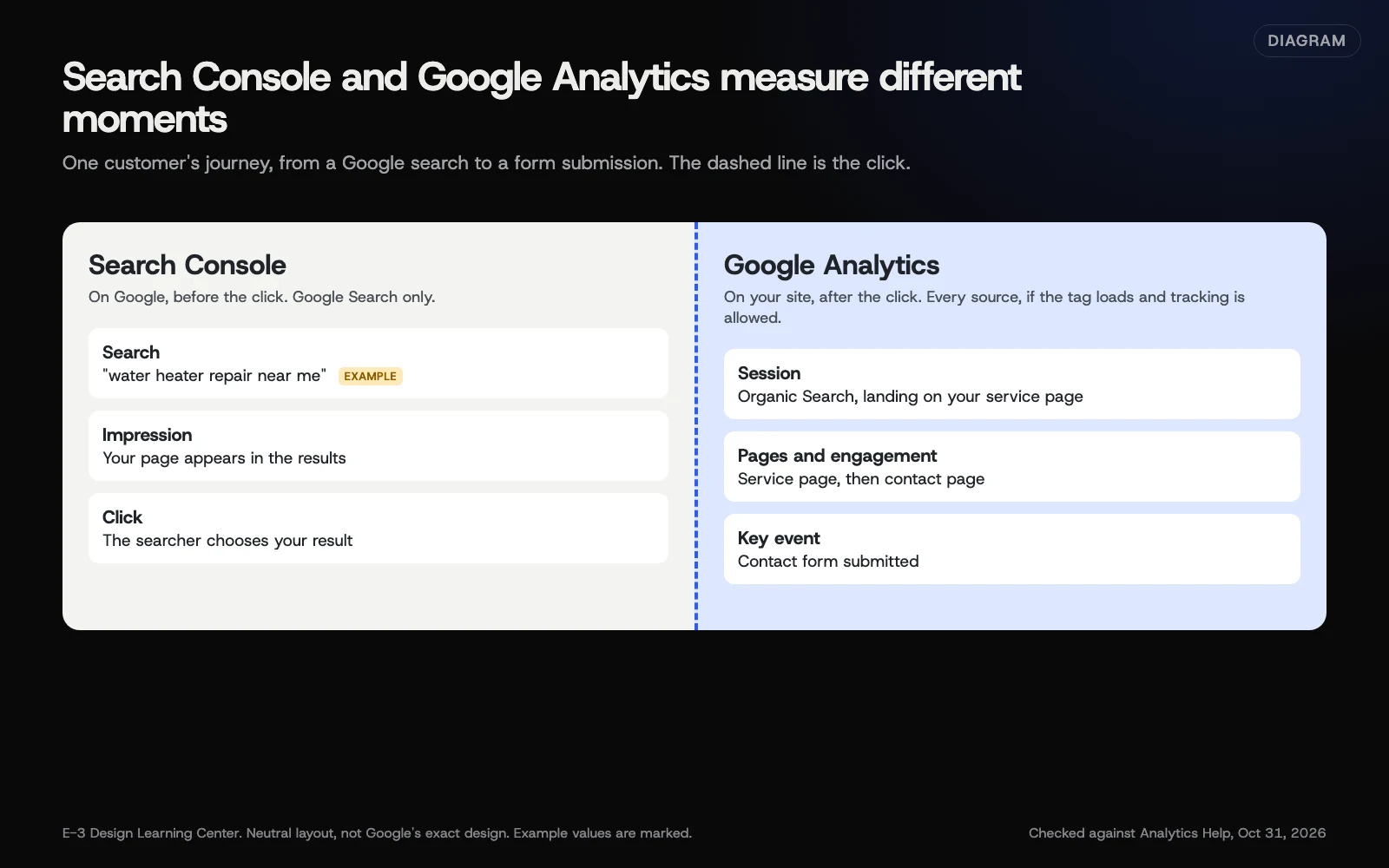 Diagram: Search Console covers what happens on Google before the click; Google Analytics covers what happens on your site after it. Based on Google’s help pages (October 2026).
The two tools measure different moments. Search Console records what happens on Google’s results page. GA4 records what happens once your page loads. Between those two moments, visits can be counted, merged or lost.
| Cause | Effect | Source |
|---|---|---|
| Clicks vs. sessions | Two clicks within one visit can be one session; one click can fail to become a session if the visitor leaves before the page loads | How each tool counts |
| Other search engines | GA4’s Organic Search includes every listed search engine, not just Google | Google’s channel rules |
| Tracking blocked | GA4 needs its tag to run. Google notes some tools, such as Analytics, “track traffic only from users who have enabled JavaScript” | Google’s data page |
| Consent | In basic consent mode, nothing is sent for visitors who decline. In advanced mode, declined visitors send cookieless pings, and GA4 may fill some gaps with modeled data if the property qualifies | Google’s consent mode page |
| Time zone | Search Console uses Pacific Time; GA4 uses your property’s time zone, so days split differently | Google’s data page |
| Privacy filtering | Search Console leaves out rare queries, and tables show at most 1,000 rows | Google’s data page |
| Data delay | Search Console data normally takes 2 to 3 days; GA4 shows visits in Realtime within minutes but can take up to 24 hours for some standard reports | Google’s data page and key events page |
| Property scope | A URL-prefix property in Search Console covers only part of the site | Search Console property setup |
Which number should I trust?
Both, for different questions:
- “How many times did Google show us, and for what?” Search Console. See the Performance report guide.
- “How many visits did search bring, and did they become leads?” GA4, with key events.
- “Is our search traffic growing?” Either, compared with itself over time.
Never add them together or subtract one from the other. Compare each tool with its own past.
How do I compare them fairly?
- Use the same date range in both, and allow for the time zone difference at the edges.
- In GA4, open Reports, Acquisition, Traffic acquisition, and filter Session source to
googlewith mediumorganic, so you’re looking at Google only. - In Search Console, use a Domain property covering the whole site.
- Look at the trend over three months, not a single day.
- Expect GA4 to show fewer Google visits than Search Console shows clicks. The size of the gap varies from site to site.
Linking the two tools puts both on one screen. See linking Search Console to GA4.
When does a gap mean something’s broken?
A steady gap is normal. A sudden change in the gap needs a look. These are starting points, not proof:
- GA4 dropped and Search Console didn’t: the GA4 tag is probably missing or broken, often after a theme change, a new plugin or a cookie banner update. Visit the site and check Realtime. See adding GA4 to your website.
- GA4 jumped: a second tag sending each page view twice is one possible cause. Confirm it in Tag Assistant before removing anything, and rule out a real spike or bot traffic.
- Search Console dropped and GA4 didn’t: check Search Console’s property. A URL-prefix property misses other versions of your address. Also check for a manual action.
- Both dropped together: it’s probably a real change in search traffic, but first confirm both use the same dates, the right property and no new filters, and that nothing changed in your tracking. Then read our answer on why traffic suddenly drops.
- Google organic visits moved to Direct: something is stripping the referrer, such as a redirect through another domain. See traffic channels.
Why does this matter?
Mismatched numbers cause a lot of worry and wasted time. Knowing which gaps are normal lets you focus on the changes that matter, and spot a broken tag in days rather than months.
What are the common mistakes?
- Expecting an exact match. Google’s own pages explain why they differ.
- Comparing Search Console with all of GA4’s Organic Search, which includes Bing and others.
- Using a URL-prefix property that only covers
https://www, then comparing it with the whole site in GA4. - Comparing yesterday. Search Console’s newest data is preliminary for a few days.
- Blaming the tools for a real drop. If both fall at once, rule out setting changes, then look for the cause on your site or in search.
What if I still can’t explain the gap?
Check the GA4 tag is on every page, including landing pages people reach from Google. Check your cookie banner isn’t blocking the tag for everyone, including visitors who accept. If the gap is steady, write it down as your site’s normal and move on.
How much does it cost, and how long does it take?
Comparing the two is free. A fair side-by-side check takes about 15 minutes. Fixing a broken tag is usually quick once you’ve found it.
How does E-3 handle this?
E-3 sets up Search Console for the sites it manages and adds itself as a user, which makes it possible to compare the two tools when a client asks why the numbers differ. That comparison is part of the reporting in our SEO and AI search service.
Related questions
Sources
- About Search Console data (Search Console Help)
- Search Console integration in Google Analytics (Analytics Help)
- Default channel group (Analytics Help)
- About consent mode (Analytics Help)
- Mark events as key events (Analytics Help)
- Performance report (Search results): Overview and basic setup (Search Console Help)
Next step
- Google Analytics 4: the complete guideEvery guide in this topic, in order.
- Free website checkPublic checks on your own site, then an action plan of what to fix first.
Still stuck? Ask E-3 for an answer from our help guides.
Rather we handled google analytics 4 for you?
It’s part of what we do every week for small businesses, as part of seo and ai search. Start with a free check of your site and profile, or call and ask.