
What your LocalBusiness and Organization markup needs
Put LocalBusiness markup, using the most specific type that fits, on your home or contact page with your name and address (Google's two required properties), plus phone, website, hours and location. Add Organization details such as your logo and links to your official profiles. Every value must match what visitors can see on the page.
The short version
- Google requires only two LocalBusiness properties: name and address.
- It recommends phone, website, hours, location coordinates and a few more.
- Use the most specific type that fits, such as Plumber or Dentist, rather than plain LocalBusiness.
- Organization markup adds your logo and links to your official profiles.
- Put it on the page that shows those details, usually home or contact.
What goes in the markup?
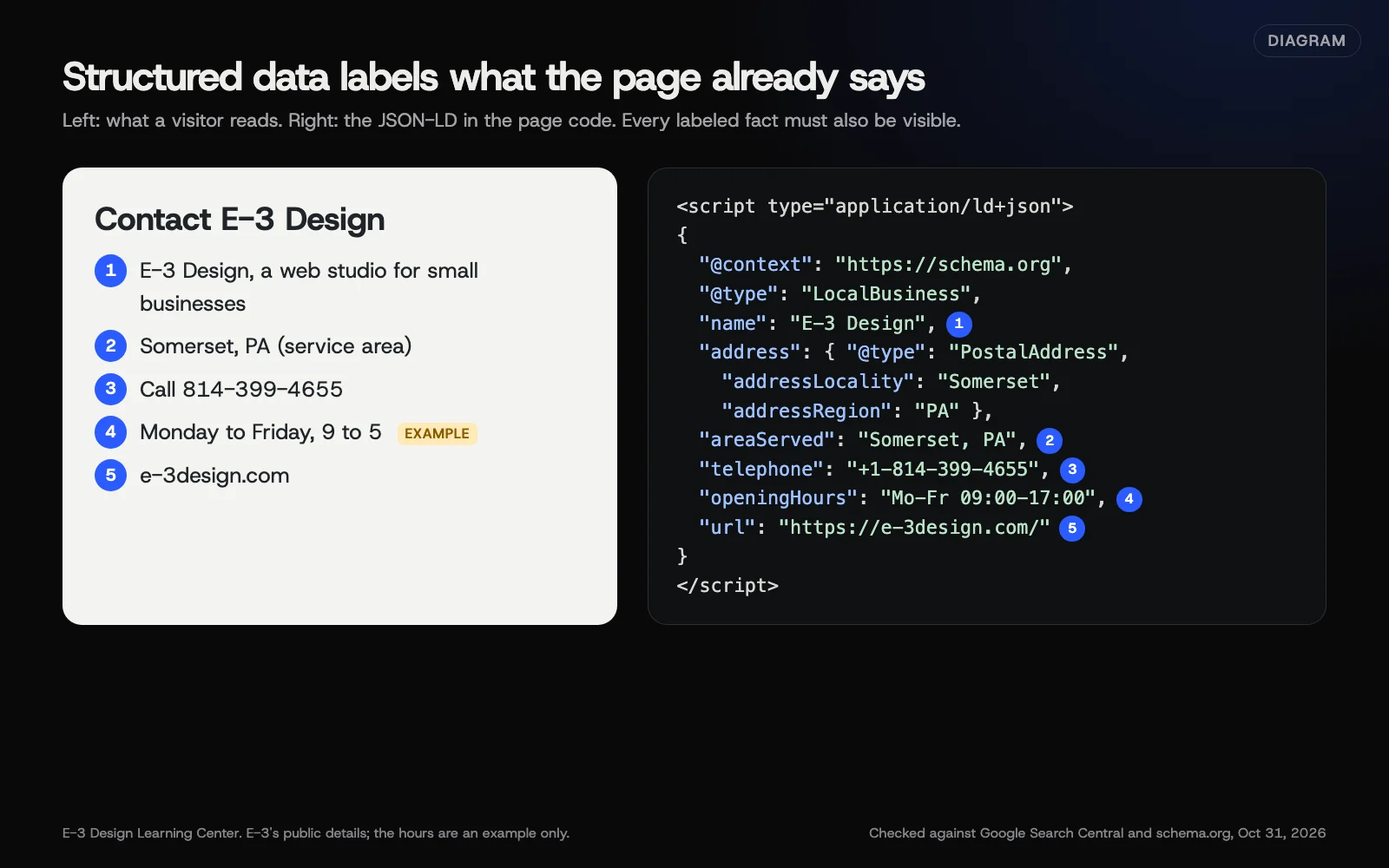 Diagram: a contact page and the LocalBusiness JSON-LD that labels the same five facts. E-3 Design’s public details; the hours are an example only. Checked against Google Search Central and schema.org, October 31, 2026.
LocalBusiness: what Google lists
Google’s local business guide lists:
| Required | Recommended |
|---|---|
name | telephone |
address (a PostalAddress) | url |
openingHoursSpecification | |
geo (latitude and longitude) | |
department, priceRange, menu, servesCuisine (where they apply) |
Google also lists review and aggregateRating, but says they’re “only recommended for sites that capture reviews about other local businesses.” Your own business’s reviews don’t qualify; see who can get review stars.
Pick the most specific type. Google says to “use the most specific LocalBusiness sub-type possible.” Schema.org’s LocalBusiness page lists many types. Some are Dentist, Electrician, Plumber, HVACBusiness, LegalService and AutoRepair. Do you do more than one thing? Google’s examples put more than one type in a list, like ["Electrician", "Plumber"].
Organization: what Google lists
Google’s Organization guide has no required properties. It says to add as many as fit. For a small business, these help most:
name,alternateNameandlegalNamelogo: Google says the image must be at least 112 by 112 pixels and crawlable, and should look right on a white backgroundurl,telephone,emailandaddresssameAs: links to your official profiles on other sitesdescriptionandfoundingDate
Google says Organization markup can go on your home page or one page about you, such as About. It “doesn’t need to appear on every page.”
Organization or LocalBusiness?
LocalBusiness is a kind of Organization. So a local business can use the LocalBusiness type and add Organization’s logo and sameAs in the same block. Many SEO plugins output both, linked together. Either way works if the facts are right and agree.
How do I add it, step by step?
- Gather the facts exactly as they appear on your site: name, street address (only if you show it), town, state, ZIP, phone, website, hours. Do customers never come to your address? Then leave the street out of the markup. If they do visit, include it.
- Pick your type from schema.org’s LocalBusiness list.
- Write or generate the JSON-LD. On WordPress, an SEO plugin usually builds it from a settings screen; see adding schema in WordPress.
- Add hours with openingHoursSpecification, one entry per group of days.
- Add your logo and sameAs links to the profiles you control.
- Publish, then test with the Rich Results Test and the Schema Markup Validator; see how to test your schema.
Here is a full example using E-3 Design’s public details. E-3 goes to its clients, so it leaves the street off. The address gives only the town and state. areaServed names the places it serves. If customers visit you, include your full street address and ZIP. The hours are an example only.
A town-and-state address like this is valid schema.org. But Google’s local business guide calls address “the physical location of the business.” It doesn’t say how it treats an address with no street. areaServed says where you work. It doesn’t qualify you for any Google feature. So this markup describes you well, but it can’t promise a result. Never make up a street address, and don’t publish one you keep private.
{
  "@context": "https://schema.org",
  "@type": "LocalBusiness",
  "name": "E-3 Design",
  "url": "https://e-3design.com/",
  "telephone": "+1-814-399-4655",
  "email": "support@e3help.me",
  "address": {
    "@type": "PostalAddress",
    "addressLocality": "Somerset",
    "addressRegion": "PA",
    "addressCountry": "US"
  },
  "areaServed": ["Somerset, PA", "Johnstown, PA", "Dayton, OH"],
  "openingHoursSpecification": [{
    "@type": "OpeningHoursSpecification",
    "dayOfWeek": ["Monday", "Tuesday", "Wednesday", "Thursday", "Friday"],
    "opens": "09:00",
    "closes": "17:00"
  }],
  "logo": "https://e-3design.com/logo.png",
  "sameAs": ["https://www.facebook.com/example-profile"]
}
The logo and sameAs addresses above are placeholders. Use your real logo file and your own profile links.
Why does it matter?
Google’s guide says your local business details can show in a knowledge panel. Markup can also help with carousels of businesses related to a search. Organization markup “helps Google understand your organization’s administrative details” and pick your logo. Beyond Google, any tool that reads your page gets a clean, labeled copy of your facts. Without it, the tool has to pick them out of your design. See helping AI tell your business apart.
Your Google Business Profile still matters more for the map results. Markup supports it; it doesn’t replace it. See the Google Business Profile guide.
What are the common mistakes?
- Hours or phone in the markup that differ from the page. Google’s general guidelines say structured data must be “a true representation of the page content.”
- A virtual office or P.O. box as the address. If customers never come to your address, leave the street out. The markup should match what your page shows.
- Plain LocalBusiness when a specific type exists.
- sameAs pointing to profiles you don’t control, such as a directory’s page about you.
- Two plugins outputting two LocalBusiness blocks with different details.
- Review stars for your own business. Not eligible, and it invites a manual action if done misleadingly.
What if it isn’t working?
Run the Rich Results Test. If it shows errors, fix the property it names. Valid but no change in results? That’s normal. Valid markup makes you eligible, and Google decides what to show. Have several locations? Give each one its own page and its own markup.
How much does it cost, and how long does it take?
The markup and Google’s test tools are free. A paid plugin or a developer’s time may cost money. Setup time depends on the site. A plugin is usually faster than writing it by hand. Clashing plugins, custom templates or many locations take longer. Google picks up the change when it next crawls the page.
How does E-3 handle this?
LocalBusiness and Organization markup is part of the schema work in our SEO and AI search service. The values come from what the client’s pages show. A business that only goes to its customers, and doesn’t serve them at its address, keeps its street address out. Markup changes go onto a staging copy first.
Related questions
Next step
- Next: Should you mark up your services and products?The next guide in Schema for owners.
- Free website checkPublic checks on your own site, then an action plan of what to fix first.
Still stuck? Ask E-3 for an answer from our help guides.
Rather we handled schema for owners for you?
It’s part of what we do every week for small businesses, as part of seo and ai search. Start with a free check of your site and profile, or call and ask.