
Online reviews for small businesses: the complete guide
Ask every customer the same way, right after the job, and send most requests to Google. Keep other review pages claimed and accurate, and follow each site's rules: Yelp says not to ask at all. Never buy positive reviews or post fake ones; a 2024 FTC rule bans both. Reply to every review; fix what complaints reveal.
The short version
- Ask every customer, the same way, soon after the job. Make it one tap.
- Send most requests to Google. Yelp says don’t ask at all; other sites have their own rules.
- No rewards for positive reviews, no fake reviews, no staff reviews without disclosure. The FTC rule covers all of these.
- Reply to every review, everywhere you’re listed. Report only what breaks the rules.
- Read complaints for patterns, and fix the cause.
How do I build a review strategy that works beyond Google?
Most review advice is about Google, and for good reason: Google’s local ranking page says “More reviews and positive ratings can help your business’s local ranking.” Our Google Business Profile hub covers getting more Google reviews and replying to them step by step. This hub covers everything around that: the other platforms, the law, your own website, and what to do with what customers tell you.
A working strategy has five parts.
1. Choose where to send requests
Pick one main place, usually Google, and send every request there. Customers who get three links tend to use none. Our answer on whether Facebook and Yelp reviews matter explains why Google is usually first and when another site might be. If customers in your trade rely on one industry site, such as Houzz for home improvement, it may deserve a share of requests too, within that site’s rules.
2. Know each platform’s rules on asking
The rules differ more than most owners realize.
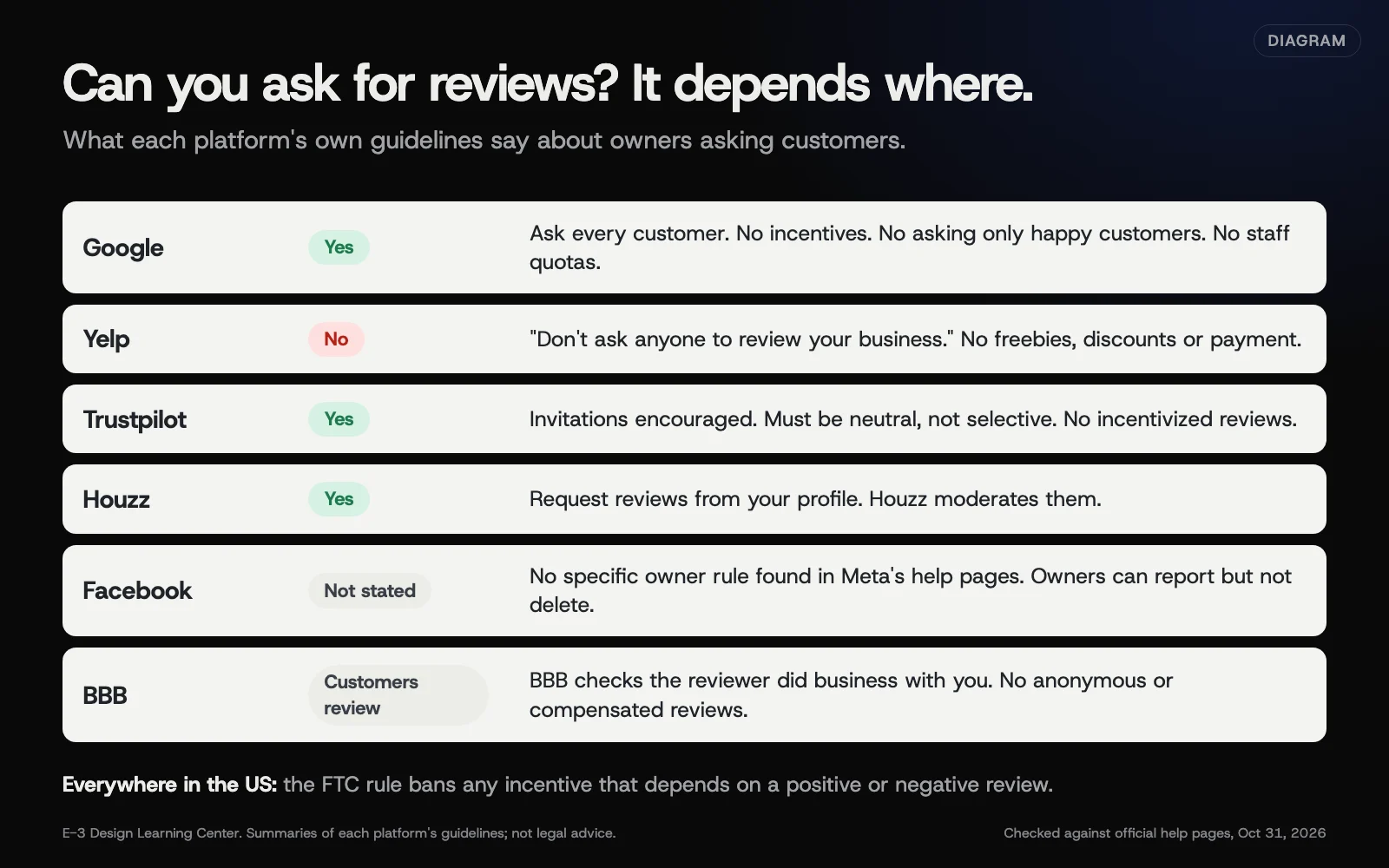 Diagram: what each major review platform says about asking customers for reviews. Based on each platform’s own guidelines, checked October 31, 2026.
| Platform | Can you ask? | Key rule |
|---|---|---|
| Yes | No incentives; don’t ask only happy customers | |
| Yelp | No | Yelp says “Don’t ask anyone to review your business” |
| Trustpilot | Yes, it encourages invitations | Invite customers neutrally, not selectively |
| Houzz | Yes, from your profile | Houzz moderates reviews before they show |
| No specific rule found in Meta’s help pages | Owners can report reviews but can’t delete them | |
| Better Business Bureau | Customers review directly | BBB checks the reviewer did business with you |
Our guide to the rules on asking, platform by platform has the details and sources. For Yelp’s side, see why some Yelp reviews are “not recommended”. For Facebook, see how Facebook recommendations work. For trade and trust sites, see reviews on industry sites and the BBB.
3. Stay inside the law
In the US, the FTC’s rule on fake reviews took effect on October 21, 2024. It applies wherever reviews appear, including on your own website.
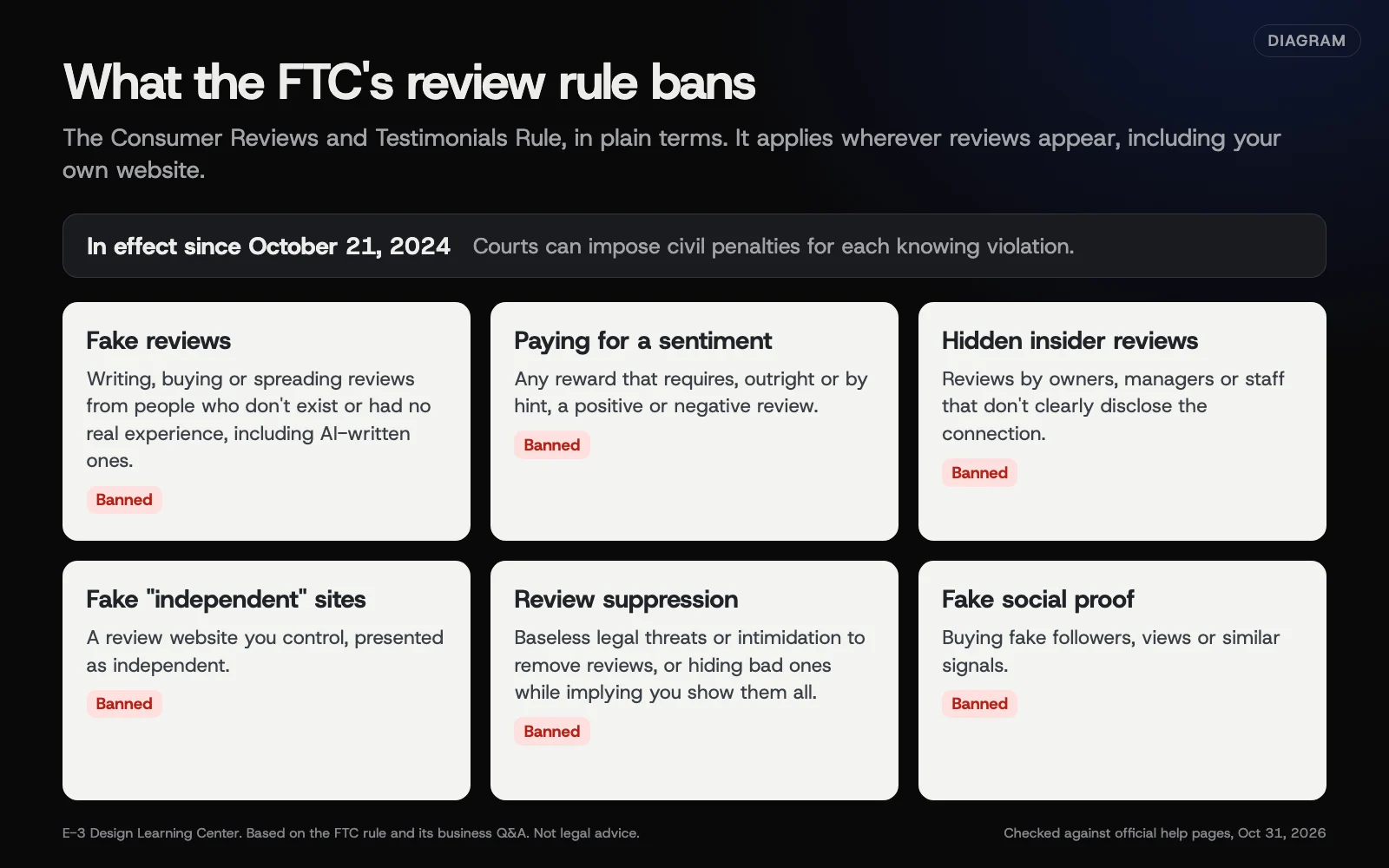 Diagram: the practices the FTC’s Consumer Reviews and Testimonials Rule bans, in plain terms. Based on the FTC’s rule and its business Q&A (November 2024). Not legal advice.
In plain terms, the FTC’s announcement and business Q&A describe bans on fake reviews, paying for a particular sentiment, undisclosed insider reviews, company-run “independent” review sites, review suppression, and fake social media followers or views. In December 2025, the FTC sent warning letters to 10 companies about possible violations. Our guide to what the FTC rule means for your business explains each part and the gray areas, like asking only happy customers. This isn’t legal advice.
4. Reply everywhere, and handle the bad ones well
Reply to good reviews briefly and specifically. Reply to bad ones calmly, once, and take the details offline. Each platform gives owners different tools: Yelp lets you reply publicly or message privately, BBB gives businesses a chance to respond, and Facebook lets you report but not delete. Our guide to handling negative reviews on other platforms covers each one. When a review is fake, see spotting and reporting fake reviews.
5. Use what customers tell you
Reviews are free feedback. Three people mentioning slow callbacks is a process problem, not bad luck. Our guide to turning reviews into fixes shows a simple monthly routine.
Where do I start if reviews have been neglected?
Work in this order:
- Claim your profiles on Google, Facebook, Yelp and any industry site customers use. You can’t reply to anything you don’t control. Our listings guide covers claiming each one.
- Reply to recent reviews, newest first, starting with any unanswered complaints.
- Check for rule-breaking reviews and report only those, with evidence.
- Stop anything risky: rewards for reviews, staff reviews, a survey that only sends happy customers onward.
- Start asking every customer, the same way, for a Google review.
- Set up the routine below so it doesn’t slide again.
What does a simple review routine look like?
Every day or two (5 minutes): read new reviews on Google and Facebook, reply to anything negative the same day if you can, and thank people for good ones.
Every week (15 minutes): check Yelp, BBB and your industry sites. Reply to anything new. Make sure review requests went out after each finished job.
Every month (30 to 60 minutes): gather the month’s reviews in one list, tag the topics, and pick one thing to fix. See turning reviews into fixes.
Every year: re-read each platform’s rules, check who can reply on behalf of the business, and look at what’s shown on your own website.
Should I use review software?
Review tools can send a request after each job, pull reviews from several sites into one screen, and alert you when a new one arrives. That saves time, especially if you’re on the road all day. They don’t change any rules, so check three things before you sign up:
- Who gets asked. The tool should send the same request to every customer. Avoid any feature that asks for a rating first and only sends happy customers on to Google; Google calls that selective asking and bans it.
- Where requests point. Make sure nothing sends customers to Yelp.
- Who owns the accounts. Your Google, Facebook and Yelp profiles should stay in your own name, so cancelling the tool doesn’t cost you access.
A simple, honest request sent consistently beats a clever tool used badly.
What has changed recently?
As of October 31, 2026:
- The FTC rule is being enforced. After it took effect on October 21, 2024, the FTC sent its first warning letters in December 2025, and in May 2026 the FTC and Illinois took action against a company accused of creating thousands of fake business listings with fake reviews.
- Trustpilot updated its guidelines for businesses in September 2026; the rules on neutral, non-selective invitations still apply.
- Facebook reviews are Recommendations. Older guides describe star ratings that work differently now.
- Apple Business replaced Apple Business Connect in April 2026. It manages Apple Maps place cards, which matters if you’re checking how your business looks on iPhones.
How should I show reviews on my own website?
Showing real reviews on your site helps visitors decide. Two rules shape how. First, the FTC rule says you can’t hide reviews because they’re negative while implying you show all or most of them. Second, Google’s review snippet guidelines say that when a business controls the reviews about itself, those pages are “ineligible for star review feature.” So star markup on your own testimonials won’t put stars in Google results. Our guide to showing reviews on your website covers what works instead, and our schema guide explains why your own review stars don’t show.
Why do reviews matter so much?
They answer the question every new customer has: will this business treat me well? A stranger’s account of a job is more convincing than anything you say about yourself. Reviews also feed the places customers find you. Google ties them to local ranking, and AI assistants that describe local businesses draw on what’s written about you across the web.
They also tell you things customers won’t say to your face. That’s worth having, even when it stings.
What are the most common mistakes?
- Asking only happy customers. Google and Trustpilot ban it, and the FTC says it can be deceptive.
- Offering a discount or entry for a review. Most platforms ban any incentive.
- Asking for Yelp reviews. Yelp’s rules say not to, and it can hurt how your reviews are treated.
- Staff or family reviewing the business. A conflict of interest on most platforms, and the FTC rule requires insiders to disclose the connection.
- Arguing in public replies. Future customers read them.
- Threatening a reviewer. Groundless legal threats to remove reviews are banned under the FTC rule.
- Cherry-picking reviews on your website while presenting them as the full picture.
- Buying a “review package.” It breaks every platform’s rules and the FTC’s.
What if something goes wrong?
- A wave of fake reviews appears. Report each one on the platform, keep screenshots, and don’t retaliate. See reporting fake reviews.
- Someone demands money to stop bad reviews. Don’t pay. Google has a specific process; our help article on replying to bad Google reviews covers it.
- Reviews you asked for disappeared. Platforms remove or hide reviews that look solicited or incentivized. Check each site’s rules on asking.
- A platform put an alert on your page. Yelp’s Consumer Alerts flag things like paid reviews. Find and stop the cause, then contact the platform.
How much does it cost, and how long does it take?
Collecting and replying to reviews is free on every major platform. Setting up a request habit takes an hour. Replies take a few minutes a day. Review management software and automated request tools cost money; they save time but don’t change the rules. Under the FTC rule, knowing violations can bring civil penalties for each violation; the FTC’s 2025 inflation adjustment set the maximum at $53,088 each.
How does E-3 handle this?
“How do I update my Google listing or get reviews?” is one of the most common questions in our support records, with about 90 requests. Review requests and replies are part of our leads and follow-up service, which can send a request after each job. Request wording and reply drafts are written for you, checked by a person and approved by you before anything goes out. Make a Google review link now with the free review link and QR maker, or draft a calm reply with the review reply writer.
Related questions
Sources
- Federal Trade Commission Announces Final Rule Banning Fake Reviews and Testimonials (FTC, August 14, 2024)
- The Consumer Reviews and Testimonials Rule: Questions and Answers (FTC Business Guidance)
- Prohibited & restricted content (Maps user-generated content policy)
- Tips to improve your local ranking on Google (Google Business Profile Help)
- Content Guidelines (Yelp)
- Don't Ask for Reviews (Yelp for Business Support)
- Guidelines for businesses (Trustpilot, September 2026)
- FTC Publishes Inflation-Adjusted Civil Penalty Amounts for 2025 (FTC)
- How to Get Reviews on Your Houzz Profile (Houzz Pro Help)
- How BBB Customer Reviews are Handled (Better Business Bureau)
- FTC, Illinois Take Action to Stop Deceptive Conduct by Company That Created Thousands of Business Listings with Fake Reviews (FTC, May 2026)
- Review snippet structured data (Google Search Central)
- FTC Warns 10 Companies About Possible Violations of the Agency's New Consumer Review Rule (FTC, December 2025)
Every Reviews guide
- Can I ask for reviews? The rules on each platformGoogle, Trustpilot, Houzz and Angi let you ask customers for reviews, as long as you ask everyone, neutrally, with no reward. Yelp says businesses shouldn't ask anyone at all. Meta's help pages don't set a rule on asking for Facebook recommendations. Wherever you ask, the FTC rule bans paying for positive reviews in the US.
- The FTC fake reviews rule: what it means for your businessSince October 21, 2024, the FTC's rule bans US businesses from writing, buying or spreading fake reviews, paying for a positive or negative review, hiding insider reviews, running fake independent review sites, suppressing reviews with threats, and buying fake followers. Courts can fine knowing violations. Ask every customer honestly and offer nothing tied to a good review.
- Facebook recommendations: how Page reviews work nowFacebook calls Page reviews Recommendations: people say whether they recommend you and add a comment. A rating shows once a Page has at least 5 public reviews. You can turn recommendations off in your Page settings, which also removes the rating, but you can't delete individual ones. Report those that break Facebook's rules, and reply to the rest.
- Why are some Yelp reviews "not recommended"?Yelp's automated software sorts every review, and ones it trusts less move to a "not recommended" link at the bottom of your page. Those don't count toward your rating or review count. Common causes: reviewers who rarely use Yelp and reviews that look solicited. Nobody at Yelp can override it, and advertising won't change it.
- Reviews on industry sites and the BBBBeyond Google, Facebook and Yelp, the review sites that matter are the ones customers in your trade actually check, such as Houzz or Angi for home services, and the Better Business Bureau for bigger purchases. Claim your profile, keep it accurate, and respond to every review and complaint. BBB asks businesses to answer complaints within 10 to 15 days.
- Showing reviews on your website, honestlyShow real reviews with the reviewer's first name, the date and the source, and link to your full Google or Facebook reviews. Never hide negative reviews while implying you show them all; the FTC rule bans it. Expect no Google stars from markup on your own testimonials: Google says businesses controlling their own reviews are not eligible.
- Handle negative reviews on Yelp, Facebook and the BBBWait until you're calm, then reply once, publicly and briefly: thank them, acknowledge the problem, and offer a direct way to sort it out. Yelp also lets you message reviewers privately, and BBB wants complaints answered within 10 to 15 days. No platform lets you delete a review. Never threaten a reviewer or offer anything to change one.
- Spot and report fake reviews on each platformA review is worth reporting when you have evidence it breaks a specific platform rule: no genuine experience, a conflict of interest, or banned content. No single sign proves it. Gather evidence, then use each platform's report option, such as the Google Reviews Management Tool. Platforms decide; a review you merely disagree with stays. Reply calmly meanwhile.
- Turn reviews into fixes: a monthly routineOnce a month, gather every new review from every site into one list, tag each by topic, such as speed, price, communication or quality, and count the repeats. Fix the cause of the problem that comes up most by changing how you work, say what changed in your replies, and check next month whether those complaints dropped.
Common questions
- Which review site should I ask customers to use?
- For most local businesses, Google. Give customers one clear link. Keep your other profiles accurate and reply there, but don't split every request across several sites.
- Can I offer a discount for a review?
- Not on Google, Yelp or Trustpilot, which ban incentives outright. The FTC rule bans any incentive tied to a positive or negative review, and its guides say other incentives must be disclosed. The simple, safe answer is no.
- Can I delete bad reviews?
- No platform lets owners delete reviews. You can report reviews that break a site's rules, and reply to the rest calmly and publicly.
Next step
- Start here: Can I ask for reviews? The rules on each platformThe first guide in Reviews.
- Free website checkPublic checks on your own site, then an action plan of what to fix first.
Still stuck? Ask E-3 for an answer from our help guides.
Rather we handled reviews for you?
It’s part of what we do every week for small businesses, as part of leads and highlevel. Start with a free check of your site and profile, or call and ask.