
AI tools for small business: a practical, honest guide
AI assistants like ChatGPT, Claude, Gemini and Copilot are useful for first drafts, summaries and rewording, and unreliable on facts they can't check. Use business accounts, never paste passwords or customer details, have a person check anything that reaches a customer, and keep reviews and marketing claims honest. The tools change often, so check vendors' own pages.
The short version
- Use AI for drafts, summaries, rewording and outlines. Don’t trust it for facts you haven’t checked.
- Use business accounts for business work, and never paste passwords, card numbers or customer details.
- A person checks and sends anything that reaches a customer or goes on your website.
- Keep it honest: no AI-written reviews, no AI photos posing as real jobs, no inflated AI claims.
- Write a one-page staff policy, and check vendors’ settings twice a year, because they change.
How do I start using AI tools in my business, safely?
AI assistants are chat tools you type into: ChatGPT from OpenAI, Claude from Anthropic, Gemini from Google, and Copilot from Microsoft are the best known. Many other products, from email to website builders, now add similar features. This guide covers how to use them in day-to-day work. It’s checked against the vendors’ own pages and US government sources as of October 31, 2026.
It doesn’t cover how AI tools find and describe your business when customers ask them questions. That’s a separate topic with its own hub: AI visibility.
1. Give it the right jobs
AI tools are strong at first drafts, summaries, rewording and turning rough notes into clean text. They’re weak on facts they can’t check: numbers, dates, laws, local details and recent news. Google’s guidance on AI content explains why: the models predict likely words rather than look facts up, so errors read as smoothly as the truth. Our guide on what AI assistants are good and bad at sorts common jobs into “go ahead,” “check closely” and “keep with a person.”
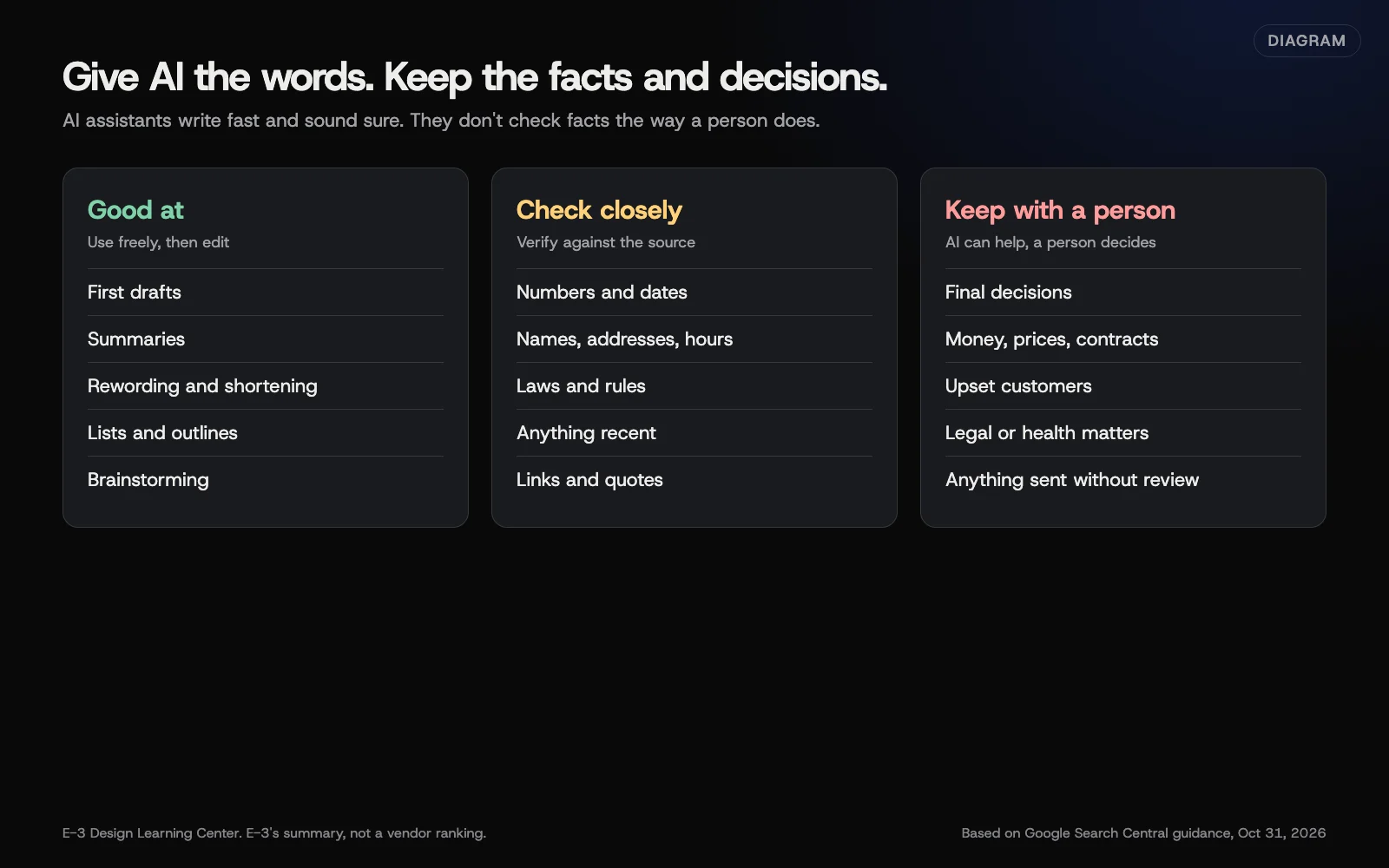 Diagram: jobs AI assistants handle well, jobs to check closely, and jobs to keep with a person. E-3’s summary, based on Google Search Central guidance, October 2026.
2. Decide what never goes in
Some things don’t belong in any chat window: passwords and login codes, card and bank numbers, customers’ personal details, health information, and anything under a confidentiality agreement. Everything else depends on the account you use.
The four big vendors treat personal and business plans differently:
| Vendor | Personal plans | Business or work plans |
|---|---|---|
| OpenAI (ChatGPT) | Chats can train models unless you turn off Improve the model for everyone in Settings, Data Controls | Business, Enterprise, Edu and the API: not used for training by default |
| Anthropic (Claude) | Since the August 28, 2025 terms update, you choose whether chats train models | Team, Enterprise and the API are under Commercial Terms, which the update doesn’t cover |
| Google (Gemini) | Keep Activity on means Google uses activity to improve services, including training, and some chats are reviewed by people | Workspace: not used for training without the customer’s permission |
| Microsoft (Copilot) | Signed-in users can turn off training; a new app arrived August 18, 2026, so check where the setting is now | Work and school accounts: prompts and responses aren’t used to train foundation models |
Our guide on what’s safe to share with an AI tool quotes each vendor’s page, explains how long chats are kept, and covers what to do if someone pasted something they shouldn’t have.
3. Write with it, then edit like an owner
The fastest way to make AI writing sound like you is to start with your own notes: the facts, the reader and one real detail only you know. Ask for a short draft in plain words. Then cut the filler, add back your voice, read it aloud, and check every name, number, date, price and link. Google’s advice is to “manually factcheck and review all AI-generated content” before publishing. Our guide to writing with AI without sounding like AI has the full routine, including what Google says about AI-assisted pages and search.
4. Keep a person between AI and your customers
AI can draft routine replies: confirmations, directions, booking steps, thanks for a good review. A person checks every draft for facts and tone and sends it. Complaints, refunds, prices and legal threats go to a person from the start. Our guide to using AI for customer emails and reviews shows how to set up a facts sheet and a two-pile routine.
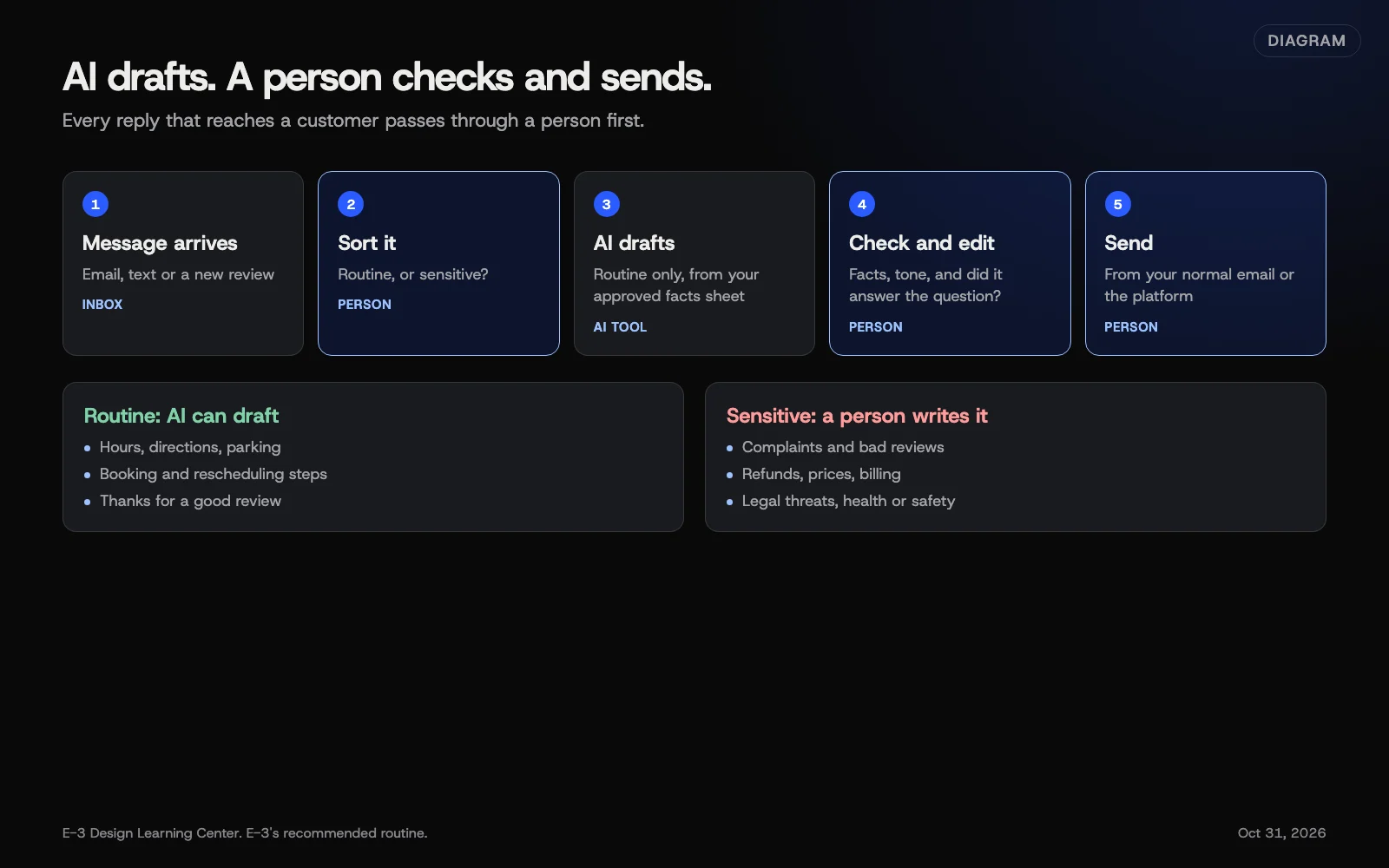 Diagram: a reply workflow with a person between the AI draft and the customer. E-3’s recommended routine.
5. Be careful with AI images
The U.S. Copyright Office said in January 2025 that prompts alone don’t make you the author of an AI image, so a purely AI-made picture likely has no copyright protection. Your own edits and arrangement can be protected. For your website, the bigger issue is trust: customers want to see your real work, team and place. Our guide on AI images and who owns them covers logos, product images and the registration rules.
6. Think hard before adding a chatbot
A chat box on your site can help when visitors keep asking questions your pages already answer. It should answer only from approved pages, say it’s automated, hand off to a person, never ask for sensitive details, and work with a keyboard and screen reader. Someone needs to read the chats every week. Our guide on whether to put an AI chatbot on your website walks through setup and testing. For phone calls, see our answer on what an AI receptionist does.
7. Stay honest, because the law expects it
The FTC’s position, from its September 2024 crackdown, is that “there is no AI exemption from the laws on the books.” Claims about what an AI product does must be true and backed by evidence. The FTC’s fake reviews rule covers reviews by people who don’t exist, including AI-generated ones; our reviews hub explains the fake reviews rule in full. Our guide to what the FTC says about AI lists the cases with dates.
8. Put it in writing for your team
A one-page policy answers the questions staff would otherwise guess at: which tools and accounts, what never goes in, who checks what, and who to ask. Our guide to a simple staff AI policy has an outline you can copy. The US government’s NIST AI Risk Management Framework is the best-known public framework if you want more depth. NIST describes it as “intended for voluntary use.”
Why does this matter for a small business?
A small team gets the most from a tool that removes the blank page from routine writing. It also has the least room for a mistake that reaches a customer. A wrong price in a reply, a customer’s details pasted into a personal account, or a review that wasn’t written by a real customer can each cost more than the time AI saved.
The tools are also changing fast. Since August 2025, Anthropic changed its consumer terms, Microsoft released a new Copilot app, and the FTC reversed one of its own AI orders. A business that sets simple rules once, and checks them twice a year, stays ahead of most of that churn.
What are the most common mistakes?
- Staff on personal accounts for business work, so the business plan’s data terms don’t apply.
- Pasting whole email threads, with every signature, address and phone number in them.
- Publishing the first draft, with its generic phrasing and any made-up facts.
- Letting a tool send or post on its own, especially review replies and customer emails.
- AI-written reviews or testimonials, which the FTC’s rule bans.
- AI photos of “our team” or “our work” that aren’t real.
- Believing vendor promises that an AI product will replace staff or guarantee results without testing it.
- Never revisiting settings after a vendor changes its plans or app.
What has changed recently?
Older guides may not reflect these. As of October 31, 2026:
- Anthropic consumer terms (August 28, 2025). Free, Pro and Max users now choose whether chats train models, with five-year retention if they allow it and 30 days if not. Anthropic’s announcement says commercial plans aren’t affected.
- FTC sets aside the Rytr order (December 22, 2025). The FTC reopened and set aside its 2024 order against an AI tool that generated reviews, citing the White House AI Action Plan. It said it will still pursue AI deception. The fake reviews rule itself is unchanged.
- Some FTC AI blog posts removed. The FTC took down some older blog posts about AI in 2025. Older guides may still quote them, so we rely on FTC press releases and orders.
- New Microsoft Copilot app (August 18, 2026). Microsoft’s privacy FAQ says its older training-setting instructions apply only to the old app. Check the linked page for the new one.
- NIST framework under revision. NIST says the AI RMF 1.0 is being revised as part of the White House AI Action Plan.
- Google’s AI content guidance updated (October 1, 2026). It adds labeling rules for AI-generated product images and text in Merchant Center.
What if something goes wrong?
- Someone pasted a password or customer data. Delete the chat, change the password, tell whoever handles privacy, and see what’s safe to share.
- A wrong fact went out in a reply or on your site. Correct it, tell the customer if they acted on it, and fix the facts sheet the AI drafts from.
- A chatbot gave a bad answer. Fix the source page first, then the bot’s rules. See AI chat on your website.
- You’re told an image or claim is a problem. Take it down while you look into it, and ask a lawyer. This isn’t legal advice.
How much does it cost, and how long does it take?
Each major assistant has a free tier and paid plans for individuals and teams. Prices and plan names change often, so check each vendor’s own pricing page. For most businesses, the data terms on business plans matter more than the extra features. Getting started takes an afternoon of trying real tasks. Writing a staff policy takes an hour or two. Checking settings takes about ten minutes per tool, twice a year.
How does E-3 handle this?
On the sites E-3 looks after, people make the changes today, and updates and bigger changes are tested on a staging copy first. AI-assisted edits, checked by a person and approved by the client, are coming soon. Accounts we set up are created in the client’s name, with E-3 added as a user. Review replies and an AI receptionist are part of our leads and follow-up service, and help with being found in AI answers is part of our SEO and AI search service.
Related questions
Sources
- Using generative AI content on your website (Google Search Central, updated October 1, 2026)
- Data controls in ChatGPT (OpenAI Help Center)
- Updates to Consumer Terms and Privacy Policy (Anthropic, August 28, 2025)
- Gemini Apps Privacy Hub (Gemini Apps Help)
- Enterprise data protection in Microsoft Copilot and Microsoft Copilot Chat (Microsoft Learn)
- Privacy FAQ for Microsoft Copilot (Microsoft Support)
- Copyright and Artificial Intelligence (U.S. Copyright Office)
- FTC announces crackdown on deceptive AI claims and schemes (FTC, September 25, 2024)
- FTC reopens and sets aside Rytr final order (FTC, December 22, 2025)
- AI Risk Management Framework (NIST)
Every AI tools for small business guide
- What are AI assistants good and bad at?AI assistants are good at first drafts, summaries, rewording, lists and turning rough notes into tidy text. They're weak at facts they can't check: numbers, dates, laws, prices, local details and recent news. They can state wrong things with full confidence, so use them for words you will read and check, not for answers you will trust blindly.
- What is safe to share with an AI tool?Never paste passwords, card or bank numbers, customers' personal details, health information or anything under a confidentiality agreement into an AI tool. General business writing is usually fine. Personal plans may use your chats for training unless you turn it off, while business plans from OpenAI, Anthropic, Google and Microsoft say they don't train on your data by default.
- How do I write with AI without sounding like AI?Start with your own notes and real details, not a blank prompt. Ask for a short draft in plain words, then cut the filler, add what only you know, and read it aloud. Before anything is published, check every name, number, date, price, law and link against the original source. Google says to fact-check all AI content.
- Can I use AI to answer customer emails and reviews?Yes, for drafts. Let AI write a first version of routine replies from facts you give it, then have a person check the facts and tone before anything is sent. Keep complaints, refunds, prices, legal threats and anything personal with a person from the start. Never let a tool post review replies or send customer emails on its own.
- Can I use AI images, and who owns them?You can usually use AI images your tool's terms allow, but the US Copyright Office says images made only from prompts get no copyright protection, so others may copy them. Human editing and arrangement can be protected. Avoid images of real people or other brands, and use real photos when customers expect your work. Not legal advice.
- Should I put an AI chatbot on my website?Only if visitors keep asking the same questions your site already answers, and someone will check the chats. A website chatbot should answer only from your approved pages, say it's an automated assistant, hand off to a person, avoid sensitive details and work with a keyboard and screen reader. Be skeptical of vendors promising it replaces staff.
- How do I write a simple AI policy for my staff?A small-business AI policy fits on one page. List the approved tools and require business accounts, name what never goes in (passwords, card numbers, customer details, health information), require a person to check anything that reaches a customer, say who to ask, and set a review date. This isn't legal advice.
- What does the FTC say about AI claims and AI-written reviews?The FTC says there is no AI exemption from consumer protection law. Claims about what an AI product or service does must be true and backed by evidence, and its fake reviews rule bans reviews by people who do not exist, including AI-generated ones. In December 2025 the FTC set aside one 2024 AI order. Not legal advice.
Common questions
- Is it safe to use ChatGPT or other AI tools for my business?
- For general writing, yes, with care. Use a business account, never paste passwords, card numbers or customer details, and have a person check anything before it reaches a customer.
- Do AI tools train on what I type?
- It depends on the plan. Personal plans may use chats for training unless you turn it off. OpenAI, Anthropic, Google and Microsoft say their business plans don't train on your data by default.
- Can I post reviews written by AI?
- No. The FTC's fake reviews rule bans reviews by people who don't exist, including AI-generated ones. Ask real customers instead.
Next step
- Start here: What are AI assistants good and bad at?The first guide in AI tools for small business.
- Free website checkPublic checks on your own site, then an action plan of what to fix first.
Still stuck? Ask E-3 for an answer from our help guides.
Rather we handled ai tools for small business for you?
It’s part of what we do every week for small businesses, as part of seo and ai search. Start with a free check of your site and profile, or call and ask.