
Can I use AI to answer customer emails and reviews?
Yes, for drafts. Let AI write a first version of routine replies from facts you give it, then have a person check the facts and tone before anything is sent. Keep complaints, refunds, prices, legal threats and anything personal with a person from the start. Never let a tool post review replies or send customer emails on its own.
The short version
- AI can draft routine replies: confirmations, directions, “here’s how to book.”
- A person checks every draft for facts and tone, then sends it.
- Complaints, refunds, prices, legal threats and personal matters go straight to a person.
- Never let a tool post review replies or send emails on its own.
- Strip customers’ personal details before pasting a message into a general AI tool.
How do I set up AI replies with a person in the loop?
1. Sort messages into two piles
Routine: “Are you open Saturday?”, “Can I change my appointment?”, “Where do I park?”, a five-star review saying thanks. These have a known right answer.
Sensitive: an unhappy customer, a refund or billing question, a price request, anything mentioning a lawyer, a health or safety issue, a long-time customer writing something personal. These need judgment, so a person writes them from the start.
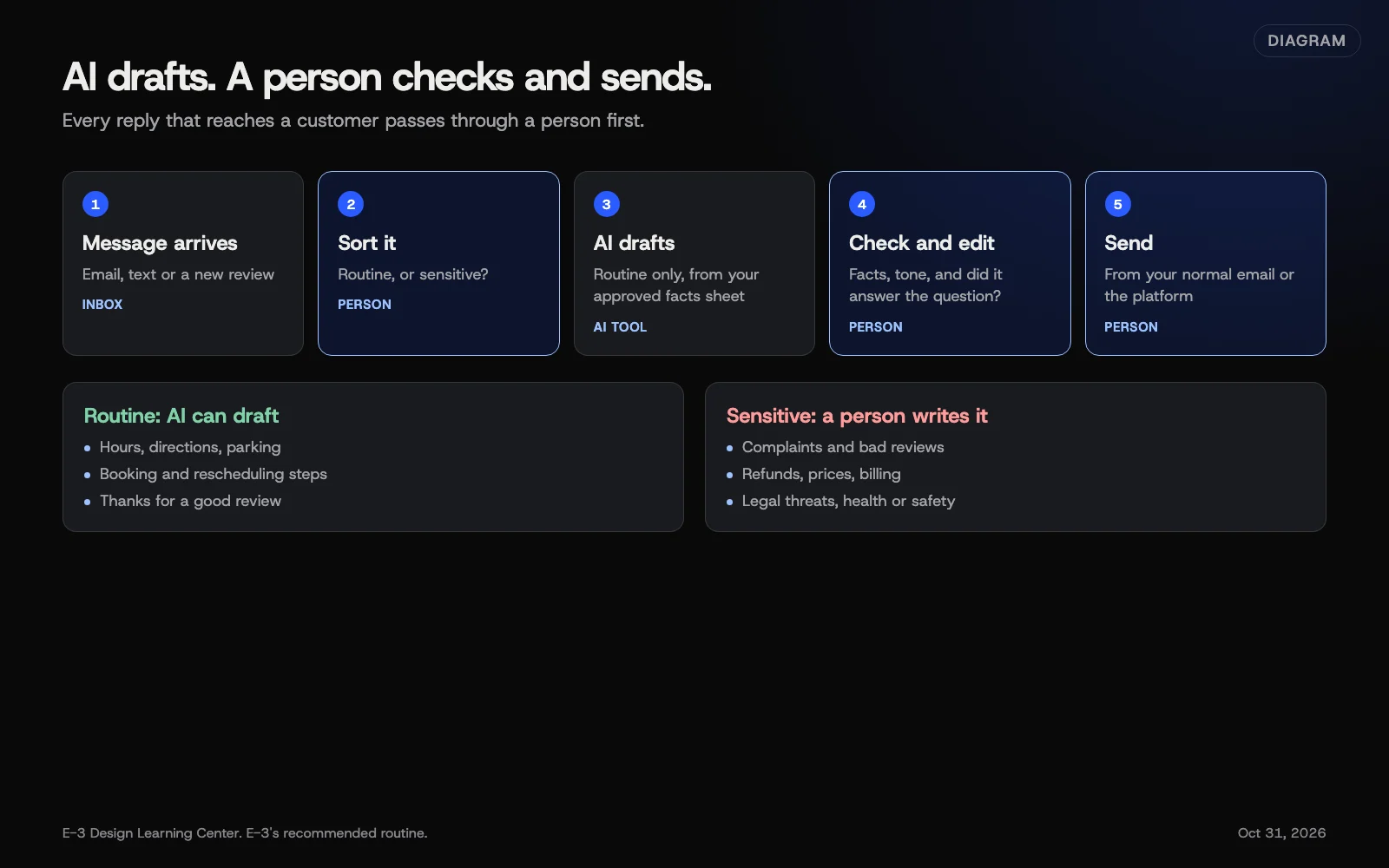 Diagram: a reply workflow with a person between the AI draft and the customer. E-3’s recommended routine.
2. Write down your approved facts
Make one short document the AI drafts from: hours, service area, services, booking steps, policies, and your standard wording for common answers. Update it when anything changes. This is what stops the tool from guessing.
3. Draft, check, send
- Paste the customer’s message, with their name, address and phone removed, plus your facts sheet.
- Ask for a short reply in your voice, using only those facts.
- Check every fact: dates, times, prices, names.
- Fix the tone. Does it sound like you? Does it answer what they actually asked?
- Send it yourself, from your normal email or the platform.
If your email or helpdesk has an AI feature built in, use the same steps. The draft appears in the reply box, and a person still presses send.
4. Review replies the same way
Google’s manage reviews page explains how to reply from your profile, and its review tips ask for replies that are short, specific and polite, not the same generic thanks every time. AI can help with variety. A person still reads each reply before posting it. Our guide to replying to reviews covers the steps and what to say to bad ones. The free review reply helper drafts a calm first version you can edit.
Why keep a person in the loop?
A wrong reply is public or permanent. An email promising the wrong date, or a review reply that reveals a customer’s job details, can’t be unsent. AI tools also tend to agree with whatever they’re given. Faced with an angry message, a draft may apologize for things that never happened or offer a refund you didn’t approve.
There’s a trust reason too. Customers can tell when a reply is boilerplate. A reply checked by someone who knows the job reads differently.
What should AI never do with customer messages?
- Send on its own. Every customer-facing message gets a human check.
- Promise money. Refunds, discounts, credits and prices are your decisions.
- Answer complaints or legal threats. Write these yourself, or with advice.
- Ask customers to change or remove reviews. Google’s content policy treats offering something to change a review the same as paying for one.
- Write reviews or testimonials. The FTC’s fake reviews rule covers reviews by someone who doesn’t exist, “such as AI-generated fake reviews.” See our reviews hub guide to the rule.
- Handle sensitive personal data in a general chat tool. See what’s safe to share.
What are the common mistakes and edge cases?
- Same reply under every review. Even AI-varied wording gets repetitive if it’s never edited.
- Over-apologizing. A draft that admits fault you don’t accept can be quoted back later.
- Old facts. Holiday hours change; the facts sheet didn’t. Date the sheet and check it monthly.
- Wrong language level. A formal, wordy reply to a two-line text message feels odd. Ask for short.
- Mixing up customers. When drafting many replies at once, a name or detail can end up in the wrong one. Check each.
What if replies still sound off, or customers complain?
Go back to manual for that type of message for a while. Read a week of sent replies and look for patterns: too long, too stiff, wrong facts. Fix the facts sheet first, since most bad drafts start there. If a customer says a reply felt automated, thank them, answer properly and personally, and adjust. For fast replies when you can’t get to the phone, our answer on missed-call text-back may fit better than AI drafting.
What does it cost, and how long does it take?
Drafting in a general AI tool costs nothing on a free tier, though business plans have better data terms. Setting up the facts sheet takes an hour or two. The check-and-send step takes a minute or two per reply, which is the point: it’s still faster than writing from scratch, and still yours.
How does E-3 handle this?
Review replies and lead follow-up are part of our leads and follow-up service. We draft each reply from the client’s approved information, a person on our team reads it, and the client approves it before it’s posted or sent. Nothing goes to a customer in a hurry, and complaints get a person from the first word.
Related questions
Next step
- Next: Can I use AI images, and who owns them?The next guide in AI tools for small business.
- Free website checkPublic checks on your own site, then an action plan of what to fix first.
Still stuck? Ask E-3 for an answer from our help guides.
Rather we handled ai tools for small business for you?
It’s part of what we do every week for small businesses, as part of leads and highlevel. Start with a free check of your site and profile, or call and ask.