
What are AI assistants good and bad at?
AI assistants are good at first drafts, summaries, rewording, lists and turning rough notes into tidy text. They're weak at facts they can't check: numbers, dates, laws, prices, local details and recent news. They can state wrong things with full confidence, so use them for words you will read and check, not for answers you will trust blindly.
The short version
- Good at: first drafts, summaries, rewording, outlines, brainstorming and tidying rough notes.
- Weak at: exact facts, numbers, dates, laws, prices, local details and recent events.
- They can sound sure and still be wrong. Google calls these errors hallucinations.
- Use them for words you will read and check. Keep decisions with a person.
- A useful test: if a mistake would cost money, trust or safety, a person checks it first.
What jobs should I give an AI assistant?
Think of an assistant as a fast, well-read helper who has never worked a day in your business. It writes clean sentences in seconds. It doesn’t know your prices, your customers or what happened last Tuesday unless you tell it.
These are the jobs where it earns its keep:
- First drafts. A job posting, a short “about us” paragraph, a reply to a routine email, a social post about a new service. You give it the facts; it gives you a starting point.
- Summaries. Paste in a long vendor email or a policy you wrote, and ask for the five points that matter. Then skim the original to be sure nothing important was dropped.
- Rewording. Make a stiff paragraph friendlier, shorten a long reply, or turn a list into a sentence and back again.
- Structure. Outlines for a page, a checklist from your notes, or a table that compares three options you’ve already researched.
- Brainstorming. Ten possible names for a newsletter, or questions a customer might ask about a service. Most of the ideas will be ordinary. One or two may be useful.
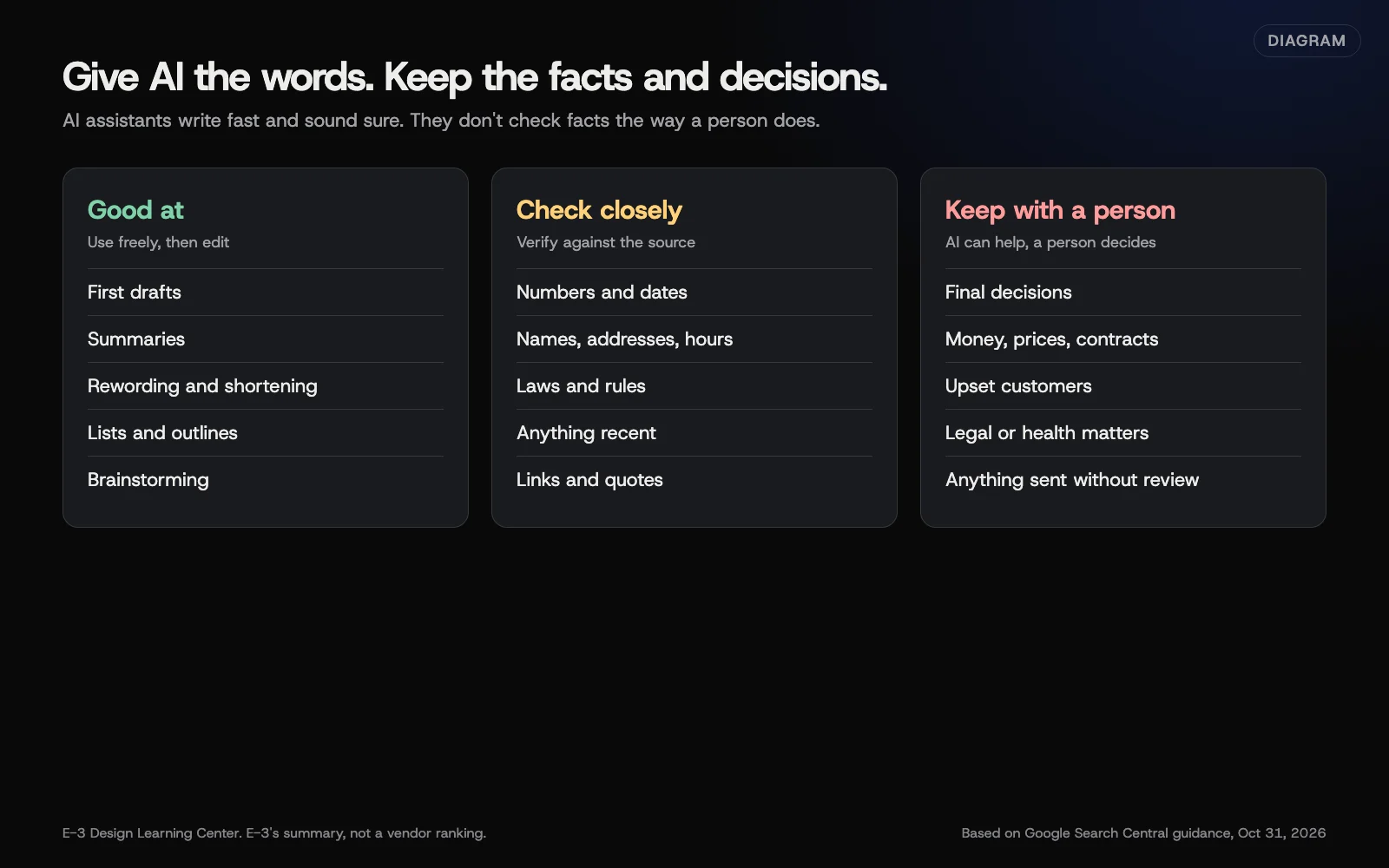 Diagram: jobs AI assistants handle well, jobs to check closely, and jobs to keep with a person. E-3’s summary, based on Google Search Central guidance, October 2026.
Where do AI assistants go wrong?
Google’s guidance on using generative AI content explains the root problem plainly. These models predict likely sequences of words. They don’t look facts up the way a person checks a reference. So the output can contain errors that read just as smoothly as the true parts.
In daily use, that shows up as:
- Numbers and dates. A made-up statistic, the wrong year a law took effect, or arithmetic that’s slightly off.
- Names and details. An address, a phone number or a staff name that looks right and isn’t.
- Laws and rules. A summary of tax, employment or privacy rules that misses your state, or describes an old version.
- Recent events. Some tools search the web and some don’t. Even with search, they can mix old and new pages.
- Your own business. Unless you give it the facts, it will guess at your hours, prices and services.
- Sources. Some tools now cite sources. A cited link can still say something different from the summary, so open it.
The confident tone is the trap. A wrong answer doesn’t come with a warning label.
Why does this matter for a small business?
Most small-business writing goes straight to customers: emails, quotes, web pages, posts. A wrong price in a reply, or a promise you can’t keep, costs more than the minutes AI saved. Google’s own Gemini privacy page also reminds users that some conversations are reviewed by people, which is one more reason to think before you paste. Our guide on what’s safe to share covers that side.
Used well, though, an assistant takes the blank-page pain out of routine writing. The owner still decides what goes out.
What are the common mistakes?
- Asking it for facts you haven’t given it. “Write our holiday hours post” without the hours invites a guess.
- Publishing the first draft. It will be generic and may be wrong. Edit it like a draft from a new hire.
- Trusting a summary of a contract or law. Read the original, or ask the person who should read it.
- Using it as a search engine for local questions. For “Is this supplier still in business?” call the supplier.
- Letting it decide. It can lay out options. Choosing between them is your job.
What if the answers keep coming back wrong or generic?
Give it more to work with. Paste in your own notes, the facts that must appear, who the reader is, and an example of writing you like. Ask for one short version, not five long ones. If it still invents details, tell it: “Use only the facts above. If something is missing, ask me.” Our guide on writing with AI without sounding like AI has a full routine.
If a task keeps going wrong, it may simply be a poor fit for an AI tool. Pricing, legal wording and judgment calls usually are.
What does it cost, and how long does it take?
Every major assistant has a free tier and paid plans for individuals and businesses. Plans and prices shift often; the vendor’s own pricing page is the place to check. Business plans usually come with different data terms, which matters more than features for most owners. Learning the basics takes an afternoon of trying real tasks.
How does E-3 handle this?
At E-3, people make client site changes today, testing updates and bigger changes on a staging copy first. AI-assisted edits, with a person checking each one and the client approving it, are planned but not live yet. We’d suggest the same rule for your own business: AI drafts, a person decides. If you want to set up a simple routine for your team, our guide to a staff AI policy is a good next step.
Related questions
Next step
- Next: What is safe to share with an AI tool?The next guide in AI tools for small business.
- Free website checkPublic checks on your own site, then an action plan of what to fix first.
Still stuck? Ask E-3 for an answer from our help guides.
Rather we handled ai tools for small business for you?
It’s part of what we do every week for small businesses, as part of seo and ai search. Start with a free check of your site and profile, or call and ask.