
What is safe to share with an AI tool?
Never paste passwords, card or bank numbers, customers' personal details, health information or anything under a confidentiality agreement into an AI tool. General business writing is usually fine. Personal plans may use your chats for training unless you turn it off, while business plans from OpenAI, Anthropic, Google and Microsoft say they don't train on your data by default.
The short version
- Never paste passwords, login codes, card or bank numbers, or customers’ personal details.
- Keep health information and anything covered by a confidentiality agreement out too.
- Personal plans may use chats to train models unless you switch that off.
- Business plans from the big four vendors say they don’t train on your data by default.
- Settings move. Check the vendor’s own page, and put your rules in a short staff AI policy.
What should I never paste into an AI tool?
Some things don’t belong in any chat window, whatever plan you’re on:
- Passwords, login codes and recovery codes. No tool needs them to help you. Our answer on business passwords covers where they do belong.
- Card numbers, bank details and tax IDs. Yours or a customer’s.
- Customers’ personal details. Names with addresses, phone numbers, order histories, or anything that identifies a person. Replace them with “Customer A” before you paste.
- Health information, such as anything a patient or client told you in confidence.
- Material under a confidentiality agreement, like a client’s unreleased plans or a contract that limits sharing.
- Staff matters with names attached: reviews, discipline or pay.
A good habit: before you paste, ask “Would I be fine if a stranger at the vendor read this?” Google says it directly on its Gemini privacy page: “Please don’t enter confidential information that you wouldn’t want a reviewer to see.”
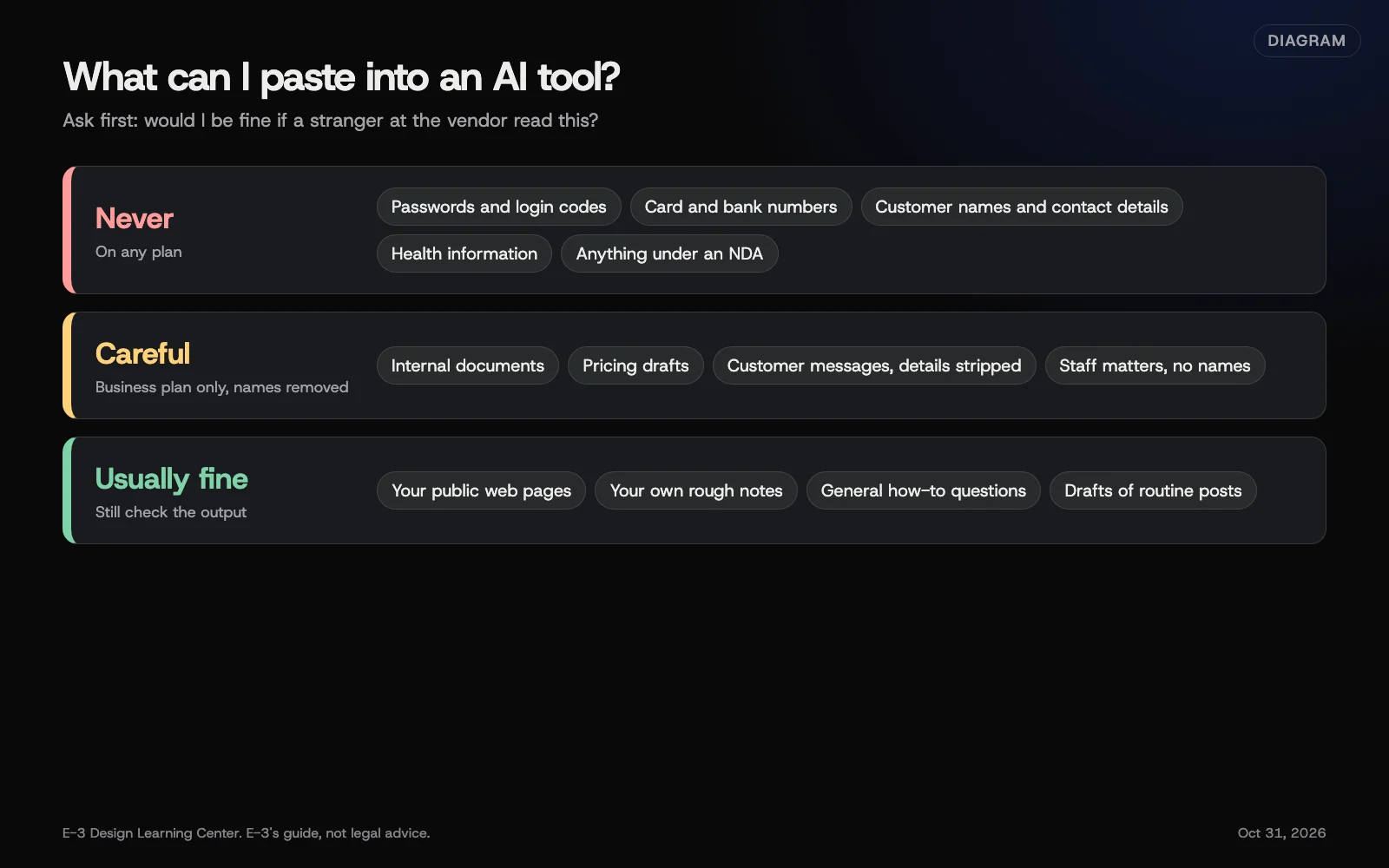 Diagram: what to keep out of AI tools, what to share only on a business plan with care, and what’s usually fine. E-3’s guide, not legal advice.
What does each vendor say it does with my chats?
Here’s what each company states on its own pages, checked October 31, 2026. Plan names and menus change, so open the linked page before you rely on it.
OpenAI (ChatGPT)
- Personal plans (Free, Plus, Pro): chats can be used to improve models unless you turn off Improve the model for everyone in Settings, then Data Controls. Turning it off doesn’t delete old chats. See OpenAI’s data controls page.
- Temporary Chat: unless you save one as a regular chat, these chats aren’t used for training and don’t appear in your history. OpenAI says it may keep a copy for up to 30 days for safety. See Temporary Chat.
- Business plans (ChatGPT Business, Enterprise, Edu) and the API: OpenAI says it doesn’t use inputs or outputs from these to train its models by default.
Anthropic (Claude)
Anthropic’s consumer terms update of August 28, 2025 lets Free, Pro and Max users choose whether their chats are used to train new models. If you allow it, Anthropic keeps that data for up to five years. If you don’t, the 30-day retention period continues. You can change the choice in Privacy Settings. The update doesn’t apply to services under Anthropic’s Commercial Terms, which include Claude for Work (Team and Enterprise) and the API.
Google (Gemini)
For personal Google Accounts, the Keep Activity setting controls what’s saved to Gemini Apps Activity. With it on, Google says it uses your activity to improve its services, including training generative AI models, and a subset of chats is reviewed by people. Chats that were reviewed are kept for up to three years, even if you delete your activity. With Keep Activity off, Google says chats are kept for 72 hours. See the Gemini Apps Privacy Hub.
For Google Workspace accounts, Google’s Workspace privacy hub says “Workspace does not use customer data for training models without customer’s prior permission or instruction.”
Microsoft (Copilot)
For work and school accounts, Microsoft’s page on enterprise data protection says prompts and responses “aren’t used to train foundation models.”
For the personal Copilot app, Microsoft’s privacy FAQ says signed-in users can turn off training on their conversations. Microsoft released a new version of the Copilot app on August 18, 2026, and the FAQ says its older instructions apply only to the old app. Check the current privacy page linked there for where the setting now sits.
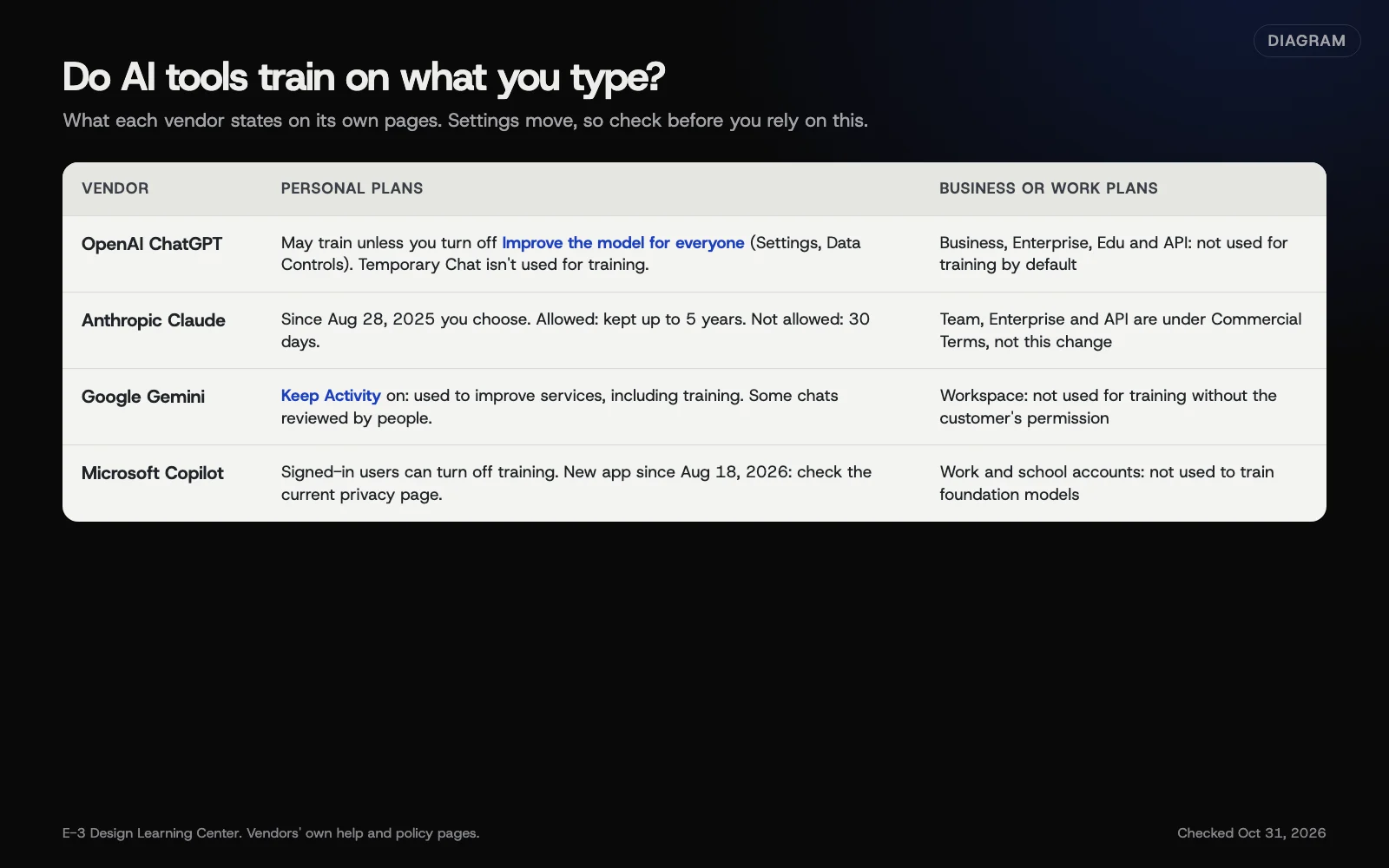 Diagram: what four vendors say about training on chats, as stated on their own pages on October 31, 2026. Check each page before you rely on it, since settings move.
Why does this matter?
Once you paste something, you’ve handed a copy to another company under its terms. Even with training switched off, vendors keep chats for a while for safety and abuse checks. A customer who trusted you with their details didn’t agree to that. Privacy laws in some states also expect you to know which vendors handle personal data. Our privacy hub’s guide on vendors and processors explains that side.
What are the common mistakes and edge cases?
- Staff using personal accounts for work. The business plan’s protections don’t apply. Give people a business account, or set the rule in writing.
- Pasting a whole email thread when you only needed one paragraph. Threads carry signatures, phone numbers and addresses.
- Uploading spreadsheets of customers to “find trends.” Remove names and contact details first, or don’t.
- Connecting an AI tool to your email or files without reading what it can see. Connected apps can read more than you’d paste by hand.
- Assuming “off” means deleted. Training settings and deletion are separate controls on every major tool.
- Screenshots. A screenshot of your inbox or admin panel shares everything on screen.
What if I already pasted something I shouldn’t have?
Don’t panic, and act in this order:
- Delete the chat in the tool. Then check the vendor’s page for how long deleted chats are still kept.
- Change any password or code you shared, at once, and turn on two-step login if it’s off. See two-factor authentication.
- Tell the right person if customer data was involved, such as the owner or whoever handles privacy for you.
- Ask a lawyer if the data was health, financial or covered by a contract. This isn’t legal advice.
- Fix the cause: a business account, the training setting, and a line in your staff policy.
What does it cost, and how long does it take?
The settings are free on every plan. Checking them takes about ten minutes per tool. Business plans cost more than personal ones; prices change often, so check each vendor’s pricing page.
How does E-3 handle this?
E-3 uses AI for routine work, and people check it before anything reaches a client. Accounts we set up are created in the client’s name, with E-3 added as a user, so the business keeps control. The same idea applies to AI tools: a business account the business owns, and a clear list of what never goes in. If you’d like help with that, we can walk through it with you.
Related questions
Sources
- Data controls in ChatGPT (OpenAI Help Center)
- Temporary chat in ChatGPT (OpenAI Help Center)
- Updates to Consumer Terms and Privacy Policy (Anthropic, August 28, 2025)
- Gemini Apps Privacy Hub (Gemini Apps Help)
- Generative AI in Google Workspace Privacy Hub (Google Workspace Admin Help)
- Enterprise data protection in Microsoft Copilot and Microsoft Copilot Chat (Microsoft Learn)
- Privacy FAQ for Microsoft Copilot (Microsoft Support)
Next step
- Next: How do I write with AI without sounding like AI?The next guide in AI tools for small business.
- Free website checkPublic checks on your own site, then an action plan of what to fix first.
Still stuck? Ask E-3 for an answer from our help guides.
Rather we handled ai tools for small business for you?
It’s part of what we do every week for small businesses, as part of seo and ai search. Start with a free check of your site and profile, or call and ask.