
Add and remove Business Profile owners and managers safely
Keep the primary owner on a Google Account the business controls, add one trusted backup owner, and give staff and agencies manager access. Manage everyone under More, then Business Profile settings, then People and access. Remove people the day they leave. New owners and managers must wait 7 days before some actions.
The short version
- Primary owner: the business owner, on an account the business controls.
- One backup owner. Everyone else, including your web company, is a manager.
- Add and remove people under More, then Business Profile settings, then People and access.
- Only the primary owner can make someone else primary owner.
- New owners and managers wait 7 days before they can remove people, delete the profile or become primary owner.
What can each role do?
Google’s owners and managers page describes three roles:
- Primary owner. One per profile. Full control. Can’t leave until they hand primary ownership to someone else.
- Owner. Full control, including adding and removing people. A profile can have several.
- Manager. Nearly the same access, but can’t add or remove users or remove the profile. Managers used to be called “site managers.”
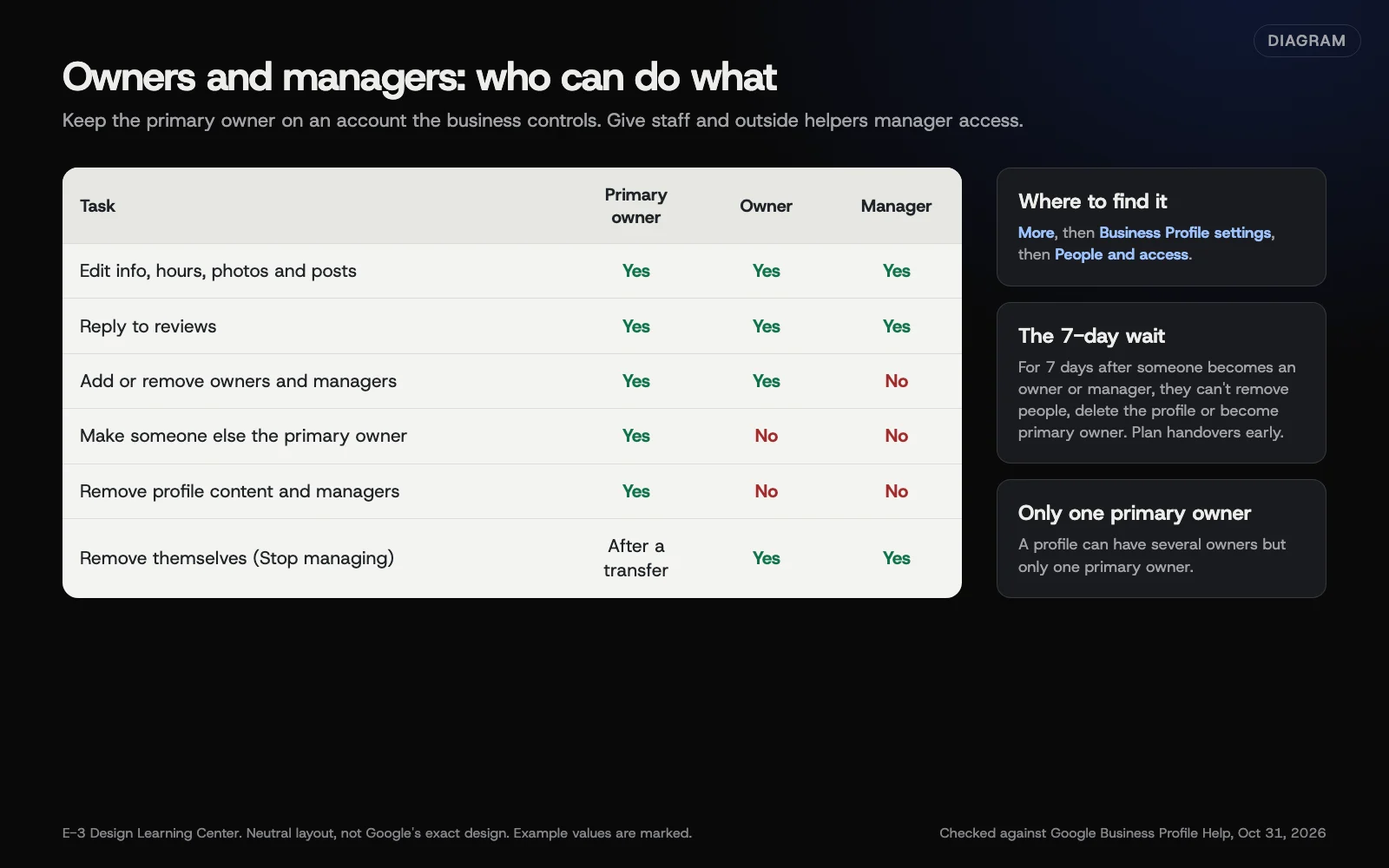 Diagram: what primary owners, owners and managers can do, based on Google Business Profile Help (October 2026).
How do I add, remove or transfer access?
Add an owner or manager
- Go to your Business Profile.
- Select More, then Business Profile settings, then People and access.
- At the top left, select Add.
- Enter the person’s email address.
- Under “Access,” select Owner or Manager.
- Select Invite.
The person has to accept the invitation, so use the email address they’ll actually sign in with.
Remove someone
- Go to People and access.
- Select the person.
- Select Remove person.
Only owners can remove other owners and managers.
Transfer primary ownership
These steps come from Google’s transfer page:
- Go to More, then Business Profile settings, then People and access.
- Select the person who will become primary owner.
- Next to “Access,” select Edit.
- Select Primary owner, then Save.
The new primary owner must already be an owner or manager. Add them first, then wait out their first 7 days.
Remove yourself
Go to People and access, select yourself, then select Stop managing and Confirm. Primary owners must transfer primary ownership first.
Why does access matter so much?
Access problems cause a lot of Business Profile headaches. The person who set it up left. The agency closed. Nobody knows which Gmail account owns it. If you part ways with an outside company that holds your listing, you can lose it. Our article on owning your digital assets covers the same rule for domains, hosting and email.
What are the common mistakes and edge cases?
- An outside company as primary owner. Make them a manager.
- Shared logins. Give each person their own manager access, so you can remove one person cleanly.
- Forgetting the 7-day wait. For the first 7 days after someone becomes an owner or manager, Google blocks deleting or undeleting the profile, removing people, and transferring primary ownership. Google’s owners page says that if they delete their Google Account in that window, they’re removed and must be added again, and its transfer page says the same happens if they leave the business. Don’t count on either: when someone leaves, an owner should remove them by hand. Add a new owner at least a week before a sale, retirement or agency change.
- Removing the profile to “clean up” access. Google’s removal page says only primary owners can remove profile content and managers, and it’s permanent. Your posts, photos and review replies are deleted; customer reviews stay. Just remove the people instead.
Google’s owners page says owners can delete the profile, while the removal page limits it to primary owners. We follow the stricter rule.
What if I can’t get in at all?
If the owner is gone and nobody else has access, request ownership. Google’s request page gives the current owner 3 days to respond before you may be able to claim it. The steps are in our guide to creating or claiming a profile.
Don’t create a new profile to get around it. That leads to a duplicate; see duplicate and unwanted listings. And if your profile is ever suspended, you’ll need someone who can sign in to file the appeal.
How much does it cost, and how long does it take?
Managing access is free and takes minutes. Plan around the 7-day wait for anything involving a new owner.
How does E-3 handle this?
We look after clients’ Google profiles through our SEO and AI search service. Accounts we set up are created in your business’s name, with E-3 added as a user, so ownership stays with you.
Related questions
Sources
- Manage your Business Profile owners & managers (Google Business Profile Help)
- Transfer primary ownership of a Business Profile (Google Business Profile Help)
- Remove a Business Profile from your Google Account (Google Business Profile Help)
- Request ownership of a Business Profile (Google Business Profile Help)
Next step
- Next: Google updates and suggested edits: catch them fastThe next guide in Google Business Profile.
- Google Business Profile checklistA free printable checklist (PDF).
Still stuck? Ask E-3 for an answer from our help guides.
Rather we handled google business profile for you?
It’s part of what we do every week for small businesses, as part of seo and ai search. Start with a free check of your site and profile, or call and ask.