
How should competition or convention registration work?
Plan the data before you pick a tool. A competition registers a studio or team, its dancers, and many entries per dancer, each with a division, a music file and a fee. Collect only what judging and safety need, get a parent's consent for minors, close entries before you build the schedule, and send each studio one confirmed summary.
The short version
- A competition isn’t one sign-up per person. It’s a studio, its dancers, and many entries.
- Write down every field each level needs before you choose software.
- Collect music files with a clear file type, size limit and naming rule.
- Get a parent’s or guardian’s consent for minors, and collect only what you need.
- Close entries on a fixed date, then build and publish the schedule.
How is a competition different from a normal event?
A workshop has one list: people and tickets. A dance competition or convention usually has three levels, and each needs different information:
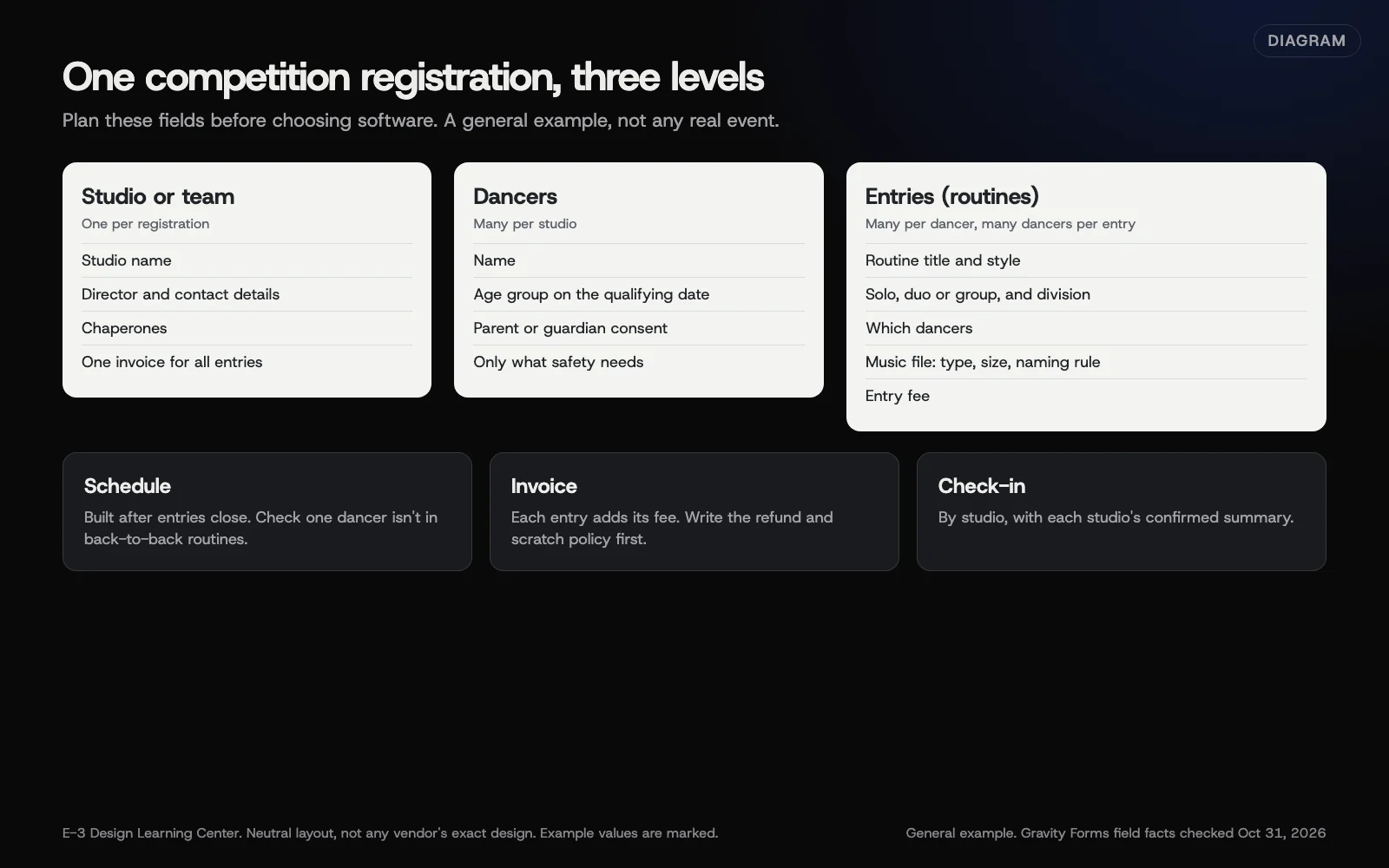 Diagram: how one registration for a competition breaks down into a studio, its dancers and their entries, and what each level needs. A general example, not any real event.
| Level | Typical details | Used for |
|---|---|---|
| Studio or team | Studio name, director, contact email and phone, number of chaperones | Invoices, communication, check-in |
| Dancer | Name, age or age group on the qualifying date, consent from a parent or guardian | Divisions, safety, consent |
| Entry (routine) | Title, style, size (solo, duo, group), division, which dancers, music file, props, fee | Judging, the schedule, the music desk |
A convention adds class registrations, often by age group, and passes for parents and teachers.
How do I plan the registration?
1. Write the rules first
Publish the rules page before registration opens: divisions, how age is worked out, entry fees, deadlines, music rules, refund policy and photo policy. Your form should follow the rules, not the other way round.
2. Map every field to a use
For each field, write down who uses it and when. If nobody uses it, drop it. Leave out anything a judge, the schedule or your safety plan doesn’t need. Dates of birth, medical details and home addresses are sensitive; if you need them, collect them once, limit who can see them, and delete them after the event. See how long to keep form data.
3. Choose a tool that matches the shape
There are three broad routes:
- Dedicated competition registration software. Several companies sell systems built for dance and cheer events, with studio accounts, entries, scheduling and music. Compare them on the features each vendor lists, and ask for a demo with your real rules. We don’t rank them here.
- A form plugin on your website, such as Gravity Forms. Workable for a smaller or first-year event. Gravity Forms’ List field lets people add rows, such as one row per dancer with several columns. More complex setups, like one form per studio with many linked entries, need add-ons from other developers. Test them on a staging copy first.
- A ticketing platform, for the audience side: spectator tickets and passes. See form or ticketing platform.
Many events use two tools: one for entries, and one for spectator tickets.
4. Collect music the right way
If you take music uploads through a form, Gravity Forms’ File Upload field lets you set Allowed file extensions, turn on Enable Multi-File Upload, and set a Maximum File Size in megabytes for each file. If you leave the size blank, your server’s upload limit applies. Tell entrants:
- the file types you accept;
- the size limit;
- a naming rule, such as studio name, entry title and division;
- the deadline, and whether they should still bring a backup on the day.
Large audio files fill server space quickly. Ask your web host about storage before you open entries.
5. Set deadlines and caps
Use a fixed closing date, set with the form’s schedule (Gravity Forms’ Schedule form under Restrictions). If you limit the number of entries, decide whether the cap is on studios, dancers or routines, then see capping registrations.
6. Take payment per studio
Studios usually pay one invoice covering all their entries. With a form, use pricing fields so each entry adds its fee, as Gravity Forms’ pricing fields guide describes, and a Total. Then take payment through a provider; see taking payment for registrations. Write the refund and scratch policy (what happens when an entry is withdrawn) before you open.
7. Publish the schedule, then check in by studio
Build the schedule only after entries close. Send each studio one confirmed summary: their entries, divisions, performance times and music status. On the day, check in by studio rather than dancer by dancer; see checking people in.
What about consent for minors?
Many competitors are under 13. The Federal Trade Commission’s COPPA FAQ explains when a website that collects children’s personal information needs verifiable consent from a parent. Have the parent, guardian or studio director register on the child’s behalf, and collect only what the event needs. Our guide to COPPA basics covers when the rule applies. Waivers and photo releases have legal wording of their own; have a lawyer check them. This isn’t legal advice.
Why does planning the data first matter?
Most of the pain at a big event comes from data that doesn’t fit: a dancer entered in the wrong age group, a music file named “final final 2,” or a studio that paid for fewer entries than it submitted. Fixing that by hand the week before is where events lose sleep. A form shaped around your rules prevents most of it.
What are the common mistakes and edge cases?
- Age worked out on the wrong date. State the qualifying date and calculate from it.
- One dancer in overlapping routines scheduled too close together. Check for clashes before you publish.
- Music collected by email, so files get lost. Use one upload route.
- No scratch policy, so withdrawn entries turn into refund arguments.
- Studios editing entries after the schedule is out. Lock changes after the deadline, and handle late changes by request.
What if this didn’t work?
If your form can’t handle the structure, don’t keep adding workarounds. Close entries, export what you have, and move to software built for the job next season. For the public listing, event pages for spectators can still qualify for Google’s event results if they’re public and in person; see Google’s event guide and our event markup guide.
How much does it cost, and how long does it take?
Dedicated software is usually priced per event or per entry; ask vendors. A form-based setup for a first-year event takes several days of planning, building and testing, mostly in agreeing the rules.
How does E-3 handle this?
We’ve built event registration for clients for years: about 168 sign-up requests in our support records since 2019. For competitions, we start with your rules and the data map above, then tell you plainly whether a website form will cope or whether dedicated software is the better fit. Anything we build is tested on a staging copy first. See how we set up registration.
Related questions
Sources
- File Upload field (Gravity Forms docs)
- List field (Gravity Forms docs)
- Gravity Forms Pricing Fields Guide (Gravity Forms docs)
- How To Schedule When A Form Is Active (Gravity Forms docs)
- Complying with COPPA: Frequently Asked Questions (Federal Trade Commission)
- Event structured data (Google Search Central)
Next step
- Events and registration: the complete guideEvery guide in this topic, in order.
- Free website checkPublic checks on your own site, then an action plan of what to fix first.
Still stuck? Ask E-3 for an answer from our help guides.
Rather we handled events and registration for you?
It’s part of what we do every week for small businesses, as part of website care. Start with a free check of your site and profile, or call and ask.