
How do I cap event registrations and run a waitlist?
Set the cap before you share the link. In Gravity Forms, turn on Enable entry limit under the form's Restrictions settings and add Schedule Form for a closing date. Ticket tools set a capacity per ticket. For a waitlist, use Event Tickets Plus or a ticketing platform, since a plain form just closes when full.
The short version
- Decide the real number first: the room, the instructor, the food, the parking.
- Gravity Forms: Settings, Restrictions, Enable entry limit, then Schedule Form for open and close dates.
- Event Tickets: set a capacity on each ticket. Plus adds shared capacity and a waitlist.
- Eventbrite: set ticket quantities, and turn on its waitlist for sell-outs.
- Know what counts: in Gravity Forms, failed and refunded payment entries count toward the cap.
How do I set a cap on a Gravity Forms registration form?
From Gravity Forms’ entry limits guide:
- Open the form, then its Settings, and go to the Restrictions section.
- Tick Enable entry limit.
- Enter the Number of Entries.
- Choose the period in the drop-down next to the number. For a one-off event, use total entries, which never resets. The per day, per week, per month and per year limits suit a standing form, such as a weekly class with a fixed number of places.
- Write the Entry Limit Reached Message, which replaces the form when it’s full. Say it’s full, and what people can do instead.
- Save the settings.
Expected result: when the count is reached, the guide says, “The form will become inactive,” and the message shows instead.
What counts toward the limit?
This trips people up. The guide says entries with Processing, Failed, Pending or Refunded payment statuses all count. Spam, trashed and partial entries don’t.
So if three people’s cards fail before they succeed, those failed entries use up three places. Check the entries list as it fills. Move failed or abandoned entries to the trash, which frees their places.
How do I set a closing date?
From Gravity Forms’ scheduling guide:
- In the same Restrictions section, tick Schedule Form.
- Set the Schedule Start Date/Time and Schedule Form End Date/Time.
- Write a Form Pending Message for before it opens and a Form Expired Message for after it closes.
The schedule uses your site’s time zone under Settings, General, Timezone in WordPress. Check it before you set a midnight deadline.
What about limits on one choice, like one session?
Gravity Forms’ built-in limit covers the whole form, not each choice. If people pick between a morning and an afternoon session with 20 places each, the simplest reliable setup is one form per session, each with its own cap. Add-ons from other developers can limit choices within one form; check them on a staging copy before relying on them.
How do I set capacity with Event Tickets?
The Event Tickets availability guide says capacity is set by you when you create each ticket. Availability is the lowest of three numbers: the capacity, the stock in your shop plugin if you sell through WooCommerce, and capacity minus attendees already created.
Event Tickets Plus adds a shared capacity, so several ticket types, like adult and child, draw from one pool of places.
How do I run a waitlist?
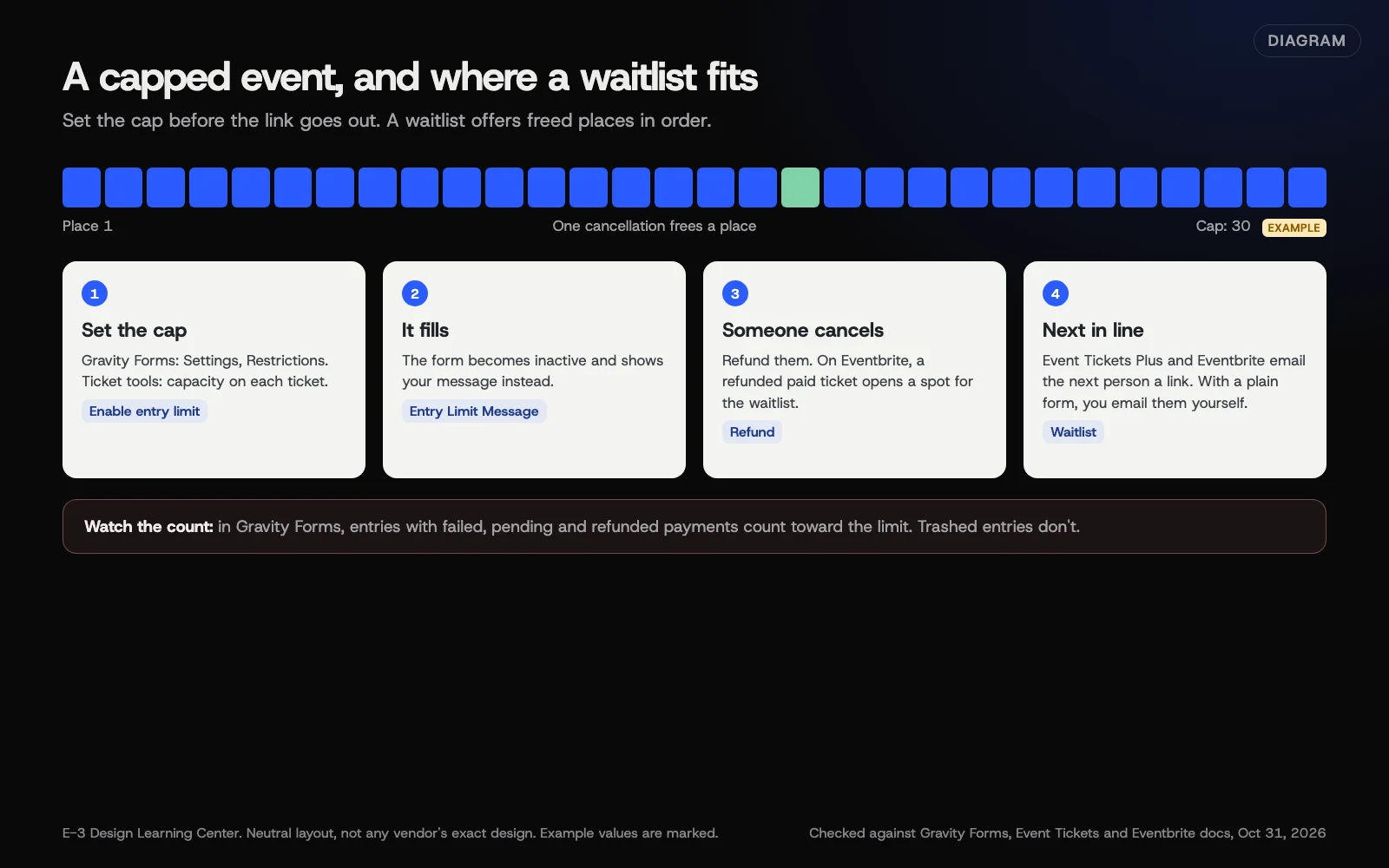 Diagram: how a capped event fills, closes and offers freed places to a waitlist. Based on Gravity Forms, Event Tickets and Eventbrite documentation (October 2026).
Event Tickets Plus. The waitlist guide says you create at least one ticket or RSVP and publish the event first. Then, in the classic editor, a Waitlist section appears on the event. In the block editor, select the tickets or RSVP block and turn on the waitlist option in the sidebar. You choose when it shows: during pre-sale or when sold out, before sales start, or only when sold out. People who join get a confirmation email, and when a ticket becomes free they get a second email with a link to buy. With several ticket types, all of them must be full before the waitlist appears.
Eventbrite. Its waitlist page says the waitlist collects names once the event sells out, and notifies the next person when a ticket opens from a cancellation or refund. Each person gets a window to claim it before the offer moves on. You can cap how many people join the waitlist. We couldn’t load Eventbrite’s help center to confirm the exact menu labels, so follow the prompts in your event dashboard.
A plain form. There’s no automatic waitlist. A practical workaround: when the main form closes, its limit message links to a short second form, “Tell me if a place opens.” When someone cancels, you email the first name on that list yourself.
Why does this matter?
Overbooking is worse than a full event. Turning people away at the door, or squeezing them in, costs more goodwill than a clear “this one’s full” message. A waitlist also tells you there’s demand for another date.
What are the common mistakes and edge cases?
- Setting the cap after the link went out. Early sign-ups can already exceed it.
- One sign-up for several people. If your form has a “number of guests” field, a cap on entries isn’t a cap on people. Use one entry per person, or set a lower entry cap and check totals by hand.
- Failed payments eating places, as explained above.
- Forgetting staff and volunteers in the room count.
- Reopening a full form by raising the limit without telling the waitlist first.
What if this didn’t work?
- The form closed early. Count the entries by status. Trash failed and test entries, then check again.
- The form didn’t close. Check the limit is enabled and saved, and that a cached copy of the page isn’t hiding the change.
- The waitlist never appears. In Event Tickets Plus, every ticket type must be at capacity and within the display window you chose.
How much does it cost, and how long does it take?
Entry limits and scheduling are built into Gravity Forms. Waitlists in Event Tickets need the paid Plus version. Setting a cap and dates takes about ten minutes.
How does E-3 handle this?
Limits and closing dates are part of every registration form we build. We set them on a staging copy and send test entries up to the cap to check the full message. Changing a cap or date later is a quick request; see setting up event registration.
Related questions
Next step
- Next: How do I send confirmation and reminder emails for my event?The next guide in Events and registration.
- Free website checkPublic checks on your own site, then an action plan of what to fix first.
Still stuck? Ask E-3 for an answer from our help guides.
Rather we handled events and registration for you?
It’s part of what we do every week for small businesses, as part of website care. Start with a free check of your site and profile, or call and ask.