
How do WordPress releases and updates work?
WordPress ships major releases with new features, about three a year in 2026, and minor releases with fixes and security patches in between. Minor releases install themselves by default. Only the latest major version is officially supported, so plan to move to each new major release within weeks, after a backup and a test.
The short version
- Major releases (7.0, 7.1) add features. Minor releases (7.1.4) fix bugs and security problems.
- Minor releases install themselves by default.
- Plugins and themes don’t update themselves unless someone turns auto-updates on.
- Only the latest major version is officially supported. On October 31, 2026, that’s 7.1, at version 7.1.4.
- Back up before any update, and check your key pages and forms afterwards.
How often does WordPress release?
WordPress has changed pace twice recently:
- In April 2025, the project moved to one major release a year. In practice, 2025 still had two: 6.8 in April and 6.9 in December.
- For 2026, the schedule proposal went back to about three major releases a year, roughly every four months, with minor releases every six to eight weeks between them.
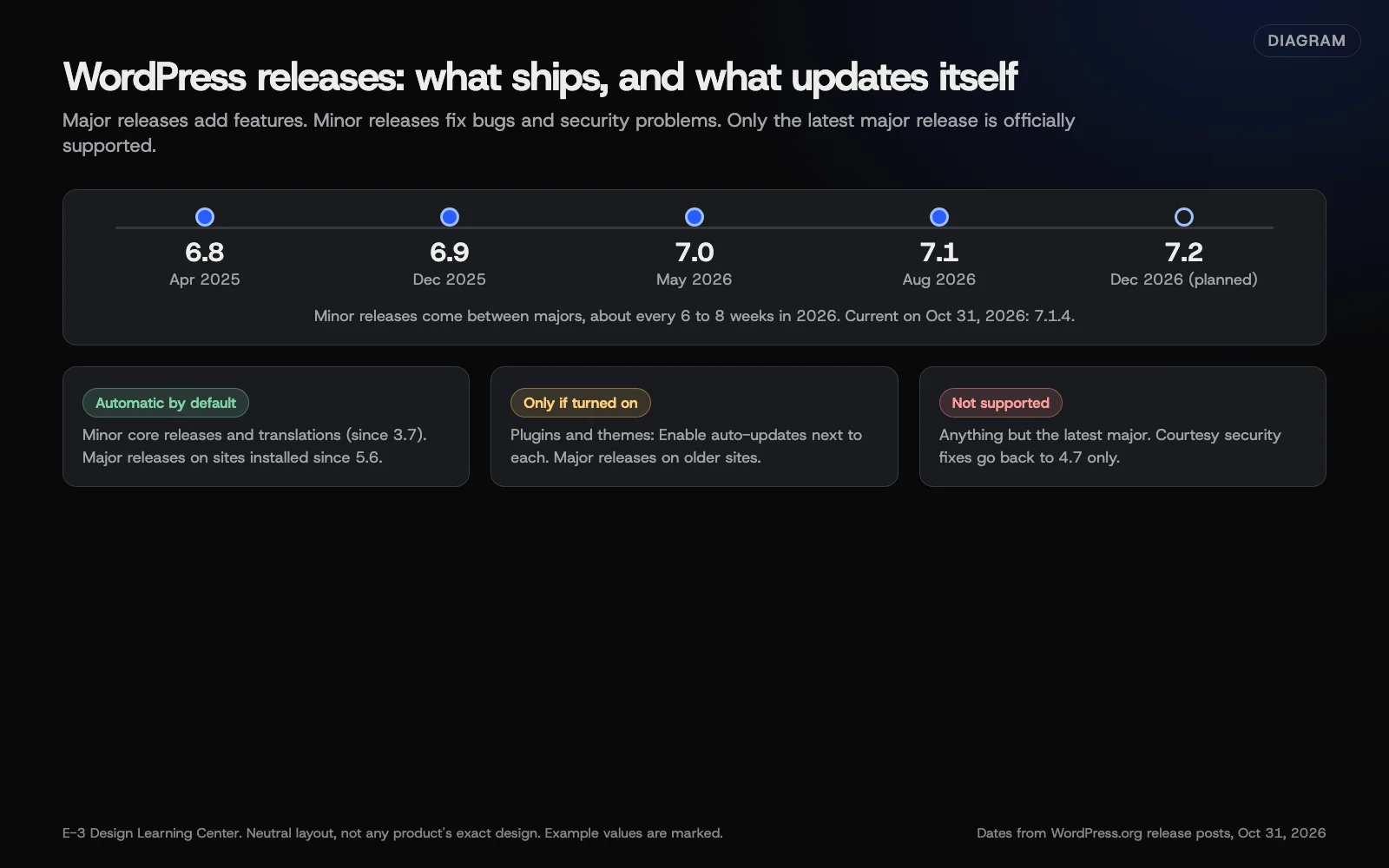 Diagram: WordPress major and minor releases in 2025 and 2026, and what installs itself by default. Dates from WordPress.org release posts; 7.2 is a planned date, not a release.
| Release | Date | Source |
|---|---|---|
| 7.0 | May 20, 2026 | Release post |
| 7.1 | August 19, 2026 | Release post |
| 7.1.4 | October 28, 2026 | Releases page |
| 7.2 | Planned for December 2026 | Beta 2 post |
WordPress 7.0 slipped from its original April date. Planned dates can move, so treat them as targets.
Which versions still get security fixes?
WordPress’s supported versions page says the only officially supported version is the latest major release. Security fixes are copied back to older versions only as a courtesy, with no fixed support period.
In 2025, WordPress stopped those courtesy fixes for versions 4.1 to 4.6. Fixes now go back to 4.7. If your site is several major versions behind, it may still get some patches, but it isn’t supported, and plugins will stop working with it over time.
What updates by itself?
From WordPress’s upgrading guide and auto-updates guide:
- Minor core releases and translations: automatic by default since WordPress 3.7.
- Major core releases: automatic on sites installed since WordPress 5.6. Older sites stay on minor-only unless an Administrator chooses Enable automatic updates for all new versions of WordPress on Dashboard, then Updates.
- Plugins and themes: manual, unless someone selects Enable auto-updates next to each one. Auto-updates run twice a day and email the results.
Your host or maintenance provider may override any of this. Ask them which applies to your site.
How do I read an update notice?
A red number on Dashboard, then Updates, or next to Plugins, counts waiting updates. The Updates screen lists WordPress, plugins and themes separately.
Before selecting anything:
- Check what it is. A minor core release or a plugin security fix is urgent. A major release can wait a week or two while plugins catch up.
- Check there’s a recent backup. See how often your site should be backed up.
- Update one thing at a time and check the site between each.
- Test your key pages and forms afterwards.
Our help article on keeping WordPress and plugins updated has the full safe-update routine. For plugins specifically, see whether plugin updates can break your site.
What are the common mistakes and edge cases?
- Turning off all updates to avoid breakage. That trades a small risk for a big one.
- Updating everything with one click on a busy day. If something breaks, you won’t know which update did it.
- Ignoring a major release for a year. The jump gets bigger, and so does the risk.
- Old PHP blocking updates. WordPress 7.0 dropped support for PHP 7.2 and 7.3. See which PHP version your site should run.
- Paid plugins with lapsed licenses. They often stop showing updates. Check renewal dates.
- Beta versions. WordPress 7.2 betas are for testing. Don’t run them on a live business site.
What if an update broke something?
If you see “There has been a critical error on this website,” see what a critical error means. If one page looks wrong, note which update you ran and ask whoever maintains the site to roll it back from the backup.
How long does it take?
A minor release takes a few minutes and installs itself. A major release, done properly with a backup and checks, takes about half an hour for a typical small-business site, more if a plugin needs replacing.
How does E-3 handle this?
On sites we look after through website care, WordPress, plugins and themes get tested updates with a backup first. Monitoring tracks waiting updates, known plugin vulnerabilities and plugin-license renewals. “Do you keep my WordPress site and plugins updated?” has come up about 156 times in our support records since 2019.
Related questions
Sources
- Releases (WordPress.org)
- A new cadence for WordPress core (Make WordPress Project, April 2025)
- Proposal: 2026 major release schedule (Make WordPress Project)
- WordPress 7.0 Armstrong (WordPress.org News)
- WordPress 7.1 Mary Lou (WordPress.org News)
- WordPress 7.2 Beta 2 (WordPress.org News)
- Supported versions (WordPress.org Documentation)
- Dropping security updates for WordPress versions 4.1 through 4.6 (WordPress.org News)
- Upgrading WordPress (WordPress Advanced Administration Handbook)
- Plugins and themes auto-updates (WordPress.org Documentation)
Common questions
- Is my old version of WordPress still safe?
- WordPress only officially supports the latest major release. Older branches back to 4.7 get security fixes as a courtesy, with no promised support period. Move to the current release.
Next step
- Next: What PHP version should my WordPress site run?The next guide in WordPress for owners.
- Website careUptime monitoring, tested updates, daily backups and security alerts.
Still stuck? Ask E-3 for an answer from our help guides.
Rather we handled wordpress for owners for you?
It’s part of what we do every week for small businesses, as part of website care. Start with a free check of your site and profile, or call and ask.