
Cybersecurity basics for small businesses: the guide
Most attacks on small businesses start with a convincing email or a stolen password, not clever hacking. Protect the business with a one-page plan: verify every payment change by phone, use a password manager and passkeys or two-step login, keep offline backups, update devices, train staff, limit vendor access, and know who to call.
The short version
- Payments: confirm every new or changed bank detail by phone, on a number you already have.
- Logins: a password manager for everyone, and passkeys or two-step login on email, banking and your domain.
- Backups: at least one copy offline or out of reach of your main accounts, and a test restore.
- Updates: computers, phones, routers and websites, all set to update.
- People: short, regular training, and a plan for the first hour of a bad day.
Why do small businesses get hit?
Small businesses send and receive money, hold customer details and have email accounts worth stealing. Most attacks aren’t aimed at you personally. Phishing, password guessing and invoice fraud are sent to thousands of businesses at once, and they work on whoever’s least prepared.
The FBI’s 2025 Internet Crime Report logged 1,008,597 complaints in 2025. Business email compromise, where criminals trick a business into paying the wrong account, accounted for $3,046,598,558 in reported losses. Only investment fraud was higher.
The good news is that the fixes are mostly habits, not expensive tools. The FTC’s Cybersecurity for Small Business page and CISA’s Secure Your Business page say much the same thing: train people, use strong passwords and multifactor authentication, keep software updated, and back up.
Where do I start?
Write a one-page plan. It doesn’t need to be a policy manual. It needs to say what you’re protecting, who’s in charge, the handful of rules everyone follows and who to call when something goes wrong.
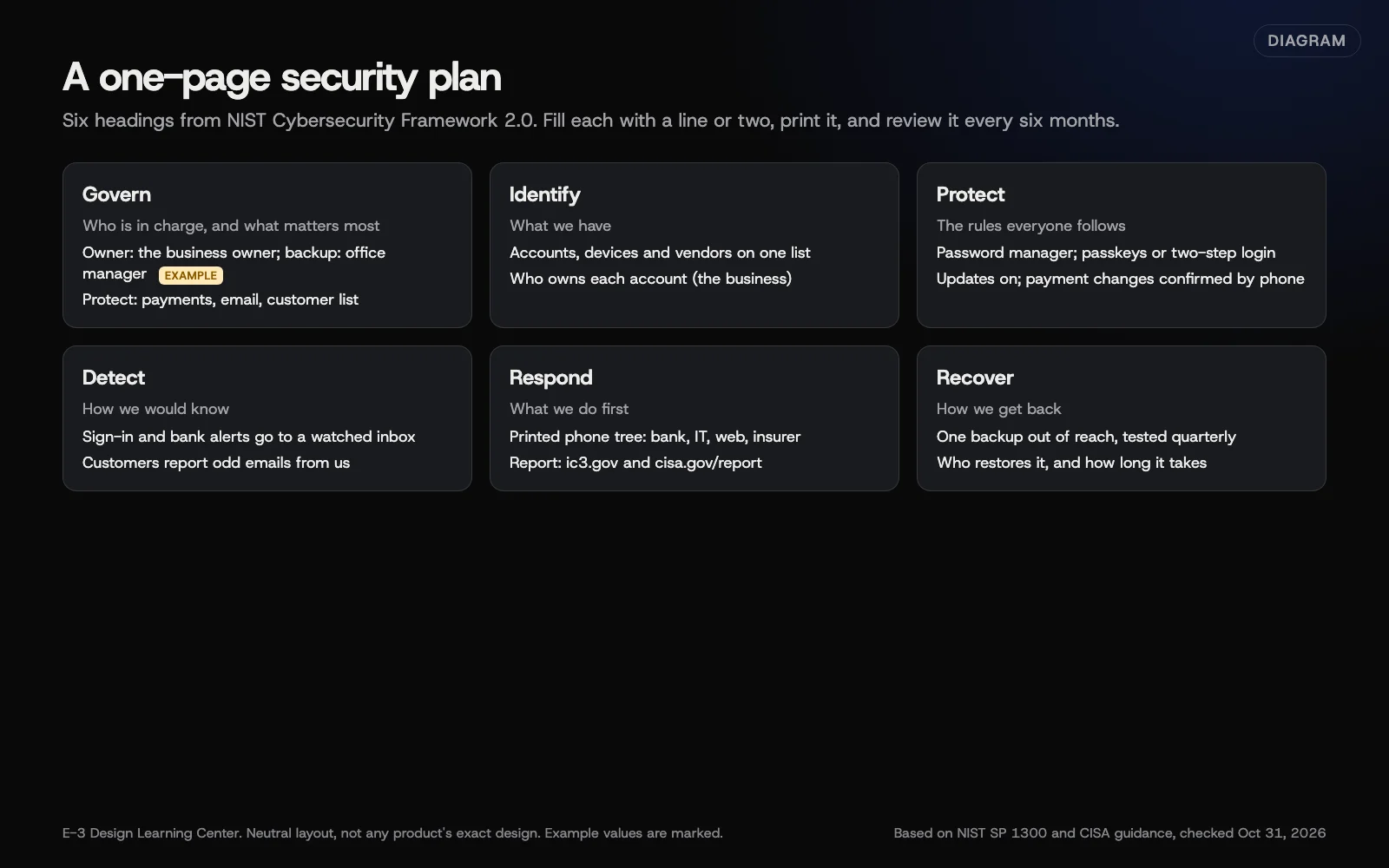 Diagram: a one-page small-business security plan, grouped by the six functions of NIST’s Cybersecurity Framework 2.0. E-3’s arrangement; example entries are marked.
NIST’s Small Business Quick-Start Guide organizes this around six functions: Govern, Identify, Protect, Detect, Respond and Recover. Our guide to writing a one-page security plan turns those into a page you can fill in this afternoon.
How do I stop payment and invoice scams?
Business email compromise is the costly one. A criminal sends an email that looks like it’s from a supplier, your accountant or you, asking for a payment to a new account. Sometimes they’ve broken into a real mailbox and reply inside a genuine thread.
The defense is a rule, not software: any new or changed payment detail gets confirmed by phone, on a number you already had. Never the number in the email. Our guide to business email compromise and invoice fraud explains the warning signs and what to do in the first minutes if money has already gone.
For general phishing signs, see our answer on how to spot a phishing email. If someone is sending emails that only look like they come from you, see someone sending fake emails as me.
How should we handle passwords and sign-in?
Our answers already cover the basics:
- How should my small business manage passwords?
- Should I turn on two-factor authentication?
- How do I turn on two-factor login?, with steps for Microsoft 365, Google and WordPress
NIST’s authentication guidelines, finalized in 2025, favor long passwords over complex ones and drop forced regular changes.
This hub goes further on two questions:
- Rolling out a password manager to a team, including who owns the account and what happens when someone leaves. See setting up a password manager for your team.
- Passkeys, which replace passwords with a sign-in that phishing sites can’t steal. Microsoft is moving its business sign-ins to passkeys and retiring its own text and voice codes from February 2027. See what passkeys are and whether to use them.
What about backups and ransomware?
Ransomware locks your files and demands payment. The fix is a backup the attacker can’t reach. CISA’s #StopRansomware Guide says to keep offline, encrypted backups of critical data and test them regularly.
That includes cloud services. Microsoft 365 and Google Workspace keep deleted items for a limited time, but that isn’t the same as a backup. Our guide to backups and ransomware covers what to back up, where, and why the FBI advises against paying. For your website, see how often a WordPress site should be backed up.
What about computers, phones and Wi-Fi?
Every device that opens business email is part of your security. The basics are updates turned on, a screen lock, encrypted drives and a router that isn’t still using its factory password. Windows 10 reached end of support on October 14, 2025, per Microsoft; computers still running it need paid extended updates or replacing. Our guide to securing devices and Wi-Fi has the checklist.
How do we train staff?
People aren’t the weakest link. Untrained people are. Short, regular reminders work better than an annual lecture, and staff need to know that reporting a mistake quickly is welcome. See training staff on security.
What about vendors and contractors?
Your web company, IT person, bookkeeper and software providers all have some access. Each one is a door. Give each their own login with only the access they need, and remove it when the work ends. Our help article on sharing logins safely covers the how. Our guide to vendor and contractor access covers what to ask before you say yes.
What do I do when something goes wrong?
Speed matters most in the first hour.
- A hacked email or Microsoft 365 or Google account: see the first hour after an account takeover.
- A hacked website: see what to do if your site was hacked and why Google says your site may be harmful.
- Money sent to a scammer: call your bank first. Then report it at ic3.gov. See business email compromise.
- Customer data exposed: see what to do after a data breach. The FTC’s breach guide notes that every state has notification laws.
Do I need cyber insurance?
It can pay for forensics, legal help, customer notices and lost income after an attack. Policies vary a lot, and insurers now ask about your security before they quote. Our guide to cyber insurance basics lists what to look for, using the FTC’s checklist. This isn’t legal or insurance advice.
How do I know where we stand today?
Answer these ten questions honestly. Each “no” points to a guide in this hub.
- Does every mailbox have a passkey or two-step login?
- Would anyone pay a changed bank account without a phone call first?
- Does everyone use the business password manager?
- Is there a backup the attacker couldn’t reach, and have we restored from it this year?
- Do all computers and phones update on their own?
- Is the router still on its factory password?
- Has everyone had security training in the last three months?
- Do we know every vendor who can reach our systems?
- Is there a printed list of who to call when something goes wrong?
- Do we know what our insurance covers for a cyberattack?
Every gap here can be fixed. The plan below starts with email and money, because those cost the most when they go wrong.
What’s changed in 2025 and 2026?
Advice from a few years ago may be out of date. As of October 31, 2026:
- Password rules relaxed. NIST finalized its SP 800-63B-4 guidelines in August 2025. They call for long passwords, no forced character mixes and no routine changes without a reason.
- Text codes are on the way out. Microsoft made passkeys the default for work accounts from September 1, 2026, and retires its own text and voice codes from February 1, 2027. See passkeys.
- Microsoft Authenticator stopped storing passwords. Autofill ended in July 2025. Use a dedicated password manager.
- Windows 10 support ended on October 14, 2025. Paid extended updates are available for up to three years.
- The FTC’s small-business security advice is now one page. Its Cybersecurity for Small Business page, dated September 2025, covers topics that used to have their own pages. Old bookmarks to those may no longer work.
- CISA’s small-business pages moved. The current home is Secure Your Business. Its Secure Our World steps now pair the password manager with multifactor authentication.
What should the first month look like?
If you’re starting from scratch, spread the work over four weeks so it actually gets done.
| Week | Focus | Done when |
|---|---|---|
| 1 | Email and money | Passkeys or two-step login on every mailbox and bank login; the payment-change rule agreed and written down |
| 2 | Passwords | Business password manager set up with two admins; key logins moved in |
| 3 | Backups and devices | One backup out of reach and one test restore; updates, screen locks and encryption on every device; router password changed |
| 4 | People and plan | First short training session; vendor list made; one-page plan printed with the phone tree |
After that, keep a monthly five-minute reminder for staff and a review of the plan every six months. Each week links to a guide above, and none of it needs a specialist to start.
Who should own this?
In a small business, the owner or office manager, with a named backup. It doesn’t need to be a technical person. It needs to be someone who can say “we confirm payment changes by phone” and make it stick. Technical jobs, like router settings or Microsoft 365 administration, can go to your IT support, but the plan and the rules belong to the business.
What are the most common mistakes?
- Paying an invoice because the email thread looked real.
- One shared password for the office email or the bank.
- Text-message codes only, when passkeys or an app are available.
- Backups that live in the same account the attacker just took over.
- An old router or computer nobody has updated in years.
- Former staff and vendors who still have access.
- No plan, so the first hour is spent working out who to call.
How much does it cost, and how long does it take?
Most of the basics are free: two-step login, passkeys, updates, router settings and a written plan. A business password manager and a backup service are small monthly costs; check current prices with each provider. Writing your plan takes an afternoon. Rolling out a password manager and passkeys to a small team takes a week or two of short sessions.
How does E-3 handle this?
Site outages, errors and security problems together account for about 550 requests in our support records since 2019. For websites we look after through website care, we run tested updates, daily backups and security alerts, and monitoring tracks known plugin vulnerabilities. Accounts we set up are in the client’s name, with E-3 added as a user. E-3 clients with an urgent security problem can call 814-399-4655.
Related questions
Sources
- Cybersecurity for Small Business (Federal Trade Commission)
- Secure Your Business (CISA)
- Secure Our World (CISA)
- NIST Cybersecurity Framework 2.0: Small Business Quick-Start Guide (NIST SP 1300)
- Small Business Cybersecurity Corner (NIST)
- Internet Crime Report 2025 (FBI Internet Crime Complaint Center)
- SP 800-63B-4, Digital Identity Guidelines: Authentication (NIST)
- #StopRansomware Guide (CISA)
- Data Breach Response: A Guide for Business (Federal Trade Commission)
- SMS and voice retirement for multifactor authentication (Microsoft Learn)
- Extended Security Updates for Windows 10 (Microsoft Learn)
Every Cybersecurity basics guide
- How do I write a one-page security plan for my business?Write one page that names who's in charge, lists the accounts, devices and vendors you depend on, sets five or six rules everyone follows, and says who to call when something goes wrong. NIST's Cybersecurity Framework 2.0 gives the structure. Review it every six months and after any incident.
- How do I stop invoice scams and wire fraud by email?Business email compromise is when a criminal, posing as a supplier, colleague or client, gets you to pay a fake account. Stop it with one rule: confirm every new or changed payment detail by phone on a number you already have. If money has gone, call your bank immediately, then report it at ic3.gov.
- How do I set up a password manager for my team?Pick a business plan, not personal accounts, so the company owns the vaults. Set up two administrators, create shared vaults by job, then move each person's work logins in, one account at a time, turning on two-step login as you go. When someone leaves, remove them and change the shared passwords they could see.
- What are passkeys, and should my business use them?Yes, wherever your key accounts offer them. A passkey signs you in with your fingerprint, face or device PIN instead of a password, and it only works on the real website, so phishing pages can't steal it. Microsoft, Google and Apple support them, and Microsoft retires its own text codes for work accounts from February 2027.
- How do I protect my business from ransomware?Keep at least one backup of your important files offline or in a separate account the attacker can't reach, test that it restores, and keep every device updated. Microsoft 365 and Google Workspace keep deleted items only for weeks, so back up email and shared files too. If you're hit, disconnect, don't pay, and report it.
- How do I secure office computers, phones and Wi-Fi?Turn on automatic updates, a screen lock and drive encryption on every computer and phone that opens business email. On the router, change the default admin password, use WPA3 or WPA2, update its firmware, turn off remote management and put guests on a separate network. Replace devices that no longer get security updates.
- What do I do in the first hour after an account takeover?From a device you trust, change the password and sign the account out of every session. Then check the sign-in methods, remove forwarding and inbox rules you didn't create, review connected apps, and turn on passkeys or two-step login. Warn contacts by phone, check for payment fraud, and report it if money or customer data is involved.
- How do I train my staff on cybersecurity?Train little and often: a 15-minute session when someone joins, then a short monthly reminder built on a real example. Cover phishing, the payment-change rule, passwords and passkeys, updates and how to report a mistake. Use free materials from CISA, NIST and the FTC, and thank people who report, even when they clicked.
- What should I ask a vendor before giving them access?Before a vendor gets access, ask what they need, how they protect logins, who on their team will use it, how they'll handle your data and how they'll tell you about a breach. Give them their own login with the least access needed, record it, and remove it when the work ends. Put the key points in writing.
- What does cyber insurance cover for a small business?Cyber insurance can pay your own costs after an attack, like forensics, data recovery, customer notices and lost income, and claims others make against you. Policies vary widely. Use the FTC's checklist to compare them, expect insurers to ask about passkeys or two-step login and backups, and read the exclusions for payment fraud and ransomware.
- What should my business do after a data breach?Follow the FTC's three steps: secure your operations without destroying evidence, fix the weakness that let the attacker in, and notify the people who need to know. Every state has breach notification laws, so talk to a lawyer about who you must tell. Report crimes to the FBI at ic3.gov, and call your insurer early.
- What do I do if a work computer or phone has a virus or malware?Disconnect the device from the internet, stop signing in to accounts on it, and run a full scan with the built-in tools: Windows Security, macOS, or Play Protect on Android. Then change passwords from a different, clean device and turn on two-step login. If the problem comes back, back up your files and reset the device.
- Why do WordPress, plugin and PHP updates matter?A WordPress site runs on three layers: PHP on the server, WordPress itself, and your plugins and theme. Each gets security fixes, and once a fix is public, attackers scan for sites without it, often within hours. Updating one layer doesn't fix the others, and a layer past its end of life gets no fixes at all.
- What does end of life (EOL) mean for software, and is it still safe?End of life (EOL) means the maker has stopped fixing a piece of software, including security holes. It keeps working, so nothing looks wrong, but every flaw found from then on stays open for good. The risk grows each month. Plan the upgrade before the date, because hosts, plugins, payment providers and insurers stop accepting old versions.
Common questions
- Is my business too small to be a target?
- No. Most attacks are automated or sent in bulk: phishing emails, password guessing and fake invoices go to every business they can reach. Size doesn't protect you, but simple habits do.
- Where do I report a cyberattack or payment scam?
- Call your bank first if money moved. Then report to the FBI's Internet Crime Complaint Center at ic3.gov. Scams can also go to ReportFraud.ftc.gov, and attacks on your systems to CISA at cisa.gov/report.
- What's the single most useful thing I can do this week?
- Turn on passkeys or two-step login for your business email, and agree a rule that nobody changes payment details without a phone call to a number you already have.
Next step
- Start here: How do I write a one-page security plan for my business?The first guide in Cybersecurity basics.
- Website careUptime monitoring, tested updates, daily backups and security alerts.
Still stuck? Ask E-3 for an answer from our help guides.
Rather we handled cybersecurity basics for you?
It’s part of what we do every week for small businesses, as part of website care. Start with a free check of your site and profile, or call and ask.