
What are passkeys, and should my business use them?
Yes, wherever your key accounts offer them. A passkey signs you in with your fingerprint, face or device PIN instead of a password, and it only works on the real website, so phishing pages can't steal it. Microsoft, Google and Apple support them, and Microsoft retires its own text codes for work accounts from February 2027.
The short version
- A passkey is a sign-in stored on your phone, computer or password manager, unlocked with your fingerprint, face or PIN.
- It only works on the real site, so a fake sign-in page can’t capture it.
- Start with business email, then banking, your domain registrar and your Google account.
- Keep a backup sign-in method for each account, so a lost phone isn’t a lockout.
- Microsoft 365 work accounts are moving to passkeys now. Plan for it before February 2027.
What is a passkey?
The FIDO Alliance, the industry group behind the standard, describes a passkey as a sign-in credential that is “always strong and phishing-resistant.” There’s no password to type, guess or reuse.
When you create one, your device makes a pair of keys. The website keeps one half. Your device keeps the other, locked behind your fingerprint, face or PIN. Apple’s passkey security page explains that the site never holds a secret that could be stolen in a breach.
There are two kinds:
- Synced passkeys copy across your devices through iCloud Keychain, Google Password Manager or a password manager. Lose your phone, and your laptop still has it.
- Device-bound passkeys never leave one device or hardware security key. They’re stronger, but you need a backup method.
Why are they better than codes?
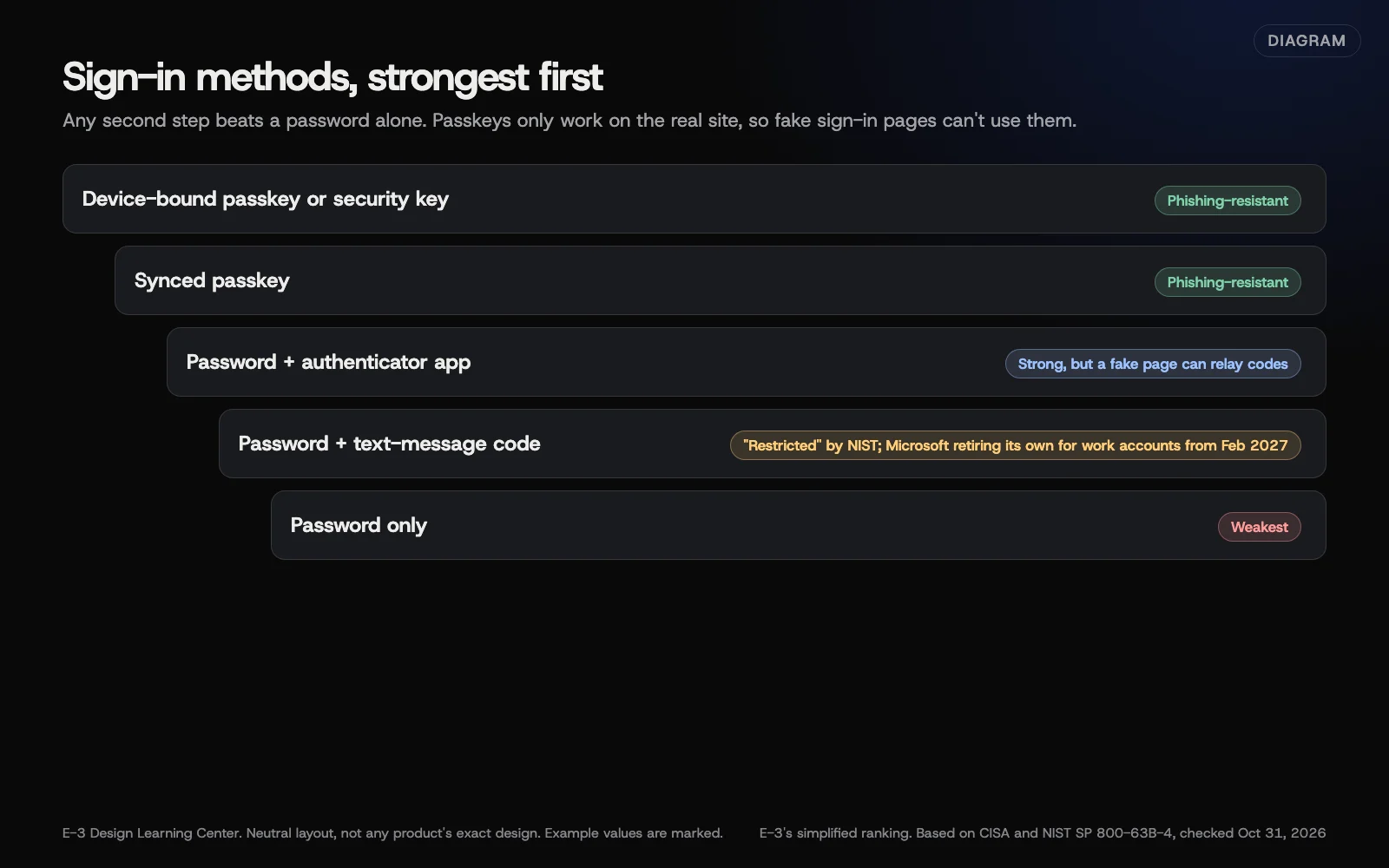 Diagram: sign-in methods from weakest to strongest against phishing, based on CISA’s phishing-resistant MFA guidance and NIST SP 800-63B-4 (October 2026). E-3’s simplified ranking.
Text-message and app codes are much better than a password alone, but a convincing fake sign-in page can ask for the code and pass it on. A passkey won’t work on the fake page at all. CISA’s phishing-resistant MFA fact sheet calls this kind of sign-in the standard to aim for. NIST’s authentication guidelines treat codes sent over the phone network as a “restricted” option.
Our answer on two-factor authentication compares all the methods briefly. This guide is about putting passkeys to work.
What’s changing with Microsoft 365?
Microsoft’s SMS and voice retirement page, updated September 23, 2026, sets out the timeline for work and school accounts:
| Date | Change |
|---|---|
| September 1, 2026 | Passkeys become the default. People using text or voice codes are prompted to register a passkey |
| February 1, 2027 | Microsoft’s own text and voice codes are retired |
| July 1, 2027 | Same for global administrators and external users |
After retirement, a passkey is required, with no opt-out. Microsoft says businesses can use a third-party phone provider instead, but for most small businesses, setting up passkeys now is simpler.
Microsoft Authenticator passkeys are device-bound, per Microsoft’s passkey FAQ, so each person also needs a backup method. Personal Microsoft accounts made since May 2025 are passwordless by default, per Microsoft’s security blog.
How do I set them up?
Google accounts. Google’s passkey help page walks through creating one from your Google Account security settings. Google Workspace administrators can let staff skip their password with passkeys, under Security, then Authentication, then Passwordless, per Workspace admin help.
Microsoft 365. Users add a passkey from their security info page when prompted, or ahead of time. An administrator must allow passkeys in the tenant’s authentication methods. If someone else runs your Microsoft 365, ask them to plan this before February 2027.
Everything else. Look in each service’s security settings for “passkey” or “security key.” Banks, registrars and accounting tools are adding them steadily.
For every account:
- Add the passkey.
- Keep or add a backup method: a second passkey, an authenticator app or recovery codes stored safely.
- Sign out and back in once, to check it works.
What are the common mistakes and edge cases?
- One phone, no backup. If it’s lost, you’re locked out. Register a second device or keep recovery codes on paper.
- Shared accounts. A passkey belongs to a person’s device. Give each person their own login instead. See sharing access safely.
- Leavers. Remove their passkeys and sessions when they leave, not just their password.
- Old computers. Very old systems may not support passkeys. That’s another reason to replace them; see devices and Wi-Fi.
- Password managers. Most business managers now store passkeys, which makes them synced. See rolling out a password manager.
What if this didn’t work?
If a site won’t offer a passkey, use an authenticator app instead. If you’re locked out, use the account’s recovery process. Never give a recovery code to someone who contacts you. See the first hour after an account takeover if you think someone else got in.
How much does it cost, and how long does it take?
Passkeys are free. Setting up the key accounts takes about five minutes each per person. Plan a short team session, the same week as your password manager rollout if you’re doing both.
How does E-3 handle this?
Accounts E-3 sets up are created in the client’s name, with E-3 added as a user, so each person can protect their own login with a passkey. For WordPress sites, see how to turn on two-factor login.
Related questions
Sources
- Passkeys (FIDO Alliance)
- Implementing phishing-resistant MFA (CISA fact sheet)
- SP 800-63B-4, Digital Identity Guidelines: Authentication (NIST)
- SMS and voice retirement for multifactor authentication (Microsoft Learn)
- Passkey FAQ for Microsoft Entra ID (Microsoft Learn)
- Pushing passkeys forward (Microsoft Security Blog, May 2025)
- Sign in with a passkey instead of a password (Google Account Help)
- Passwordless sign-in for Google Workspace (Google Workspace Admin Help)
- About the security of passkeys (Apple Support)
Next step
- Next: How do I protect my business from ransomware?The next guide in Cybersecurity basics.
- Website careUptime monitoring, tested updates, daily backups and security alerts.
Still stuck? Ask E-3 for an answer from our help guides.
Rather we handled cybersecurity basics for you?
It’s part of what we do every week for small businesses, as part of website care. Start with a free check of your site and profile, or call and ask.