
How do I protect my business from ransomware?
Keep at least one backup of your important files offline or in a separate account the attacker can't reach, test that it restores, and keep every device updated. Microsoft 365 and Google Workspace keep deleted items only for weeks, so back up email and shared files too. If you're hit, disconnect, don't pay, and report it.
The short version
- One backup out of reach: an offline drive, or a backup service with its own separate login.
- Test a restore every few months. A backup you’ve never restored is a hope, not a plan.
- Include cloud data. Microsoft 365 and Google Workspace keep deleted items for weeks, not forever.
- Prevent the way in: updates, passkeys or two-step login, and phishing awareness.
- If hit: disconnect affected devices, don’t switch them off, don’t pay, and report it.
What is ransomware?
Ransomware is malicious software that locks your files or systems and demands payment to unlock them. Newer attacks also copy data first and threaten to publish it. It usually gets in through a phishing email, a stolen password or an unpatched device. See our glossary entry on malware.
What makes a backup ransomware-proof?
CISA’s #StopRansomware Guide tells organizations to “maintain offline, encrypted backups of critical data” and to “regularly test the availability and integrity of backups.”
The key word is offline. If your backup sits on a drive that’s always plugged in, or in the same cloud account the attacker just signed into, it gets locked too.
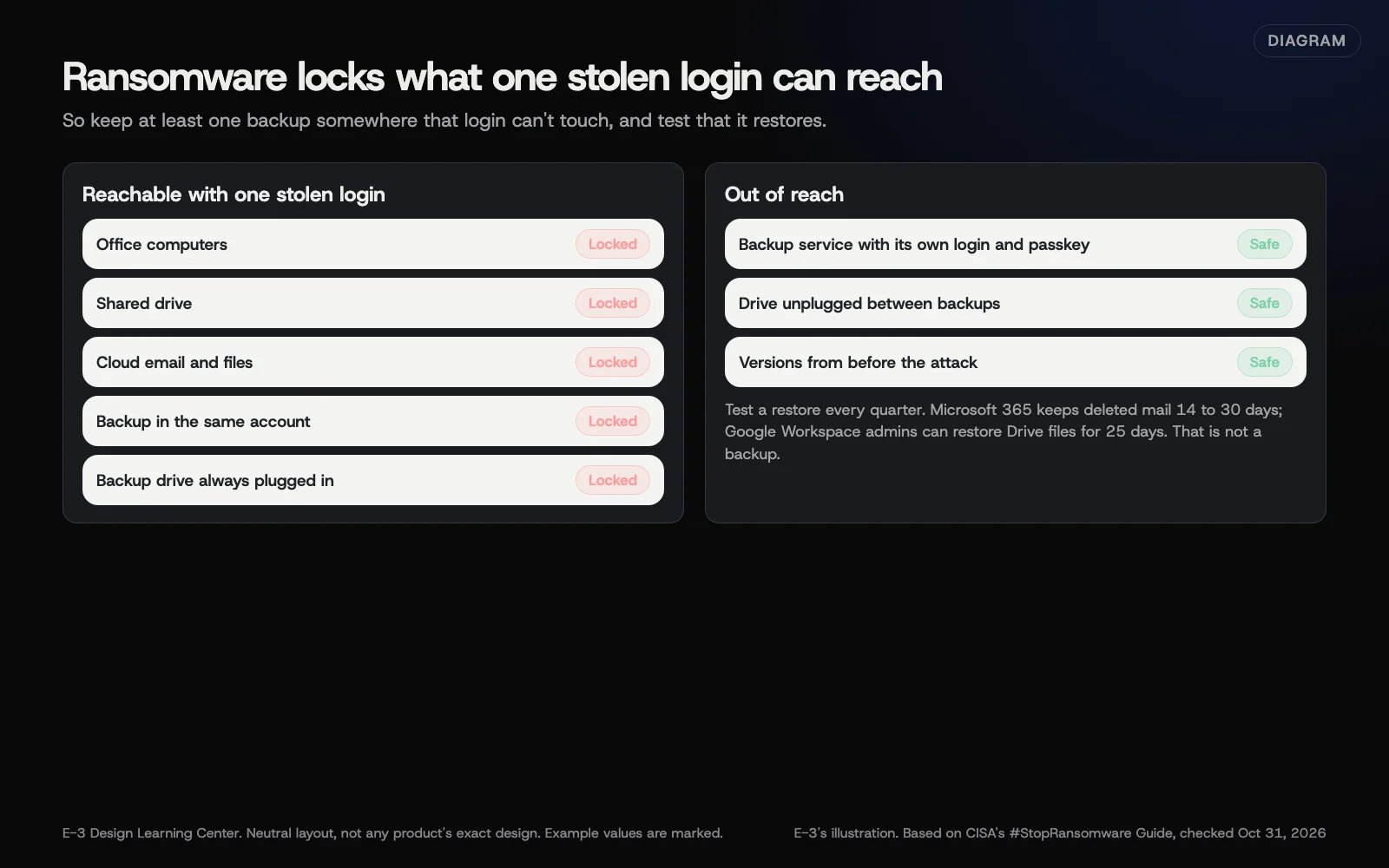 Diagram: why a backup needs to be out of the attacker’s reach. Based on CISA’s #StopRansomware Guide (October 2026). E-3’s illustration; example systems are marked.
A practical setup for a small office:
- Daily automatic backup of computers and shared files to a backup service.
- A separate login for that backup service, owned by the business and protected with a passkey, not shared with everyday accounts.
- Versioning, so you can go back to copies from before the attack.
- A second copy on a drive that’s unplugged between backups, if your data allows.
- A test restore every quarter: pick a file and a folder, and bring them back.
Do Microsoft 365 and Google Workspace back up my email?
Not in the way most people think. They keep deleted items for a short time:
- Exchange Online (Microsoft 365 email) keeps deleted items for 14 days by default, which an administrator can raise to 30, per Microsoft’s documentation.
- Google Workspace lets an administrator restore Drive files for 25 days after a user empties their trash, per Google’s Drive restore page, and has a similar window for Gmail, per its Gmail restore page.
That protects against accidents. It doesn’t protect against a problem you notice in month two, or an attacker who deletes things deliberately. If your email and shared files matter, use a backup service built for Microsoft 365 or Google Workspace.
Your website needs its own backups. See how often a WordPress site should be backed up and checking backups and restores.
How do I stop it getting in?
- Updates on for every computer, phone, router and website. See devices and Wi-Fi.
- Passkeys or two-step login on email and remote access.
- Phishing awareness for everyone. See training staff.
- Fewer admin accounts. Daily work on a standard user account, not an administrator one.
What do I do if we’re hit?
- Disconnect affected computers from the network and Wi-Fi. The FTC’s small business guidance says not to power them down, because evidence can be lost.
- Call your IT support and your insurer’s breach line, if you have cyber insurance.
- Report it to the FBI at ic3.gov and to CISA at cisa.gov/report.
- Restore from clean backups once the way in is closed.
- Check whether data was taken. If customer information was exposed, see what to do after a data breach.
Should we pay?
The FBI’s ransomware page says plainly: “The FBI does not support paying a ransom.” Payment doesn’t guarantee your files come back, and it funds the next attack.
There’s a legal risk too. The US Treasury’s sanctions advisory warns that paying a sanctioned group can bring penalties, and it treats prompt reporting to law enforcement as a significant mitigating factor. This isn’t legal advice; talk to a lawyer and your insurer before any decision.
What are the common mistakes?
- Backup drive always plugged in.
- Backup account on the same login as everything else.
- Never testing a restore, then finding the backups stopped months ago.
- Assuming the cloud is the backup.
- Switching everything off in a panic, losing evidence.
How much does it cost, and how long does it take?
Backup services charge per device or per user; check current prices with each provider. Setting up takes an afternoon. A test restore takes about 30 minutes each quarter.
How does E-3 handle this?
For websites we look after through website care, we take daily backups and can restore a whole site or a single page. Office computers and cloud email need their own backup plan, so put them on your security plan with whoever runs them.
Related questions
Sources
- #StopRansomware Guide (CISA)
- Ransomware (FBI Internet Crime Complaint Center)
- Updated advisory on potential sanctions risks for facilitating ransomware payments (US Treasury OFAC, 2021)
- Recoverable Items folder in Exchange Online (Microsoft Learn)
- Restore a user's Drive files (Google Workspace Admin Help)
- Restore deleted Gmail messages (Google Workspace Admin Help)
- Cybersecurity for Small Business: ransomware (Federal Trade Commission)
Next step
- Next: How do I secure office computers, phones and Wi-Fi?The next guide in Cybersecurity basics.
- Website careUptime monitoring, tested updates, daily backups and security alerts.
Still stuck? Ask E-3 for an answer from our help guides.
Rather we handled cybersecurity basics for you?
It’s part of what we do every week for small businesses, as part of website care. Start with a free check of your site and profile, or call and ask.